dsh-file-link-menu
Right-click menus for files and links in the DSH Web UI, and file-type glyphs with short names on every path chip (中文说明见 README.zh.md).
What it does
Right-click a file chip, a delivered file card, an inline path in an answer, or an external link, and the menu offers the actions that surface actually supports:
| Target | Rows |
|---|---|
| File (delivered card, produced chip, inline path mention) | Open file (default application) · Open in VS Code · Open with ▸ (probed applications) · Save as… · Copy file path · Reveal in file manager |
External link (http/https anchor, or a selected bare URL) |
Open in new tab · Open in default browser · Copy link · Save link as… |
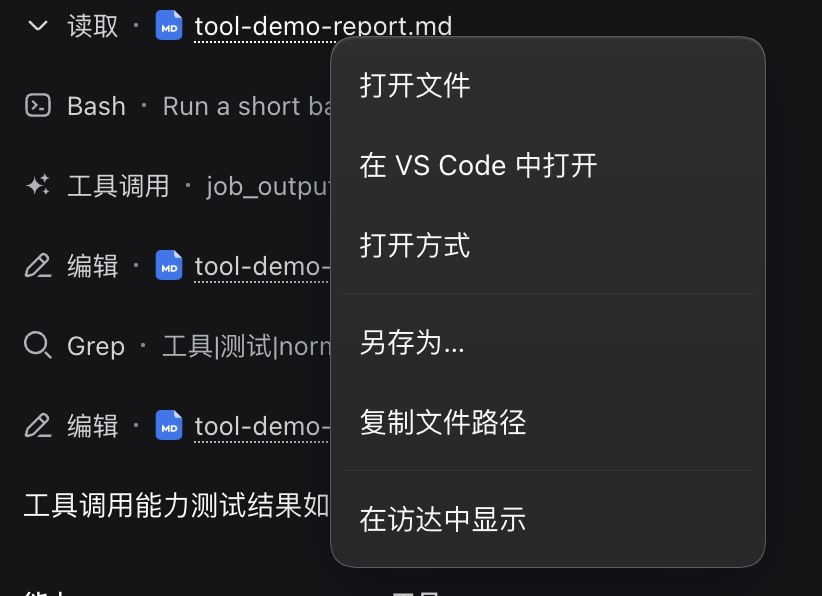
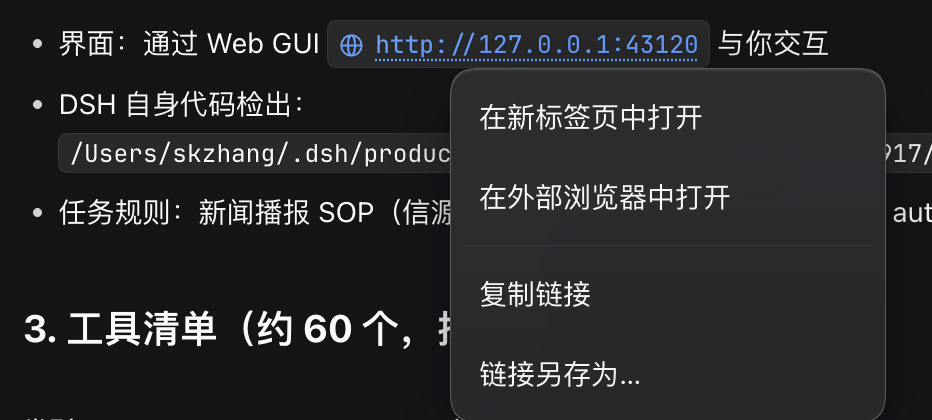
Every row is composed from what the Host reports it can do (GET /api/dsh-file-link-menu/caps), so a Host without a desktop session hides the launch rows instead of offering rows that fail.
Path chips show a type glyph and a file name
A path the shell prints in the conversation — a tool row's argument path, an inline path in an answer, a produced-file chip, an @ reference the user wrote — is re-dressed to lead with the file's type glyph and to show only the file's name. The full path stays on the chip: it is stamped on the element (data-flm-full-path), shown on hover, and it is what every menu action runs against.
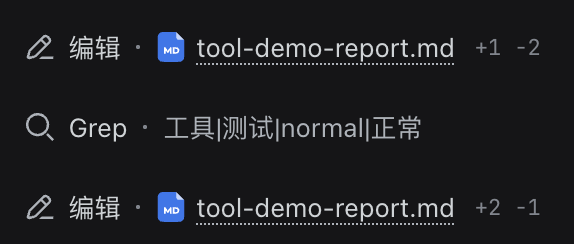
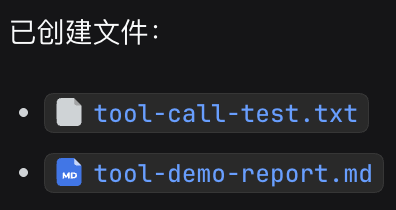
The glyph is DSH's own artwork, borrowed from the shared UI primitives, so a .tsx chip carries the React mark, a .md chip the Markdown mark, and a category a later shell release adds appears here without a change. A chip the plugin does not recognize — including the delivered file cards, which already draw both a glyph and a short name — keeps the shell's rendering exactly.

An attachment card — the one the transcript draws for a sent file, and the one the composer shows for a pending file — behaves the same way: a left click previews the file in the right Sidebar, and a right click opens the same file rows. The card carries the file's display name and nothing else, so the Host resolves that name against dsh's attachment store, whose files are content-addressed and live outside every workspace. Name resolution is not exact when one name was attached twice: the most recently written file wins.
An @ reference the user wrote renders as a file chip in a sent message, and that chip takes the same rows on right click. Its own left click stays the shell's — except for a pasted file: dsh-auto-paste references one by its file name (paster-…) rather than by its long stored path, so the name is not a path at all, and this plugin resolves it against the attachment store and previews it in the right Sidebar itself.
Install
# from npm (prebuilt, no build step)
dsh plugin --profile web add dsh-file-link-menu

# or straight from the repository
dsh plugin --profile web add github:shkzhang/dsh-file-link-menu
Restart dsh web (or the application wrapper hosting it) and reload the page.
The npm package and the repository both ship the built lib/, so neither path
builds on your machine. A source checkout is the same: the repository keeps its
build output committed, so nothing runs at install time and no build approval is
asked for. prepublishOnly rebuilds lib/ from the sources only when the
package is published, so a release can never ship stale artifacts.
How it works, and what it assumes
The web client slot map has no file or link menu hole, so this plugin cannot contribute rows into the shell's own menus. It therefore watches contextmenu (for the menu) and click (for the attachment preview) in the capture phase, and recognizes a target from anchors the shell publishes:
[data-presented-files-row]— delivered file cards, path on the chip'stitle;[data-produced-files-row]— produced file chips, sametitleconvention;- a
button[title]carrying a path-shaped title and an accessible label — the inline path mention; - a
button[data-ref-chip="file"]whosetitleis the whole@reference token (@path, or@"path with spaces") — a reference the user wrote, rendered in a sent message. A token carrying a paste name (paster-…, the namedsh-auto-pastegives a paste) is an attachment reference, not a path: the Host resolves it against the attachment store; a[href]whose authored value is an absolutehttp(s)URL;[data-message-attachments]— the transcript's attachment row, whose card carries the attachment's display name ontitle;- the composer's pending-attachment rail: the labelled
role="group"group whose items hold the card that carries the sametitle.
Anything else — including same-page and relative links — keeps the shell's own menu, and so does any event a previous listener already claimed. The composer rail is styled by CSS modules, so its class names carry a build-hashed prefix; the plugin matches the local name at the end of the class list, which a rebuild keeps.
Anchor failure costs the affected surface only. If a future DSH release renames these anchors, detectTarget stops recognizing that surface and the shell's menu opens as before; no Session data is touched. The anchors and their failure mode live in src/client/surfaces.ts.
The display layer
The same anchor vocabulary drives the chip re-dressing, in three files: chips.ts recognizes a chip and derives the name it should show, icons.ts renders the shared FileTypeIcon once per file type into a detached React root and mints per-instance ids for its gradients, and enhance.ts applies both from the mutation stream.
Two measurements shape that design, and both are exercised by tests/chips.spec.ts:
- React tolerates inserted nodes while a chip's own props are unchanged, but rewrites its text — rebuilding that button's children — as soon as a prop changes, which a streaming tool call does continuously. The layer therefore re-runs after each commit, and it records the name it wrote (
data-flm-shown) so it can tell a chip it shortened from one the shell rewrote afterwards. Without that record a re-rendered chip would keep showing the previous file's name. useIdanswers the same value on every render into a reused root, so caching per type would put one id on every chip of that type.url(#…)resolves to the first match in the document, so removing that chip would strip the fill from the rest. Ids are therefore scoped per instance — suffixed, never replaced, because one piece of artwork declares several and its shapes reference each of them.
The layer hides, never removes, the glyph the shell draws beside a chip: React still owns that node, and taking it out of the tree would leave the virtual DOM and the document disagreeing. A chip the plugin cannot glyph, cannot name, or cannot recognize is left as the shell rendered it.
Host routes
| Route | Method | Purpose |
|---|---|---|
/api/dsh-file-link-menu/caps |
GET | platform, file-manager flavour, launchable applications |
/api/dsh-file-link-menu/attachment |
POST | resolve an attached file's display name to its stored path |
/api/dsh-file-link-menu/open |
POST | open a Session file with the default application |
/api/dsh-file-link-menu/reveal |
POST | select a Session file in the file manager |
/api/dsh-file-link-menu/open-with |
POST | open a Session file with one probed application |
/api/dsh-file-link-menu/download |
GET | stream a Session file as an attachment |
/api/dsh-file-link-menu/save-as |
POST | copy a Session file into a chosen directory |
/api/dsh-file-link-menu/open-url |
POST | hand a URL to the default browser |
/api/dsh-file-link-menu/download-link |
GET | stream a remote URL as an attachment |
/api/dsh-file-link-menu/save-link-as |
POST | write a remote URL into a chosen directory |
Guarantees the routes enforce:
- every route asks the composition's
connectionservice for a Host/Origin and authentication rejection first; - a requested path must land inside one of two roots the Host itself names, after symlinks are followed: the Session workspace, which relative paths resolve against, and dsh's attachment store. The store is a root because a pasted attachment lives outside every workspace and its card carries only the file name, which the
/attachmentroute turns back into one of the store's own paths. A path outside both roots, a URL-shaped value, a missing file, a relative path with no resolvable workspace, or an attachment name the store does not hold is refused, so the menu cannot become an arbitrary-file read or open primitive; - commands are argv arrays passed to
spawnwithout a shell; 链接另存为acceptshttp/httpsonly, re-validates every redirect hop, refuses loopback and private-network destinations, and caps both time and bytes. That refusal belongs to the routes where the Host itself connects.在外部浏览器中打开instead hands the URL to the user's own browser, which is reachability the page already has — the adjacent在新标签页中打开row opens the same address with no Host round trip at all — so a loopback or intranet address is allowed there, and the user's local dashboard opens like any other link.
Configuration
None. The size, timeout, and redirect ceilings are protocol limits in src/shared.ts, not deployment choices.
Development
pnpm install
pnpm run typecheck
pnpm test
pnpm run build
lib/index.js is the Host half; lib/client.js is the browser bundle the shell's module loader registers as dsh-file-link-menu.
This repository is self-contained: its TypeScript and test configurations do not
reference anything outside it, so a fresh clone builds and tests on its own. The
official @deepseek-ai/* packages are declared as peerDependencies with an
explicit prerelease branch in each range, because a range without one silently
excludes the harness's prerelease builds.
No comments yet. Be the first to write one.