dsh-rss-daily
A dsh plugin that brings you a daily news digest — every morning, in your IM, from 46 curated RSS sources across tech / science / world / finance / humanities / dev.
What makes it different from a plain RSS reader:
- Editor, not aggregator. A candidate pool of ~20 items is scored (source tier × recency × signal words), deduplicated (Jaccard + MD5 history), cross-checked against a multi-source event graph (newsflash, ≥3 independent outlets), then handed to the model already configured in your dsh for editorial selection: merge same-event reports, drop PR filler and weekly roundups, balance topics (max 2 per tag), and write one concrete fact line per item (≤45 chars, Chinese rendering for English news).
- Zero extra LLM credentials. The editorial pass goes through
ctx.llm— whatever model your dsh already uses. If the model call fails, it degrades to a deterministic rule-based selection, so the digest never misses a day. - Delivered where you read. Webhook push to ServerChan / PushDeer / WeCom bot / Telegram / Bark / gotify / any custom JSON endpoint.
- Production-grade pipeline. Ported from a personal pipeline that has run daily since June 2026 through 9 revisions: per-source health tracking with adaptive timeouts, feed charset-mojibake repair, full-text enrichment for thin summaries, a 420s hard budget, idempotent two-phase send (fetch → outbox → deliver → confirm), and a 14-day dedup window.
Requirements
- dsh with the
web(or any long-running) profile - Python 3.9+ with
feedparser:pip install feedparser - Node.js ≥ 18 (bundled with dsh)
Install
One command — dsh plugin add installs the package via pnpm and appends it to the profile's dsh.profile.bundles; the row itself comes from this package's cordis.patch.yml:
dsh plugin --profile web add github:shangjian2023/dsh-rss-daily
Restart dsh web and the schedule is live. For development from a local checkout: dsh plugin --profile web add /absolute/path/to/dsh-rss-daily (pnpm links it; run pnpm install in the checkout once).
Configure
Tune config by overlaying the row from the profile's patch layer ($DSH_HOME/profiles/web/cordis.patch.yml):
- insert:
- id: rss-daily
name: dsh-rss-daily
config:
time: "08:00" # local time, daily
targets:
- type: serverchan # ServerChan sendkey
key: SCTxxxxxxxx
- type: telegram
token: "123456:ABC..."
chatId: "-1001234567890"
| Key | Default | Meaning |
|---|---|---|
enabled |
true |
daily schedule on/off (agent tool stays) |
time |
"08:00" |
local HH:MM to run; a boot-time catch-up runs if missed by <12h |
stateDir |
$DSH_HOME/rss-daily |
sources / dedup history / outbox live here |
sourcesFile |
stateDir/sources.json |
your source list; seeded from the bundled 46-source default on first run |
digestItems |
8 |
max items per digest |
llmMode |
harness |
harness (use dsh's model) or none (rule-based only) |
llmProvider / llmModel |
first available | override which harness model edits the digest |
footer |
"" |
custom footer line |
targets[] |
[] |
delivery targets; delivered = at least one succeeded |
Source entry shape (sources.json): { "name", "url", "category", "tier" (1–3) }. The bundled list was reachability-tested from mainland China; add sources freely — unhealthy ones auto-degrade for 24h after 3 consecutive failures and rotate back in.
Use
- Automatic: every day at
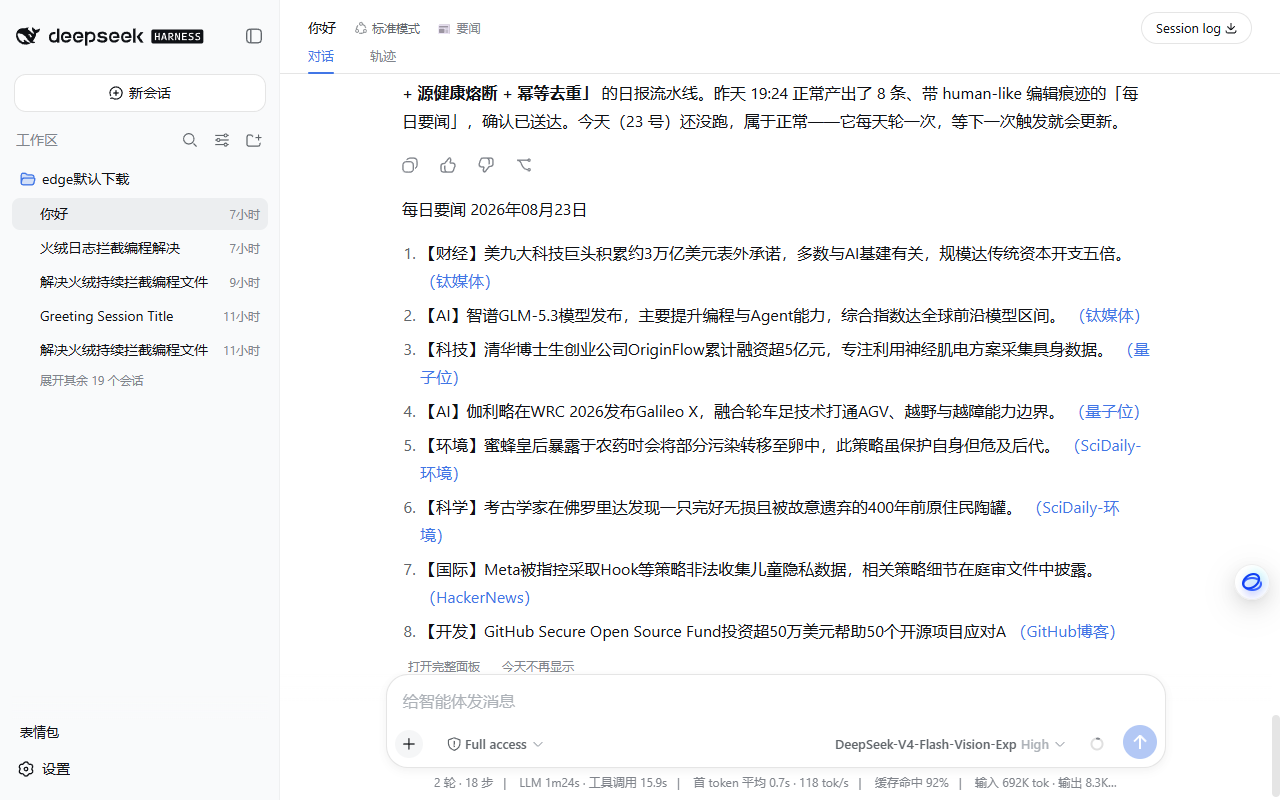
time, the digest is generated and pushed. Missed runs are caught up on boot. - Web panel: every session header gets a 📰 button — open it for today's digest (tag-colored items, source links), the sources tab (view all 46, enable/disable, add your own), and the settings tab (change the schedule time, delivery targets, digest size — saved through the plugin's
rss-dailysettings namespace, timer re-arms live). A 获取今日日报 / 重新生成 button runs the pipeline on demand with a live phase spinner (fetching → LLM editing → delivering); everything renders client-side and never enters the session log. The same settings form also appears under Settings → Plugins → Plugin configuration. - In-chat broadcast: once today's digest is generated, it automatically appears in the chat flow styled exactly like a model reply (between the last message and the composer) — same borderless text stream and markdown typography (heading, ordered list, source links); while the pipeline runs you get a "generating today's digest…" line first. This "message" is frontend-only DOM (React portal, styles mirror the host markdown renderer via theme variables) — displayed in the conversation but never written to the session log and never costs model context. "Hide for today" only affects this browser; a regenerated or next-day digest appears again. Toggle it off in the settings tab ("insert digest into the chat", config key
broadcast, default on). - In chat: ask the agent — it has an
rss_dailytool (run/status/redo/deliver), e.g. "generate today's news digest now" (this path uses context; the panel does not). - Headless / system cron: run the pipeline directly with any OpenAI-compatible endpoint:
python py/daily.py --state-dir ~/.rss-daily # one-shot full run (rule mode)
RSS_LLM_ENDPOINT=https://api.deepseek.com/v1 \
RSS_LLM_KEY=sk-... RSS_LLM_MODEL=deepseek-chat \
python py/daily.py --state-dir ~/.rss-daily # with LLM editing
python py/daily.py --stage confirm --state-dir ~/.rss-daily # after delivery succeeded
HTTP API (advanced)
The web panel talks to a same-origin API at /rss-daily/api/* (registered only in profiles with a webserver): GET status, POST run, POST redo, GET/PUT sources, POST config. Secrets in delivery targets are masked in responses; a write containing the mask keeps the stored value. All writes are field-validated before they touch settings or disk.
Pipeline stages (advanced)
py/daily.py is independently scriptable and speaks single-line JSON on stdout:
python py/daily.py --stage fetch --state-dir DIR # → {"status":"READY","prompt":...}
python py/daily.py --stage finalize --llm-reply FILE --state-dir DIR
python py/daily.py --stage confirm --state-dir DIR
python py/daily.py --stage status --state-dir DIR
The plugin itself uses exactly these stages: fetch produces the editor prompt, the plugin streams it through ctx.llm, finalize parses the reply (falling back to rule mode on garbage), then the plugin delivers and confirm marks the day done. Never confirm before successful delivery — confirmed items enter the 14-day dedup window permanently.
License
MIT
Operations
- Catch-up. If dsh is down at the scheduled time, the digest is sent on next boot as long as less than 12 h have passed; otherwise it waits for the next day.
- Manual control. The
rss_dailyagent tool acceptsrun/status/redo/deliver. - State. Per-source health, MD5 dedup history, outbox and sent log live under
$DSH_HOME/rss-daily(default~/.dsh/rss-daily); delete the directory to start fresh.
No comments yet. Be the first to write one.