dsh-image-studio
DSH(DeepSeek Harness)插件:在 DSH 里管理多套图片生成服务,并在对话中直接出图。
界面中显示为图片工作台。不绑定厂商——只要接口兼容 OpenAI 的 /images/generations,都能接进来。
功能
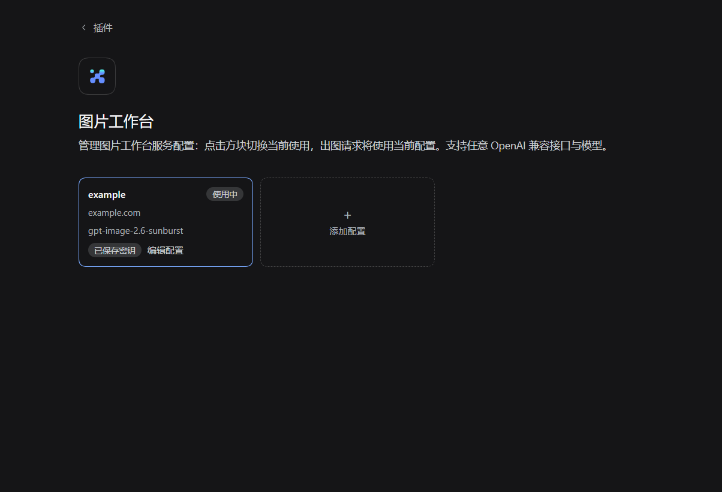
- 多套配置:地址、API Key、模型、输出目录分别保存,点方块切换当前使用
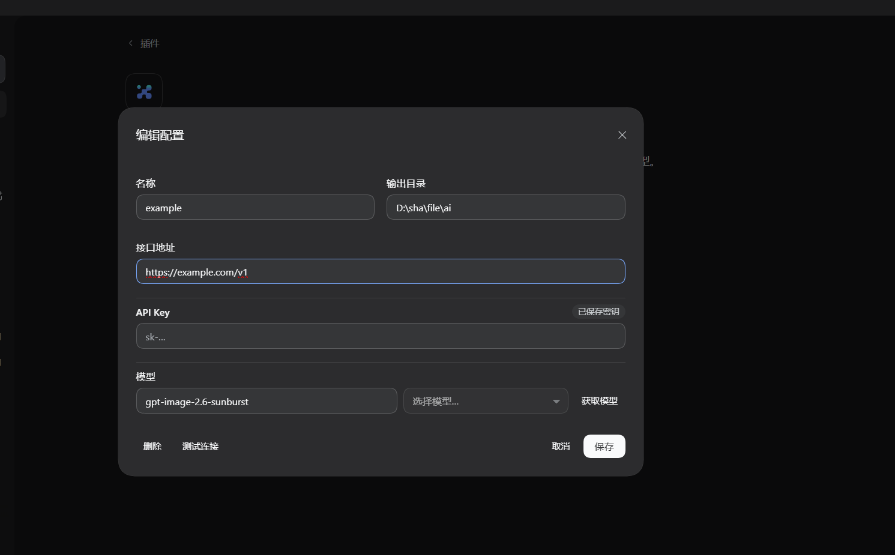
- 模型列表:按「地址 + Key」拉取
/models,下拉选择或直接输入模型 ID - 文生图与图生图:只给描述就出图;给参考图则按图编辑
- 密钥安全:API Key 存在凭据存储里,配置文件只留引用名
界面
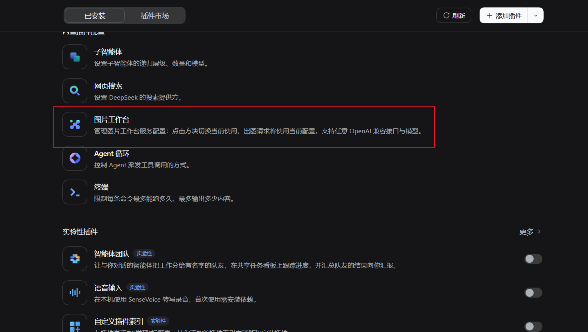
插件出现在「插件 → 已安装」列表里:
进入后每套配置是一个方块,点一下就切换为当前使用:
点方块里的「编辑配置」或 + 添加配置 打开配置弹窗:
安装
有 dsh CLI 时(把 desktop 换成你的 profile 名,通常是 desktop 或 web):
# 从 npm 装(推荐,预构建、无需构建授权)
dsh plugin --profile desktop add @shamanjin/dsh-image-studio

# 或直接从 GitHub 仓库装
dsh plugin --profile desktop add github:shamanjin/dsh-image-studio
也可以装 Release 里的包:
dsh plugin --profile desktop add "https://github.com/shamanjin/dsh-image-studio/releases/download/v1.0.0/dsh-image-studio-1.0.0.tgz"
只有桌面版、没有 dsh CLI 时(桌面应用不带 CLI,dsh 会提示命令不存在):
下载 Release 里的
dsh-image-studio-1.0.0.zip,解压到任意目录,例如C:\dsh-plugins\dsh-image-studio把它链接进 profile 的
node_modules(注意包名带作用域,目录嵌在@shamanjin下):New-Item -ItemType Directory "$env:USERPROFILE\.dsh\profiles\desktop\node_modules\@shamanjin" -Force New-Item -ItemType Junction ` -Path "$env:USERPROFILE\.dsh\profiles\desktop\node_modules\@shamanjin\dsh-image-studio" ` -Target "C:\dsh-plugins\dsh-image-studio"打开
%USERPROFILE%\.dsh\profiles\desktop\package.json,在dsh.profile.bundles数组里加一项"@shamanjin/dsh-image-studio"重启 DSH
两种方式装完都重启 DSH,然后侧栏 → 插件 → 图片工作台。
命令里的
<profile>是占位符,要替换成实际 profile 名再执行;PowerShell 里<是保留字符,原样粘贴会报「<运算符是为将来使用而保留的」。
使用
1. 配置一套服务
侧栏 → 插件 → 图片工作台 → + 添加配置:
- 接口地址:填到
/v1层,例如https://api.example.com/v1 - API Key:填完随「保存」一起写入
- 模型:点「获取模型」拉列表,在下拉里选;也可以直接输入模型 ID
- 输出目录:可留空
2. 对话里出图
配好后回到对话,直接说要什么:
- 「画一张雨夜的乡村车站,动画电影风格」
- 「参考
D:\images\a.png,把背景换成雪夜」
出图后返回本地图片路径,并以图片形式展示。
说明
| 项 | 说明 |
|---|---|
| 输出目录 | 留空时保存到当前工作目录下的 dsh_outputs/images |
| 密钥存放 | ~/.dsh/.credentials.yaml,配置文件里只有引用名 |
| 生效范围 | 只使用当前选中的那套配置,模型侧无法改地址、Key 或模型 |
License
MIT
No comments yet. Be the first to write one.