dsh-codex-like-markdown
让右侧栏的 Markdown 预览就地可编辑:文档保持渲染后的样子,点段落、点标题、点表格单元格,光标落在那里直接改字。
Markdown editing in place for the DSH right Sidebar: the document keeps its rendered look, and clicking a paragraph, a heading, or a table cell puts the caret exactly there.
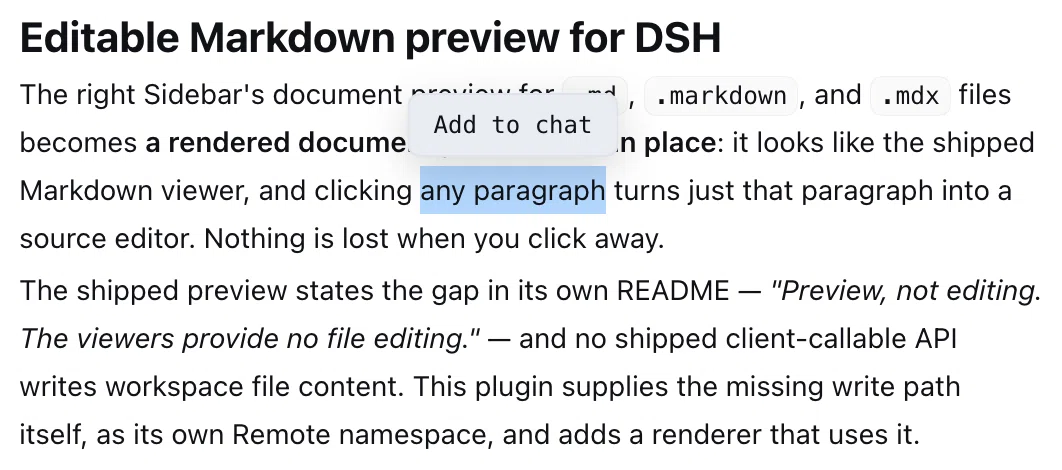
选中一段文字 → 添加至会话;也可以直接点段落,就地编辑。
Select a passage to add it to the session, or click any paragraph to edit it in place.
中文
一个 DeepSeek Harness 插件,让右侧栏的 Markdown 预览就地可编辑——文档保持渲染后的样子,点段落、点表格单元格、点标题,光标就落在那里,直接改字。
DSH 自带的预览插件在自己的 README 里就写明了这个缺口:"Preview, not editing. The viewers provide no file editing.",而且它没有暴露任何可以写工作区文件内容的客户端 API。所以这个插件自己补上写入通道(一个独立的 Remote 命名空间),再提供一个使用它的渲染器。
你能得到什么
打开 .md 文件 |
以 Markdown(可编辑) 打开,渲染效果与内置视图完全一致 |
| 编辑 | 点段落、标题、列表、代码围栏 → 就地变成可编辑:没有边框盒子,用的是文档自己的字体,屏幕上不出现 Markdown 标记 |
| 光标 | 点哪个字,光标就落在哪个字上,和普通文本编辑器一样 |
| 打字 | 改动立即拼回文档,所以「未保存」状态与自动保存都是实时的(停顿约 1.2 秒自动保存);Esc 或 ⌘Enter 关闭当前块 |
| 表格 | 表格保持渲染器自己的表格;点某一格只在那一格上浮出编辑面,也只回写那一格 |
| 引用到会话 | 在预览里选中一段文字,浮出的操作条可以把选中的文字添加至会话:作为带出处的引用插进输入框(界面语言是中文时按钮就叫「添加至会话」) |
| 新增 | + 新增段落 追加一个段落并打开它 |
| 工具栏 | 只有一行:状态提示 · B / I / </> / 🔗 · 保存相关按钮 |
⌘S / Ctrl+S |
立即保存 |
| 原始文档 | ⌥⌘E 在渲染视图与原始 Markdown 之间切换(也可以把渲染器下拉切到内置 Text 只读查看原文) |
| 文件在别处被改 | 未保存的内容不会被覆盖,工具栏给出 仍然覆盖 或 从磁盘重新载入;在你再次编辑前暂停自动保存 |
| 只读渲染视图 | 仍然可用:预览的渲染器下拉里可以选回内置的 Markdown |
| 草稿 | 每个标签页的未保存内容,在切换标签、切换渲染器、切到源码再切回来时都不丢 |
| 界面语言 | 中文 / 英文跟随界面语言(按钮、状态、提示文案),两种语言都有测试兜底 |
| 写入 | 经 ctx.fs.writeText 走文件系统后端:read-only 会话被拒绝,workspace-write 只能写工作区内;带上版本即 compare-and-set |
| 失败降级 | 渲染器不可用时退回纯源码编辑;单个块渲染出错时退回该块原文,不会让整个面板变空 |
设计
渲染完全一致。 正文通过 @deepseek-ai/dsh-client-ui-primitives 的 MarkdownText 渲染——就是内置 Markdown 视图用的那个组件——所以标题、列表、表格、代码块、公式、脚注(含它的链接净化策略)看起来都一样。该模块在浏览器冻结的基线模块表里,因此 require 它不需要任何构建步骤;万一某个部署里没有它,插件会退化成「只能编辑源码」。
Markdown 本身就是文本,从不反推。 编辑面是一个 contenteditable,它的文本内容就是该块的 Markdown:语法标记仍在 DOM 里、但用 CSS 隐藏,加粗、代码、链接、标题、列表符号、引用、围栏都在标记周围做样式。任何时候都不会把样式反向序列化成语法,所以一次编辑只可能改变字符——不存在「富文本转 Markdown」这一步把文件改花的可能。读回内容就是对文本节点做一次遍历,浏览器自己生成的块级元素算作换行。
看起来像文档,是因为它是从文档上量出来的。 打开一个块时,插件会读取该渲染块的计算样式(字族、字号、行高、内边距)套到编辑面上,所以进入编辑不会改变文档的字体。光标用浏览器自己的命中测试(caretRangeFromPoint)按你点击的坐标放置。
选中即上下文。 在预览里选中文字会浮出一个操作条,唯一的动作是把这段文字交给输入框自己的 captureInsertion() / insertText()——它是光标处的一次可撤销编辑,不会覆盖你已经写好的内容——并以「出处单独一行、下面是被引用的段落」的形式插入,末尾留一个空行——光标就落在那里,你可以直接接着提问。为了让拖拽始终能用于选择,「按下与松开在同一位置」才进入编辑,拖拽不会。
表格单元格按格编辑。 表格是一个块,为了改一格而替换整张表不叫编辑——所以表格保持渲染器自己的表格,点某一格时只在那一格上浮出一个单格编辑面。单元格文本通过它在行内的字节区间改写,行内其它格、分隔行、表外内容一个字节都不动。编辑面每次渲染都重新量一次该格的位置,所以行变高时它会跟着走;它是单行的:回车即提交、粘贴进来的换行会变成空格,因此一次单元格编辑不可能多出一行。
是块,不是第二套文档模型。 源码按空行切块,代码围栏保持完整。每个块记录精确的 [start, end) 区间,所以一次编辑只替换那段区间,其余字节——空格、列表符号、结尾换行——原样保留。块做了 memo,敲一个键只重画被改动的范围而不是整篇文档。每个块都有错误边界,渲染失败时退回原文而不是让整个面板变空。
一个小小的 Remote 命名空间。 markdownDocs/write 接收 { sessionId, path, absolutePath, content, expectedVersion? },返回状态信封(saved / stale / denied / missing / error)。宿主半通过 ctx.fs.writeText 写入,所以目标身份、原子性、沙箱围栏都由文件系统后端负责:read-only 会话会被拒绝,workspace-write 只能写工作区内。传 expectedVersion 时写入是 compare-and-set;除非用户明确选择 仍然覆盖,编辑器都会带上它。
index.js 不 import 任何 @deepseek-ai/*。Typert 绑定是手工拼的(ctx.provide 加一个冻结的 typertRemote),调用描述符用 ctx.typert.register 注册——这是生成物管线之外的宿主被文档认可的路径。避免这些 import 让插件不依赖「profile 如何解析运行时包」。client.js 是一个普通的 module-loader bundle,无需构建。
安装
这是一个 profile bundle:它声明了 dsh.bundle.patch,所以装上即启用。
在 Harness 会话里 —— 让 agent 安装,它会用 plugin_manager 的 action: install_bundle,target 指向本目录。
在终端里 —— 先退出应用:
# macOS 应用自带的 CLI
"/Applications/DeepSeek Harness.app/Contents/Resources/runtime/cli/bin/dsh" \
  plugin --profile desktop add /absolute/path/to/dsh-codex-like-markdown
安装需要授权或 Full access,因为 profile bundle 会在宿主进程内执行代码。本包没有安装脚本、也没有依赖。卸载用 remove_bundle。
之后修改 client.js 会即时生效——客户端模块注册表在监视这个 bundle——而改动 index.js 需要重启应用以加载新的模块代。
环境要求
本插件是针对把 @deepseek-ai/dsh-client-ui-sidebar-documentpreview 与 API Gateway 挂进 Web 组合的 Harness 版本开发的(0.2.0-rc.2 前后)。如果某个 profile 没有它们,客户端半会保持 inactive 而不是报错:它在等 slots、documentPreviews、remote、locale 这四个服务。
已知限制
- 编辑过程中现敲的 Markdown 语法会先以原文显示,直到该块被关闭——因为编辑面在持有你的光标与输入法组合态时不会重渲染。
Esc之后就会渲染。 - 标记被隐藏意味着它不能手工编辑;在标记旁边删字可能把标记删掉,结果是那处格式丢失(下一次渲染可见),不会改变你的文字。
- 表格是逐格编辑;增删整行整列属于结构性修改,请用源码视图。
- 块按空行切分。用空行隔开的松散列表会渲染成多个列表;被空行切断的表格也会被切开。某行格子数不再匹配表头时,表格就地结束,不会吞掉后面的正文。
- 脚注与引用式链接只在单个块内解析,不跨文件。
- 完整字节读取受预览的
maxFileBytes(32 MiB)限制。 - 草稿存在浏览器内存里,生命周期为当前页面;刷新页面不保留。
- 「添加至会话」依赖预览拿到输入框的
inputActions:没有可用的输入框时会提示「无法添加至会话」;输入框正在提交时同样会被它拒绝。 - 写入是整篇替换加可选的版本护栏。读与写之间发生的改动会被检测到而不是合并,谁覆盖谁由用户决定。
测试
先抓取测试套件依赖的运行时包,再 npm test;见 test/README.md。186 条断言覆盖:宿主半经过真实 Gateway 派发与真实文件写入、正文经过真实 React 渲染、以及交互逻辑——其中最关键的一条是把编辑面的标记剥掉后必须逐字节等于原 Markdown。
许可
MIT —— 见 LICENSE。
English
A DeepSeek Harness plugin that makes the right Sidebar's Markdown preview editable in place — the document keeps its rendered look, and clicking a paragraph, a table cell, or a heading puts the caret exactly there and lets you type into it.
The shipped preview states the gap in its own README — "Preview, not editing. The viewers provide no file editing." — and no shipped client-callable API writes workspace file content. This plugin supplies the missing write path itself, as its own Remote namespace, and adds a renderer that uses it.
What you get
Opening a .md file |
Opens in Markdown (editable), rendered exactly like the built-in viewer |
| Editing | Click a paragraph, heading, list, or code fence → it becomes editable in place: no border box, the document's own font, and no Markdown syntax on screen |
| Caret | Clicking lands the caret on the character you clicked, like a plain text editor |
| Typing | The edit is spliced into the document immediately, so the dirty state and auto-save stay live (auto-save after ~1.2 s idle); Esc or ⌘Enter closes the block |
| Tables | The table keeps the renderer's own table; clicking a cell opens an editor over just that cell, and only that cell is written back |
| Quote to chat | Select a passage in the preview and the bar adds it to the composer as a quote with its source (in a Chinese UI the action reads 添加至会话) |
| Adding | + Add paragraph appends a paragraph and opens it |
| Toolbar | One row: the status · B / I / </> / 🔗 · the saving controls |
⌘S / Ctrl+S |
Saves immediately |
| Raw document | ⌥⌘E swaps the rendered view for the raw Markdown and back (the renderer dropdown's built-in Text viewer reads it, read-only) |
| File changed elsewhere | The dirty buffer is kept, and the toolbar offers Overwrite or Load from disk; auto-save pauses until you edit again |
| Read-only rendered view | Still available: the preview's renderer dropdown lists the built-in Markdown viewer |
| Drafts | A tab's unsaved text survives switching tabs, switching renderers, and going to the source view and back |
| UI language | Chinese and English copy follows the interface language, with tests pinning both dictionaries |
| Writes | Through ctx.fs.writeText, so the filesystem backend keeps the fence: a read-only session is denied, workspace-write stays inside the workspace root, and the version makes it compare-and-set |
| Degrading | Without the renderer it falls back to source-only editing; a block that fails to render falls back to its own raw text instead of blanking the pane |
Design
Identical rendering. The body renders through MarkdownText from
@deepseek-ai/dsh-client-ui-primitives — the very component the shipped Markdown
viewer uses — so headings, lists, tables, code blocks, math, and footnotes look
the same, including its link sanitization. That module ships in the browser's
frozen baseline module table, so requiring it adds no build step; if a deployment
ever lacks it, the plugin falls back to source-only editing.
The Markdown is the text, never a reconstruction. Editing uses a
contenteditable whose text content is the block's Markdown: syntax markers
are present in the DOM but hidden with CSS, and emphasis, code, links, headings,
list bullets, quotes, and fences are styled around them. Nothing is ever
serialized back from styling into syntax, so an edit can only change characters —
there is no rich-text-to-Markdown step that could mangle a file. Reading the
surface back is a walk over its text nodes, with browser-created block elements
as line breaks.
It looks like the document, because it is measured from it. When a block is
opened, the plugin snapshots the rendered block's computed typography — family,
size, line height, padding — and applies it to the editing surface, so switching
into editing does not change the document's type. The caret is placed by the
browser's own hit test (caretRangeFromPoint) at the coordinates that were
clicked.
A selection is context. Selecting text in the preview raises a small bar with one action, which hands the passage to the composer through the composer's own captureInsertion() / insertText() — one undoable edit at the caret, so it never replaces what the user already wrote — naming the file on its own line above the quoted passage and leaving a blank line under it, which is where the caret lands. Because a drag has to stay available for selecting, a press and release in the same place opens an editor and a drag does not.
A table cell edits as a cell. A table is one block, and replacing all of it to change one cell is not an edit — so a table keeps the renderer's own table on screen, and clicking a cell floats a single-cell editing surface over exactly that cell. The cell's text is rewritten through its own byte range in the line, so nothing else in the row, the table, or the document moves. The surface is re-measured from the cell on every render, so it follows the row as it grows, and it is single-line: Enter commits, a pasted newline becomes a space, and a cell edit can never add a row.
Blocks, not a second document model. The source is split into
blank-line-separated blocks, with fenced code kept whole. Each block records its
exact [start, end) range, so an edit splices that range and leaves every other
byte — spacing, list markers, trailing newline — untouched. Blocks are memoized,
so a keystroke redraws the edited range rather than the document. A per-block
error boundary falls back to the raw text instead of blanking the pane.
One small Remote namespace. markdownDocs/write takes
{ sessionId, path, absolutePath, content, expectedVersion? } and answers with a
status envelope (saved / stale / denied / missing / error). The host
half writes through ctx.fs.writeText, so target identity, atomicity, and the
sandbox fence stay with the filesystem backend: a read-only session is denied
and workspace-write may only write inside its workspace root. Passing
expectedVersion makes the write compare-and-set; the editor sends it unless the
user explicitly chose Overwrite.
index.js imports nothing from @deepseek-ai/*. The Typert binding is assembled
by hand (ctx.provide plus a frozen typertRemote) and the invocation
descriptor is registered with ctx.typert.register, which is the documented
route for an owner outside the generated-artifact pipeline. Avoiding those
imports keeps the plugin independent of how the profile resolves the runtime
packages. client.js is a plain module-loader bundle with no build step.
Install
This is a profile bundle: it declares dsh.bundle.patch, so installing it
enables it too.
From a Harness session — ask the agent to install it, which runs
plugin_manager with action: install_bundle and this directory as target.
From a shell — with the app quit:
# the CLI bundled with the macOS app
"/Applications/DeepSeek Harness.app/Contents/Resources/runtime/cli/bin/dsh" \
  plugin --profile desktop add /absolute/path/to/dsh-codex-like-markdown
Installing needs approval or Full access, because a profile bundle runs host code
in-process. The package has no install scripts and no dependencies. Remove it
with remove_bundle.
Editing client.js afterwards is picked up live — the client module registry
watches the bundle — while a change to index.js needs an app restart to load a
fresh module generation.
Requirements
The Harness version this was developed against (0.2.0-rc.2 era) mounts
@deepseek-ai/dsh-client-ui-sidebar-documentpreview and the API Gateway in the
Web composition. On a profile without them the client half stays inactive rather
than failing: it waits on slots, documentPreviews, remote, and locale.
Limitations
- Markdown syntax you type during an edit appears literally until the block is
closed, because the surface is not re-rendered while it holds your caret and
your in-flight IME composition.
Escrenders it. - Hiding a marker means it cannot be edited by hand; deleting text next to one can drop it, which loses that formatting on the next render rather than changing your words.
- Tables are edited cell by cell; adding or removing a row or column is a structural change and belongs in the Source view.
- Blocks are split on blank lines. A loose list separated by blank lines renders as several lists, and a table split by a blank line would split too. A row that stops matching the header ends the table rather than swallowing the prose after it.
- Footnotes and reference links resolve within one block, not across the file.
- Complete-bytes loading is bounded by the preview's
maxFileBytes(32 MiB). - Drafts live in browser memory for the page's lifetime; they are not persisted across a page reload.
- The selection action needs the composer's
inputActionsfrom the slot: without a mounted composer it reports that it could not add the text, and the composer refuses the insert while it is submitting. - Writes are whole-document replaces with an optional version guard. A change made between the read and the write is detected, not merged, and the choice of what wins stays with the user.
Tests
npm test after fetching the runtime packages the suites import; see
test/README.md. 186 checks cover the host half through a real
Gateway dispatch and real filesystem writes, the body through a real React
render, and the interaction logic — including the invariant that stripping the
editing surface's markup returns the Markdown byte for byte.
License
MIT — see LICENSE.
No comments yet. Be the first to write one.