dsh-matlab-runner


A DeepSeek Harness plugin that puts a VS Code–shaped MATLAB panel in the right
sidebar: edit .m code, press ⌘/Ctrl+Enter, watch the console, open figures
inline, keep a warm MATLAB session between runs, browse several folders like
MATLAB's add-to-path list, and inspect/assign workspace variables.
dsh-matlab-runner is a UI plugin: the host half spawns MATLAB with the
system user's permissions (not the agent's sandbox) and the browser half gives
you an editor + runner + workspace inspector. Unlike the MCP-based MATLAB
plugins, it is not an agent tool wrapper — the agent does get a matlab_run
tool, but the panel is the product.
Two halves in one package:
| Half | File | What it does |
|---|---|---|
| Host | lib/index.js, lib/runner.js |
Owns the persistent MATLAB session and the run registry, serves /matlab/api/*, and registers the matlab_run agent tool. |
| Browser | lib/client.js |
A page-type sidebar tab (editor, gutter, script picker, Run/Stop/Save, live console, figure previews, settings) plus a guide card and the matlab-runner.open shortcut. |
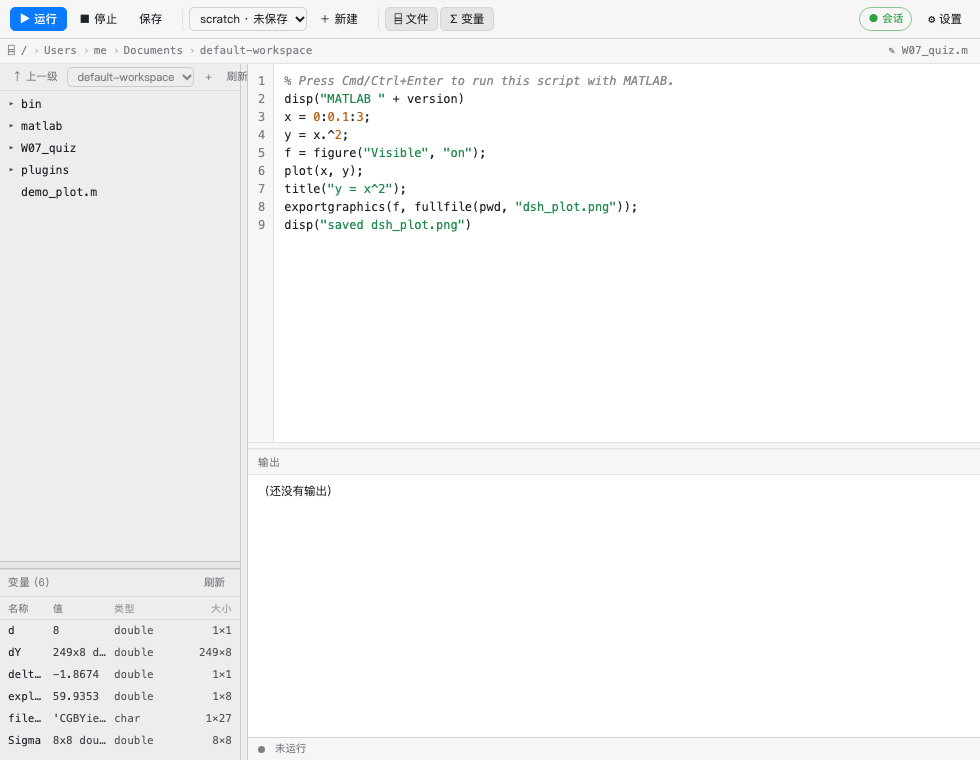
A real run: file tree + variables on the left, editor in the middle, live console below, exported figures as thumbnails. Dividers resize the tree, the variables pane and the console; settings are one click away.
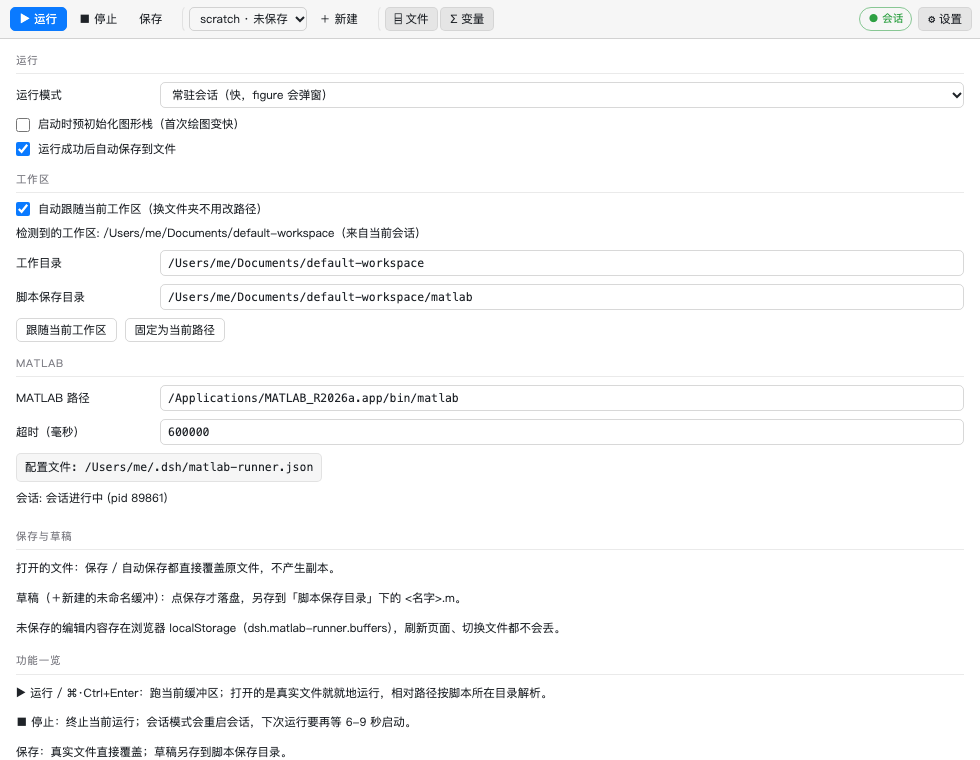
| Settings | Narrow sidebar |
|---|---|
 |
 |
Two run modes
session(default) — one long-livedmatlab -nodesktop -nosplashprocess fed through stdin. After the first boot (≈6–9 s) a run costs ~10–30 ms, the prompt keeps your variables between runs, and figure windows really open on the desktop while the panel also shows the exported PNG. Output is streamed into the console while the script is still running.batch—matlab -batchper run, headless, exits with the script (15–20 s per call, no windows). Kept for CI-ish, leave-nothing-behind work.
The session is shared between the sidebar and the agent tool, so what the model runs and what you type land in the same MATLAB workspace.
Why this runs when the agent's shell cannot
MATLAB needs to write ~/Library/Application Support/MathWorks before it will
start. A sandboxed shell (workspace-write) makes matlab -batch exit 1 with
an empty console, and a PTY tab owned by the agent is subject to the same
sandbox. The host half spawns MATLAB with node:child_process from the host
process, i.e. with the system user's permissions, independently of the agent's
sandbox mode — so this panel runs MATLAB without switching the session to Full
access.
Install
From npm (once published):
dsh plugin --profile web add dsh-matlab-runner
For the desktop app, whose profile is owned by the Electron application, use the
bundled script — it copies the payload into the profile, wires the dependency and
the dsh.profile.bundles row, seeds the config, and re-composes the plugin:
node bin/install-local.sh # or: plugins/dsh-matlab-runner/bin/install-local.sh
The official desktop app owns its profile, so the script copies the payload
into ~/.dsh/profiles/desktop/node_modules/dsh-matlab-runner, adds the
dependency and the dsh.profile.bundles row, seeds the config, and re-composes
the plugin's Loader entry.
About that last step: the app watches ~/.dsh/profiles/desktop/package.json, so
dropping the bundle row and putting it back reloads the plugin from disk —
no app restart, no lost session. bin/reload-host.sh does exactly that:
plugins/dsh-matlab-runner/bin/reload-host.sh # host half picked up new files
Then reload the page (⌘/Ctrl+R) so the browser half updates too. A full app restart is only needed if the tab still shows the old panel.
Open it
Right sidebar → the add control (+) → the MATLAB 运行器 / MATLAB runner
card. After the first visit the tab is in the strip; ⌘/Ctrl+Shift+M opens it
from anywhere (web builds: ⌘/Ctrl+Shift+Alt+M).
What the panel does
- File tree (
⌸ 文件) — browseworkdirfrom the panel, expand folders lazily, click any text file to open it in the editor (↑ 上一级walks up,刷新re-reads). Only files with a text extension are editable; anything else reportsbinary. - Editor with a line-number gutter, MATLAB syntax highlighting (keywords,
strings, numbers, comments), no autocorrect,
Tab= two spaces. - Run (⌘/Ctrl+Enter) writes the buffer to
<workdir>/.dsh-matlab-runner/<stem>.mand runs it in the persistent session. - Script picker — every
.minscriptDirplus every unsaved draft. Picking one loads it into the editor. + New starts a blank buffer, and every buffer is remembered (per file path, plus each draft) so switching files or tabs never throws typed code away. - Multiple folders — the tree header has a folder picker plus a + button.
+mounts any absolute path (~works) as an extra tree root, exactly like MATLAB's "add to path" list; mounts are persisted inmatlab-runner.jsonasextraRootsand can be removed again from the same row. Mounted folders are browsable and editable, but a run's working directory still follows the workspace (relative paths stay anchored to the script being run). - Variable editor — double-click any row in the variables panel to open the
value; edit the literal and 写回工作区 / Write back assigns it with
evalin('base', '<name> = <literal>;'), so it really replaces the MATLAB variable (the panel refreshes right after). Numerics are shown withmat2str, anything else throughevalc('disp(x)'). - Stop / ■ aborts the current script (in session mode this restarts the MATLAB session; the next run boots it again).
- Save writes a real script to
<scriptDir>/<name>.m. - Console streams stdout/stderr live, then shows exit code, elapsed time, and the
script path. Errors print
getReport(e,'extended'), so line numbers survive. - Autosave — after a run that exits cleanly the buffer is written back to
disk: opened files go to their own path, drafts are saved as a new script
under
scriptDir. Turn it off with theautoSavesetting or the Settings checkbox. - Drag the dividers — one between the file tree and the editor (width), one between editor and console (height); both are remembered per browser.
- Variables (
Σ 变量) — the live workspace: name, class, and size for every base-workspace variable. The host asks MATLAB to writewhosas JSON into.dsh-matlab-runner/vars.jsonand reads it back, so the list is never truncated by the console. Refreshed automatically after each run. - Figures — image files touched by the run (
.png/.jpg/.svg/.gif/.webp) show as thumbnails under the console; click one to open the full image in a tab. Withsessionmode thefigurewindow also opens on the desktop. - Live scripts (
.mlx) — clicking an.mlxin the file tree opens a read-only preview: text with headings, colourised code blocks, text outputs, and inline figures. Parsing is local (lib/livemd.js: ZIP + OOXML, no MATLAB needed). Run/Save are disabled while previewing; close the preview to edit. - Settings — run mode, the graphics warm-up flag, every path, the timeout, the config location, and a Restart session button.
Interface
The panel follows the VS Code / MATLAB layout conventions:
| Area | What it holds |
|---|---|
| Toolbar | Three groups: run (▶ Run / ■ Stop / Save), files (script picker + New), views (file tree / variables). The session badge and the settings gear sit on the right. |
| Breadcrumb | The folder the panel currently points at, clickable per segment, plus the edit target on the right. |
| Left column | File tree on top, MATLAB workspace variables underneath (name / value / class / size), with a drag bar between them and a vertical drag bar against the editor. |
| Editor | Gutter, syntax highlighting, splitter above the console — drag it to resize. |
| Console | Header strip, streaming output, figure thumbnails, and a status bar with phase, exit code, elapsed time and the script path. |
| Settings | Three labelled sections — run, workspace, MATLAB — as a label/control grid, with the current detection source, "follow this workspace", "pin to this path", Save and Restart session. |
Panel toggles (tree / variables) are remembered per browser. node bin/preview-ui.mjs
renders the two views to /tmp/mrun-*.html for a quick headless look:
node bin/preview-ui.mjs
"/Applications/Google Chrome.app/Contents/MacOS/Google Chrome" --headless=new \
  --screenshot=/tmp/panel.png --window-size=980,760 file:///tmp/mrun-panel.html
Saving, drafts and buffers
| Buffer | What Save does | Where it lives |
|---|---|---|
| An opened file (picked from the tree or the script picker) | Overwrites that file in place — same as the editor's ⌘S. Auto-save (after a clean run) does the same. | the file itself |
A draft (+ new, name without a path) |
Saves a copy to <scriptDir>/<name>.m and switches the buffer to that file. |
<scriptDir> (default <workspace>/matlab) |
| Unsaved edits of either kind | Kept in browser localStorage under dsh.matlab-runner.buffers, so switching files or reloading never loses them. |
browser storage |
| The script MATLAB actually executes | A draft runs from a temporary copy in <workspace>/.dsh-matlab-runner/; an opened file runs in place, so relative paths resolve next to it. |
workspace |
Config
~/.dsh/matlab-runner.json ($DSH_HOME/matlab-runner.json when set), created
on first boot with the paths this machine actually uses:
{
  "mode": "session",
  "warmFigures": false,
  "autoSave": true,
  "autoDetect": true,
  "matlabPath": "/path/to/MATLAB/bin/matlab",
  "sessionArgs": ["-nodesktop", "-nosplash"],
  "extraArgs": ["-nodisplay", "-nosplash"],
  "workdir": "~/your-project",
  "scriptDir": "~/your-project/matlab",
  "timeoutMs": 600000,
  "env": {}
}
mode—session(persistent, fast, figures open) orbatch(one process per run, headless).warmFigures—trueinitializes the graphics/Java stack during boot, so the firstfigurecosts ~2 s instead of ~13 s; the first run pays that cost up front instead.autoSave—true(default): a successful run writes the buffer back to the open file (or saves a draft asscriptDir/<name>.m).autoDetect—true(default):workdirfollows the folder the DSH session has open andscriptDirbecomes<workspace>/matlab, so switching projects needs no config edit.falsepins the two paths below.matlabPath— the launcher binary (an app bundle'sbin/matlab, not theContents/MacOSpayload).sessionArgs— flags aftermatlabPathfor the persistent process.extraArgs— flags before-batchin batch mode.workdir— the session's working directory, and the root scratch scripts are written under. WithautoDetecton this is derived, not fixed.scriptDir— where Save puts.mfiles and where the picker looks (<workspace>/matlabin auto mode).timeoutMs— hard cap per run; Stop is the manual version.env— extra environment variables for MATLAB.
Everything except env is editable in the panel's Settings pane.
Which folder does a script run in?
A buffer that maps to a real file runs that file, so MATLAB's working
directory is the file's own folder and readmatrix('data.xlsx') resolves next
to the script (same as the editor's Run button). Drafts still run from the
scratch copy under <workspace>/.dsh-matlab-runner/, and when MATLAB cannot
find a relative path the console shows the base folder:
相对路径以脚本所在目录为基准: /…/W07_quiz(数据文件放这里,或用绝对路径)
Which folder does it use?
The tab sends its session's workspace root with every API call (?cwd=), so:
- Session folder wins — the panel always works on what you have open.
- Otherwise the first folder in
ctx.workspaceRegistry, then the host process cwd (this is what the agent tool sees when no panel is talking). - A report older than 2 minutes is treated as stale, so
matlab_runnever inherits a folder you closed long ago. autoDetect: falseskips all of the above and usesworkdir/scriptDir.
Settings shows the detected root and its source, with 跟随当前工作区 and
固定为当前路径 buttons. Path rejections name the folder you are on, e.g.
path outside the configured roots: /etc · 当前工作区: /tmp(面板 → 设置 → 自动检测 / 使用当前工作区).
Agent side
matlab_run({ code | file, name? }) runs one script through the same registry
and returns its console text, so the model can iterate on MATLAB code, read the
output, and see errors (the wrapper prints getReport(e,'extended')).
Tests
node plugins/dsh-matlab-runner/test/host-unit.mjs     # names, argv, config dialect, path containment, vars helper
node plugins/dsh-matlab-runner/test/client-smoke.mjs  # loader shell + registration order
node plugins/dsh-matlab-runner/test/client-render.mjs # renders the panel body once against stubs
node plugins/dsh-matlab-runner/test/client-tokenize.mjs # highlighter token split (transpose vs string, comments, numbers)
node plugins/dsh-matlab-runner/test/livemd.mjs        # .mlx parser, self-contained fixture
node plugins/dsh-matlab-runner/test/host-apply.mjs    # the whole apply(): routes, tool, tree, vars, session (~40 s)
node plugins/dsh-matlab-runner/test/session.mjs       # real MATLAB: boot, warm reuse, errors, figures, stop (~50 s)
node plugins/dsh-matlab-runner/test/host-run.mjs      # real MATLAB batch path (needs an unsandboxed shell)
bin/check.mjs is the live one: it talks to the running app over loopback
(DSH_GUI_URL, default http://127.0.0.1:54501), prints the resolved config,
runs a script, proves the session is reused on the next run, and fetches the
exported figure through the artifact route. A pass proves the host half is live
and MATLAB is reachable; only the page can prove the tab rendered.
The MATLAB tests fail under a sandboxed shell by design — they exercise the same spawn path the app uses, which only exists outside the sandbox.
Limits
- First figure in a session costs ~13 s (Java/desktop initialization), then
~2 s. Turn on
warmFiguresto move that cost to boot. - Don't name a script after a MATLAB builtin (
plot.m,mean.m, …):runresolves the script first and shadows the function, soplot.mfails with "不支持将脚本 plot 作为函数执行". - One session per host, shared by the panel and the agent tool; a long
pauseor an infinite loop blocks that session until Stop. - The variables panel lists base-workspace variables only, and it needs a running session (before the first run it says "session not started").
- Windows is untested;
sessionArgs/extraArgsand the launcher path would need adjusting. - Until the first successful run (or a manual Save) buffers live in
localStorageonly, so they survive tab switches and page reloads but not a different browser or a cleared profile. - Syntax highlighting is a tokeniser, not a parser: it does not fold blocks, and
a
%inside an unusual context can still be read as a comment. .mlxis preview only — the panel renders what MATLAB saved, but cannot edit or run a live script (that needs the Live Editor engine). Section counts are a heuristic for live scripts imported from Word; the order of blocks is always the document order.- Stopping or restarting the session asks MATLAB to
exitfirst, so no-nodesktopprocess is left behind. A long-running-nodesktopMATLAB does register with macOS under MATLAB's bundle id, which can make a Finder double-click look like a no-op (the windowless instance receives the activation). Fix:open -n -a /Applications/MATLAB_R2026a.appor quit the session; in VS Code setMATLAB.matlabConnectionTimingtoonDemand. - The file tree is rooted at
workdir; it does not follow the DSH workspace switcher or show git status. - MATLAB file names must start with a letter: a generated helper named
_vars.mfails with "文本字符无效".
License
MIT © 2026 seally-web
No comments yet. Be the first to write one.