dsh-plugin-mermaid-gb-svg




A DeepSeek Harness plugin that turns Mermaid flowcharts into GB/T 1526-1989 compliant SVG (the Chinese national standard, identical to ISO 5807:1985), and exposes it to the model as one tool.
Preview
| GB/T 1526-1989 symbol chart | Generated flowchart |
|---|---|
 |
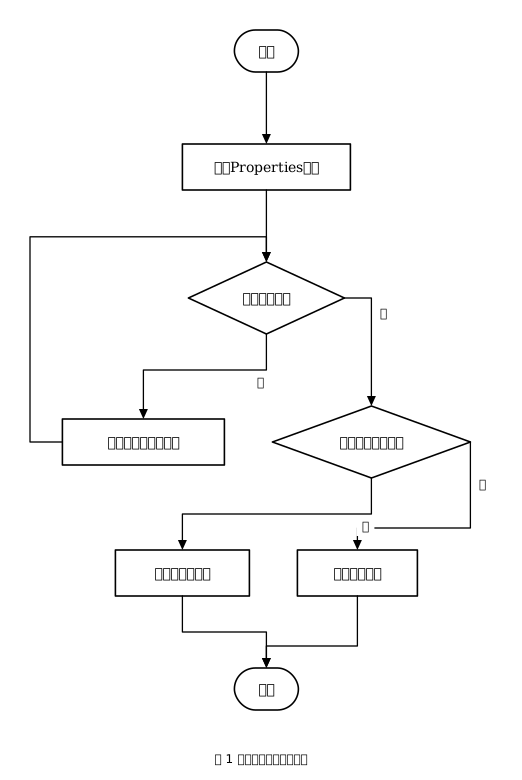 |
Both SVGs are produced by this tool — the source .mmd files are in examples/.
Install
# 1) install into a profile (web shown here)
dsh plugin --profile web add dsh-plugin-mermaid-gb-svg

# 2) make the loader load it — append to $DSH_HOME/profiles/web/cordis.patch.yml
- insert:
    - id: mermaid-gb-svg
      name: dsh-plugin-mermaid-gb-svg
      # config:
      #   fontSize: 14
      #   paper: none
For local development point at the source directory instead:
dsh plugin --profile web add /path/to/dsh-plugin-mermaid-gb-svg.
Tool: mermaid_to_gb_svg
| Parameter | Type | Description |
|---|---|---|
out |
string, required | Output path. Ending in .svg = file name (multi-diagram gets -1/-2), otherwise output dir/prefix |
source |
string | Mermaid source (mutually exclusive with path) |
path |
string | Input .mmd/.mermaid, or .md containing ```mermaid blocks (all blocks extracted; nearest heading above becomes the caption) |
title |
string | Figure caption |
dir |
td|lr|bt|rl |
Force flow direction |
paper |
none|auto|a4|a4l|a3|a3l |
Sheet size; none (default) emits one large SVG, others paginate when the drawing does not fit |
font_size |
integer | Body font size in px (14 ≈ 10.5pt) |
font_tu |
boolean | Use technical-drawing font (GB/T 14691 FangSong) |
caption |
boolean | Draw the caption (default true) |
Returns files, diagrams, pages, summary, warnings.
GB/T 1526-1989 symbols
| Symbol | Meaning | Mermaid syntax |
|---|---|---|
| rounded rectangle | terminal (start/end) | A([x]) A((x)) A(x) |
| rectangle | process | A[x] |
| diamond | decision | A{x} |
| parallelogram | data (input/output) | A[/x/] A[\x\] |
| hexagon | preparation | A{{x}} |
| double-sided rectangle | predefined process | A[[x]] |
| cylinder | direct access storage | A[(x)] |
| trapezoid | manual operation | A{/x/} |
| sloped-top quad | manual input | A{\x\} |
| square bracket | annotation | A>x] |
| circle | connector (on page) | A@{ shape: connector, label: "A" } |
| pentagon | off-page connector | A@{ shape: off-page, label: "B" } |
| — | document / multi-document | A@{ shape: doc, label: "report" } / docs |
| — | display / delay | A@{ shape: display, label: "display" } / delay |
| — | internal storage | A@{ shape: internal-storage, label: "storage" } |
shape accepts both Mermaid v11 names and Chinese names (处理/起止/判断/数据/准备/预定义处理/
直接存取存储/人工输入/人工操作/文档/多文档/显示/延迟/内部存储/注释/连接符/换页连接符).
Drawing conventions
- Flow runs left-to-right or top-to-bottom; flowlines are orthogonal with solid arrowheads.
- Decision branches:
是leaves the bottom vertex downward,否leaves the right vertex (going right first, then turning). - Every incoming flowline enters a symbol vertically at its top centre.
- At most 3 bends per flowline — routes are tried in order 0→1→2→3 bends and the first one that does not cross a symbol wins.
- Geometry is self-checked after generation (overlaps, flowlines through symbols) and reported in
warnings.
Pagination (optional)
With paper: a4 (or a3/auto), a drawing that does not fit is split:
- cuts fall in the gaps between layers (and between columns of symbols), never through a symbol;
- each sheet is sized in real millimetres (
width="210mm" height="297mm") with a frame, a binding margin and a(page n/N)caption; - each broken flowline gets an off-page connector (pentagon) pointing along the flow, and the connector sits at the same place with the same label on both sheets.
Configuration
| Key | Default | Meaning |
|---|---|---|
font |
SimSun, '宋体', 'Microsoft YaHei', sans-serif |
Font family |
fontSize |
14 |
Body font size (px) |
stroke |
1.6 |
Line width |
paper |
none |
Default sheet size |
Sandbox
Writes go through the Harness ctx.fs seam with the session's sandbox policy, and support the same
one-shot sandbox_permissions + justification escalation retry as the built-in write tool.
Development
npm test # test/engine.test.mjs + test/plugin.test.mjs
lib/engine.js is generated from the CLI version (tools/mermaid2gb-svg.js) so both stay in
sync; edit the CLI and regenerate rather than editing the engine directly.
Feedback
Feedback is what decides what gets built next — especially standard-compliance corrections, since GB/T 1526-1989 has details that are easy to get subtly wrong.
| Channel | Use it for |
|---|---|
| Issues | Bugs, symbol corrections (there is a dedicated template — please cite the clause/figure), feature requests |
| Discussions | Usage questions, layout/typography opinions, open-ended ideas |
| sandyyst@hotmail.com | Anything you would rather not post publicly |
When reporting a problem, attach the Mermaid source. A one-line description plus the .mmd is
usually enough to reproduce it — the generated diagram, the tool's warnings array, and your plugin
version help too.
If the tool reports geometry warnings, the output already carries the link to the issue tracker — that is the moment the report is most useful.
License
MIT
No comments yet. Be the first to write one.