dsh-git · Git & Source-Control Plugin Suite for DeepSeek Harness — with Self-Evolving Memory
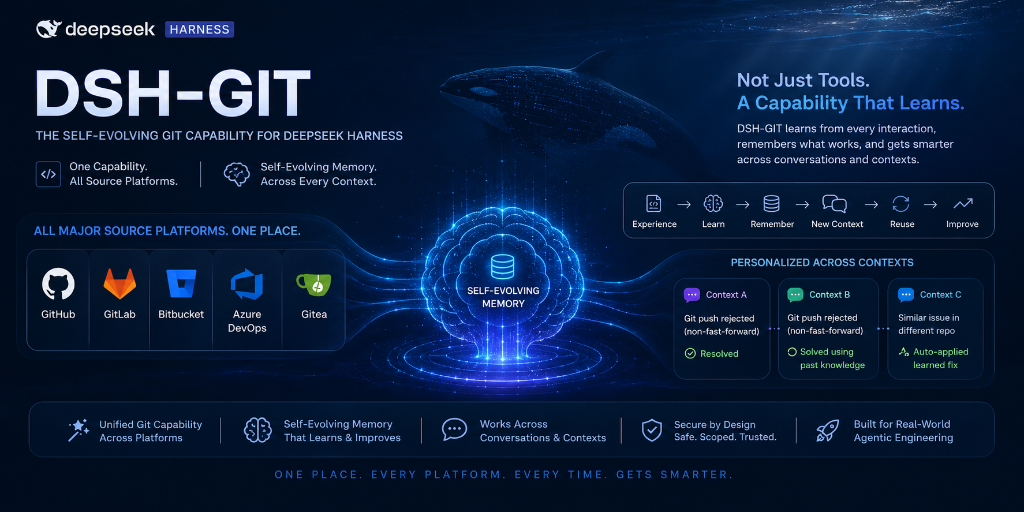


A complete, production-ready Git / source-control plugin suite for DeepSeek Harness (DSH). It gives the agent typed, policy-aware access to local git and every major hosted Git platform — GitHub, GitLab, Bitbucket, Azure DevOps, and Gitea — and its self-evolving memory is the defining feature: the agent genuinely gets smarter about your repos, conventions, and past mistakes with every session.
Official ecosystem keyword: this is a
dsh-plugin— add thedsh-pluginGitHub topic to this repository.
🤖 LLM-readable summary
- What: a bundle of 11 packages that extends DSH agents with 8 model-facing git tools + durable memory.
- Install:
dsh plugin --profile web add github:sakthiveltofficial/dsh-git-plugins, then restart the profile. No preset editing required (host rows are inserted automatically viadsh.bundle.patch). - Tools:
git_repo,git_inspect,git_pr,git_issues,git_release,git_security,git_ci,git_memory. - Platforms: GitHub, GitLab, Bitbucket (Cloud), Azure DevOps, Gitea (also any self-hosted host).
- Runtime requirements: DeepSeek Harness, Node.js ≥ 20 (global
fetch), and thegitCLI on PATH. - Secrets: never stored in config — env-var references resolved per operation via
ctx.credentials(GITHUB_TOKEN,GITLAB_TOKEN,BITBUCKET_APP_PASSWORD,AZURE_DEVOPS_PAT,GITEA_TOKEN). - Safety: destructive actions (force-push, merge, rebase, PR merge, release) route through the host approval service; mutations honor the sandbox policy and support
sandbox_permissionsescalation; memory is scrubbed of secrets. - License: MIT.
✨ What it does
- Local repository operations — clone, branch, checkout, commit, push, pull, stash, tag, merge, rebase, diff, blame, log, code search, file search — through the real
gitbinary, with typed arguments and readable results. - Hosted platform operations — pull requests (create / list / merge / comment), issues, releases, CI/CD pipeline status, and security alerts across five platforms behind one provider-agnostic interface.
- ⭐ Self-evolving memory (the USP) — the agent builds a persistent, scrubbed knowledge base across sessions: environment facts, per-project conventions (branch naming, commit style, merge strategy), error signatures paired with their fixes, and explicit user preferences. Known errors are pre-empted before they happen; conventions are followed automatically without re-asking; secrets are scrubbed; and an explicit instruction always overrides memory. The agent gets measurably better at your codebase over time.
- Policy-aware hardening — approval gates on destructive actions, sandbox confinement with escalation, rate-limit backoff, and read caching.
🚀 Install
Prerequisites
# DeepSeek Harness running (a profile, e.g. the default web profile)
# Node.js >= 20 (the host's Node — plugins run in-process)
git --version        # the git CLI must be on PATH
Install — from this GitHub repository
# the repo ROOT is itself a bundle (dsh.bundle manifest + cordis.patch.yml)
# and pulls every @dsh-git/* package from npm — no build step needed
dsh plugin --profile web add github:sakthiveltofficial/dsh-git-plugins
Restart the profile (or the DSH process). The bundle's cordis.patch.yml inserts the whole capability — local provider, platform registry, all five adapters, memory, and the tools — into the profile composition automatically.
Verify
dsh --profile web --dump-config | grep -i git
Then ask the agent: "what git tools do you have?" — it should list git_repo, git_inspect, git_pr, git_issues, git_release, git_security, git_ci, git_memory.
🔑 Configure credentials
Platform operations resolve tokens per operation through DSH's credential service — config carries only env-var references, never literal tokens.
| Env var | Platform | Notes |
|---|---|---|
GITHUB_TOKEN |
GitHub | public repos work without it |
GITLAB_TOKEN |
GitLab | baseUrl configurable for self-hosted |
BITBUCKET_APP_PASSWORD |
Bitbucket | needs the username config too (HTTP Basic) |
AZURE_DEVOPS_PAT |
Azure DevOps | empty username + PAT |
GITEA_TOKEN |
Gitea | baseUrl required (any self-hosted instance) |
Set them in the DSH environment (or via ctx.credentials sources). Unset references fall back to anonymous access: public repos work, writes fail loud with GIT_AUTH_FAILED.
🧰 Tools
| Tool | What it does |
|---|---|
git_repo |
clone, branch, checkout, commit, push, pull, stash, tag, merge, rebase |
git_inspect |
diff, blame, log/history, code search, file search (read-only) |
git_pr |
create / list / merge / comment on pull requests (merge requires approval) |
git_issues |
list / create issues |
git_release |
create releases (requires approval) |
git_security |
list security alerts (Dependabot / vulnerability findings) |
git_ci |
list / inspect pipeline runs |
git_memory |
record / recall / forget self-evolving memory |
Example — the agent can do all of this with plain language:
"Clone the repo, check out a
feat/branch, commit these changes and open a PR againstmain; squash-merge it and create a v1.2.0 release."
🌐 Platform support
| Host | PRs | Issues | Releases | CI/CD | Security alerts |
|---|---|---|---|---|---|
| GitHub | ✅ | ✅ | ✅ | ✅ Actions | ✅ Dependabot (404 → empty) |
| GitLab | ✅ MRs | ✅ | ✅ | ✅ pipelines | ✅ vulnerability findings (404 → empty) |
| Bitbucket (Cloud) | ✅ | ✅ | tags (no releases API) | ✅ Pipelines | ❌ GIT_UNSUPPORTED |
| Azure DevOps | ✅ | ✅ (Work Items) | ❌ GIT_UNSUPPORTED |
✅ Builds | ❌ GIT_UNSUPPORTED |
| Gitea | ✅ | ✅ | ✅ | ✅ Actions (≥ 1.21) | ❌ GIT_UNSUPPORTED |
Unsupported operations fail loudly with GIT_UNSUPPORTED — never silently empty.
🧠 Self-evolving memory
gitMemory persists across sessions in a git_memory storage-domain table and:
- auto-captures every git tool failure with its
tool:action:codesignature and marks it resolved when a later success matches; - dedupes repeated events into a
hitscount so recurring patterns surface (facts vs. inferences are tracked separately viasource); - scrubs secrets (tokens, keys, private-key blocks, username paths) before persisting;
- injects a bounded digest into the system prompt each step so known errors are pre-empted and conventions followed without re-asking;
- supersedes stale entries (delete via
git_memory forget) instead of accumulating noise.
🏗️ How it works
The suite follows DSH's own three-role package pattern (packages/fs/{fs, fs-local, tool-fs}): Service Definition → Provider → Consumer.
packages/git/
├── core/              @dsh-git/core           Service Definitions + types + GitError + HTTP plumbing
├── git-local/         @dsh-git/local          local provider (shells to git via ctx.shell)
├── git-platform/      @dsh-git/platform       platform registry/dispatcher + backoff + read cache
├── git-github/        @dsh-git/github         GitHub adapter
├── git-gitlab/        @dsh-git/gitlab         GitLab adapter
├── git-bitbucket/     @dsh-git/bitbucket      Bitbucket adapter
├── git-azuredevops/   @dsh-git/azuredevops    Azure DevOps adapter
├── git-gitea/         @dsh-git/gitea          Gitea adapter
├── git-memory/        @dsh-git/memory         self-evolving memory service
├── tool-git/          @dsh-git/tool-git       grouped model-facing tools
├── tool-git-memory/   @dsh-git/tool-git-memory  git_memory tool
└── bundle/            @dsh-git/bundle         profile bundle (dsh.bundle.patch)
Key design decisions:
- One seam, many hosts. A Cordis service name registers once, so
gitPlatformis a registry: adapters register viaregisterProvider(same pattern asctx.llm.registerAdapter), and the registry detects the host from the repo's origin remote URL. - Typed, grouped tools. Seven workflow groups instead of dozens of flat verbs; each action has typed parameters and validates before dispatch.
- Hardening in the tool layer. Approval gates, sandbox policy stamping, and escalation fields live in
tool-git, not in the providers.
🔒 Security
- Secrets are env-var references, resolved per operation, never cached, never logged.
- Destructive git operations require explicit approval when the host approval service is present.
- Mutations run under the resolved
sandboxPolicy;sandbox_permissionsescalation mirrors the harness's own file tools. - Memory is scrubbed before persistence; the harness's credential and sandbox layers are never bypassed.
- Commands shell out to the real
gitbinary withGIT_TERMINAL_PROMPT=0so missing credentials fail fast instead of hanging.
🧪 Development
Versions are pinned exactly to the deployment (cordis 4.0.1, schemastery 3.18.1, dsh-* 0.1.0-rc.6).
pnpm install
pnpm build        # tsc, in dependency order
pnpm typecheck
pnpm smoke:all    # local git E2E + platform registry + live GitHub API + all adapters + memory
Smoke suites: scripts/ — the platform suite hits the live GitHub API on public repos; the adapter suite verifies remote detection, URL construction, and unsupported paths for all five hosts; the memory suite drives the full record/recall/scrub/resolve lifecycle.
📦 Publishing
pnpm -r publish --access public --no-git-checks
or push a v* tag (.github/workflows/publish.yml publishes via NPM_TOKEN). Full distribution guide (alternatives, no-npm fallback, versioning): docs/DISTRIBUTION.md.
📄 License
MIT © 2026 dsh-git-plugins contributors.
No comments yet. Be the first to write one.