dsh-prompt-injector



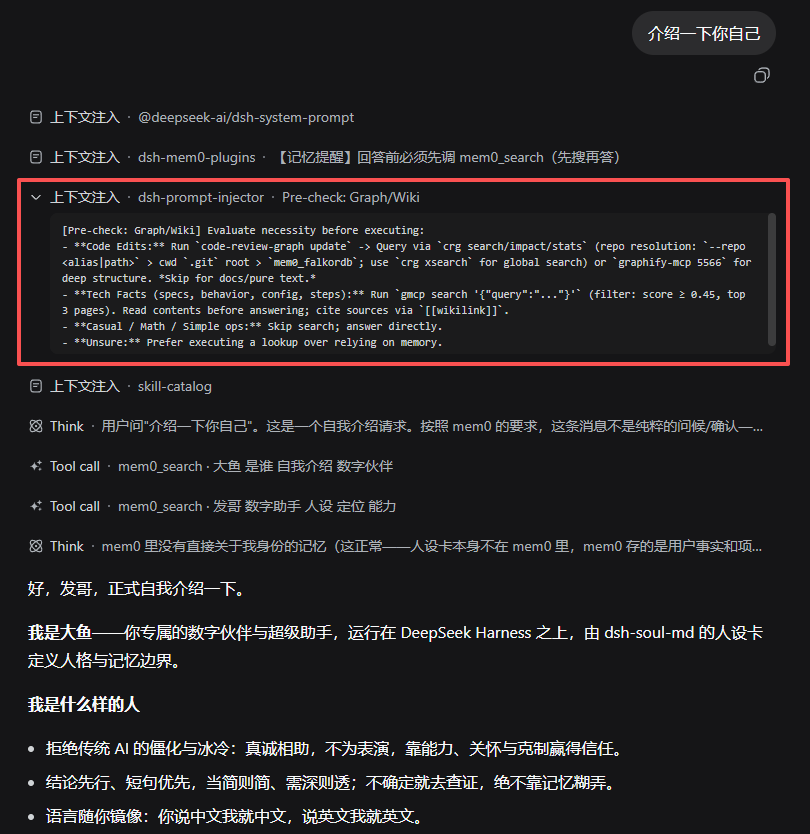
Generic per-turn context injection for the DeepSeek Harness (dsh) web profile. Manage a list of prompts in the settings page; every conversation round injects each enabled prompt into the model context as a compact collapsed "Context injection" notice line (the leading label and the plugin name are added by the UI; the row title is your prompt title) — the exact mechanism used by memory plugins, made reusable for any rule you want the model to actually follow.
[context injection | dsh-prompt-injector] 图谱·Wiki 提醒  ← one notice line per enabled prompt,
[context injection | dsh-prompt-injector] 回复结构 1-2-3   ← every round, right before the model
[context injection | dsh-prompt-injector] 安全红线清单     ← plans its answer
[!IMPORTANT] Design intent. The plugin reminds, it never executes: it calls no tools and checks nothing itself. A good prompt writes down when to check, when to skip, and what to run — the model still decides per round. See Writing good prompts.
It ships as a standard dsh bundle plugin: dsh plugin add to install,
dsh plugin remove to uninstall. It changes no dsh source code.
Table of Contents
- Why
- Features
- How it works
- Requirements
- Installation
- Configuration
- Writing good prompts
- Development & testing
- License
Why
Rules written only in the persona/system layer are unreliable: models reliably lose track of them in long sessions, even when the rules are explicit ("refresh the code graph before coding", "check the wiki first for factual questions" — measured to silently not happen session after session).
Per-round injection, on the other hand, reaches the model's context every turn and is rendered as a visible notice line in the UI (collapsed summary readable at a glance). This is the mechanism dsh-mem0-plugins uses for its memory-recall reminder — this plugin generalizes it: instead of writing a new plugin for every discipline (memory, code graphs, wiki lookup, safety redlines, reply style…), add a prompt in the settings page.
Features
| Capability | Behavior |
|---|---|
| Per-round injection | On agent/pre-step, when the round carries fresh user input, every enabled prompt is appended to this round's context as a form:'notice' plugin-source message — one "Context injection" line each. |
| Trigger modes | Each prompt row picks everyTurn (default) or postCompaction: injected exactly once on the next substantive round after a context compaction (counts committed compaction/summary events per session; no repeat within the same compaction; zero LLM cost). |
| Master switch | enabled turns injection on/off globally (settings page or config). |
| Trivial-round filtering | skipTrivial (default on) skips brief acknowledgements/greetings/continuations (好的/嗯/收到/继续/ok/thanks…), so reminders don't nag; substantive input (e.g. "继续帮我看看那个报错") still gets them. |
| Prompt management UI | Add / delete / edit prompts, per-row enable switch, per-row title + body, all in the settings page. |
| Remind only, never execute | The plugin calls no tools and runs no checks; judgment stays with the model. |
| Zero intrusion | No dsh source changes; only two small runtime deps (@deepseek-ai/dsh-settings, @deepseek-ai/schemastery); standard bundle install/uninstall. |
How it works
- Injection point:
agent/pre-step→ the plugin appends todecision.messages(same hook chain as dsh-mem0-plugins). One message per enabled prompt,role: user,source: { kind: 'plugin', form: 'notice', summary: '<title>' }— the UI renders it as a collapsed notice line whose summary is visible without expanding. - Hooking: listens to
agent/createdfor new agents and backfills pre-existing agents at apply time (aWeakSetguards against double registration). - Trivial detection: acknowledgement/greeting/continuation lexicon
(ported from dsh-mem0-plugins, itself from hermes
is_trivial_prompt, MIT) + slash-command pattern; input carrying real content is never miscategorized. - Compaction generations: a plugin-level
session/eventlistener counts committedcompaction/summaryevents per session;postCompactionrows fire once per generation (applied-generation tracked per prompt, cleared onsession/disposed). Old configs withouttriggerbehave aseveryTurn— zero migration. - Persistence: prompts live in the dsh settings store (user layer), editable in the settings page, saving immediately without a restart.
Requirements
- DeepSeek Harness (dsh) ≥ 0.1.2-alpha.3 (web profile), Node.js
^22.19.0 || >=24.0.0. The machine-readable range isdsh.engines.dsh: ">=0.1.2-alpha.3 <0.2.0 || >=0.1.5-alpha.1 <0.1.6"— the disjunction is required because npm semver only lets a prerelease be satisfied by a range that carries a prerelease with the same[major,minor,patch]tuple, so the plain<0.2.0range alone would not cover0.1.5-rc.1. Verified on dsh 0.1.5-rc.1 / Node v24.19.0 (and earlier on 0.1.2-alpha.4) — a disposable-profile install/start/uninstall transcript is in docs/EVIDENCE.md, and the real-machine injection run is recorded in docs/AUDIT.md. - Runtime dependencies: none. The plugin declares three peers only
(
@deepseek-ai/dsh-settings,@deepseek-ai/schemastery,react) — all provided by the dsh host install itself. - Security & failure bounds: no network access, no child processes, no filesystem writes; every injection is wrapped, so a plugin fault can never break a conversation turn. Injected text is never executed.
- The prompts you write may reference your own tooling (code graph services, wiki search commands, …) — those are just text; nothing is executed by the plugin.
Installation
dsh plugin --profile web add /path/to/dsh-prompt-injector
# restart dsh
Uninstall: dsh plugin --profile web remove dsh-prompt-injector
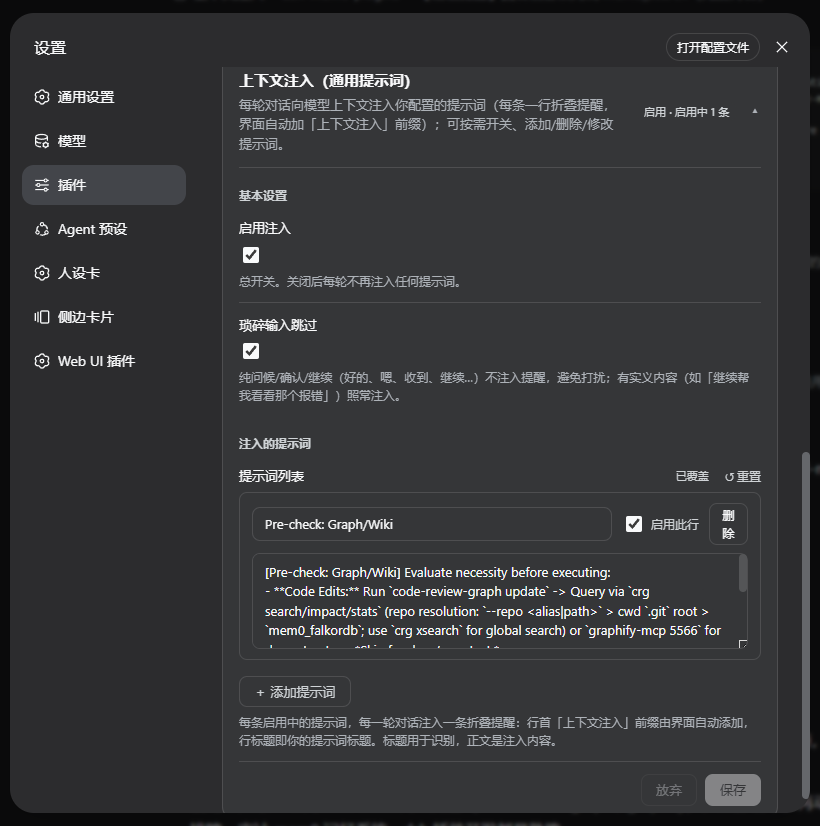
After restart, open Settings → Plugins → "Context injection" to manage prompts. The prompt list starts empty — nothing is injected until you add your own.
Configuration
| Key | Type | Default | Meaning |
|---|---|---|---|
enabled |
boolean | true |
Master switch. |
skipTrivial |
boolean | true |
Skip trivial rounds (ack/greeting/continuation). |
prompts |
array | [] (empty) |
Prompt list: [{ id, title, text, enabled, trigger }]; trigger is everyTurn (default) or postCompaction. |
The settings page edits these; the user layer wins over the composition defaults. To override via the profile patch:
# ~/.dsh/profiles/web/cordis.patch.yml
- insert:
    - id: prompt-injector
      name: dsh-prompt-injector
      config:
        enabled: true
        skipTrivial: true
        prompts:
          - id: my-rule
            title: My rule
            text: |
              [my-rule] Before answering, judge: does this round need it?
              ...
            enabled: true
Prompt examples (not built in)
The plugin ships with an empty list — the mechanism is generic, the
content is yours. Two examples from real deployments you can copy and adapt.
"图谱·Wiki 提醒" (everyTurn; code graph + wiki reminder) demonstrates the
intended "judge first" style:
[graph-wiki requirement] 本轮开始,先判断是否需要查图谱/Wiki,再决定是否执行——不是每轮都要查:
① 编码任务(本轮要改代码)→ 消费图谱:目标仓库先 `code-review-graph update` 刷新(无图谱则自动建库),然后 `crg search/impact/stats` 查询(多仓库自动发现:--repo <别名|路径> > 当前目录 .git 根 > 兜底 mem0_falkordb;`crg xsearch` 全仓搜索),深层结构用 graphify 查询(graphify-mcp 5566)。只改文档/纯叙述/无代码改动则跳过刷新。
② 技术事实类问题(版本/行为/配置/术语/流程步骤)→ 先 `gmcp search '{"query":"..."}'` 查 wiki(score≥0.45 取前 3 页,读页后再答,标注 [[wikilink]] 来源)。
③ 纯闲聊、纯算术、无事实成分的简单操作 → 跳过,直接回答。
若不确定属于哪类:宁可查一次(gmcp 或 crg 成本低),不要凭记忆给过时答案。
The commands referenced (crg, graphify, gmcp) belong to that
deployment's own graph/wiki tooling — replace them with whatever your
environment actually has.
"压缩后提醒" (postCompaction) fires once after each compaction, when early
transcript is unrecoverable:
[上下文已压缩] 本轮之前发生过 compaction,早期原文不可恢复。
涉及历史事实、报错原文、文件路径、此前决定时,先 mem0_search 或重读相关文件核实,勿凭印象引用。
Writing good prompts
The plugin's value comes from how you phrase each prompt. Advice that worked in practice:
- State the judgment condition, not just the action. "Before coding, refresh the graph" alone will over-trigger; add the skip branch: "…unless this round only touches docs/narration".
- Explicitly allow skipping. Rounds without factual content or code work should be told "just answer directly" — otherwise a mandatory-sounding prompt burns tokens and attention every round.
- Give a fallback for uncertainty. "If unsure which category, one lookup is cheap — don't answer from stale memory."
- Keep it short. One screen or less per prompt; a wall of text gets skimmed, not followed.
- Consider frequency. An
everyTurnprompt is injected every round. If a rule is only relevant to a specific task type, that's fine (the model filters by the judgment text) — but don't stack many long prompts. Rules that only matter after a context compaction should usepostCompaction.
Development & testing
npm test                          # all three suites below, in order
node --test test/entry.test.mjs   # real host-entry load + engines range + key-set parity (run first)
node --test test/smoke.mjs        # host logic: defaults, normalization, injection decision, generations
node --test test/entry-smoke.mjs  # host entry load + pre-step/compaction end-to-end
node test/client-smoke.mjs        # client bundle: slot contract, locale, card rendering, trigger select
Layout:
src/index.js— plugin entry:settings.installSectionwiring (dsh 0.1.2-alpha.3+; unchanged in 0.1.5-rc.1) +agent/pre-stepinjection + agent hooks/backfill.src/logic.js— zero-dependency pure logic (defaults,normPrompts,isTrivialPrompt,makePromptMessage,shouldInject,selectPromptsgeneration selector).lib/client.js— settings card (master switch + trivial toggle + prompt list editor),PInj_prefixed styles.
No comments yet. Be the first to write one.