OpenBook RSS Reader — a DeepSeek Harness UI plugin
OpenBook is a local-first RSS reader and knowledge collector, rebuilt as a
DeepSeek Harness (dsh)
plugin. Everything — feed sync, article materialization, notes/highlights,
activity timeline, chat commands, and the three-column reading UI — runs
inside the dsh plugin runtime as native Cordis services.
| Package | @openbook/dsh-rss-reader |
| Host runtime | Node ^22.19 || >=24, dsh >=0.1.0-rc.8 |
| License | MIT |
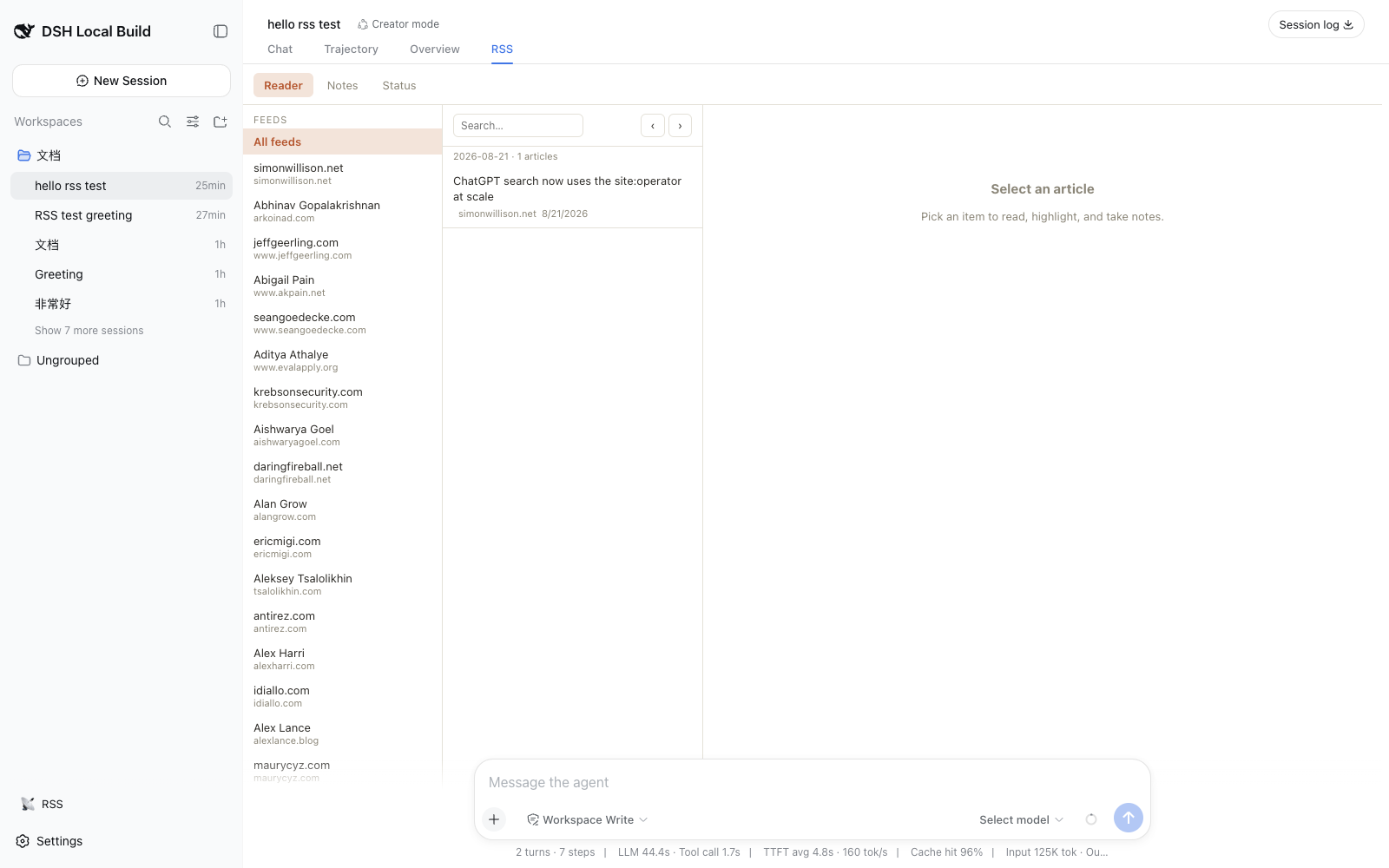
One click on the sidebar 📡 shortcut lands straight on the RSS tab; discussing an article pushes it into the conversation and switches back to Chat.
What it gives you
A single RSS surface: the RSS tab in the session view ring (a
conversation.view entry). It is a three-column reader with a feed sidebar,
per-day article queue with date navigation, full-text reading, favorites, and
note-taking, plus Notes (activity-driven waterfall) and Status (sync
statistics, activity stream) tabs. A lightweight sidebar 📡 shortcut jumps
straight to the RSS tab — opening a non-blank session first when needed — so
there is one reader with one obvious way in, and no competing docked panel.
Reading and chatting work together:
- Ambient awareness — opening an article injects it into the session's
agent context (
agent.inject), so the model knows what you are reading without a chat round-trip. - Discuss this article — quick actions (总结 / 翻译 / 提取要点) plus a
free-form question push the article into the conversation (
agent.followup), then the view automatically switches back to the Chat tab so you see the reply. Selecting text first attaches it as a highlighted passage. - Sync nodes — each sync run renders as one compact card in the chat flow
(
rss/syncconversation node), driven by durable session events.
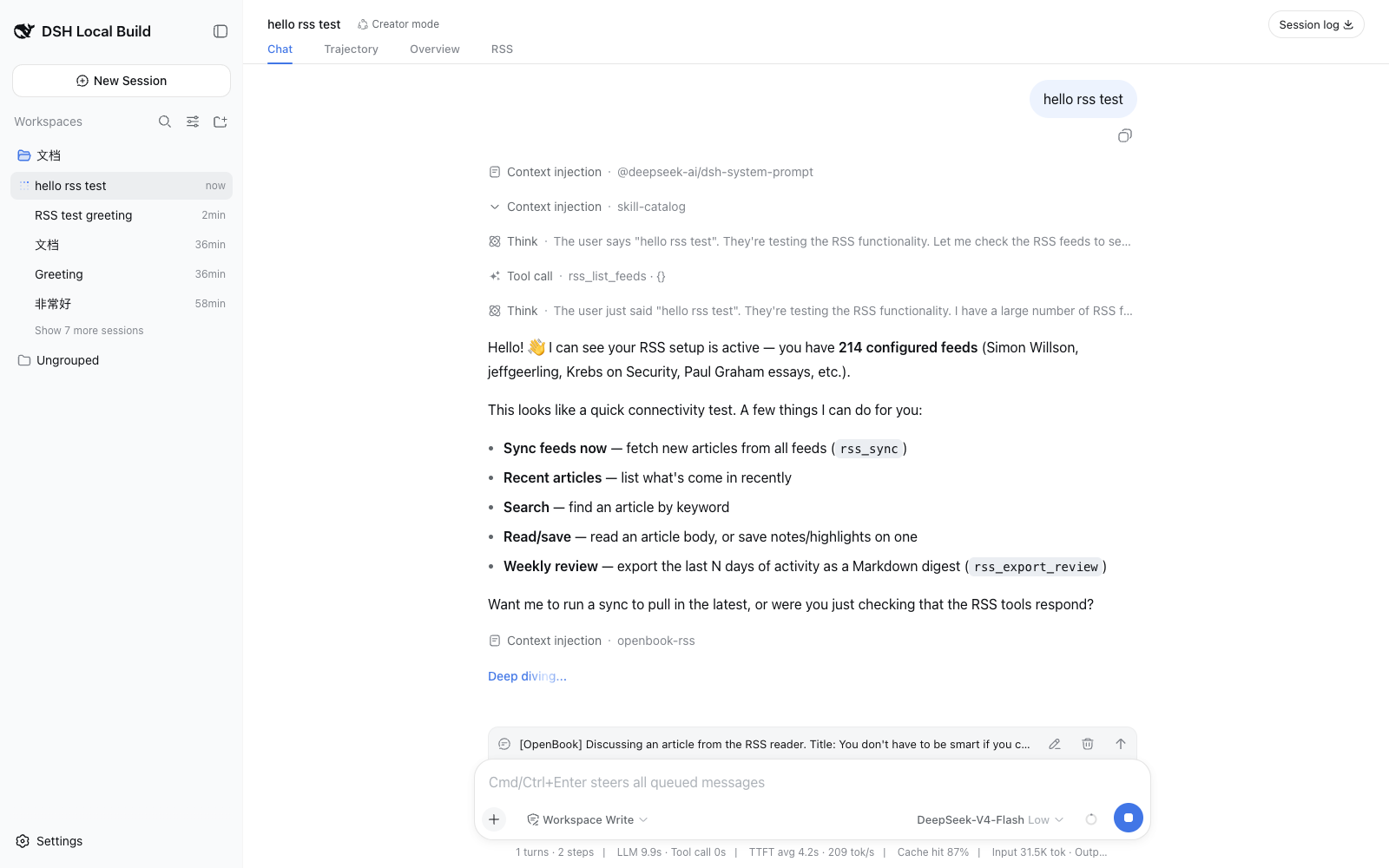
The same functionality is available to the agent:
- Tools the model can call:
rss_list_feeds,rss_sync,rss_search,rss_read_article,rss_materialize,rss_save_note,rss_export_review, plus the agent-readablebook_index,book_recent,book_article,book_search. - Chat commands (the legacy
cli.jssurface, mapped 1:1):/feeds,/read,/search,/recent,/notes,/favorites,/stats,/open,/materialize,/sync,/export-review,/review,/activity,/book,/doctor.
Installation
As a dsh bundle (recommended)
The package ships a pre-built client bundle in lib/ and declares
dsh.bundle + dsh.client, so it installs with the plugin CLI. Grab the
tarball from the latest release
and add it (no npm account needed):
dsh plugin add https://github.com/rocklau/dsh-rss-reader/releases/download/v0.1.0-rc.1/openbook-dsh-rss-reader-0.1.0-rc.1.tgz
This injects the openbook-rss row into your profile's composition; the
browser plugin is served from lib/client.js. A local checkout works the
same way: dsh plugin add ./dsh-rss-reader.
# or from npm (once published)
dsh plugin --profile web add @openbook/dsh-rss-reader

# then just start the web UI
dsh web
dsh plugin add installs the package into the web profile and, because the
package declares dsh.bundle, adds it to the profile's bundle list
automatically. No other configuration is needed.
Development (no install)
npm install
npm run build          # esbuild bundles + tsc declarations
dsh web --patch ./cordis.patch.yml
The overlay in cordis.patch.yml inserts the plugin into the running web
profile. The client half (the RSS view tab) is picked up automatically from
the package's dsh.client declaration.
Tests
npm test               # unit suites (node --test)
npm run test:e2e       # real-composition e2e; needs DSH_SOURCE_DIR
The e2e boots a real dsh web composition and invokes the rssApi endpoints
over the same transport the browser uses. Point it at a DeepSeek Harness
source checkout:
DSH_SOURCE_DIR=/path/to/deepseek-harness npm run test:e2e
Configuration
All options are validated at load and overridable from a patch overlay:
# cordis.patch.yml
- id: openbook-rss
  config:
    dataDir: ~/.dsh/openbook-rss/v1     # sqlite + markdown + notes + index.json
    allowPrivateFeeds: false            # SSRF guard: block DNS private ranges
    startupSync: true                   # warm sync at boot
    startupSyncLimit: 50
    feedMinSyncIntervalMs: 120000
    feedHeadCheck: true                 # HEAD validator before conditional GET
    feedHeadTimeoutMs: 3000
    fetchConcurrency: 4
    fetchIntervalCap: 10                # requests per rate window
    fetchIntervalMs: 1000
    defaultFeeds: [{ url: "...", name: "..." }]
    opmlFiles: []                       # absolute OPML paths imported at boot
Data model
The plugin keeps OpenBook's three-state local persistence under dataDir:
openbook.db— SQLite (feeds, fetch cache, sync state/log, articles, article state, notes, activity log), WAL mode, migrations insrc/db/schema.ts.articles/YYYY/MM/*.md— materialized articles with YAML front matter (title,url,feed_url,published_at,fetched_at,source).notes/YYYY/MM/*.md— notes/highlights keyed byarticle_id.index.json— compact grep-friendly feed/article index.
Article ids are sha256(feedUrl::guid|link|title) (stableId), so rows are
idempotent across syncs. Materialization is deduplicated by normalized URL
and serialized with in-flight joins. Image assets are localized into
<article>-assets/ with MD5-hash dedupe (downloadResources).
Fetch pipeline
Memory cache → per-feed min-interval skip → HEAD validators (ETag /
Last-Modified) → conditional GET (304) → SQLite BLOB fallback. All requests
run through a shared rate-limited queue with exponential-backoff retry on
429/5xx; feed URLs are SSRF-checked at the DNS level (private ranges blocked
unless allowPrivateFeeds: true).
Development
npm run typecheck       # host + client faces
npm test                # build + node --test (no network required)
Layout:
src/        host side (Node) — plugin entry, Cordis services, tools, commands, db, rss engine
client/     browser side (React) — reading view, notes/status tabs, sync conversation node
cordis.patch.yml   bundle overlay for dsh web --patch
legacy/     the pre-refactor Express codebase, archived
The host entry (src/index.ts) constructs six Cordis services: rssStore
(database + repositories + fetch queue), rssFeed (feeds + reader engine),
rssArticle (queries/materialization/state/notes), rssActivity (timeline +
review export), rssSync (warm sync state machine), and rssApi (the
Typert Remote surface the client calls). The client mounts the matching
TypertRemoteContribution (hand-written in client/remote.ts), registers
the conversation.view tab, and registers the rss/sync conversation node
with its chat renderer.
Mapping from the legacy OpenBook
| Legacy | Plugin |
|---|---|
| Express server + routes | Cordis services + Typert Remote API |
public/ three-column UI |
conversation.view tab (React) |
cli.js commands |
chat slash commands (/feeds, /book, /export-review, …) |
book * --json |
book_* tools + /book |
| RSSReader + queue + cache | RssReader service (same layered cache) |
data/ layout |
same layout under dataDir (default ~/.dsh/openbook-rss/v1) |
No comments yet. Be the first to write one.