dsh-provider-fold

Collapsible provider groups with prominent headings for the DSH (DeepSeek Harness) model selection menu.
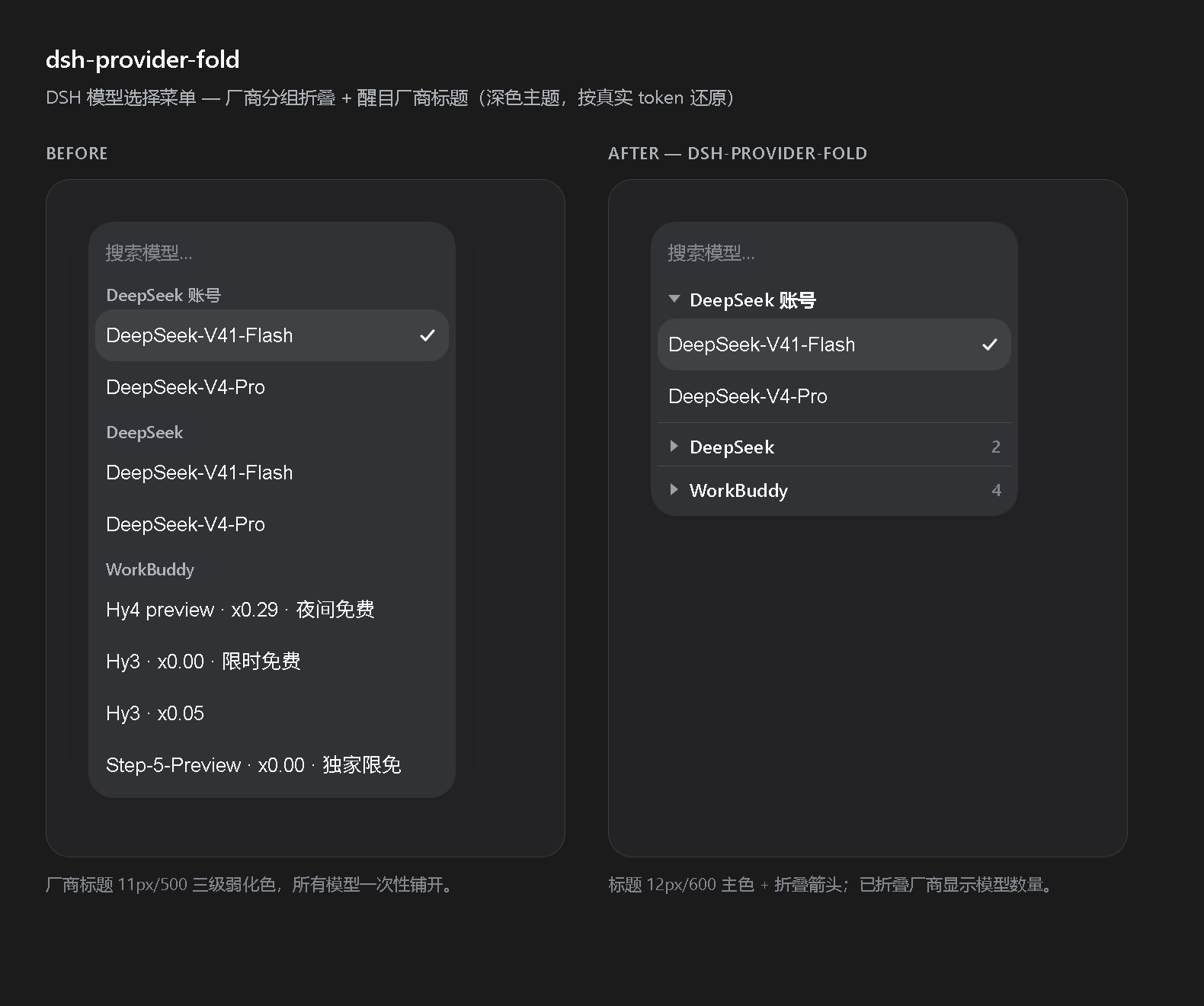
When several providers are connected, the model picker becomes one long scroll. This plugin turns every provider heading into a clickable disclosure row with a stronger visual style, and lets you fold the providers you are not using.
Features
- Collapsible provider groups — click a provider heading (or focus it and press Enter / Space) to fold that provider's models away.
- Prominent provider headings — headings are upgraded from 11px/500 tertiary text to a 12px/600 primary-label row with a chevron, so providers are easy to scan.
- Model count badge — a folded provider shows how many models it hides.
- Remembers your choice — folded providers are stored in
localStorageand restored the next time you open the menu. - Search always wins — typing in the search box expands everything so matches are never hidden; your saved folding is untouched and comes back when you clear the search.
- Keyboard friendly — moving the highlight into a folded provider reveals it for that interaction only, without overwriting what you saved.
- Scoped and defensive — only the model menu (
role="menu"+-modelscontainer) is decorated; any other menu built from the same primitives is left alone. If the host markup changes, the plugin does nothing instead of breaking the menu. - No layout removal — folding hides rows with
display: noneand keeps them in the DOM, so the host component's own keyboard index stays correct.
Install
Install straight from this repository:
dsh plugin --profile web add github:rnmxrbb/dsh-provider-fold
Replace web with the profile you use (for the desktop app that is usually desktop):
dsh plugin --profile desktop add github:rnmxrbb/dsh-provider-fold
The same target also works as a full URL if your setup prefers it:
dsh plugin --profile desktop add https://github.com/rnmxrbb/dsh-provider-fold
After installing, reload the page once. The plugin is a client-side bundle with immediately: true, so it mounts with the app shell.
To remove it:
dsh plugin --profile desktop remove dsh-provider-fold
Usage
- Open the model menu in the composer (the model chip).
- Each provider name is now a heading row with a chevron.
- Click a heading, or focus it and press Enter / Space, to fold or unfold that provider.
- Folded providers show a small count of the models they contain.
Compatibility
- DSH client
0.2.0-rc.2or newer. platform: "web"only (the desktop app uses the web surface).- Uses only public, stable hooks exposed by the host UI:
data-menu-group/data-menu-group-headingon the primitivesMenuGroup, plus DSH theme tokens (--dsw-alias-label-primary,--dsw-alias-label-caption,--dsw-alias-interactive-bg-hover,--dsw-alias-border-l2,--dsw-focus-ring-color). - No host services, no network access, no telemetry. The only persisted data is the list of folded provider names in
localStorageunder the keydsh-provider-fold:collapsed.
Permissions
| Resource | Use |
|---|---|
localStorage |
Store which providers you folded. |
| DOM (read/write) | Decorate the model menu and toggle display on model rows. |
Nothing else is touched.
How it works
The plugin ships a client bundle and a host bundle:
client.js— a DSH client module. Insideapply(ctx)it registers a singlectx.effectthat injects one<style data-plugin="dsh-provider-fold">element, installs aMutationObserverplus delegatedclick/keydown/input/focusinlisteners, and returns a cleanup function. The host's client-modules runtime claims the style element and removes it automatically on reload or uninstall.index.js— an empty host half (export function apply() {}) so the bundle has a resolvable entry point.cordis.patch.yml— inserts the bundle into the profile composition.
Development
The repository root is the plugin package. To hack on it against a live DSH install:
dsh plugin --profile desktop add /absolute/path/to/dsh-provider-fold
That installs it as a link, so edits to client.js are picked up by the host's client HMR watcher within about half a second — no host restart and no page refresh needed.
Run the headless DOM test suite (jsdom) that covers decoration, folding, persistence, search interaction, keyboard reveal and teardown:
npm install
npm test
License
MIT — see LICENSE.
No comments yet. Be the first to write one.