dsh-toomuch-plugins
Makes room in the DSH Web sidebar. · Too many plugins, too little room.




A small plugin set that gives the DeepSeek Harness (DSH) Web sidebar some breathing room.
It ships one plugin today:
| Plugin | What it does |
|---|---|
| Sidebar panel collapse | Collapses the "global panels" column above the workspace into one toggle in the sidebar footer, plus a display settings page |
Why
The DSH Web sidebar stacks, from top to bottom: brand row → new session → global panel entries → workspace → settings.
Every plugin that adds a sidebar entry adds a row to that column: plugins, plugin market, schedules, MCP studio, context, skill manager, system monitor… Seven rows are roughly 280px, which squeezes the workspace region down to a few sessions.
This plugin does exactly one thing: collapse that column of global panel entries, and bring it back when you need it.
Highlights
- Collapsed by default — the workspace gets ~280px back as soon as the plugin is installed.
- One toggle in the sidebar footer, right above "settings".
- Remembered in
localStorage; survives reloads and restarts. - Nothing else is touched — no panel, no workspace, no host behaviour; only the display of the list element the sidebar already renders.
- Themed with
--dsw-alias-*tokens only, so it follows the DSH theme. - Rail-friendly — in the narrow 56px rail the toggle becomes a round icon button.
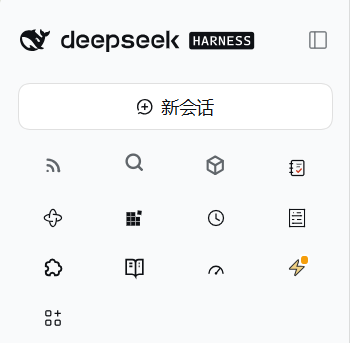
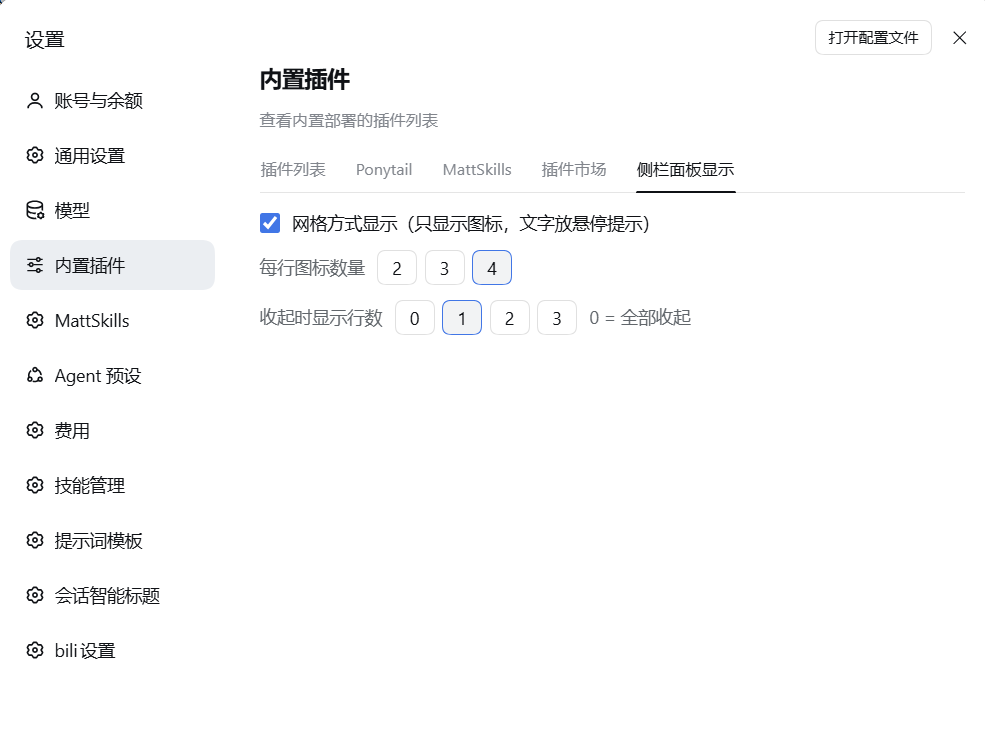
- Grid display — in Settings → Built-in plugins, switch the entry list to icons
only (panel names become hover tooltips) with 2–4 icons per row. Bundles that skip
the panel-list slot and inject their own sidebar buttons (the
data-dsh-*-entryconvention, e.g. 今日值得读 / 全局搜索 / 容器) are adopted into the grid too, and put back in place when the grid turns off. - Keep some entries while collapsed — list mode keeps the first 0–5 entries visible while the panels are collapsed; grid mode keeps the first 0–3 rows (rows × icons). Default 0, i.e. everything collapsed.
- Plugin display order — pick panels one by one from a dropdown on the
settings page; the list order is the sidebar order (lossless CSS
orderoverrides). Capped at 20, duplicates dropped on save. The dropdown also lists slot-skipping sidebar entries (今日值得读 / 全局搜索 / 容器 and otherdata-dsh-*-entryfollowers); listed ones are adopted into the list so the order really applies, and released when the order is cleared. - Click counting — panel clicks accumulate into
~/.dsh/plugins/dsh-toomuch-plugins/click-counts.json, (silently skipped when the remote is unavailable). - Plugin activity log — an icon right of the "collapse / expand global panels" toggle opens a
window with two tabs: Install / remove (every record) and Enable / disable (the last
month), written to
~/.dsh/plugins/dsh-toomuch-plugins/plugin-history.json. Records are built by comparing the profile manifest with the state the log recorded last time, not by listening for change events: plugins are installed and removed from the settings panel, from the plugin market and from thedshCLI, and only the first of those announces what it did. Upgrades are left out: DSH upgrades by removing the package and installing it again, so a package that reappears with another version retracts the removal it started with. Each row shows the action as a 16px stroke icon rather than text, coloured by state — install and enable are green (the power symbol), remove and disable are red (the power symbol with a bar through it) — and the plugin name and the time are set larger than the body text. Both tabs are returned newest first. - First run lists nothing — the plugins a profile already has were installed before this log existed, so they are not news: the window starts empty and the current state becomes the baseline the next comparison starts from. Only what happens afterwards is a record.
- Icon size — pick small (12px), medium (the sidebar's own size, the default) or large (24px); the list and grid icons scale right away and the choice survives reloads.
- Off by default — grid mode is opt-in; the preference lives in
localStoragealongside the collapse state and survives reloads.
Screenshots
Grid display — icons only, panel names as hover tooltips, 2–4 icons per row:
The "Sidebar panel display" settings page (Settings → Built-in plugins) — grid mode, icons per row, and how many rows stay visible while collapsed:
Install
The plugin is a repository-root package: it declares the dsh.bundle manifest, so
DSH can install it straight from npm or GitHub.
# from npm (prebuilt — no build approval step)
dsh plugin --profile web add dsh-toomuch-plugins

# from GitHub
dsh plugin --profile web add github:rivenshanghai/dsh-toomuch-plugins

# or from a local clone
git clone https://github.com/rivenshanghai/dsh-toomuch-plugins.git
dsh plugin --profile web add /path/to/dsh-toomuch-plugins
dsh plugin forwards to pnpm inside the profile. After the install, enable the
plugin in DSH's plugin settings (it is written into the profile's
dsh.profile.bundles), then refresh the page.
From the plugin market, once listed: open Settings → Plugin Market in DSH and
search for dsh-toomuch-plugins.
Verify: the sidebar footer gains a "Collapse global panels / Expand global panels" row above "settings", and the global panel column is gone. Settings → Built-in plugins gains a "Sidebar panel display" page for grid mode, icons-per-row, how many entries (list) or rows (grid) stay visible while collapsed, the custom plugin display order (up to 20 entries), and the icon size (small / medium / large).
Requirements: DSH (DeepSeek Harness) with a web profile; Node.js ≥ 20.
How it works
src/client.js does the following:
- registers a toggle into the sidebar footer slot
sidebar.footer.action(the row next to "settings"); - walks up from its own root node to find the sidebar root's direct
<nav>child — the global panel list — and toggles itsdisplay; - remembers the choice in
localStorage; - registers a settings page through the
settings.plugins.tabslot (Settings → Built-in plugins) where grid mode, the 2–4 icons-per-row choice and the three icon sizes (small / medium / large) live; - applies grid mode to the same
<nav>: a marker class plus a columns CSS variable, the label span hidden, and each entry'saria-labelmirrored into the nativetitleas the hover tooltip (DSH's own tooltip is disabled in the wide sidebar, and the label is not rendered there either); - applies the custom display order as CSS
orderoverrides on the<nav>'s direct children (lossless — React's DOM reconciliation is never fought), and makes the collapsed limit keep the first N entries visually; - mounts a hand-rolled Typert remote contribution (the dsh-cost-meter pattern)
and reports panel clicks to the host half, which accumulates them into
click-counts.json; - draws a clock icon right of the toggle; clicking it opens the activity
window (registered in the
shell.overlayslot, so it floats over the app instead of being clipped by the sidebar) with an 「安装/删除」 and an 「启用/禁用」 tab, fed by the host half'sspcHistory.list.
The host half (src/index.js) provides two services:
spcClicks— the click counts described above;spcHistory— the plugin activity log.src/history.jscompares the profile manifest with the state it recorded last time and writes the differences down: the plugin name, the time and the action. It recognises an upgrade by the version that disappears and comes back, so an upgrade leaves no record. The log lives inplugin-history.jsonnext toclick-counts.json.
The basis is DSH's own @deepseek-ai/dsh-client-ui-sidebar: nav.panelList is a
direct child of the sidebar root, so walking up from the footer button always
reaches it. Styling uses only --dsw-alias-* theme variables, and the stylesheet
rides inside the component, so unmounting removes it.
No DSH internal package is imported, and no DSH file is modified. The full contract is written down in docs/design.md.
Repository layout
.
├── package.json            plugin manifest: dsh.bundle.patch + dsh.client
├── cordis.patch.yml        inserts the loader row into the profile
├── src/
│   ├── index.js            Host half: spcClicks / spcHistory remote services
│   ├── history.js          Host half: the activity recorder → plugin-history.json
│   └── client.js           Client half: footer toggle + collapse/expand + grid + display order + click reporting + activity window
├── test/smoke.js           zero-dependency smoke check (node test/smoke.js)
├── locale/{en,zh}.json     title and description in the plugin list
├── docs/                   design notes, market submission, pre-submit checklist
├── icon.svg                icon
├── CHANGELOG.md
└── LICENSE
Known limits
- It collapses the global panel entries column only. The brand row, new session and settings are left alone — the brand row's "collapse sidebar" button is the only entry point on Linux / Windows, so hiding it would lose a feature.
- With no global panels installed, the sidebar never renders that
<nav>and the toggle is a harmless no-op. - Verified on DSH Web (Linux) only.
Plugin market
DSH plugins are listed in the
awesome-dsh-plugin
catalog, which aggregates the repositories carrying the dsh-plugin GitHub
topic. Add that topic to this repository, then open a one-file pull request
against that catalog: the entry file is data/plugins/<owner>__<repo>.yml,
with a category, a one-line description.en and an optional description.zh
(the catalog's contributing guide has the exact rules).
Related plugins
- dsh-sidebar-quiet — folds the sidebar footer rows (balance / import / memory / sign out) into one line
- dsh-sidebar-buttons — manage sidebar footer buttons: drag to reorder, show / fold into More / hide
- dsh-sidebar-pins — a collapsible pinned-sessions block above the settings row
- dsh-sidebar-drawer — an edge-hover drawer that expands the sidebar
- dsh-plugin-sidebar-visibility — hide / collapse at the workspace level
Contributing
Bug reports and pull requests are welcome. Please include your DSH version, the browser, and whether the toggle appeared in the sidebar footer. Keep the change focused: this plugin does one thing, and the DOM contract it relies on is documented in docs/design.md.
License
MIT © rivenshanghai — see LICENSE.
No comments yet. Be the first to write one.