Riffkit — change the outfit, place, product or person in your video



Don't copy. Riff. Riffkit changes the outfit, place, product or person in your video, and your shots, cuts and timing stay (Swap). Or it turns a winning short video into yours: same formula — the hook, the pacing, the emotional beats — in new footage of your story, product and character (Adapt). Or it makes a video from one written idea (Create). It never re-uploads the source clip: what comes out is a new render.
This is the official Riffkit agent skill. Add it to your AI assistant (Claude Code, Codex, Cursor, OpenClaw, …) and just say "put me in a red dress in this video, keep every shot" or "riff this TikTok into mine" — your agent drives the whole pipeline. Or use it in the browser at riffkit.ai.
Watch an agent do it
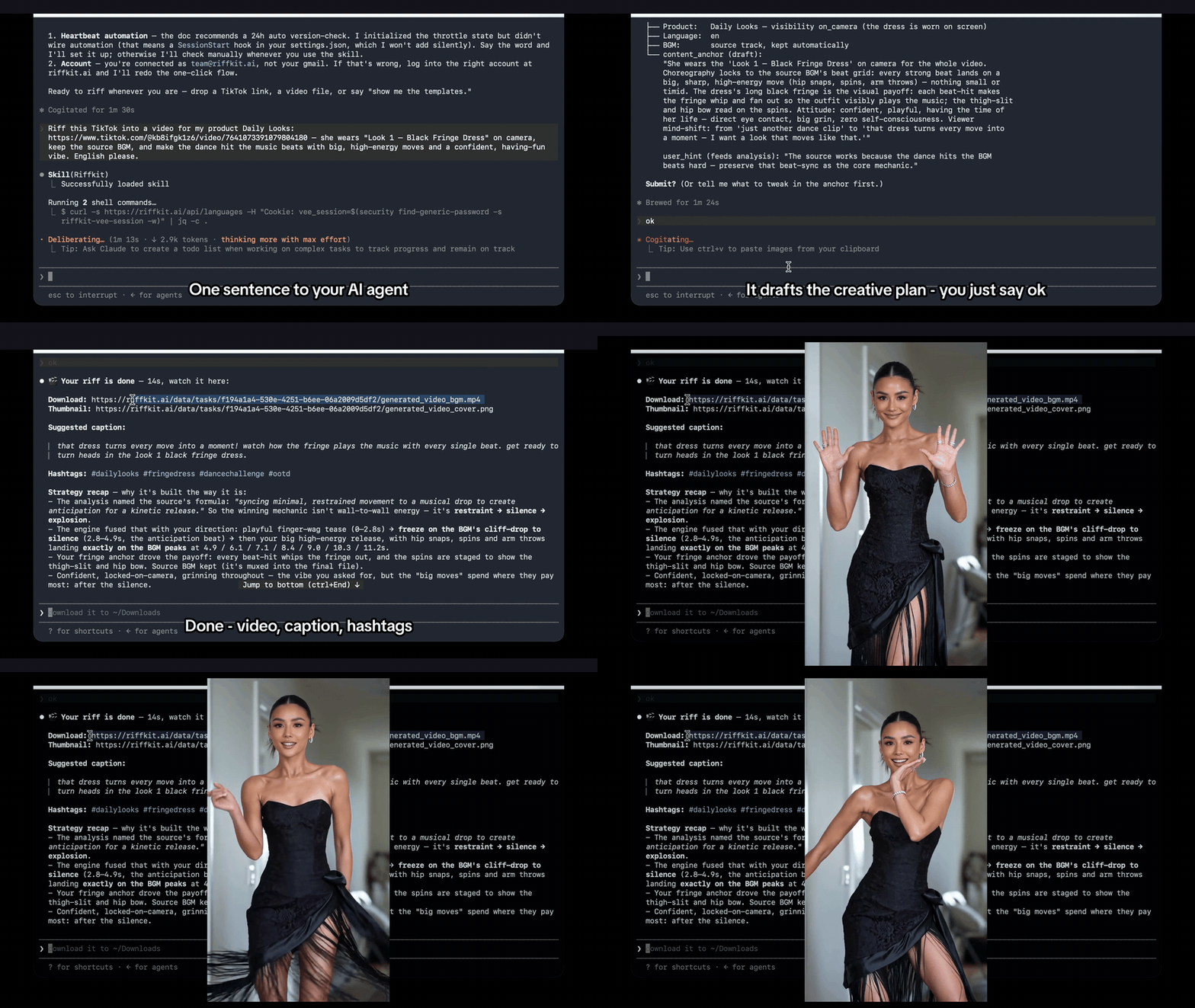
A real Claude Code session (an Adapt riff) — one sentence, one “ok”, and minutes later a finished video with caption, hashtags, and a strategy recap (the render wait is compressed by one title card). Walkthrough with sound: riffkit.ai/skill.
Quick start (from your agent)
Point your AI coding assistant at the live skill and let it set itself up:
Run curl -fsSL https://riffkit.ai/SKILL.md in your terminal and follow the instructions to join Riffkit
Then just ask, in plain language:
put me in a red dress in this video, keep every shot
riff https://www.tiktok.com/@user/video/123 into a video for my product, in Spanish
Your agent handles the rest — Swap: your video → what to change → the same shots, re-rendered → captions, hashtags; Adapt: source → formula → new footage → your product & character → captions, cover, hashtags. It asks Swap or Adapt when your words don't say, and quotes the price in credits before it spends any.
The
SKILL.mdin this repo is a readable mirror — your agent always reads the live, canonicalhttps://riffkit.ai/SKILL.md.
See it in action
Real Swap results (same shots, a new outfit or background) are written up on the blog: change the outfit in a video and change the background of a video.
Every clip below is an Adapt riff, made from one winning short video — the source is never re-uploaded, so each result is a new render.
Recreate a proven survival hook
https://github.com/user-attachments/assets/b7e6ea34-9f9a-4d3c-a191-cabd84ca6f00
Weave your product into the format
https://github.com/user-attachments/assets/d476c952-8ae6-404e-9a62-349f476fa89c
Localize to native Spanish — phrasing + fonts, not a subtitle overlay
https://github.com/user-attachments/assets/a3016013-fa4a-48cf-8c74-8fe1cb3e2a48
Any look — real, cartoon, or game / CG
https://github.com/user-attachments/assets/b7196db2-311b-48f5-b9c8-8f08a96a2831
More riffshttps://github.com/user-attachments/assets/c4b3d4d9-2a50-4f05-9c03-02ca413ca9ce
https://github.com/user-attachments/assets/397d8ace-82fb-41b0-8b04-539d68eeb1e3
https://github.com/user-attachments/assets/e2fb65c3-5123-409f-bdce-3f64b4a66f48
Works with
| Where | How |
|---|---|
| Claude Code · Codex · Cursor · OpenClaw — any agent that can run terminal commands | Run curl -fsSL https://riffkit.ai/SKILL.md in your terminal and follow the instructions to join Riffkit |
| Claude Code plugin — install from this repo as a marketplace | /plugin marketplace add riffkit/skill, then /plugin install riffkit@riffkit |
skills installer — for the agents it supports |
npx skills add riffkit/skills |
| Riffkit CLI — Node 20+ | npm i -g @riffkit/cli, then riffkit login |
| DeepSeek Harness (DSH) | dsh plugin add @riffkit/dsh-plugin |
| ChatGPT — in the ChatGPT plugin directory | Open Riffkit in ChatGPT, then connect your Riffkit account |
| Claude (claude.ai, desktop, mobile) and other MCP apps | Add the connector https://mcp.riffkit.ai/mcp (steps) |
| Browser — no agent needed | Upload a clip or paste a TikTok link at riffkit.ai |
DSH also reads a plain SKILL.md: mkdir -p ~/.agents/skills/riffkit && curl -sSL https://riffkit.ai/SKILL.md -o ~/.agents/skills/riffkit/SKILL.md works without the plugin, and any harness scanning the shared ~/.agents/skills root picks it up too.
No GPU and no local models: the skill (and the optional CLI) is a thin layer over Riffkit's hosted backend.
What you get
- Change what's in your video, keep every shot — Swap re-renders your own video (or a template) shot for shot, keeping the camera, cuts and timing, and changes what you name: the outfit, the place, the product, the person (a saved character), or the whole look described in words (say, 1990s hand-drawn anime). Sources up to 45 seconds.
- Riffs the formula, not the footage — Adapt studies a winning video's hook, pacing, and beats, then makes new footage of that formula for your story. Or Create makes one from a written idea, no source video.
- Your product, woven in — in Adapt, on camera (a physical item) or off camera (an app or service, spoken of and captioned), placed into the story the format calls for; in Swap, your product in the original shots.
- A consistent character — a saved digital character with the same face in every video, or Auto (no avatar needed): Adapt casts one for you; Swap keeps the original person.
- Reference images — pictures of an outfit, a place or a prop for the video to show.
- Ten languages in Adapt and Create — English, Spanish, Portuguese, Indonesian, German, French, Italian, Japanese, Korean or Chinese, with native phrasing and the right fonts, not a translated subtitle laid on top. Swap keeps the source video's language unless you ask for another.
- Post-ready — a link to the finished video, captions burned in and timed to the speech (where the video has speech), a cover frame, and a caption with hashtags.
- Ad-ready — the same video works as UGC-style ad creative for TikTok Ads & Meta Ads.
- Any look — real footage, cartoon, or game-style; the original music, when kept, ducks under the voiceover.
- Price first — your agent quotes the price in credits before it spends any; billed by the second of finished video (pricing).
- Commercial rights — what you make is yours to post, run as ads, and monetize (the FAQ says what stays with a source's owner).
Examples
Short, real walkthroughs — the prompt you give your agent and what comes back (for Swap, see the two blog write-ups above):
- Riff a proven format for your product
- Localize a winning video into Spanish
- Any look — real, cartoon, or game / CG
- Run a faceless account on Auto
FAQ
Swap or Adapt? Swap keeps your shots and changes who or what is in them; Adapt keeps what made a video work and tells your story with new footage.
Do I need an account? Yes — Riffkit is hosted; generating videos needs a Riffkit account, billed in credits by the second of finished video.
Which agents work? Any assistant that can run terminal commands or make HTTP calls — Claude Code, Codex, Cursor, OpenClaw, DeepSeek Harness, and more; with Node 20+ it uses the Riffkit CLI. In ChatGPT, open Riffkit from the plugin directory (link); Claude and other MCP apps add the hosted connector https://mcp.riffkit.ai/mcp (setup).
What languages? Adapt and Create make videos natively in the ten listed above, with native phrasing and fonts. Swap keeps the source video's language unless you ask for another.
Is my source video re-uploaded? No. Whether it keeps your shots (Swap) or the formula (Adapt), Riffkit renders a new video; the source clip is never re-hosted. Flat graphics from the source (cards, stickers) can carry over into it.
Do I own what I make? Yes, for commercial use — post it, run it as ads, monetize it. What comes from someone else isn't ours to give: a source video's music, and in a Swap the person and voices it keeps from the source.
Do I need a GPU or local setup? No. Rendering runs on Riffkit's servers.
Requirements
Riffkit is a hosted service: the skill is a thin layer that calls the Riffkit backend, and rendering happens on Riffkit's servers — no local GPU or models. Generating videos requires a Riffkit account (billed in credits by the second of finished video). Create one at riffkit.ai.
Who it's for
People who want to change the outfit, background, person or product in their own video without reshooting; TikTok Shop & e-commerce sellers; performance marketers running TikTok & Meta ad creative; indie founders and makers marketing what they built; and faceless and digital-character account operators — anyone who has to keep posting short-form video.
Links
- App & sign-up — https://riffkit.ai
- Pricing — https://riffkit.ai/pricing
- Blog — https://riffkit.ai/blog
- Live skill (source of truth) — https://riffkit.ai/SKILL.md
- Riffkit CLI — https://github.com/riffkit/cli
- ChatGPT plugin — https://chatgpt.com/plugins/plugin_asdk_app_6ac1d83b7c0081918475085dec6634c5
- Chat-assistant setup (Claude, ChatGPT and more) — https://riffkit.ai/mcp#set-up
- ClawHub listing — https://clawhub.ai/riffkit/skills/riffkit
Don't copy. Riff.
License
MIT — covers this repo's files (the skill's integration spec + docs). The Riffkit service itself is a hosted product.
No comments yet. Be the first to write one.