English · 中文
@weichen96/dsh-browser-use
Give DeepSeek Harness a browser that can see and click: a page is read as an indexed action-space table, and the model does exactly one operation on one observed target per step.
This is a DSH plugin (a host half + a web half). It contains no browser logic of its own — it hands requests to the Jev Ultrafast engine, so there is only one loop implementation. The engine ships inside the npm package as a pinned wheel, and the plugin installs it into its own Python environment with uv the first time it loads: no engine clone, no manual Python setup.
⚡ The point: speed
The focus is fast browser decisions. Jev (TypeSafe System One) picks an operation and target from the current action table; a text model supplies values only when needed for TYPE_TEXT. browser_goal runs the decision loop inside the engine. browser_act({ observation, intent }) delegates one decision to Jev, but still returns to its calling agent after each step. Enabling Jev makes these paths available; it does not automatically replace every chat-model turn.
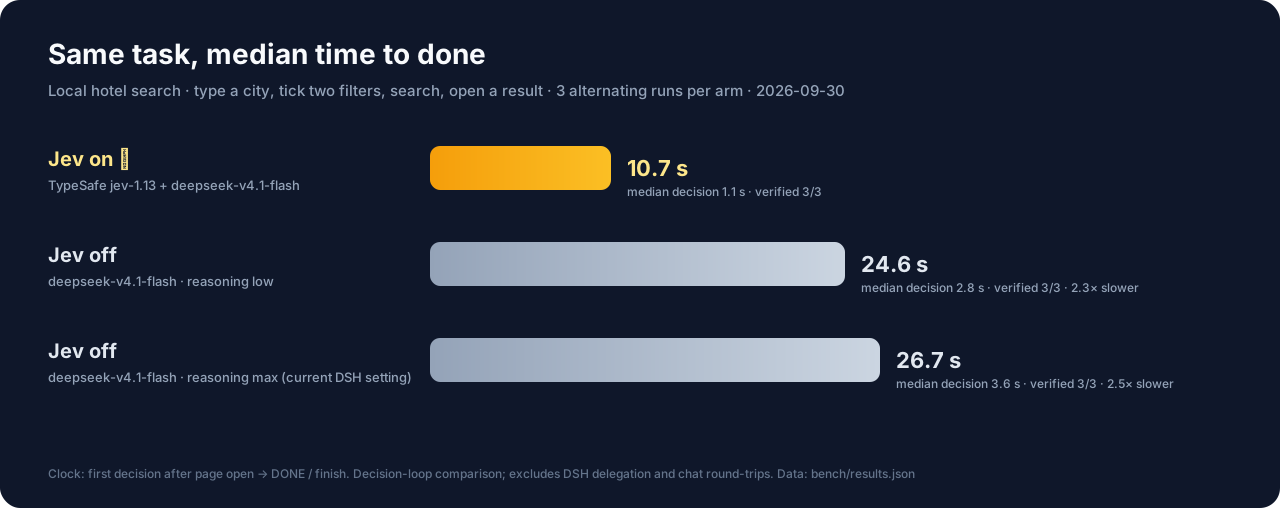
The same local hotel task (type a city, tick two filters, search, open a result), running jev and the "current chat model" in alternating arms, 3 runs each, every run independently verified:
| Mode | How each step is decided | Whole task (median) | Relative |
|---|---|---|---|
| Jev on ⚡ | one jev-1.13 choice | 10.7 s | baseline |
| Jev off (reasoning low) | a full deepseek-v4.1-flash turn | 24.6 s | 2.3× slower |
| Jev off (reasoning max, current DSH setting) | a full deepseek-v4.1-flash turn | 26.7 s | 2.5× slower |
In this decision-loop benchmark, Jev took about 60% less time than the max-reasoning arm (26.7 s / 10.7 s ≈ 2.5). Median per-step decision latency was 1.1 s versus 2.8–3.6 s.
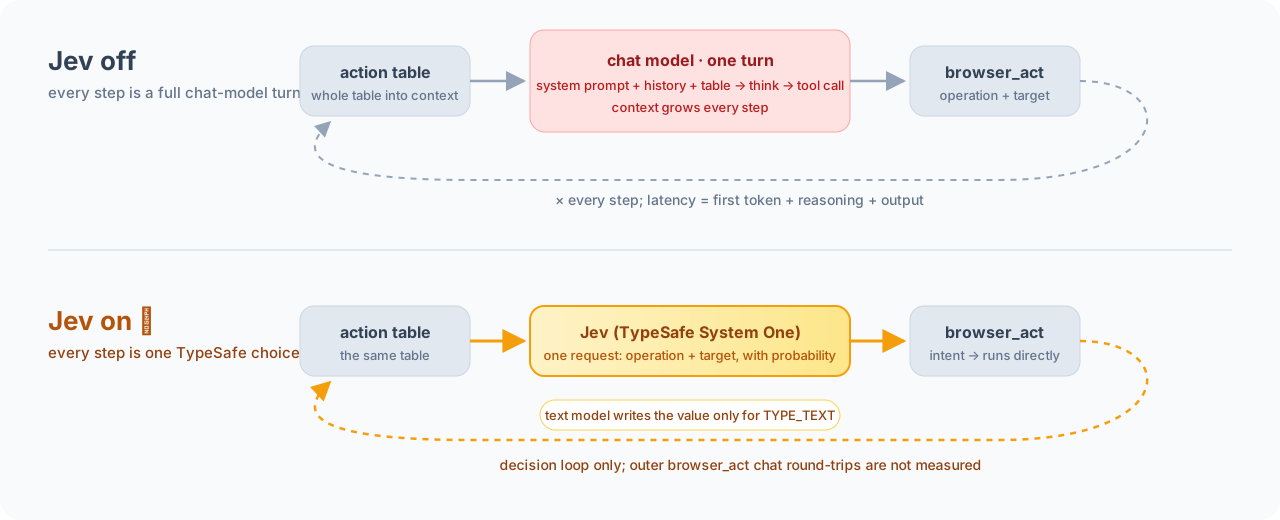
Measured on 2026-09-30: three arms, three completed runs each, all independently verified; one transport failure was recorded and retried. The clock runs from the first decision after page opening to DONE/finish. The script directly loops over the sidecar's intent path versus lean Responses API tool-calling turns using
deepseek-v4.1-flash, the model configured in DSH at measurement time. This is not an end-to-end DSH toggle comparison: it excludes browser startup, initial navigation, post-run verification, DSH delegation and outer chat round-trips. Three runs of one local task do not establish a universal speedup. The Jev text helper uses the same model with thinking disabled; session mode shares routing settings, not necessarily protocol or reasoning settings. Seebench/for the script and raw data. The benchmark spends model quota and reads credentials only from environment variables.
Repository layout
dsh-browser-use/
├── lib/          Node half: index.js (assembly + delegation) / tools.js (tools & delegate tool) /
│                 sessions.js (browser ownership, attach exclusivity) / sidecar.js (process, cancel, generation) /
│                 engine.js (interpreter & environment probing) / provision.js (installs the engine) /
│                 inspector.js + client.js (side panel)
├── bin/          doctor (self-check, --install) / vendor_engine.py (rebuild & verify the bundled engine) / release checks
├── sidecar/      Python half: bridge.py — the only place that imports the engine
├── vendor/       the engine wheel the plugin installs + jev-ultrafast.json (the engine revision it was built from)
├── test/         Node checks (plugin.mjs / delegation.mjs / inspector.mjs / provision.mjs) + Python checks (pytest + two e2e)
├── pyproject.toml / uv.lock   the sidecar's Python environment (engine from the vendored wheel)
└── package.json  the DSH plugin manifest (dsh.bundle / dsh.client)
The engine (jev_ultrafast) is a separate repository. This package ships one wheel built from a pinned revision of it (vendor/, named in vendor/jev-ultrafast.json) and none of its source.
1. What it provides
Browser operations are not in the main agent's hands. The conversation sees only these tools (browser_task_status exists only with a persistent subagent):
| Tool | Job |
|---|---|
browser_task |
Hand a goal to this conversation's persistent browser subagent: the first call starts it, and every later call sends the new task to the same subagent (it remembers the page and what it did before). The call returns immediately; the conclusion comes back later as a message. fresh: true swaps in a new subagent with no memory. |
browser_task_status |
What the persistent browser subagent is doing: working (for how long, on which task, on which page) or idle (how its last run ended, its closing message). The conclusion arrives as a message without calling it; wait: true blocks until the subagent finishes or messages you, or the user writes (timeout_ms, default 2 min, at most 10 min) — only for a step that cannot go on without the result. |
browser_doctor |
Self-check: interpreter, engine version, engine install progress, browser, delegation status (including whether this conversation's subagent is working), and a fix command for each missing piece. install: true installs the engine now, or retries a failed install. |
The browser tools live in the delegated subagent's scope (6 by default, with browser_goal off). Only it can see and call them:
| Tool | Job |
|---|---|
browser_open |
Open a page in the browser this Session owns and return the action-space table. |
browser_page |
Re-observe and produce a new observation number. |
browser_act |
Run one operation on one target from an observation: CLICK / TYPE_TEXT / SELECT / SCROLL_UP / SCROLL_DOWN / WAIT. With jev on you may instead pass an intent: with no operation, TypeSafe picks the operation and target on that observation; a TYPE_TEXT with no text gets its value from the jev text model. |
browser_screenshot |
Capture the viewport (image attachment). |
browser_console |
Read console messages, page exceptions, failed requests and 4xx/5xx. |
browser_goal |
Hand the whole goal to the TypeSafe policy in one run (off by default, spends paid quota). |
browser_close |
Close the tab, browser and daemon. |
Keep delegating without opening a pile of browser_tasks. The plugin uses DSH's native continuable subagent (ctx.subagents.startContinuable / sendMessage); each conversation has exactly one browser subagent:
- New task: call
browser_taskagain — the task is delivered as a message into the same subagent's conversation; if it is busy it is admitted at the next step boundary, if idle it starts right away, and if it was released it cold-starts from persistence (browser tools re-attach automatically). - Two-way messaging: the subagent is granted only the global
send_message, so it can send you progress, questions and results at any time; you usesend_messageto add to or correct the current task, andinterrupt_agentto stop it. - Results come back on their own: the subagent sends its conclusion back; when it goes idle DSH also sends the main agent a "Background subagent … finished" notification and wakes it, so no polling. The
browser_taskreceipt says so explicitly — keep working or end the turn, neversleepin a shell — and, where an agent team is present, that itswait_agent/list_agentsdo not see this subagent. - Status on request:
browser_task_statusreads the subagent's state from the host's ownsubagent/start/subagent/endevents and the agent registry. Withwait: trueit blocks on the same settlement the notification rides on, instead of guessing withsleep, and returns early when the user writes or the subagent messages the main agent. - Survives restarts: the subagent is recorded under the tag
browser-taskin the parent session's directory, so after a DSH restart or resume the nextbrowser_task/send_messagefinds the same subagent.
When the provider doesn't support continuable subagents (or delegateMode: one-shot is set), it falls back to one-shot delegation: one subagent per task, and browser_task returns after it reports back.
When the composition has no usable subagent provider (or delegate: false), the plugin falls back to direct mode: the browser tools are mounted on the composition and called from the chat itself — the same implementation, just without a subagent.
Here is what the subagent sees (real output):
Page https://www.baidu.com/ — 百度一下,你就知道
Observation 3. Targets below are valid only for this observation.
[13] textbox 国台办回应鲁比奥涉台言论 — TYPE_TEXT, CLICK
[14] button 百度一下 — CLICK
Without a target: WAIT
The side panel also has a Browser agent tab: URL, live screenshot, element table, last action — showing the exact page the tools are driving.
2. Advantages
1. Targets come from the observation, not from the model's imagination
The model outputs (operation, index), never a selector, coordinate or JavaScript. By contrast, Playwright MCP / Chrome DevTools MCP make the model write its own selectors, which miss or misfire the moment the page changes and cannot be validated ahead of time. Here the index is valid only for "the frame it just read".
2. Freshness is a first-class citizen
Every decision is bound to the observation fingerprint: if the page changed, it refuses to execute and hands back the new table instead of clicking blindly. Measured on Baidu's homepage: the hot-search list auto-rotates → the first input is intercepted ("Nothing was executed") → re-pick on the new observation → success. No change is ever auto-retried, so there are no double clicks or double submits.
3. Cheap on tokens
Screenshots are not fed to the model (they're for humans); each step sends only structured text: visible text + element table + the operations available this round.
3b. The main agent never reads the page
The table, indices, refusals and re-reads all happen in the subagent's context; the conversation receives only a conclusion. However complex the page, the main agent's context stays the same length — and it has no tool that could misclick a page.
4. The model doesn't have to guess what's possible
The table lists the operations and targets allowed on this frame, including every option of a dropdown (6:1 → Stay category → Design). Unsupported operations, occluded controls and disabled fields simply never appear in the table.
5. One loop, not two
The browser loop, freshness guards and executor all live in the Python engine, covered by 21 real-browser guard checks + 10 sidecar e2e checks + 92 offline unit tests; the plugin is a thin adapter (start the sidecar, render the table, forward signals). Fix one place, both sides agree.
6. Session-level isolation and reclaim
Each DSH Session gets its own browser (its own profile, debug port and daemon) with serialized operations; everything closes when the Session ends. Parallel sessions never fight over a tab or leak state.
The browser belongs to the Session that started the task, not to the subagent: the subagent may be released, restored, or even swapped with fresh: true, and the browser, logins and tabs stay. So consecutive browser_tasks continue on the same page rather than reopening each time. An external browser adopted via mode: attach is held by only one live Session at a time — a second session is explicitly refused. Two Sessions fighting over one external browser is the only real data risk at this layer.
7. It doesn't touch the browser you're using
By default the plugin launches a dedicated Chrome instance. It never touches your personal Chrome profile, so there's no Chrome 144+ "allow remote debugging?" prompt and none of your logins get swept into automation. When you do want to use your own browser, switch explicitly to mode: attach:
- Attach to the Chrome you're using (no
cdpEndpoint): openchrome://inspect/#remote-debuggingin that Chrome and allow remote debugging; the plugin finds it through theDevToolsActivePortChrome writes into its profile, opens a new tab there to work in, and your logins are available. On macOS this file is privacy-protected, so the app running DSH needs Full Disk Access (System Settings → Privacy & Security → Full Disk Access, then restart DSH), otherwise it reportsno_permissionclearly. Each DSH Session's first connection triggers Chrome's one "Allow remote debugging?" prompt; click allow. The plugin only closes tabs it opened and never closes your browser at the end. The engine uses exactly the tab the connection layer built for this run — no extra blank tab — and blank tabs you opened yourself are not closed. - Attach to a dedicated debug Chrome (with
cdpEndpoint):http://127.0.0.1:9333orws://…/devtools/browser/…, see the config table below.
Each Session uses its own profile: if a browser is already running for the same profile, Chrome hands the new launch off to the existing instance and exits (status 0), so the two Sessions share one browser. That's why the plugin partitions by Session; if the host restarts while the browser is still up, the plugin adopts that instance (same profile of the same Session) and keeps its logins and tabs rather than starting another.
A launch leaves exactly one tab: the browser opens a startup tab, and the connection layer opens a separate tab for this run (named daemons can't share one), which the run drives; once the page is ready the startup tab is closed. Cleanup is conservative — it won't close when only a blank page remains, and it never closes a page the user is reading.
8. Debugging is in the tools, not in words
browser_console gives console exceptions and failed requests directly; the panel shows the same page live. Observation and action share one state — there is no "what the tool says" vs "the actual page".
9. Zero build
The host half is plain ESM; the web half is a hand-written __ModuleLoader__ script — no tsdown/rollup step. Clone it, pnpm install once (only for @deepseek-ai/schemastery, used by the Config schema), then edit and restart.
10. Capabilities can be turned off
allowScreenshots, jev.enabled and reserveBrowserUseSlot are all config options. Turn off jev.enabled to keep decisions with the calling model. The Jev settings are editable under Sidebar → Plugins → @weichen96/dsh-browser-use; allowScreenshots and reserveBrowserUseSlot are profile-patch settings.
3. Install
From npm
Requires Node.js ^22.19.0 || >=24.0.0, DSH, Chrome/Chromium and uv (curl -LsSf https://astral.sh/uv/install.sh | sh, or brew install uv). Python is not a prerequisite: uv fetches Python 3.12 when the machine has none.
dsh plugin --profile desktop add @weichen96/dsh-browser-use
Restart DSH. On its first load the plugin installs the engine it bundles into its own environment (<plugin>/.venv): uv sync --frozen from the package's uv.lock, so the same versions on every machine. The log says when it starts and when the engine is ready, browser tools wait for a running install, and browser_doctor shows how far it got. A first install downloads about 6 MB of dependencies from PyPI, plus about 25 MB of Python 3.12 when uv finds none to use, and takes seconds to a minute; later loads only check that the engine imports. Each plugin version builds its own environment, so an upgrade installs again. Behind a proxy, set HTTPS_PROXY in the environment DSH runs in.
To install ahead of time, or retry after a failure, ask for browser_doctor with install: true, or run the doctor in the installed package:
node /path/to/node_modules/@weichen96/dsh-browser-use/bin/doctor.mjs --install
The install is not an npm postinstall script: DSH installs plugins with lifecycle scripts gated off, so the plugin does it when it loads. npm does not install Chrome. If installing the package into a Node project rather than a DSH profile, use npm install @weichen96/dsh-browser-use; this alone does not register it with DSH. Append @0.3.0 to either command to pin a release.
If migrating from the unpublished local @rc/dsh-browser-use package, remove that plugin entry before adding the npm package; do not enable both providers. The internal id: dsh-browser-use and configuration keys remain unchanged. A profile that still sets projectPath to an engine checkout keeps using that checkout; remove it to use the bundled engine.
From a local checkout
This repo holds both the plugin (Node) and its Python half (the sidecar):
# 1. Python environment: this repo's own .venv, with the bundled engine wheel and the dev tools
uv sync

# 2. Node dependency: @deepseek-ai/schemastery, used by the Config schema (once)
pnpm install

# 3. The plugin itself: install into a DSH profile
dsh plugin --profile desktop add /absolute/path/to/dsh-browser-use
Or install by path from DSH's Plugins page. After installing, restart DSH (host code is cached in-process; the web bundle loads at startup). The tests drive the engine from a checkout as well: clone it into the sibling ../jev-ultrafast (or set DSH_BROWSER_USE_PROJECT), at the revision vendor/jev-ultrafast.json names, and uv sync it.
The name, description and icon on the plugin page are not written in the plugin code — DSH reads them from package metadata (packages/boot/app-boot/src/package-meta.ts), and they must be resolvable through Node's ESM resolver — so if those two subpaths are missing from exports, the card shows only a bare package name:
| Shown | Source | Fallback |
|---|---|---|
| Title | meta.title in locale/<lang>.json (en.json is the English fallback; add zh.json etc. per language) |
package.json.name |
| Description | meta.description from the same |
package.json.description |
| Icon | the icon field in package.json (relative path, svg/png/jpeg/webp, ≤256 KiB, inside the package dir), rendered to a data URL |
default icon |
// the three things package.json must have
"icon": "icon.svg",
"exports": {
  ".": { "default": "./lib/index.js" },
  "./client": "./lib/client.js",
  "./package.json": "./package.json",     // ← without it, title/description/icon can't be read
  "./locale/*.json": "./locale/*.json"    // ← without it, localized text can't be read
},
"files": ["icon.svg", "locale/*.json", "..."]
To run another engine than the bundled one (a checkout you are working on, or an interpreter that already has it), add config to the id: dsh-browser-use line in the profile's cordis.patch.yml. Either setting turns the plugin's own install off (§4):
- id: dsh-browser-use
  config:
    projectPath: /absolute/path/to/jev-ultrafast   # an engine checkout: its .venv (uv sync there), or uv run in it
    # pythonPath: /absolute/path/to/python        # or point directly at an interpreter that already imports jev_ultrafast
4. The engine
The sidecar (sidecar/bridge.py, shipped with this package) does import jev_ultrafast — the upstream engine. The package bundles it as a wheel (vendor/jev_ultrafast-<version>-py3-none-any.whl, built from the revision vendor/jev-ultrafast.json names), and uv.lock pins that wheel and every dependency by hash. The plugin tries these interpreters in order and uses the first one that can import the engine:
- the
pythonPathconfig (if set, only this one is used; failure won't silently fall through); <projectPath>/.venv/bin/python(the engine checkout's own environment);uv run --project <projectPath>;- this package's own environment,
<plugin>/.venv, which the plugin builds itself.
An interpreter the system happens to have (python3) is never tried: on a Mac without the developer tools it opens an installer dialog instead of answering.
With neither pythonPath nor projectPath set, the plugin owns its environment. When the engine doesn't import from <plugin>/.venv, it runs
UV_PROJECT_ENVIRONMENT=<plugin>/.venv \
  uv sync --frozen --no-dev --no-install-project --inexact --python 3.12 --project <plugin>
when DSH loads it, before a browser call, or when asked (browser_doctor with install: true, node <plugin>/bin/doctor.mjs --install). --frozen installs exactly what uv.lock says, so every machine gets the same engine and dependencies. One install runs at a time: a browser call that arrives meanwhile waits for it. After a failure, calls within the next minute get the same diagnosis instead of a new attempt, and install: true retries at once. uv is looked up on PATH, then where its installer and Homebrew put it (~/.local/bin, ~/.cargo/bin, /opt/homebrew/bin, /usr/local/bin, …), since DSH started from the Dock has a minimal PATH; UV names it exactly.
With either set, the plugin never installs: that interpreter or checkout is yours, and the doctor names the command (cd <projectPath> && uv sync, or uv pip install --python <pythonPath> <plugin>/vendor/<wheel>). projectPath is read only from the plugin config (not from environment variables). When set, the probe verifies where each interpreter's jev_ultrafast is imported from: anything not under projectPath is rejected, and the doctor spells out "imports jev_ultrafast from X, not from projectPath Y".
How to confirm "everything is installed"
Adding the plugin only puts the engine's wheel on disk; installing it into Python needs uv and the network, at load. So the plugin doesn't assume — it detects, and says so clearly:
1. Self-check (one command, exit code usable in scripts)
node <plugin>/bin/doctor.mjs             # check only
node <plugin>/bin/doctor.mjs --install   # install the engine first if it's missing (or retry), then check
npm run doctor                           # the same, in a checkout; a path argument sets projectPath
browser_doctor and the startup log print the real <plugin> path. Right after dsh plugin add, before DSH has loaded the plugin:
Engine   : not usable — tried 1 interpreter(s)
           <plugin>/.venv/bin/python (this package’s environment): not installed yet
Sidecar  : <plugin>/sidecar/bridge.py
Browser  : /Applications/Google Chrome.app/Contents/MacOS/Google Chrome
Project  : (unset)
Problems :
  - the browser engine is not installed yet in <plugin>/.venv
    fix: the next browser call installs it; to install it now: browser_doctor with install: true, or node <plugin>/bin/doctor.mjs --install
With --install, uv's own output streams first, then:
Engine   : <plugin>/.venv/bin/python (Python 3.12.14, chosen by this package’s environment)
           jev_ultrafast 0.1.0 at <plugin>/.venv/lib/python3.12/site-packages/jev_ultrafast
           browser-harness 0.1.13
Install  : installed into <plugin>/.venv in 9s
Sidecar  : <plugin>/sidecar/bridge.py
Browser  : /Applications/Google Chrome.app/Contents/MacOS/Google Chrome
Project  : (unset)
Status   : ready
A failed install says what uv reported and the fix for that cause: uv missing → its installer command; no network → HTTPS_PROXY; no Python download → uv python install 3.12 or UV_PYTHON_INSTALL_MIRROR; a read-only package directory → make it writable, or set pythonPath. Every candidate interpreter that was tried is listed with its own failure.
2. Checked at DSH startup
The plugin runs the same probe when it loads: if ready, it writes a version line at INFO; if the engine is missing and the environment is its own, it logs that it is installing and starts the install in the background (then logs the version line, or WARNs the full report). Otherwise it WARNs the full report (with fix commands). A missing engine won't make loading fail and drag the whole profile down.
3. Checked again before every call
Any browser tool confirms the engine is usable before starting the sidecar, joining or starting the install when the environment is the plugin's own. If the engine still isn't usable, the call refuses directly with the same diagnostic rather than throwing a "sidecar exited (1)".
4. Ask the model any time
The browser_doctor tool returns the same report plus the current Session's browser state, so you can just ask: "check whether the browser environment is ready".
5. Configuration
Change it in the UI (recommended): the plugin exports DSH's Config schema (lib/config.js), and the web half mounts the form in two places, so you don't need to find a config file and changes take effect immediately:
- Sidebar → Plugins → open
@weichen96/dsh-browser-use: the toggles are drawn right above "Included components" (the plugin page's own config area). - On the same page, the
dsh-browser-userow title is itself a "Configure" button (with a>arrow, accessible nameConfigure @weichen96/dsh-browser-use) — it opens the same form.
The form has only the jev group, drawn with the shell's own components in the same row layout as other plugins:
| Field in the form | Meaning |
|---|---|
jev.enabled |
Enable browser_goal and browser_act's intent (spends TypeSafe and text-model quota) |
jev.source |
session inherits the main conversation; custom uses the URL/key you fill in below |
jev.typesafe.baseURL / .model / .apiKeyEnv / .apiKey |
TypeSafe endpoint, model name, key (credential name or plaintext) |
jev.textModel.baseURL / .model / .apiKeyEnv / .apiKey |
text-model endpoint, model name, key |
These fields are .volatile(): a change takes effect on the spot (the next browser_goal or intent-bearing browser_act uses the new value); apiKey is submitted with role('secret') and never appears in any form response, and leaving it blank in the form means "don't touch the stored key".
All other switches are changed in the profile patch (after which DSH remounts the plugin, as before): mode, cdpEndpoint, executablePath, userDataDir, headless, allowScreenshots, requestTimeoutMs, delegate, delegateMode, subagentProvider, maxDepth, projectPath, pythonPath, reserveBrowserUseSlot, jev.typesafe.fallbackURL, jev.textModel.reasoning, jev.textModel.headers. They decide which tools exist, which interpreter runs, and whether a composition slot is taken — making them form fields would promise an "immediate effect" that can't be delivered.
One known edge: jev.enabled changes the tool set, and the conversation's own tool surface rebuilds immediately; but an already-running persistent browser subagent keeps the tools it was composed with, until it is swapped with fresh: true or the plugin is remounted (the browser_doctor Jev line always reflects the current config).
After a first pass through the UI, the YAML form below still works (and is the only entry point for fields like projectPath):
Write it into the config: of the id: dsh-browser-use line in the profile's cordis.patch.yml:
- id: dsh-browser-use
  config:
    # projectPath: /absolute/path/to/jev-ultrafast   # only to run an engine checkout instead of the bundled engine
    jev:
      enabled: true              # enable browser_goal and browser_act's intent; when false nothing is resolved and no key is sent
      source: session            # session: inherit the main conversation; custom: configure it yourself
      typesafe:
        baseURL: https://opencode.ai/zen/v1/systemone
        model: jev-1.13
      textModel:
        reasoning: thinking-disabled
        headers: { x-opencode-session: dsh-harness }
source: session (inherit from the main conversation): on each browser_goal or intent-bearing browser_act, it reads the model route the conversation is currently using (it follows you when you switch models) — the text model uses that route's baseURL, headers, model name and key (the DSH credential the provider config's apiKeyEnv points at); TypeSafe uses the same key, with its endpoint from jev.typesafe.baseURL (the TypeSafe endpoint can't be inferred from a chat route). You can only override typesafe.baseURL/model/fallbackURL, textModel.model (blank = the main conversation's model), textModel.reasoning and appended textModel.headers. It refuses with a fix hint when: the route is the Anthropic protocol, has no baseURL, uses a login session rather than an API key (e.g. a DeepSeek account login), or the conversation hasn't picked a model yet.
source: custom (configure separately):
    jev:
      enabled: true
      source: custom
      typesafe:
        baseURL: https://opencode.ai/zen/v1/systemone
        model: jev-1.13
        apiKeyEnv: OPENCODE_GATEWAY_API_KEY   # name of a DSH credential (stored on the Models page) or a DSH env var
      textModel:
        baseURL: https://opencode.ai/zen/go/v1
        model: deepseek-flash
        reasoning: thinking-disabled
        headers: { x-opencode-session: dsh-harness }
        apiKeyEnv: OPENCODE_GATEWAY_API_KEY   # or apiKey: plaintext (not recommended)
In both modes, the endpoint and key used by browser_goal and browser_act's intent come only from the plugin config / main conversation: the sidecar does not read the engine checkout's .env, and any TYPESAFE_* / TEXT_MODEL_* in the DSH process environment are cleared before the sidecar starts; the key is passed per request to the sidecar and is visible only during that run. browser_doctor shows the jev status and key source (never the key itself). The old allowGoalMode: true is still equivalent to jev.enabled: true.
| Field | Default | Meaning |
|---|---|---|
projectPath |
empty (the bundled engine, in this package's .venv, installed automatically) |
an engine checkout to run instead; once set, only interpreters that import the engine from here are accepted, and the plugin installs nothing |
pythonPath |
auto | pin an interpreter that already imports jev_ultrafast; once set, only it is tried, and the plugin installs nothing |
mode |
launch |
launch starts a browser; attach connects to a running one |
cdpEndpoint |
— | the DevTools address for attach (http(s):// or ws(s)://); blank auto-attaches to the Chrome you use with chrome://inspect remote debugging on |
executablePath |
system Chrome | which browser to launch |
userDataDir |
one per Session (~/.jev-ultrafast/browser/<session>) |
dedicated profile directory |
headless |
false |
launch without a window |
reserveBrowserUseSlot |
true |
take the ctx.browserUse singleton slot (when that service is mounted) |
jev.enabled ✎ |
false |
enable browser_goal and browser_act's intent (spends TypeSafe and text-model quota); old name allowGoalMode |
jev.source ✎ |
session |
session inherits the main conversation's route and key; custom uses the baseURL/key you configure below |
jev.typesafe |
engine default | TypeSafe endpoint: baseURL, model, fallbackURL; add apiKeyEnv / apiKey for custom. The form has the first two plus two key fields; fallbackURL is YAML-only |
jev.textModel |
main conversation / engine default | text model (OpenAI-compatible): model, reasoning (none / thinking-disabled), headers; add baseURL, apiKeyEnv / apiKey for custom. The form has baseURL / model plus two key fields; reasoning / headers are YAML-only |
allowScreenshots |
true |
enable browser_screenshot |
requestTimeoutMs |
180000 |
per-request cap for the sidecar |
delegate |
true |
hand browser operations to a subagent; when false, mount them on this conversation (direct mode) |
delegateMode |
persistent |
persistent: one persistent browser subagent per conversation, receiving all later tasks; one-shot: one subagent per task, returning after it reports. Falls back to one-shot automatically when the provider doesn't support continuable subagents |
subagentProvider |
spawn |
the provider name in ctx.subagents; it must be able to compose an in-process subagent, otherwise it falls back to direct mode |
maxDepth |
0 |
delegation-depth cap for the subagent; 0 means use the provider's own recursion budget |
✎ = appears in the form under Sidebar → Plugins → @weichen96/dsh-browser-use (the package page, or the "Configure" in the row title), with immediate effect (the next time the value is used); fields without ✎ are set only in the profile patch.
6. Verify (spends nothing)
npm run check             # lint, Python units, release metadata + Node checks (real browser, no model calls)
uv run pytest             # offline sidecar protocol and release-gate tests
uv run python test/check_bridge.py   # 10: sidecar end-to-end (stdio + real browser)
uv run python test/check_tabs.py     # 5: a launch leaves exactly one tab
node test/plugin.mjs      # 66: 24 tools & refusals (real browser) + 3 element-state rendering + 4 missing-engine diagnostics + 16 engine config + 2 attach exclusivity + 3 attach-to-your-Chrome + 11 settings form & immediate effect + 3 in-flight cancel
node test/delegation.mjs  # 70: conversation sees only browser_task(+_status), persistent subagent takes later tasks, restores & re-mounts tools after release/restart, status & wait (settle, timeout, user, subagent message, cancel, silent exit), fresh & lost replacement, one-shot delegation, cancel & fallback
node test/inspector.mjs   # 27: web-half registration + config form registration keys/fields/write-back + host routing + page renders
node test/provision.mjs   # 70: 14 uv lookup & failure diagnosis + 24 install (one at a time, failure → fix, retry window, no uv, timeout) + 21 install through the engine check & report + 4 cancelled wait + 7 doctor tool & CLI (fake uv, no download)
npm run release:check     # npm/Python/uv.lock version, publishing metadata and bundled engine (wheel, manifest, lock hashes) agreement
npm run release:pack      # inspect and install the exact npm tarball, then install its bundled engine with uv; writes dist/ (no publishing)
The Node checks drive an engine checkout, not the bundled wheel. When it isn't the sibling ../jev-ultrafast:
DSH_BROWSER_USE_PROJECT=/path/to/jev-ultrafast node test/plugin.mjs
7. Relation to the official @deepseek-ai/dsh-browser-use
DSH ships @deepseek-ai/dsh-browser-use, which is the service definition for "browser capability" (one registration slot only, with no browser operations: no dsh.bundle, no ./client, no registered tools). This project is a third-party provider implementation, package name @weichen96/dsh-browser-use — a different scope, so the two don't override each other.
The unscoped dsh-browser-use on npm is a different project (a Browser Use Cloud bridge), unrelated to this plugin; install by scope so you don't get the wrong one.
If that service is mounted in the profile, this plugin takes its single provider slot; enabling it alongside Playwright MCP / Chrome DevTools MCP / Stagehand would conflict, in which case set reserveBrowserUseSlot to false to load only the tools without taking the slot.
(Measured: the desktop 0.2.0-rc.2 app.asar has no browser-use package, and the monorepo doesn't mount it into any composition — so this "slot taking" mostly doesn't happen, and the plugin takes the "no such service in the composition" branch.)
Alignment with the DSH provider contract
Those upstream 63 lines only define the slot, the name and ownership; the contract is written in docs/subsystems/browser-use.zh.md and the corresponding decision records. This plugin aligns with it point by point:
| Contract | How |
|---|---|
| Single-slot registration, released on unload | ctx.get('browserUse')?.register('browser-use'), disposer managed by the effect |
| Stop tools first, then wait for own work, before releasing | effect cleanup order: tools → Session browser → registration slot |
| The browser belongs to an exact live Agent/Session | every call verifies the initiator is still a live agent; resume/fork gets a new browser |
| Attach browser exclusivity | held by one live Session at a time within this provider instance; a second is explicitly refused (2 more checks) |
| Cancellation is one channel before and after launch | request-level AbortSignal: in-flight requests settle immediately (kind cancelled), delegation winds down with run.dispose(); operations already delivered to the browser are not rolled back |
| No reuse after a failed cleanup | a generation that failed to close is marked unusable: the next open uses a new process + new daemon name and writes the reason into the tool result |
| Subagent lifecycle belongs to the host | started and continued with ctx.subagents.startContinuable() / sendMessage() (start() in one-shot mode), never building an Agent by hand; toolFilter / subagent scope / finish notifications all use host mechanisms, and browser_task_status reads the host's subagent/start / subagent/end events rather than keeping its own clock |
| Tools don't pollute other agents | browser tools are registered in the subagent's scope (not global), and the subagent is restrict({ allow: ['send_message'] }) (allow: [] in one-shot mode) to block other global tools |
The internal identifier is still dsh-browser-use
Only the package name changed. These are stable anchors for config and UI and don't follow the package name:
- loader-line id:
id: dsh-browser-usein the profile'scordis.patch.yml, where yourconfig.projectPathoverride is attached; - web half: tab id
dsh-browser-use/inspector, panel route/browser-use/; - log and error prefix:
dsh-browser-use:.
The client module id and plugin form registration keys must use the package name, now @weichen96/dsh-browser-use. The host dispatches __ModuleLoader__.load({ id }) by the loader line's name (the package name); a mismatch shows bundle … loaded without registering "…" in the console. The cordis.patch.yml bundle row uses the same package name while retaining its internal row id.
8. How it works
DSH host (Node)                                        ← this repo's lib/
  dsh-browser-use ── ctx.tools.register(browser_task, browser_task_status, browser_doctor)   the conversation sees only these
                  ── ctx.subagents.startContinuable / sendMessage('spawn') persistent subagent, later tasks go to it
                  │     └─ the subagent's scope: browser_* is registered only here
                  │        the subagent gets only send_message; other global tools are blocked
                  ── ctx.on(subagent/start, subagent/end, agent/inbox/inserted)   the subagent's state, for browser_task_status
                  ── ctx.systemPrompt.section(subagent usage rules)
                  ── ctx.webServer.register('/browser-use')     panel route
                  └─ one sidecar process per Session, serialized operations (reused across delegations)
                         │  stdio JSON lines
                         ▼
  sidecar/bridge.py                                    ← this repo's sidecar/
      ├─ Browser.observe / Browser.act / screenshot / settle   (the engine's existing executor)
      ├─ model.choose / field_text (browser_act with an intent, single step)
      └─ Agent + TypeSafe policy (browser_goal, the whole goal)
                         │  CDP
                         ▼
                   a dedicated Chrome instance (one profile per Session)

engine = jev_ultrafast (a separate repo; a wheel of it ships in vendor/), imported by the sidecar
         from <plugin>/.venv, which the plugin builds with uv when it first loads.
9. Limits
- The engine is installed when the plugin loads, not by the package manager: DSH installs plugins with lifecycle scripts gated off, so the plugin installs the engine it bundles itself (section 4). That needs uv and, the first time, network access to PyPI (and to Python's downloads when uv finds no Python 3.12). Until it finishes, browser calls wait; a failure names its fix. With
projectPathorpythonPathset, the environment is yours and the plugin only hands you the command. - Depends on the Python engine; when the engine is unavailable, the browser tools refuse with a fix command (
browser_doctoris always available). - The
browserUseslot is exclusive (only when that service is mounted). - Changing the plugin code requires a DSH restart to take effect.
- No
browser_eval/ coordinate input — turning model output into code would break this project's first principle. - Page state doesn't survive Session recovery: resume/fork opens a new browser (as the DSH provider contract requires).
browser_goaland intent-bearingbrowser_actspend TypeSafe and text-model quota, which DSH's usage stats don't see.- Delegation needs a subagent provider in the composition (e.g.
@deepseek-ai/dsh-subagent-spawn-in-processthat can compose in-process subagents). Without one it falls back to direct mode: a WARN in the log, and thebrowser_doctorDelegation:line explains why. The standard DSH base bundle mountsspawnby default; if the provider appears after the plugin loads, a DSH restart is needed to enter delegation mode. - The subagent is restricted to the browser tools plus
send_message(other global tools are blocked by the allow list): it can click pages and message the main agent, but can't touch your files or shell. - The persistent subagent's context accumulates across tasks; when it grows too long or drifts, swap it with
browser_task({ fresh: true, … })(the old one is interrupted, the browser kept). In one-shot mode the subagent is released when its task ends.
10. Uninstall
dsh plugin --profile desktop remove @weichen96/dsh-browser-use
11. CI and releases
ci.yml runs on pull requests and pushes to main. It tests Node 22.19.0 and 24.21.0 with Python 3.12 on Ubuntu 24.04, using the runner's Chrome. Actions and package-manager versions are pinned; pnpm and uv install from their lockfiles. The tests drive the engine checked out at the revision vendor/jev-ultrafast.json names, and CI rebuilds the bundled wheel from that revision and fails if any file differs (bin/vendor_engine.py check). The checks include lint, unit tests, real-browser integration, matching npm/Python versions, the bundled engine's wheel, manifest and lock hashes, generated chart consistency, and an isolated install of the actual npm tarball together with its engine. No model credentials are needed.
To adopt engine changes, rebuild the bundled wheel deliberately from a clean engine checkout at the commit to adopt, and commit vendor/, pyproject.toml and uv.lock together:
uv run python bin/vendor_engine.py update ../jev-ultrafast   # build the wheel from its HEAD, write the manifest, relock
uv run python bin/vendor_engine.py check ../jev-ultrafast    # what CI runs: the wheel holds exactly that revision
release.yml runs on annotated vX.Y.Z tags whose commits are reachable from main. It reruns CI and publishes the exact tarball CI tested, then creates a GitHub Release with generated notes and the tarball attached. Only stable releases are supported; prerelease tags are refused rather than accidentally published as latest. Reruns skip npm publication only when the existing version's integrity matches; different bytes for the same version fail. New releases cannot move latest backwards.
One-time trusted publishing setup
In the npm package's Settings → Trusted publishing, add a GitHub Actions publisher:
| Setting | Value |
|---|---|
| Organization or user | ricardochen1996 |
| Repository | dsh-browser-use |
| Workflow filename | release.yml |
| Environment | npm |
The publisher must be allowed to publish. The terminal equivalent needs account 2FA, and --allow-publish is off unless passed:
npx npm@11.20.0 trust github @weichen96/dsh-browser-use --file release.yml \
  --repo ricardochen1996/dsh-browser-use --env npm --allow-publish
If no publisher with publish permission matches this workflow, the publish step fails with E404 Not Found - PUT and nothing is published. Fix the setting, then use Re-run failed jobs on the same run.
In GitHub, create the npm environment and allow version-tag deployments. Required-reviewer approval is recommended. Keep the publisher's environment name identical to the workflow. The publishing job alone receives id-token: write and contents: write; CI stays read-only. npm OIDC generates short-lived credentials and provenance, so no NPM_TOKEN secret is required. These account settings must be configured by a package/repository administrator before the first automated release.
Cut the next version
Start from a clean, up-to-date main checkout, with the engine checkout the tests drive (../jev-ultrafast) at the revision vendor/jev-ultrafast.json names. Keep all three version records together:
npm version 0.3.1 --no-git-tag-version
uv version 0.3.1 --no-sync
npm run check
npm run test:e2e
npm run release:pack

git add package.json pyproject.toml uv.lock
git commit -m "chore(release): v0.3.1"
git tag -a v0.3.1 -m "v0.3.1"
git push --atomic origin main v0.3.1
Inspect the Release workflow before announcing the release. To retry a failed run, use Re-run jobs, or gh workflow run release.yml --ref v0.3.1; dispatching on a branch is rejected. Never move a published tag or reuse a published version.
v0.1.0 records the source of the already-published npm package and predates these workflows. Pushing that tag does not run the new workflow, and it must not be moved to the CI commit. After pushing main and v0.1.0, its GitHub release can be backfilled without republishing npm:
gh release create v0.1.0 --verify-tag --generate-notes --title v0.1.0
Engine: Jev Ultrafast (forked from browser-use/jev-ultrafast, MIT) · browser access: Browser Harness · plugin host: DeepSeek Harness
No comments yet. Be the first to write one.