Obsidian Notes for DeepSeek Harness
A local Obsidian-style notes pane for the DeepSeek Harness web UI. Point it at a folder of Markdown files, then read, edit, search and cite them next to the conversation — without opening Obsidian, without importing anything, and without your notes leaving the machine.


English | 中文
Why this one
There is already an Obsidian-ish plugin in the DSH ecosystem
(DedsecLemon/dsh-obsidian), and it
is a good fit if you want an outline pane, backlinks and ==highlight==. This
plugin bet on a different set of things — the three that matter if you write next
to a chat:
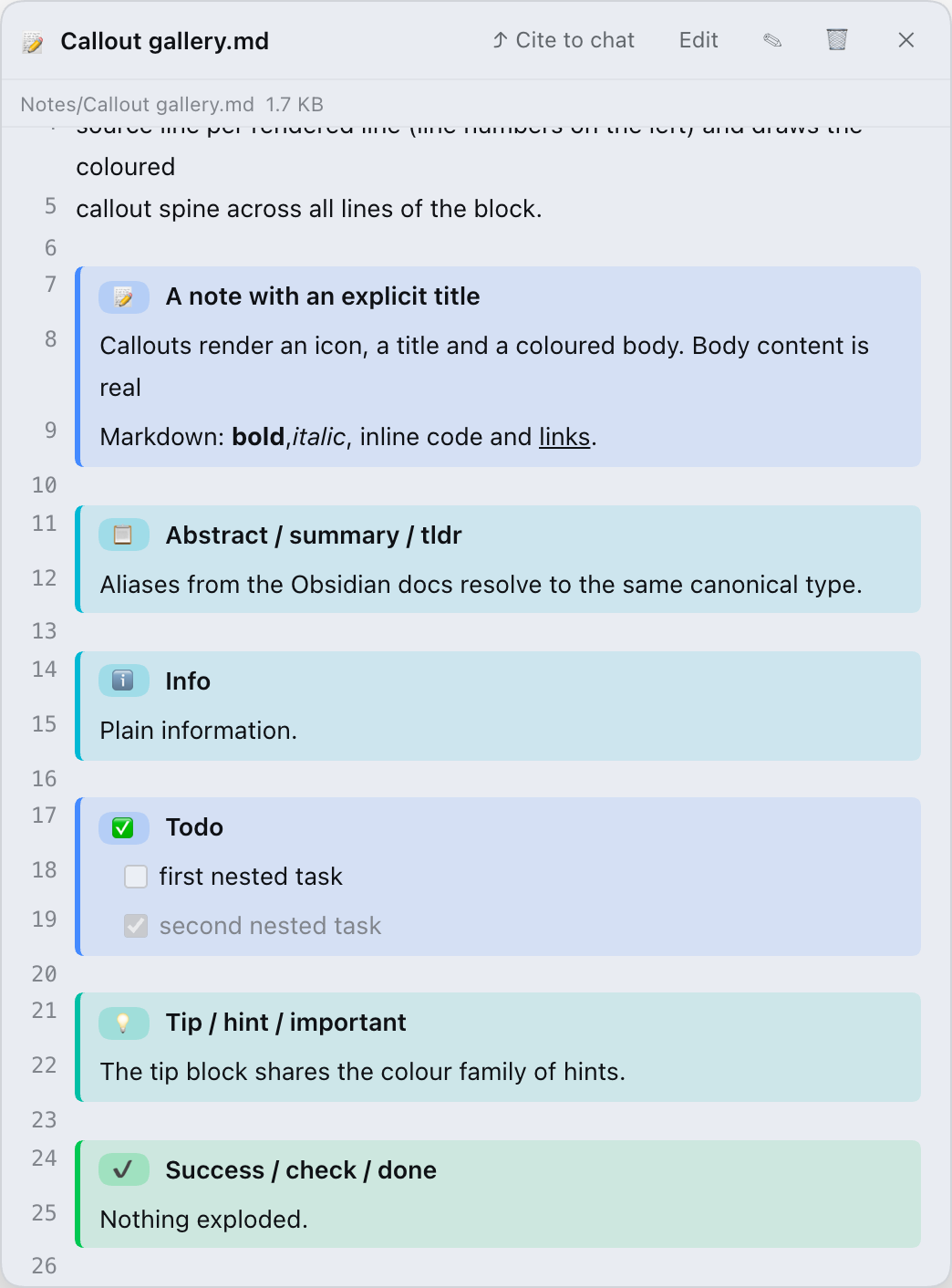
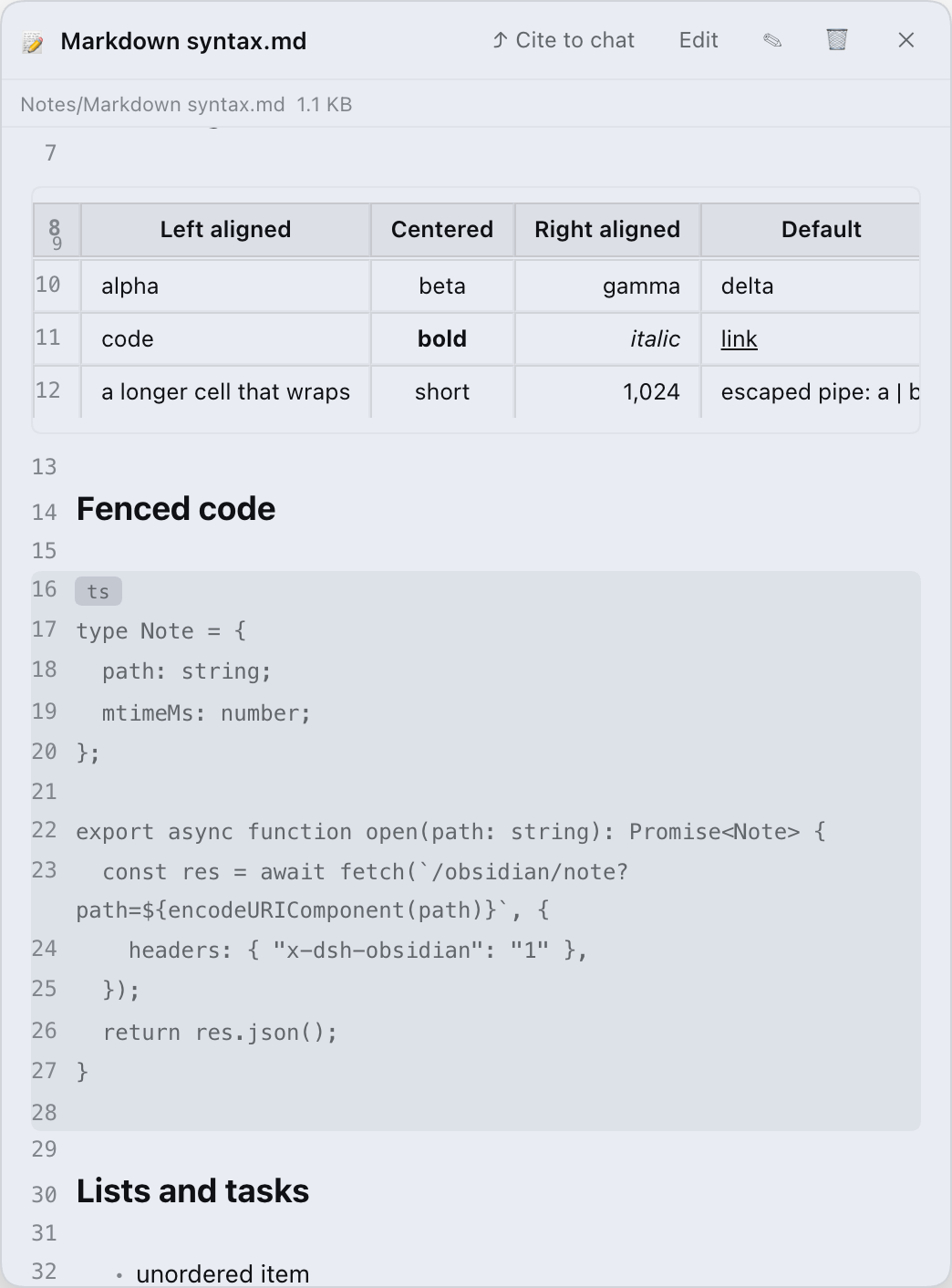
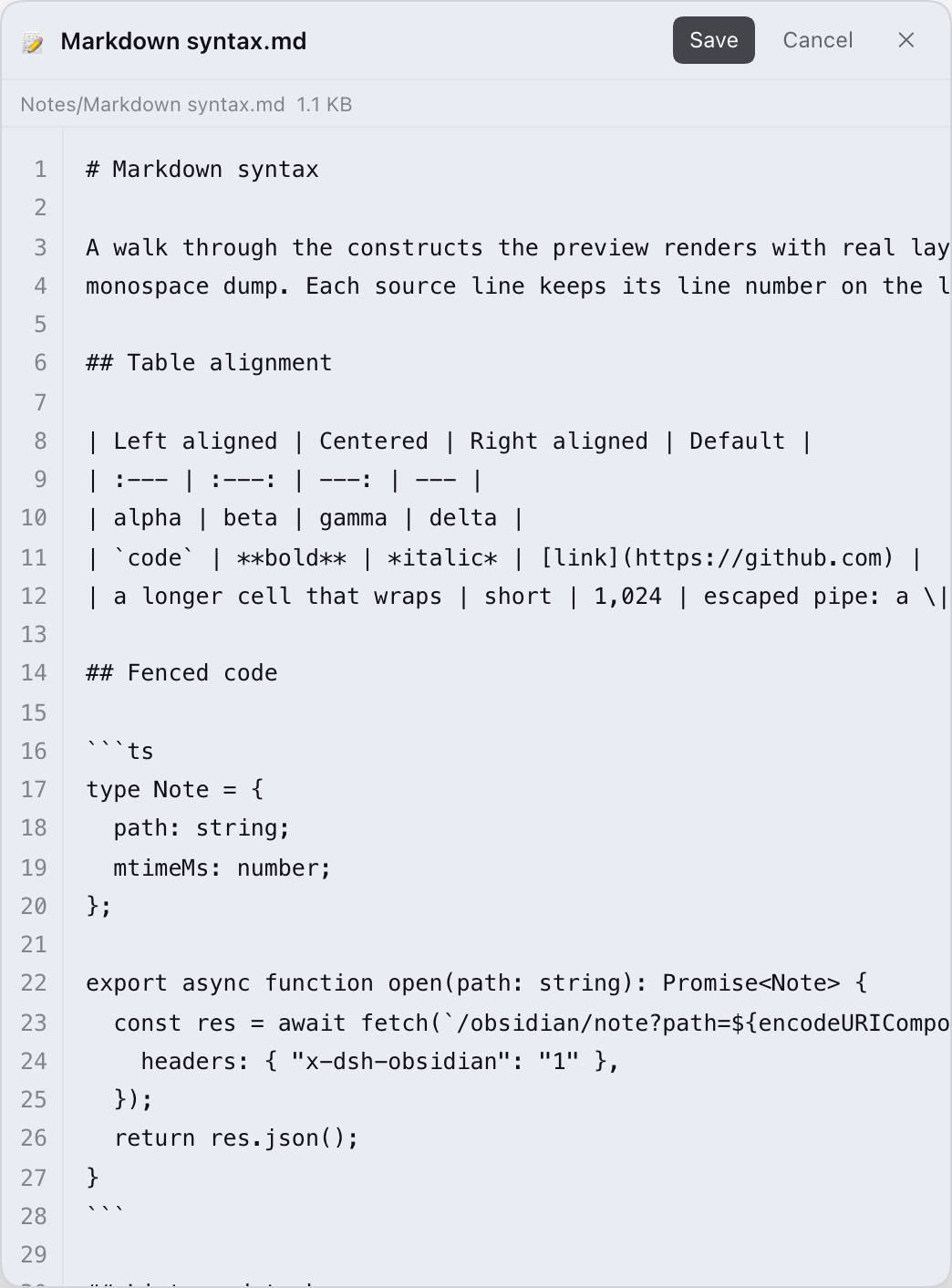
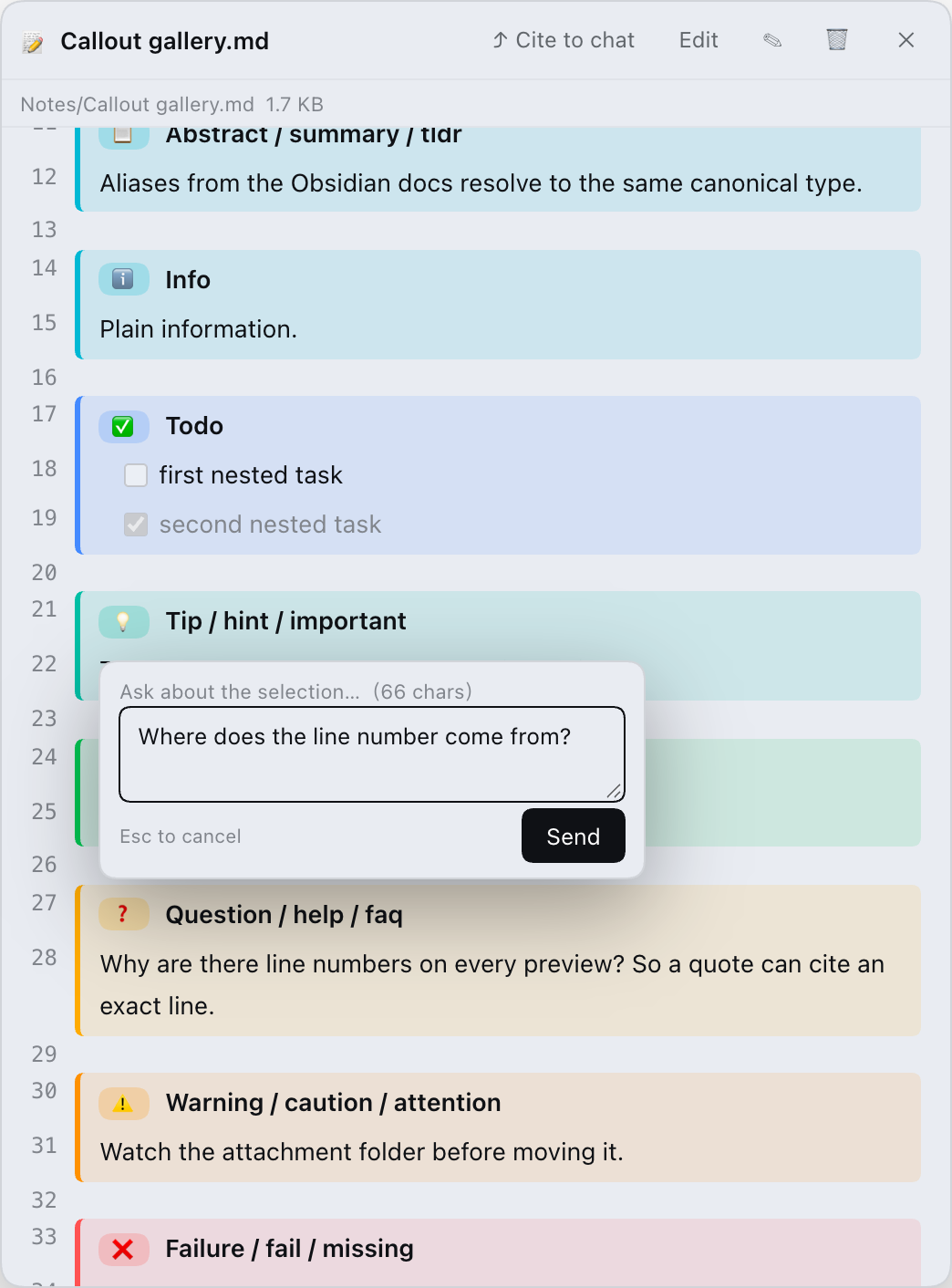
- Rendering fidelity is the feature. The preview is line-numbered and keeps the Obsidian details other viewers flatten: all 13 callout types plus 15 aliases, table alignment, fenced code with info strings, task lists, setext headings, and frontmatter that round-trips byte-for-byte on save.
- Pasted screenshots stay attached. Paste an image while editing and the
host writes an Obsidian-native
![[Pasted image …]]embed. Move the attachment folder later and every embed in the vault is rewritten to match. - The note can talk to the chat. Cite a whole note as an
@pathmention, or select a passage and ask about it — the prompt carries the absolute path, the line range and the quoted text.
What it does not do: no backlinks, no outline pane, no graph view, and no math/mermaid/transclusion rendering. If those are your priority, use a real Obsidian vault (or the plugin above) instead. The comparison is spelled out below.
Screenshots
| Notes tree + docked preview | Callouts, line numbers, badges |
|---|---|
 |
 |
| Real tables and fenced code | Edit with a line-numbered source view |
|---|---|
 |
 |
Install
Requirements: DeepSeek Harness 0.2.1 or newer (web UI or desktop app).
The CLI install also needs pnpm (npm i -g pnpm, or corepack enable) and a
Node.js ^22.19 || >=24 runtime for DSH.
A plugin that ships a bundle layer is only composed at startup, so restart the DSH host after installing (desktop: quit and reopen). Refreshing the page is not enough.
1. Desktop app (after the npm release)
- Open Settings → Plugins.
- Search for
dsh-obsidian-notesand install it. - Restart DeepSeek Harness.
This path requires the package to be published on npm (target release 0.5.0). If search shows nothing, use one of the two paths below.
2. CLI (after the npm release)
npm i -g pnpm                                   # `dsh plugin` forwards to pnpm
dsh plugin --profile web add dsh-obsidian-notes
# restart the host, then start it again
dsh web
3. From source (works before the npm release)
git clone https://github.com/revive123456/dsh-obsidian-notes.git
cd dsh-obsidian-notes
npm i                     # runs build.mjs via prepare → lib/client.js
dsh plugin --profile web add "$(pwd)"            # PowerShell: "$PWD"
# restart `dsh web`
dsh plugin add records the package as a bundle in
$DSH_HOME/profiles/web/package.json; the profile patch is applied on the next
boot.
Avoid installing this repository with a bare
github:spec: pnpm ≥ 10 blocks lifecycle (prepare) scripts by default, so the build step that produceslib/client.jswould be skipped. Clone +npm i+ install the local path instead.
Uninstall: dsh plugin --profile web remove dsh-obsidian-notes, then restart.
If you installed it the old way (manual cordis.patch.yml row), see
docs/legacy-install.md.
First run
Open the 📚 Notes row at the bottom of the sidebar. If no vault is configured, choose one:
- 📂 opens a directory picker;
- 📋 accepts a pasted absolute path.
The default vault is $DSH_WORKSPACE/obsidian_vault, falling back to
./obsidian_vault under the directory you started dsh web from.
Features
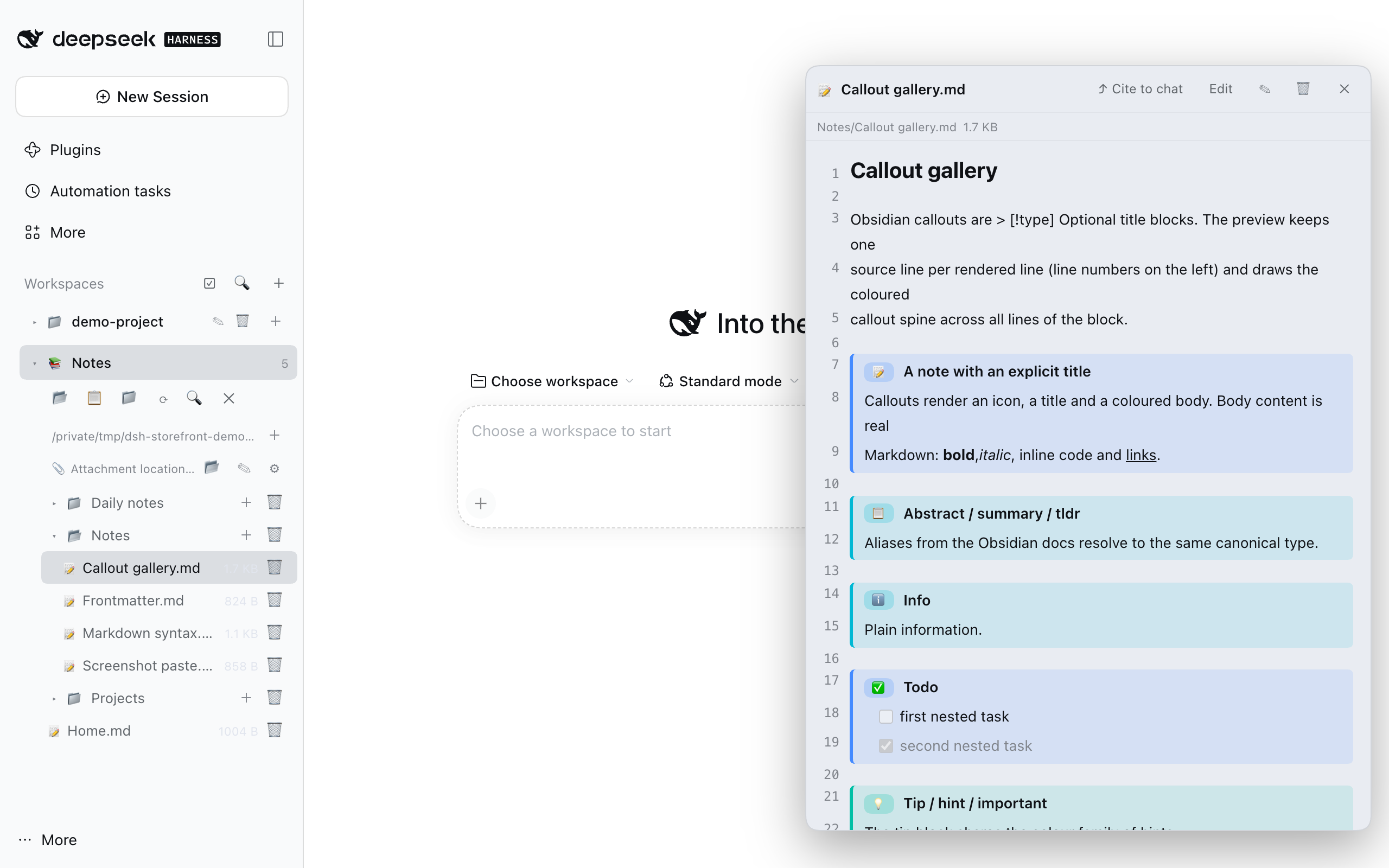
- Vault sidebar — lazy directory tree; open a note with one click, create, rename or delete notes and folders, and search titles and file contents. Shows a live note count.
- Line-numbered Obsidian preview — every source line keeps its line number.
Real tables with alignment, fenced code with language labels, nested lists and
task lists, all heading levels, setext headings, horizontal rules, and
clickable
[[wikilinks]](aliases and#sectionsincluded). - Callouts —
> [!type] titleblocks render with type colours, icons and badges. 13 canonical types (note,abstract,info,todo,tip,success,question,warning,failure,danger,bug,example,quote) plus 15 Obsidian aliases (summary,tldr,hint,important,check,done,help,faq,caution,attention,fail,missing,error,cite,none). - Edit and save — line-numbered source editor, save with the button or Ctrl/Cmd+S. The YAML frontmatter is never shown in the editor and is stitched back untouched on save; external edits to the YAML are preserved.
- Screenshot paste — Ctrl/Cmd+V in the editor uploads the image to
the configured attachment folder and inserts the Obsidian-native
![[Pasted image <timestamp>.png]]embed (20 MB per image). Files written this way keep working in real Obsidian. - Attachment folder management — four location modes (Vault root, fixed folder, same folder as the note, subfolder under the note), image-only folders hidden from the tree, and optional orphan cleanup. Changing the folder moves existing screenshots and rewrites the embeds in every note.
- Cite and ask —
⤴ Cite to chatinserts@/abs/path/to/note.mdinto the composer (falling back to the clipboard if the composer cannot be reached). Select text in the preview or editor to get the 💬 Ask / ⚡ Explain bar: the prompt contains the absolute path, the line range, the quoted passage (up to 1500 characters) and your question. - Session and workspace housekeeping — rename, archive or permanently delete sessions from the sidebar; batch-select sessions (archive/delete) or workspaces (delete registration and their session logs); rows whose logs are already gone are hidden instead of resurrected. Running sessions are refused, and deleting a workspace never touches its directory or files.
- Docked panel — the preview panel can be dragged around and resized; the width you pick is remembered. The preview polls the file's mtime and refreshes when the file changes on disk.
The UI is bilingual (English / Chinese) and uses DSH theme tokens, so it follows the app's light and dark themes.
Comparison
| This plugin | DedsecLemon/dsh-obsidian | |
|---|---|---|
| Vault tree, search | ✅ tree, title + body search | ✅ tree, whole-vault matching-line search |
| Obsidian callouts | ✅ 13 types + 15 aliases, line-numbered spine | ✅ rendered, fold state kept |
| Tables, fenced code, setext headings | ✅ | ✅ |
| Frontmatter | ✅ preserved on save | ✅ shown as properties |
| Paste screenshots + attachment folder moves | ✅ | — |
| Cite a note / ask about a selection | ✅ | — |
| Session & workspace housekeeping | ✅ | — |
| Backlinks | ❌ | ✅ |
| Outline pane | ❌ | ✅ |
==highlight== |
❌ | ✅ |
The point is not "more features" — it is a different trade-off. If you need outline and backlinks, use the other plugin (or Obsidian itself); if you want a faithful Obsidian reading/editing experience with a clean hand-off into the chat, this one is built for that.
Configuration
Everything lives inside the notes pane; there is no YAML to edit.
Vault root
📂 (pick a directory) or 📋 (paste an absolute path) in the notes toolbar.
The picker and the pasted path are validated: the vault must exist and be a
directory. Switching the vault clears the currently open note.
Attachments
The 📎 Attachment location row in the tree controls where pasted images go:
| Mode | Behaviour |
|---|---|
| Vault root | The image lands in the vault root. |
| Fixed folder | The image lands in the configured folder (default attachments). |
| Same folder as note | The image lands next to the note it was pasted into. |
| Subfolder under note | The image lands in <note dir>/<subfolder>. |
Defaults: fixed folder attachments, image-only folders hidden from the tree,
automatic orphan deletion off (files are never deleted implicitly). When
automatic cleanup is enabled, saving a note deletes an attachment only if the
embed was removed and no other note references the file.
Settings are persisted in $DSH_HOME/dsh-obsidian-vault.json
($DSH_HOME defaults to ~/.dsh).
Keyboard
- Ctrl/Cmd+S — save the note being edited.
- Esc — close the search box or the ask popup.
Security and privacy
- Local only, no telemetry. The plugin serves everything from the DSH host's
own
/obsidian/*routes. It makes no outbound network requests and contains no analytics. (Links you click in a note are ordinary links; the plugin does not fetch them.) - Behind the DSH auth fence. The routes are mounted on the DSH web server, so
they require the same authenticated session/token as the app. On top of that,
every non-image request must carry the plugin's
x-dsh-obsidian: 1header; image requests are exempt only because<img>tags cannot set headers (they are still behind the app's auth). - Vault containment. Every path that crosses the route boundary is
normalized first (absolute paths,
.., backslashes and drive letters are rejected) and then re-checked withrealpathagainst the resolved vault root, so symlinks cannot escape either. Setting the attachment folder outside the vault is rejected with403. - Explicit limits. A single note is capped at 1 MB, a pasted image at 20 MB, and a search at 4000 scanned files / 100 results.
- Destructive actions are scoped.
- Deleting a note or folder requires confirmation and deletes only the vault entry (folders recursively).
- Deleting sessions removes only that session's log directory under
$DSH_HOME/sessionsand its projection cache under$DSH_HOME/storages; running sessions (including running subagents) are refused, and symlinked directories are skipped. Archiving is one-way: the log stays on disk. - Deleting a workspace removes its registration and its session logs — the directory and files are kept.
- No hidden writes. The only write paths are: a note save, the attachment upload, attachment folder migration, orphan cleanup (opt-in), and session-log deletion you initiated.
Compatibility
- DSH: verified against 0.2.1-rc.5 (web UI, desktop app shell). The composer integration targets DSH 0.2's Lexical input and falls back to the 0.1.x textarea path where possible.
- Node.js:
^22.19 || >=24(needed only when running the host from source). - OS: paths are handled with the platform separator; session paths use
$DSH_HOME. The screenshots above were captured on macOS. - Not rendered (kept as source text): math, mermaid, footnotes, strikethrough
and highlight, tags, raw HTML, note transclusion, audio/PDF embeds, block refs
(
^id), callout folding/unknown types/nested callouts, and some inline emphasis edge cases (***bold italic***, nested emphasis,_next to text).
Development
npm i             # installs dev deps and builds lib/client.js via prepare
npm test          # node --test test/*.mjs — offline, no network, no API keys
npm run build     # rebuild lib/client.js from src/
npm run check:bundle   # bundle manifest consistency (patch file, module id, files)
Repository layout:
| Path | Purpose |
|---|---|
src/index.js |
Host half: /obsidian/* routes, path containment, attachment migration |
src/client.js |
Browser half: sidebar, notes tree, preview dock, session/workspace UI |
src/markdown.js |
Zero-dependency line-numbered Markdown renderer |
src/vault-store.js |
Vault + attachment settings persistence |
src/session-store.js |
Session log discovery and deletion |
lib/client.js |
Build artifact (gitignored; produced by npm run build) |
cordis.patch.yml |
The bundle layer inserted by dsh plugin add |
tools/demo/ |
Isolated demo environment + headless-Chrome asset pipeline (see tools/demo/README.md) |
docs/assets/ |
The screenshots and GIF used above |
The plugin never modifies the DSH installation: it only contributes a bundle layer plus host/client plugin modules.
Contributions are welcome through pull requests — main is protected and only
the maintainer can push to it. See CONTRIBUTING.md.
License
MIT. See README.zh.md for the Chinese version and docs/troubleshooting.md for troubleshooting.
No comments yet. Be the first to write one.