DSH Agent Enhancer
English: README.en.md
一个插件,让 DeepSeek Harness Desktop 更好写、更好改、更好回退,并持续向主流 Agent 体验对齐。
历史回顾 · 一键优化 · 下一条预测 · 对话与文件恢复 —— 嵌在官方会话输入区,不用另开窗口。




30 秒看懂
| 你想… | 怎么做 |
|---|---|
| 找回刚发过的提示词 | 草稿首行 ↑ / 末行 ↓,或 Alt+R 搜索 |
| 把糊草稿写清楚 | 输入框右侧点 优化,不满意再 撤销 |
| 顺着上一轮继续问 | 回复结束后按 Tab 采纳灰字建议 |
| 回到某一轮之前 | 点 恢复到这里,在预览里确认范围 |
| 省一点模型费用 | 设置里给优化 / 预测单独选更便宜的模型 |
| 关掉某个能力 | 设置 → 内置插件 → 智能体增强 |
默认四项均开启。界面语言跟随 Desktop(zh / en)。
功能对照
| 功能 | 怎么用 | 要点 |
|---|---|---|
| 历史提示词 | 首行 ↑、末行 ↓;Esc 退出;Alt+R 搜索(兼容 Ctrl+R) |
只覆盖当前已加载会话;Enter 只填草稿不发送;含 chip 的草稿不误触发 |
| 提示词优化 | 点右侧优化;有选区只改选区;可撤销 | 模糊稿补全执行信息,明确稿少改;保留引用 / chip;可单独选模型 |
| 下一条预测 | 回复结束后看灰字,Tab 采纳 |
每轮最多一条;输入或切会话会清除 |
| 对话与文件恢复 | 消息旁点 恢复到这里;恢复后点输入框 + 或键入 /,选 撤销恢复(仅有可撤销 tip 时出现) |
可选仅对话,或对话 + 已跟踪文件;不恢复进程 / 终端 / 未跟踪文件等 |
设置
路径:设置 → 内置插件 → 智能体增强
| 开关 | 配置键 | 默认 | 作用 |
|---|---|---|---|
| 历史提示词 | historyEnabled |
开 | ↑↓ 与 Alt+R |
| 提示词优化 | optimizeEnabled |
开 | 优化 / 撤销;旁有模型药丸 |
| 下一条提示词预测 | predictEnabled |
开 | 灰字建议;旁有模型药丸 |
| 对话与文件恢复 | rollbackEnabled |
开 | 「恢复到这里」;+ / / 菜单「撤销恢复」 |
模型药丸默认「跟随会话」,也可指定提供商 / 模型 / 推理等级。实拍见下方「界面一览」。
界面一览
| 界面 | 说明 | 预览 |
|---|---|---|
| 历史搜索 | Alt+R 浮层与结果列表 |
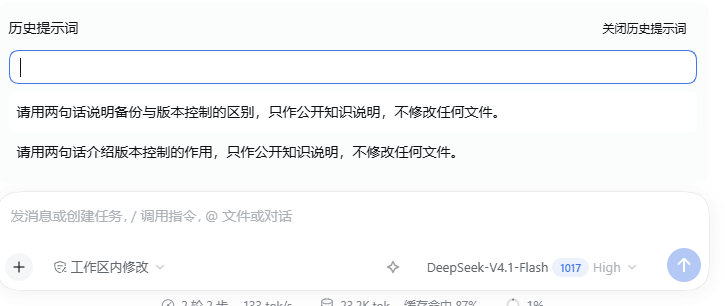 |
| 优化与预测 | 右侧优化入口 + 回复后的灰字建议 | 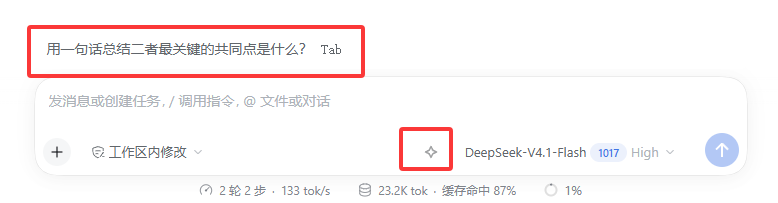 |
| 回滚入口 | 消息旁恢复图标,悬停「恢复到这里」 | 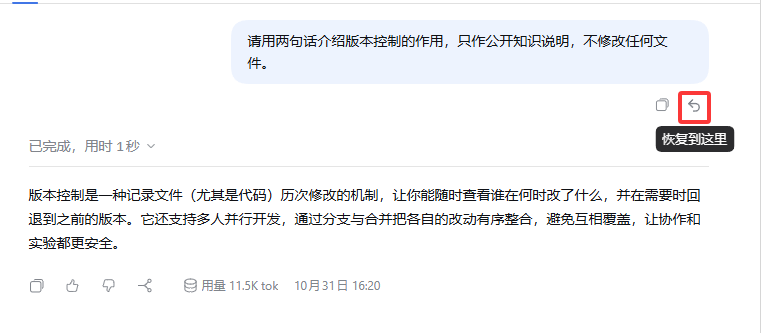 |
| 回滚预览 | 将撤回的对话;可选仅对话或含已跟踪文件 | 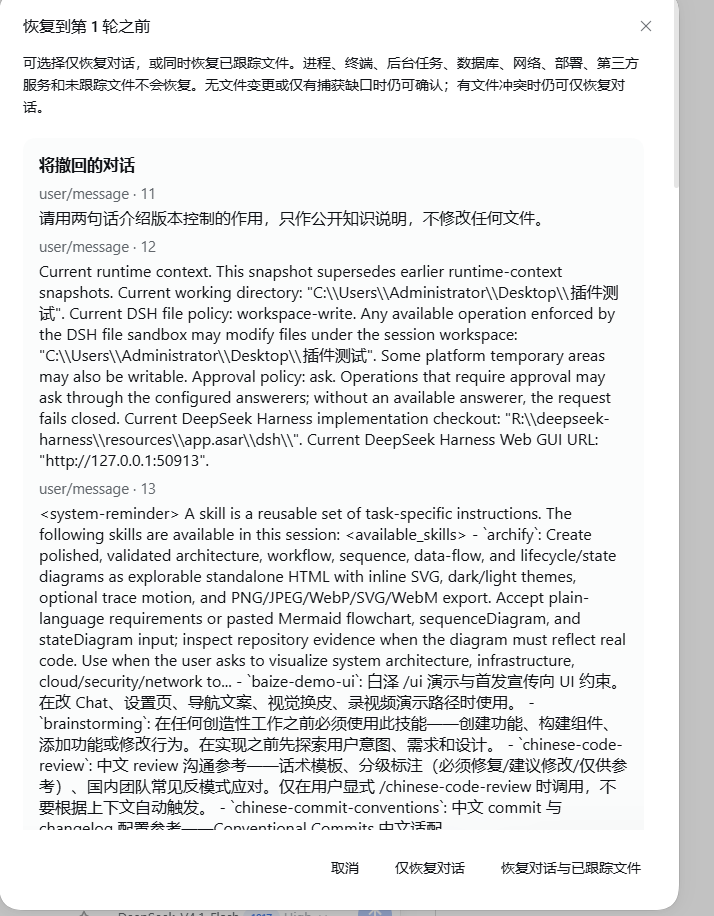 |
| 撤销恢复 | 恢复后打开输入框 + 或 /,选「撤销恢复」 |
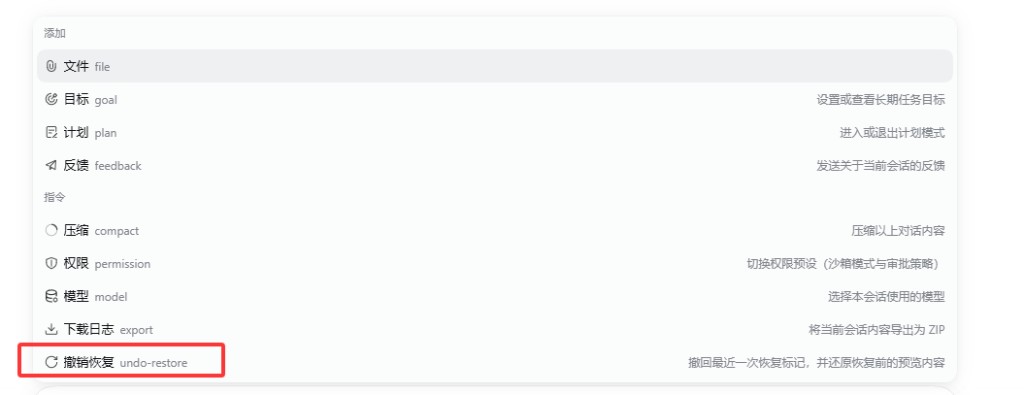 |
| 设置 · 智能体增强 | 四个开关、模型药丸、隐私说明 | 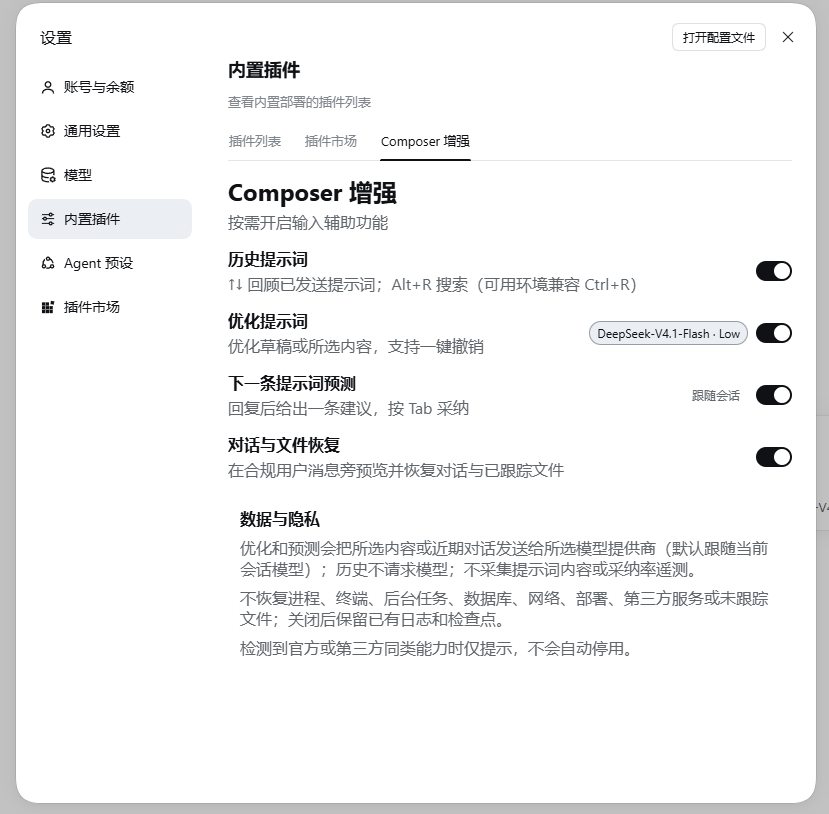 |
安装
安装 / 升级 / 卸载前,请退出所有 Desktop 窗口和托盘,确认旧主进程结束后再操作。
本插件面向 Desktop / desktop profile(不要用 web 验收)。收录于 awesome-dsh-plugin,也可在第三方市场中搜索 dsh-agent-enhancer / 智能体增强。
官方桌面端 · 应用内安装(推荐)
适用于 DeepSeek Harness 官方桌面端(以及同样提供「设置 → 插件」的官方发行形态):
- 打开应用内 设置 → 插件(或侧边栏 插件)。
- 在已安装 / 搜索框中查找
dsh-agent-enhancer或 智能体增强,按提示安装。 - 完全退出并重启 Desktop。
桌面端的 profile 由应用管理。不要用
dsh plugin --profile web …往桌面端装插件——命令可能显示成功,但装进的是profiles/web,桌面端看不到。
dsh-market(可选)
需要独立的市场 UI / 一键升级时,可安装社区市场插件 dsh-market:
- 官方桌面端: 在应用内 设置 → 插件 搜索
dshmarket并安装(不要用 CLI 的webprofile)。 - 普通
dsh web:dsh plugin --profile web add dshmarket,然后重启。
装好后打开 插件市场 标签,搜索并安装本插件。部分第三方桌面客户端会预装或推荐此市场。
命令行 · npm
本机已配置 dsh CLI、且要写入 desktop profile 时:
dsh plugin --profile desktop add dsh-agent-enhancer@0.2.0
也可不钉版本:dsh plugin --profile desktop add dsh-agent-enhancer。
若曾安装旧包 dsh-composer-enhancer,请先卸载再装本包。
启动后应能看到输入框右侧优化入口,以及设置中的 智能体增强。
本地目录(开发)
dsh plugin 会把参数原样转给 profile 目录里的 pnpm。对本地仓库要用绝对路径,这样会写入 link:<路径> 并加入 bundles:
corepack pnpm install --frozen-lockfile
corepack pnpm build
dsh plugin --profile desktop add ((Resolve-Path .).Path)
然后完全退出并重启 Desktop。之后改代码只需再执行 corepack pnpm build(加载的是 lib/)。
与宿主共享的 DSH 包请同时放在 peerDependencies 与 devDependencies,不要放进 dependencies。
隐私与共存
| 项目 | 说明 |
|---|---|
| 历史 | 不请求模型 |
| 优化 | 发送原稿或选区 + 最近一轮已完成对话 |
| 预测 | 发送最近一轮已完成对话 |
| 缓存 | 仅当前会话内存 |
| 审计 | 本地 plugin:agent-enhancer/request(无遥测上传) |
| 共存 | 只提示,不自动关闭第三方 |
兼容
- DSH:
>=0.2.1-rc.5 <0.3.0-0(0.2.1-rc.3无法加载)
卸载
| 安装方式 | 做法 |
|---|---|
| 官方桌面端 / dsh-market | 在应用内 插件 页对本插件选择卸载或禁用;或 dsh plugin --profile desktop remove dsh-agent-enhancer |
| 命令行 npm | dsh plugin --profile desktop remove dsh-agent-enhancer |
本地 link: |
不要 remove / 在 profile 里 pnpm remove(可能删掉源仓库)。按下面做 |
- 退出 Desktop(含托盘)
- 编辑 profile 的
package.json:从dependencies与dsh.profile.bundles去掉本插件 - 更新依赖并删除链接本身(不删链接目标):
$DshHome = if ($env:DSH_HOME) { $env:DSH_HOME } else { Join-Path $env:USERPROFILE '.dsh' }
$ProfileDir = Join-Path $DshHome 'profiles\desktop'
dsh plugin --profile desktop install
$PluginLink = Join-Path $ProfileDir 'node_modules\dsh-agent-enhancer'
$Item = Get-Item -LiteralPath $PluginLink -Force -ErrorAction SilentlyContinue
if ($Item -and $Item.LinkType -in @('SymbolicLink', 'Junction')) { $Item.Delete() }
开发
corepack pnpm install --frozen-lockfile
corepack pnpm typecheck
corepack pnpm test
corepack pnpm build   # Desktop 加载 lib/
corepack pnpm check   # typecheck + test + build + 打包校验
| 路径 | 内容 |
|---|---|
src/host/ |
模型调用、RPC、检查点回滚 |
src/client/ |
会话输入区 UI 与状态机 |
tests/ |
Vitest |
lib/ |
构建产物 |
许可
更新日志见 CHANGELOG.md。
No comments yet. Be the first to write one.