dsh-prompt-polish


Prompt polishing for the DeepSeek Harness web GUI — one click (or one shortcut) turns a rough composer draft into a directly usable prompt, and your original draft is always preserved.
Derivative work — read this first
dsh-prompt-polishis a modified, unofficial derivative ofdsh-prompt-enhanceby its author (Apache-2.0). Upstream version 0.2.7 is the base of this project's1.0.0.What this fork adds: the plugin is actually configurable on the dsh
0.2.xruntime (upstream's configuration wiring had been removed from the harness, so its settings were silently unreachable), it ships its own configuration page, it no longer leaks its HTTP route when the entry is remounted, it drops pre-0.2 support, and the built-in rewrite strategy is the concise one. The full list is in Differences from upstream and CHANGELOG.md.Not endorsed. This is not an official release of the upstream project, and it is not affiliated with or endorsed by the upstream author or by DeepSeek. See NOTICE for the attribution and the list of changed files.
Two disclosures before you install. (1) The plugin serves an unauthenticated loopback HTTP route: any local process can call it and spend your model quota. (2) The draft you polish — and, with
contextAwareon, up tocontextMaxMessagesrecent turns — is sent to your configured model provider. Both are detailed under Security & privacy.
English | 简体中文
What it is
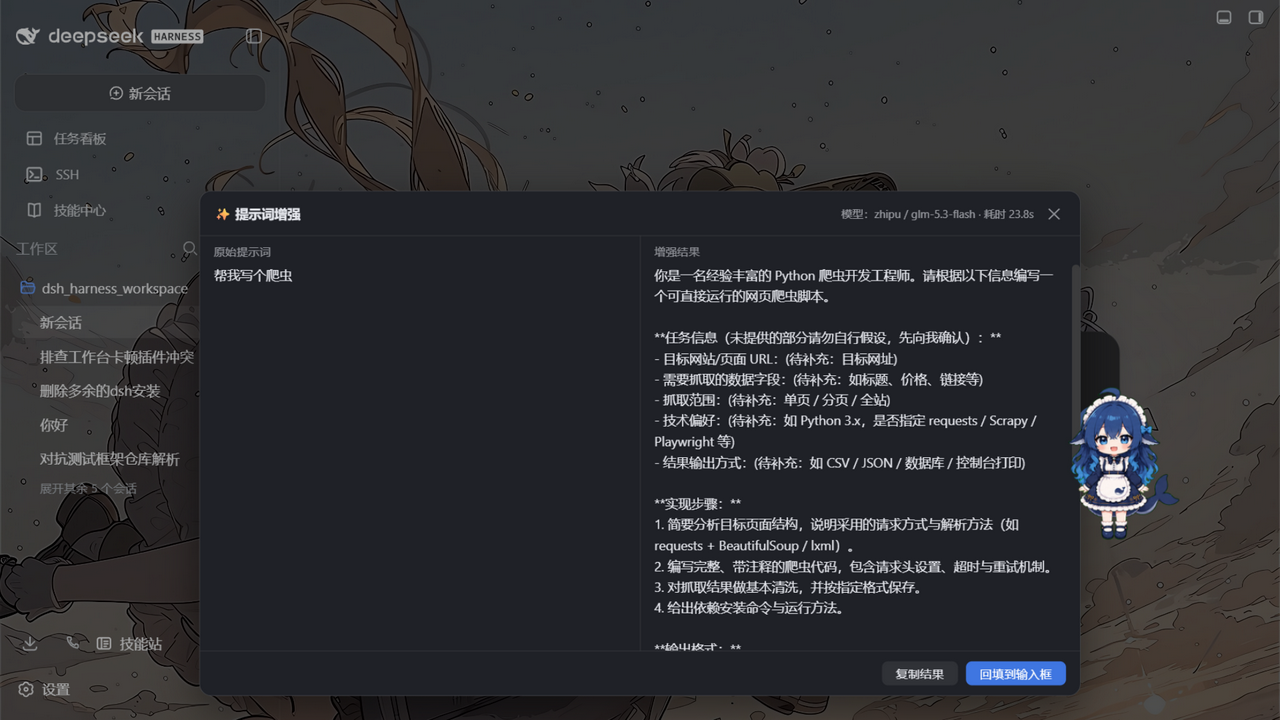
A plugin for the DeepSeek Harness web GUI. It adds a polish affordance to the composer: your draft goes through a low-temperature rewrite pass served by the harness' own LLM service, the result appears in a preview panel next to the original, and you choose to apply it, copy it, or throw it away. Applying raises an undo bar that restores exactly what you had typed.
One npm package, two halves, following the dsh plugin conventions: a host half (Node) that owns the HTTP route, the /enhance slash command and the settings namespace, and a browser half that contributes the composer button, the preview panel, the undo bar and the configuration page.
Why this fork exists
Upstream 0.2.x of the harness changed three things that this plugin depended on, and the result was a plugin that installed cleanly and then did nothing you could configure:
- Configuration silently disappeared. dsh
0.2.xderives a plugin's settings namespace from theConfigschema the package exports and keeps only fields whose meta isvolatile. Upstream marked none, so its entry was skipped entirely — no config page, no form, no way to write a value — while theinstallSection/installSettingsSectionwiring it used instead had already been removed from the harness, so its compatibility probe returned without doing anything or logging anything. This fork marks every field volatile and serves the namespace the way0.2.xexpects. - The plugin could not be remounted. Upstream dropped the disposer that
webserver.register()returns, so the/prompt-enhanceprefix route outlived the entry that owned it; the next mount died onwebserver: duplicate prefix route "/prompt-enhance"and left the entryfaileduntil the host was restarted. This fork holds the disposer in an effect. - Nothing could be edited where users look. Because upstream relied on a settings section that no longer existed, the only way to change a knob was to edit the profile's patch file by hand. This fork registers its own
plugins.row.configpage, so the row's configure control on the Plugins page opens a real form.
On top of that the built-in strategy is now the concise one (no mandatory acceptance-criteria or boundary-condition sections, no (待补充:…) placeholders) and maxOutputTokens defaults to 6000 instead of 2048, which is what produced "the rewrite hit the output limit" on long Chinese drafts.
Features
| ✨ Composer button | A small button in the input box's tool row, next to the send button |
| 🔀 Preview panel | Original and polished text side by side, with model name and elapsed time |
| ↩️ One-click undo | After applying, a quiet bar above the composer restores the original draft |
| ⌨️ Shortcut | Default Ctrl+Alt+E, configurable, acts on the composer you are working in |
💬 /enhance command |
Rewrite any text from the slash-command plane; the result never enters model history |
| 🧠 Model routing | Settings pair → current session model → harness default model, in that order |
| 🔑 Zero credential setup | Calls ride the harness LLM service; keys stay in the harness credential store |
| ⚙️ Live settings | All sixteen fields, on a page this package ships, applying to the very next call |
| 🛡️ Draft safety | Empty, over-length, images-only and reference-chip inputs are refused locally; upstream failures become readable messages; a failed call never touches your draft |
Install into a dsh profile
This project is prepared for its own npm release but has not been published yet, and the package is not on the registry under this name today. Until it is, install it from a checkout (or from this repository's GitHub URL) using the dsh plugin CLI:
# from a local checkout (built output is committed, so no build step is needed)
git clone https://github.com/rangercd67/dsh-prompt-polish.git
dsh plugin --profile web add link:/path/to/dsh-prompt-polish
# restart dsh web
# from the GitHub URL
dsh plugin --profile web add github:rangercd67/dsh-prompt-polish
Once dsh-prompt-polish is published under this name, the same command with the bare package name is the shortest path:
dsh plugin --profile web add dsh-prompt-polish
# restart dsh web
The row this package patches has the id prompt-enhance and the name dsh-prompt-polish. The id is deliberate and permanent: it is the settings namespace key, and every existing profile patch targets it. Only the name: in cordis.patch.yml follows the package name.
Uninstall:
dsh plugin --profile web remove dsh-prompt-polish
# check the profile's package.json `dsh.profile.bundles` array for a leftover
# row and remove it if present, then restart dsh web
If you use the dsh desktop application and install through the profile manager rather than the CLI, see the 1.0.0 release notes for the exact install_bundle / rollback steps used to verify this build.
Configuration
All sixteen fields live in the prompt-enhance settings namespace. Edit them on the Plugins page: find this plugin's row and use its configure control (the row key is dsh-prompt-polish#prompt-enhance, registered by this package — no companion plugin is needed). On a profile that also bundles the harness' own settings surface, the same namespace appears under Settings → 插件配置. Changes apply to the very next call; no restart.
Every polish is one billable LLM call. maxOutputTokens bounds the cost of one call, and maxConcurrent / rateLimitPerMinute bound how often calls can be made.
| Field | Default | Description |
|---|---|---|
enabled |
true |
Master switch; off hides the composer button and disables every trigger |
provider |
(empty) | Explicit route override; must be filled together with model (or leave both empty to follow the current session model) |
model |
(empty) | Explicit route override; must be filled together with provider |
temperature |
0.3 |
Sampling temperature (0–1). Low keeps the rewrite faithful to the original |
strategyMode |
replace-default |
How a custom systemPrompt combines with the built-in strategy: replace-default swaps it out entirely (the built-in hard rules — preserve intent, never fabricate, body-only output, language mirroring — are not retained and must be carried into your own text); extend-default appends your text after the built-in strategy, keeping those rules in force |
systemPrompt |
(empty → built-in strategy) | Custom strategy text; blank uses the built-in concise strategy |
shortcut |
ctrl+alt+e |
Global shortcut spec (at least one of ctrl/alt/meta plus one alphanumeric or function key; bare keys are ignored so normal typing can never be swallowed); empty disables it |
maxOutputTokens |
6000 |
Output token budget of one polish call (256–32768); it bounds that call's cost |
maxInputChars |
12000 |
Input character cap (200–200000), counted in Unicode code points — an emoji is one character. Over-length drafts are rejected, never truncated |
timeoutMs |
60000 |
End-to-end deadline of one call (5000–600000 ms) |
maxConcurrent |
2 |
Concurrency cap within a single host process (1–16); extra requests answer 429 (concurrency-limit). The browser UI admits exactly one in-flight request (a single preview panel), so this cap mainly protects the /enhance command plane and multi-client callers |
rateLimitPerMinute |
10 |
Sliding-window rate cap per minute within a single host process (1–600), counting successful calls only — failures never consume the window, so a run of failures cannot rate-limit you out; extra requests answer 429 (rate-limit) with a Retry-After in seconds |
streaming |
true |
Show the model's output in the panel as it streams instead of waiting for the whole rewrite — display-only: the applied text is still the normalized full result, and the client falls back to the one-shot JSON route when the host or network does not support text/event-stream |
contextAware |
true |
Ground the rewrite in the current conversation's recent history (resolve pronouns, fill in stated constraints, mirror the established stack and terminology). With no session, no history, or this switch off, the call degrades to the plain single-prompt polish. Privacy: the assembled snippet is sent to the configured provider alongside the draft — see Security & privacy |
contextMaxMessages |
8 |
Context breadth: how many recent user/assistant turns may ground the rewrite (0–50); 0 admits none |
contextMaxChars |
4000 |
Context depth: character budget of the assembled history snippet (0–100000), spent newest-first so the most recent turns win when the budget is tight; 0 admits none |
provider / model values match the harness settings: each key under the harness' provider settings (for example zhipu, muyuu) is a provider and each models[].id under it (for example glm-5.3-flash) is a model. example pair: provider: zhipu + model: glm-5.3-flash.
Model routing precedence: the explicit settings pair → the route recorded in the current session's request header → the harness-wide default model. If none of the three names a route (a fresh session with no default model, say), the plugin fails with an actionable message instead of guessing.
How it works
flowchart LR
    A[Composer draft] --> B{Local guards<br/>empty / length / chips / busy}
    B -- pass --> C["POST /prompt-enhance/enhance<br/>(loopback-fenced host route)"]
    B -- reject --> P[Preview panel:<br/>readable error, draft untouched]
    C --> D["ctx.llm.stream<br/>rewrite with the system strategy"]
    D --> E[Normalize:<br/>strip fences, trim, refuse empty]
    E --> F[Preview panel:<br/>original / polished]
    F -- Apply --> G["setDraft(polished)<br/>original pushed to the undo stack"]
    F -- Cancel / Copy --> H[Draft untouched]
    G --> U[Undo bar: one click restores]
Host half (exports ".", Node) — registers the /prompt-enhance prefix route on the shared webserver (POST /prompt-enhance/enhance for one JSON envelope, POST /prompt-enhance/enhance-stream for incremental SSE frames), the /enhance slash command, and the prompt-enhance settings namespace derived from the Config schema this package exports. The model call goes through ctx.llm.stream with a normalized output pass and the same auxiliary-call discipline the harness applies to session titles: deadline and caller cancellation rechecked during and after the stream, terminal-finish validation, tool-call rejection. Settings are read per request from the live composition config, which is what makes a saved change land on the next call without a remount.
Browser half (exports "./client") — registers the polish button into the conversation.input.right slot and the undo bar into conversation.input.dock, keeps a live mirror of the settings namespace, installs the global shortcut, and registers the plugins.row.config page keyed dsh-prompt-polish#prompt-enhance. All copy is localized (zh/en) through the harness locale system. The half hard-requires no service: slots, locale and configForms are all reached through optional ctx.inject, so a profile that lacks one degrades (bundled defaults, dictionary keys) instead of blocking the web boot.
Configuration page — the form is the harness' shared SettingsForm / SettingsFormModel machinery over the prompt-enhance namespace, which is what gives it the override badges, per-field reset, revision-fenced save and read-only/unavailable states. It lives in this bundle, so nothing else has to be installed to edit the plugin.
Using it
Composer button / shortcut — type (or leave) a draft and hit ✨ or Ctrl+Alt+E:
- Local guards run first: empty drafts, over-length drafts (never auto-truncated — that would change your meaning), images-only drafts, and drafts containing command or file-reference chips are refused with a clear message. Chips are refused because filling back would destroy them.
- The preview panel opens with a cancellable spinner. Your draft stays untouched, and the panel says so.
- The result phase shows both texts side by side. Apply fills the polished text back and raises the undo bar; Copy puts it on the clipboard; Cancel (or
Esc, or clicking the overlay) discards everything. - The undo bar sits above the composer: one click restores the original. If you keep typing after applying, the bar quietly retires itself, so stale text can never overwrite newer edits. Undo entries live only in the current page's memory (up to 3 per session) — a reload, a web restart or a session switch clears them.
/enhance <text> — rewrite any text from the slash menu. The result renders in the command plane (copyable) and never enters the conversation history or the model's context. To polish the composer draft itself, use the button or the shortcut: the draft lives in the browser. Cancelling a running /enhance follows the harness command plane; if the client offers no cancel affordance, the call runs to completion or times out.
Language consistency — the strategy instructs the model to mirror the input language (Chinese in → Chinese out). That is a best-effort instruction, not a guarantee.
The built-in strategy
The default system prompt makes the model a prompt editor: state the goal and the deliverable, add the steps the task actually needs, and put the constraints the draft itself implies under a short lead-in. It keeps the structure only as heavy as the task requires — no mandatory acceptance-criteria, boundary-condition, role or output-format sections, and no (待补充:…) placeholders: an unknown detail is simply left out, and only a detail that makes the task impossible to execute becomes one closing question. Length target is roughly 1x–2x the original, and an already-clear draft is polished lightly rather than inflated.
Hard rules: preserve intent exactly; never invent facts, data, names, numbers or constraints; keep the scope unchanged; output only the rewritten body (no explanation, no fences, no pleasantries); mirror the input language; treat the framed draft as literal data.
Set systemPrompt to use your own strategy; strategyMode decides how it combines. The default replace-default is a complete replacement — the built-in hard rules are not retained automatically, so your own text must include them. extend-default appends your text after the built-in strategy instead, keeping those rules in force.
Errors and edge cases
| Case | Behavior |
|---|---|
| Empty / whitespace / invisible-only draft | Local refusal: "the input box is empty" |
Draft over maxInputChars |
Refused locally and at the route with exact counts; no auto-truncation |
| Images attached but no text | Refused: text-only feature |
| Command or file-reference chips in the draft | Refused: filling back would destroy the chips |
| Submitting / busy phase, or a request already in flight | Refused with "try again in a moment" |
| Per-minute cap exceeded | 429 (rate-limit) with a Retry-After in seconds; the host message names the exact wait. The window counts successful calls only |
| Concurrency cap full | 429 (concurrency-limit), no Retry-After — a slot frees whenever an in-flight call settles |
| Upstream model failure | Stable codes mapped to readable hints: AUTH → check the API key, RATE_LIMIT → retry later, QUOTA_EXCEEDED → check the balance, CONTEXT_WINDOW_EXCEEDED → shorten the input, NO_ADAPTER/unconfigured → configure a model |
Output reaches maxOutputTokens |
Refused with a hint to raise the cap or shorten the draft |
| Model returns empty / fence-wrapped / tool-call output | Normalized (fences stripped) or refused; retryable |
| Timeout | A 504-mapped message carrying the configured seconds; retryable |
| Browser tab closed mid-flight | The host route notices the disconnect and aborts the model call |
| Session switch | Panel state, undo stack and shortcut targeting are per-session; switching closes the panel and clears its undo entries |
Every failure surfaces inside the plugin's own panel, and the composer draft is never modified by a failed call, so manual input continues undisturbed.
The host route answers structured errors of the shape { code, message?, params? }: the browser renders its localized primary line from code + params using the current language dictionary, and message — when present — is an optional diagnostic detail (the provider's raw failure text, a config error) shown verbatim beneath it. The /enhance command plane has no locale dictionary; a host-side renderer of the same errors produces Chinese text directly.
| Error code | HTTP status | Browser primary copy (dictionary key) | Params |
|---|---|---|---|
rejected |
403 / 413 / 415 / 422 | generic error.rejected; with { count, max } it reuses error.tooLong |
over-length input: { count, max } |
rate-limit |
429 | error.rateLimit |
{ limit, retryAfterSeconds } |
concurrency-limit |
429 | error.concurrencyLimit |
{ max } |
timeout |
504 | error.timeout |
{ seconds } |
unconfigured |
409 | error.unconfigured |
— |
upstream |
502 | generic error.upstream; with reason it uses error.upstream.{reason} (auth / invalidCredential / rateLimit / quota / empty / contextWindow / toolCall / maxTokens) |
{ reason } |
internal |
500 / 502 | error.internal |
— |
Troubleshooting
Button missing / shortcut dead — open the plugin's configure page (Plugins page row) and check enabled; check that the plugin is installed (dsh plugin --profile web list) and that dsh web was restarted; check the browser console for a failed apply.
"No model resolved for the polish" — routing follows the settings pair → the session model → the harness default; if all three are empty there is nothing to call. Pair provider/model in the settings, or send a message in the current session first so it carries a model route, and check the harness' default-model settings section.
Authentication failures — the message detail line carries the concrete cause (a 401, say). Check the provider's API key in the harness credential store; quota and balance problems surface as the quota hint.
Rate-limited (429) right after a run of failures — that should not happen, because the window counts successes only. If it does, check whether several profiles or processes are mounted (each counts independently and they stack up) or whether rateLimitPerMinute is set too low.
Poor rewrites (fabrication, dropped requirements, broken formatting) — with strategyMode set to replace-default, a custom systemPrompt replaces the built-in strategy entirely, hard rules included; carry them into your own text or switch to extend-default.
Project name changed, settings look reset — the namespace and row id are still prompt-enhance, so stored values and existing profile patches keep working across the dsh-prompt-enhance → dsh-prompt-polish rename. What changes is the package name, and with it the row key of the configuration page (<package name>#prompt-enhance); it is injected at build time, so a stale hand-built bundle from an older name will not show the page until it is rebuilt.
Security & privacy
1. The loopback HTTP route is unauthenticated by design. Any process on your machine can POST /prompt-enhance/enhance and spend your model quota. Per-caller authentication is not attempted. What guards the route instead:
- Socket fence — requests from non-loopback peer addresses are refused (
127.0.0.1/::1only). - Host allowlist — the
Hostheader must belocalhost/127.0.0.1/[::1], which defeats DNS rebinding (a rebound attacker domain keeps the loopback socket address but carries the attacker's hostname and is refused). Responses arecache-control: no-store. - Origin gate — browser calls from non-local pages are refused.
- Proxy rejection — requests carrying
X-Forwarded-FororForwardedare refused outright: those headers only exist when a proxy is in the path, which the trust model does not cover. - Abuse caps — a body cap derived from
maxInputChars(with aContent-Lengthfast reject), a sliding-window rate limit (rateLimitPerMinute, default 10, counting successful calls only) and a concurrency cap (maxConcurrent, default 2), both answering429. Both counters live in a single host process's memory: several processes, a cluster or several profiles mounting the plugin each count independently, so this plugin supports single-process deployments and ships no shared rate-limit store. - Request-level timeouts belong to the host and Node — the plugin bounds the body size and the per-call
timeoutMs; connection-level timeouts (headers / request / keep-alive) are settings of the sharedhttp.Serverthat a prefix route must not touch, so they fall to the host and Node's defaults. - Not for reverse-proxy exposure — if you put dsh web behind a proxy that listens on the LAN, external callers look like loopback to the route and the fence is moot. Do not expose a proxied host without adding your own authentication at the proxy.
- Prompt-injection boundary — the draft is framed between
<raw_prompt>tags, literal closing tags inside the draft are neutralized, and the strategy prompt treats the framed text as pure data. That lowers the risk of a simple tag escape; prompt-based boundaries are best-effort, not a guarantee.
2. Your draft leaves the machine — to the provider you configured. Browser → your own dsh host (loopback only) → the harness LLM service → the configured model provider. With contextAware on (the default), the plugin also assembles the recent user/assistant history of the current session — up to contextMaxMessages turns and contextMaxChars characters — and sends it to the same provider alongside the draft. That history may contain secrets you typed earlier in the session (API keys, tokens, internal hostnames, customer names) which the provider will see verbatim. Treat contextAware as the privacy boundary: turn it off, or end the session and start a fresh one, when the conversation should not leave the machine. The strategy's rules forbid introducing anything the raw prompt does not support, but they cannot un-share what has already been sent.
Credentials stay in the harness. The plugin stores none; the model call rides ctx.llm and the API keys are the harness's own. The enhancement never enters the session's model history, and nothing is sent anywhere except the provider the harness routes the call to.
Compatibility
- Harness:
dsh.engines.dsh=>=0.2.0-rc.2 <0.3.0. This fork drops pre-0.2 support: the settings wiring it replaced no longer exists in those lines.dsh.enginesis advisory metadata read by the loader and plugin manager — it states support, it does not enforce it. - Node:
^22.19.0 || >=24.0.0(for building from source). - Peers:
@deepseek-ai/dsh-llm >=0.2.0-rc.2as an optional peer — it is a runtime module supplied by the dsh host and is not installed from npm (bothlib/bundles keep every package import external), so a host that does not provide it produces no install warning and the plugin reports a normal error at polish time instead of failing to load.react/react-dom^18.2.0are required and supplied by the web shell's module registry. - Other plugins on a
0.2.xruntime: the runtime's compatibility gate skips bundles whose peer ranges pin an older@deepseek-ai/dsh-*line (observed upstream withdshmarket,dsh-find-pluginanddsh-better-sidebar). This package passes that gate.
| dsh | >= 0.2.0-rc.2 < 0.3.0 |
| Node | ^22.19.0 || >=24.0.0 |
| Plugin | 1.x |
Development
npm install
npm run typecheck     # tsc, no emit
npm test              # unit + real-http + component suites
npm run build         # typecheck + both halves
npm run watch         # esbuild watch for both halves
npm run rename -- --check   # do the package name and the patch row name agree?
Daily debug loop (link install + watch): see CONTRIBUTING.md.
lib/ is built output, and it is committed. lib/index.js is the host half (ESM, package imports kept external); lib/client.js is the browser half (CJS inside the window.__ModuleLoader__.load({ id, factory }) envelope the dsh web shell expects). Both are committed so a GitHub install needs no build step, and CI fails if lib/ drifts from src/ — always run npm run build before pushing. The client bundle carries the package name injected at build time (scripts/build.mjs's define, mirrored by vitest.config.ts), because the Plugins page dispatches a row's configure control by <package name>#<row id>: a rename that is not followed by a rebuild silently detaches the configuration page. npm run rename -- --name <pkg> [--repo <url>] performs the rename and --check reports whether package.json and cordis.patch.yml agree. The row id stays prompt-enhance and must never change.
Test coverage (21 files, 216 tests): input validation, output normalization, the enhancer against stubbed ctx.llm streams, a real-node:http route suite (loopback/Host fence, disconnect abort, error envelopes, SSE end to end), the loopback fence units, prompt framing, config resolution, the undo stack, shortcut parsing, client settings, the configuration page, and React component tests locking the polish → apply → undo flow.
More: architecture · usage and configuration in depth · the 0.2.x compatibility findings · docs index.
Publishing
The publishing checklist — name and metadata, the load-bearing ROW_KEY coupling, licence and attribution duties, the tarball review, and the post-publish verification steps — is docs/publish/checklist.md. Nothing in this repository publishes automatically, and CI has no publish step.
License & attribution
Apache-2.0. dsh-prompt-polish is a derivative of dsh-prompt-enhance (Apache-2.0), based on upstream version 0.2.7; the upstream licence text is retained verbatim and the attribution, changed-files statement and no-endorsement wording are in NOTICE. The fork's own release history starts at 1.0.0 and is independent of upstream's numbering — see CHANGELOG.md.
Differences from upstream
Against upstream dsh-prompt-enhance 0.2.7 (the base of this project's 1.0.0). The full rationale is in the 1.0.0 release notes and the compatibility findings.
| Area | Upstream 0.2.7 | This project 1.0.0 |
|---|---|---|
Settings namespace on 0.2.x |
No Config field marked volatile, so the harness skips the entry and it is not configurable anywhere |
Every Config field marked volatile (through the public schemastery's meta), so 0.2.x serves the prompt-enhance namespace |
| Configuration page | None; relied on installSection / installSettingsSection, both removed from the harness |
Ships its own plugins.row.config page keyed dsh-prompt-polish#prompt-enhance, rendered with the harness' SettingsForm / SettingsFormModel primitives; no companion package |
| Route lifecycle | Drops the disposer webserver.register() returns, so /prompt-enhance outlives its entry and the next mount fails with duplicate prefix route until the host restarts |
Holds the disposer in an effect and clears the per-context mount guard, so toggling the bundle off and on re-activates cleanly |
| Built-in strategy | Six mandatory sections including acceptance criteria and boundary conditions, plus (待补充:…) placeholders; 1–3x length target |
Structure only as heavy as the task needs, no placeholders, one closing question only when a missing detail blocks execution; 1x–2x target |
maxOutputTokens default |
2048 |
6000 |
| Client settings mirror | Reads the removed settingsScope, so it stayed on bundled defaults — enabled: false never hid the button |
Reads configForms, so the mirror follows a save live |
| Harness adaptation | Plugs into runtime APIs that changed (settings registration, request-header route read, cordis service lookups) | 0.2-only: dsh.engines.dsh >=0.2.0-rc.2 <0.3.0, call declares its own MessageSourceMap kind, devDeps on the 0.2.0-rc.2 client line |
| Version line | 0.2.x |
1.0.0, its own line — not a continuation of upstream's numbering |
Retained from upstream unchanged: the composer button / preview panel / undo bar flow, the /enhance command, the loopback + Host + Origin fence with the abuse caps, the <raw_prompt> framing, the bounded conversation-context snippet, and the two disclosures in Security & privacy.
Acknowledgments
The loopback fence, the plugin skeleton and the settings-section pattern follow the conventions of the dsh plugin family — in particular @linxin666/dsh-tool-describe-image. Thanks to the upstream author of dsh-prompt-enhance, whose work this project modifies.
No comments yet. Be the first to write one.