🪄 Intelligent UI for DeepSeek Harness



Turn LLM responses into live, interactive mini-apps directly inside DeepSeek Harness.
Intelligent UI is a plugin for DeepSeek Harness (Desktop & Web UI) inspired by ChatGPT's Intelligent UI and Claude Artifacts. Instead of generating static walls of text, the model writes markdown embedded with interactive component tags, reactive expressions, and beautiful Mermaid diagrams. The chat interface renders them in-place in real time as the response streams in.
📸 Screenshots
| 🧮 Interactive Cost Simulator | ⚖️ Interactive Tech Stack Comparison |
|---|---|
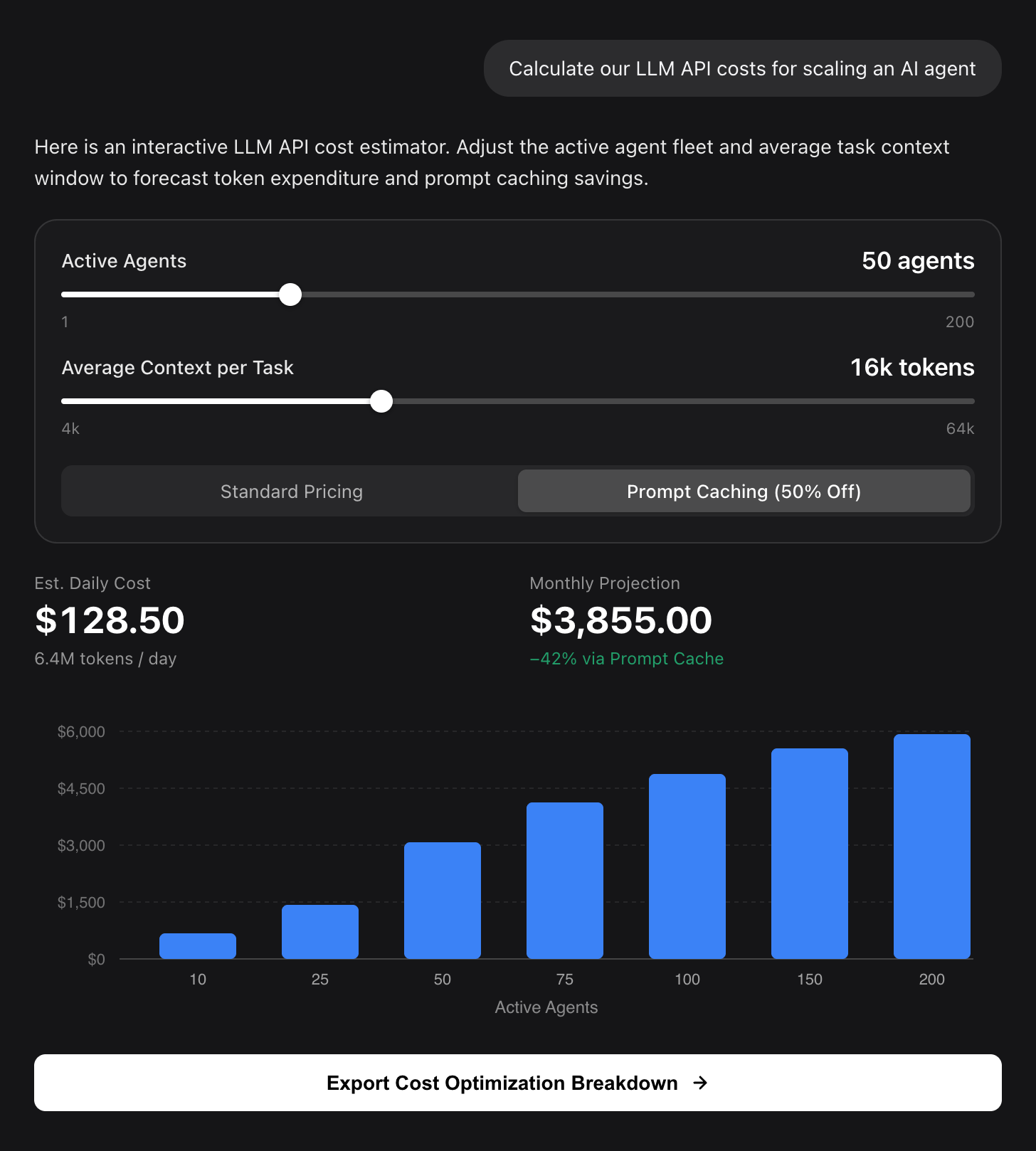 |
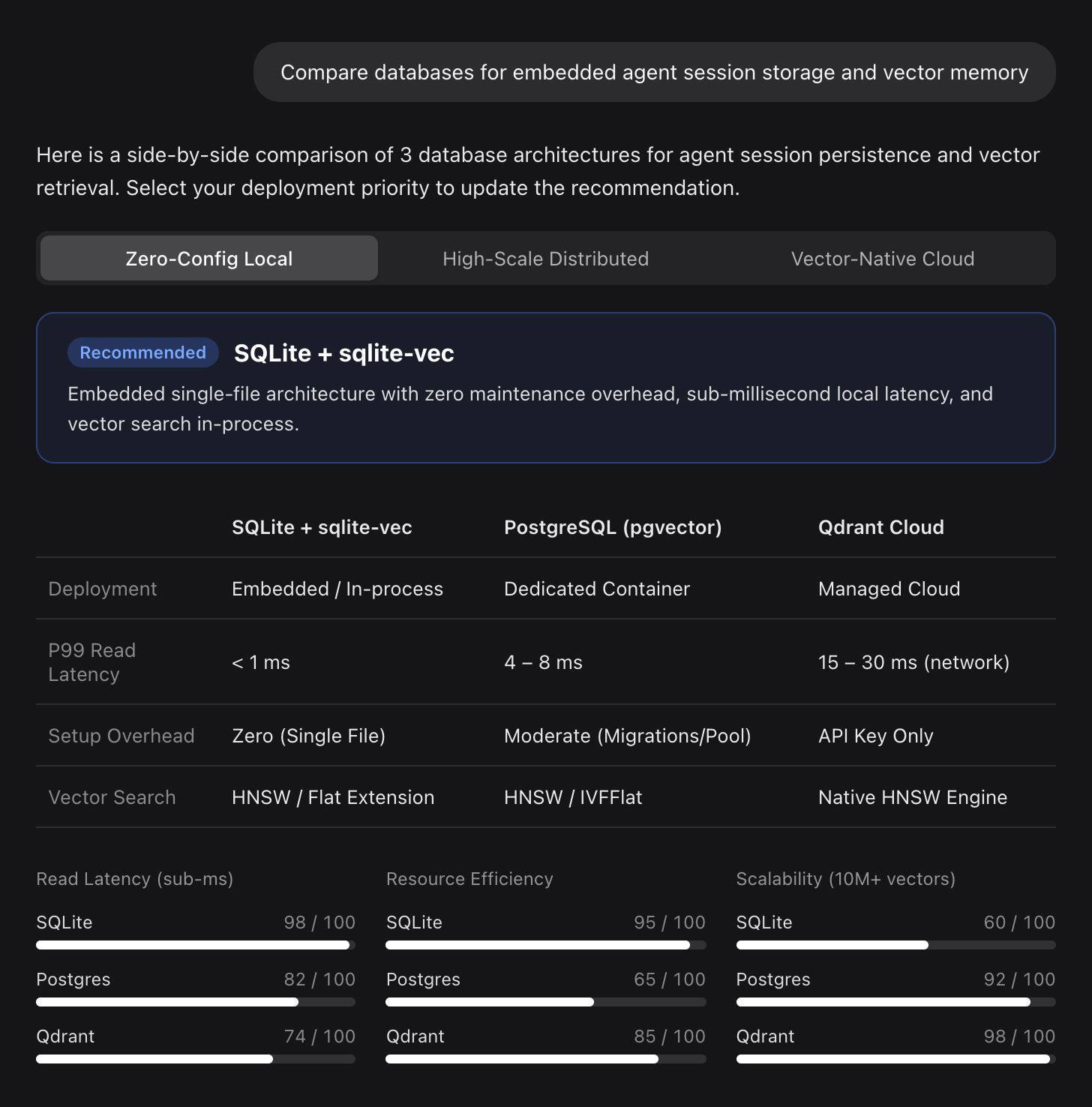 |
🎨 Themed Mermaid Diagrams with Rounded Nodes & Semantic Role Colors
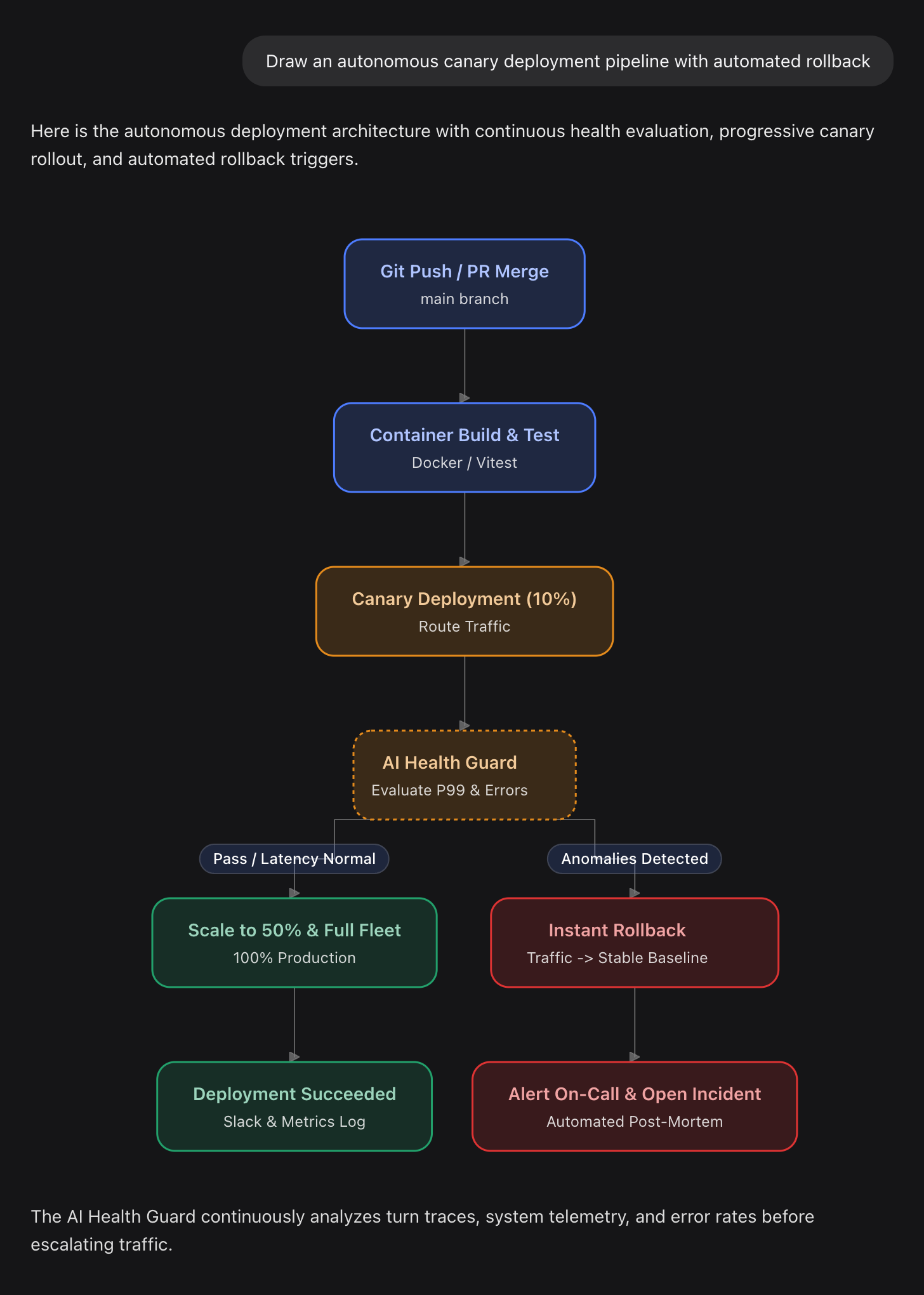
✨ Key Features
- ⚡ Real-Time Interactive Mini-Apps: Sliders, number inputs, dropdowns, and toggles recompute formulas, statistics, and charts instantly inside your browser—no backend round-trips needed.
- 📊 Rich UI Component Library: Over 20 built-in components including KPI tiles (
stat), bar/line/pie charts (chart), responsive layouts (box,row,grid), progress bars, data tables, badges, and segmented controls. - 🎨 Beautiful Themed Diagrams: Automatically transforms
```mermaidfences into styled diagrams with rounded cards, dark/light theme harmony, and hierarchy-aware typography. - 🔁 Bidirectional Interaction: Action buttons (
GenUI.issueNewTurn(...)) let you send configured values back to the agent as your next prompt with a single click. - 🧠 Context-Aware Triggering: The model intelligently uses UI only when helpful (e.g., calculations, comparisons, workflows) and answers simple questions in clean plain text.
- 🔒 Secure by Design: Expressions execute inside a sandboxed AST interpreter without
eval, DOM access, or network permissions. Form state stays strictly within your local browser session.
🚀 Installation
Requires DeepSeek Harness 0.2.x or later (Desktop app or dsh web).
Option 1: Web UI / Desktop App (Easiest)
- Open DeepSeek Harness.
- Navigate to Plugins → Click Add plugin.
- Enter either package name or repository URL:
or@rakutek/dsh-intelligent-uihttps://github.com/rakutek/dsh-intelligent-ui - Click Install. The plugin is ready to use immediately without restarting!
Option 2: CLI Installation
Run the following command in your terminal:
# For Desktop app profile (make sure to quit Desktop first):
dsh plugin --profile desktop add @rakutek/dsh-intelligent-ui

# For Web server profile:
dsh plugin --profile web add @rakutek/dsh-intelligent-ui
Note: To temporarily return to plain-text replies, simply toggle off the plugin in Plugins.
💡 Example Prompts to Try
Once installed, prompt the model naturally with questions that benefit from interactivity:
- Simulators & Estimations:
"Create a SaaS pricing simulator where I can adjust team seats and billing frequency (monthly vs. annual) and see the discount impact."
- Product Comparisons:
"Compare MacBook Pro M3, ThinkPad X1 Carbon, and Dell XPS 13 for battery life, weight, price, and developer workflows with interactive filters."
- Workflow & Architecture Diagrams:
"Draw a flowchart showing how a GitHub pull request goes through CI checks, code review, and deployment."
- Financial & Planning Calculators:
"Build a mortgage repayment calculator with loan amount, interest rate slider, and amortization chart."
🛠️ How It Works (What the Model Writes)
The plugin injects concise instructions into the system prompt. The model writes standard Markdown enhanced with JSX-like component tags and reactive state declarations:
{@body const [seats, setSeats] = useState(25)}
{@body const [price, setPrice] = useState(1200)}

<box border radius="xl" padding={3} gap={2}>
  <title level={3}>Team Plan Estimator</title>

  <slider min={1} max={100} value={seats} onChange={setSeats}/>
  <slider min={500} max={5000} step={100} value={price} onChange={setPrice}/>

  <row gap={2}>
    <stat label="Monthly Cost" value={`¥${(seats * price).toLocaleString()}`}/>
    <stat label="Annual Cost (10% off)" value={`¥${Math.round(seats * price * 12 * 0.9).toLocaleString()}`}/>
  </row>

  <button onClick={() => GenUI.issueNewTurn(`Please review quote for ${seats} seats at ¥${price}/mo`)}>
    Submit this configuration
  </button>
</box>
Supported Components & Syntax
| Category | Available Elements |
|---|---|
| Layout & Structure | <box>, <row>, <grid>, <grid-item>, <divider> |
| Typography & Data | <title>, <text>, <caption>, <label>, <badge>, <icon>, <stat>, <progress> |
| Tables & Collections | <table>, <table-row>, <table-cell> |
| Data Visualization | `<chart type="bar |
| Interactive Controls | <slider>, <input>, <checkbox>, <radio-group>, <radio>, <segmented-control>, <select>, <button> |
| Expressions & Logic | {expression}, {#if condition}...{/if}, {#each item in list}...{/each}, {@body ...} |
🛡️ Security & Privacy
- Sandboxed Execution: Expressions are evaluated via a safe AST interpreter. There is no
eval(),new Function(), access towindow/document, or network fetch access. - Local State Privacy: Interactive input state is saved per message in your browser's local storage. Values are never sent to the model until you explicitly click an action button.
- Safe Resources: External links open via DeepSeek Harness's native safe URL handler. External images only load from model-specified HTTPS URLs.
📋 Compatibility
- DeepSeek Harness:
v0.2.0-rc.1or later - Tested Models: Claude 3.5 Sonnet / 3.7 Sonnet, GPT-4o / GPT-6.1, DeepSeek-V3 / R1
📄 License
This project is licensed under the MIT License.
Distributed client bundles package mermaid and zod. See THIRD_PARTY_NOTICES.md for full licensing disclosures.
No comments yet. Be the first to write one.