dsh-plugin-labels


版本更新记录见 CHANGELOG.md,或在 GitHub Releases 查看。
给 DSH(DeepSeek Harness)已安装插件配「中文名 + 一句话说明」:官方「插件」页的已安装插件行、插件包卡片与详情页都会原地显示中文名与中文描述(由 host 覆盖显示元数据);新装插件会在启动后自动翻译。本插件没有任何 UI 入口(没有 tab、没有设置项),管理通过 loopback HTTP API 或让 AI 代改。
- 当前版本:0.8.0(本仓库即源码目录;通过
plugin_manager install_bundle从 GitHub 或 npm 安装到 DSH profile) - 只支持 DSH 桌面版 Web GUI(开发验证版本 0.2.1-rc.2)
功能
- 中文名 + 一句话说明:每个插件一条中文名(≤10 字)和一句说明(≤80 字);说明必须写清怎么用,不只是“是什么”(见下方「标签格式」)。
- 官方页原地中文:官方「插件」页的已安装插件行、点开的详情页,以及插件包卡片(
listBundles)都会直接显示中文名与中文描述;未翻译的插件回退英文。默认开启。 - 自动翻译新插件:host 启动约 4 秒后自动补一次缺失标签(每次最多 20 条,只补空缺、不覆盖手改),不用点任何按钮;可用
DSH_PLUGIN_LABELS_AUTO_TRANSLATE=0关闭。 - 手改优先:手动设置的标签不会被自动翻译覆盖;显式“重翻”才会覆盖。
- 无 UI 管理入口:通过 4 个 loopback HTTP API(见「使用」)或让 AI/脚本直接调用它们来翻译、手改、重翻、导入导出。
- 导出 / 导入 API:导出带
source(ai/manual)的 JSON,导入时保留来源,只接受已安装插件名(≤64KB)。 - 缓存 v2:标签缓存在
<DSH_HOME>/plugin-labels.json,UTF-8 无 BOM、原子写,旧 v1 数据可迁移读取。
标签格式
- 中文名:≤10 个汉字,命名它“做什么”,不直译包名、不用营销词。
- 一句话说明:≤80 字,必须同时回答:①这插件解决什么问题;②在 DSH 里从哪里进入 / 怎么操作(例如:设置 → 某个分区、侧栏 → 某个页面、在对话里下指令、装好自动生效);③必要时给一句可执行的第一步。
- 模型无法从包名/描述判断入口时,会被要求写「入口以界面为准」并给出用户能做的第一步;不会编造不存在的菜单或按钮。
界面
官方「插件」页的已安装插件行、插件包卡片与详情页直接显示中文名与中文描述(v0.6.0+,v0.7.0 起补上包级卡片):
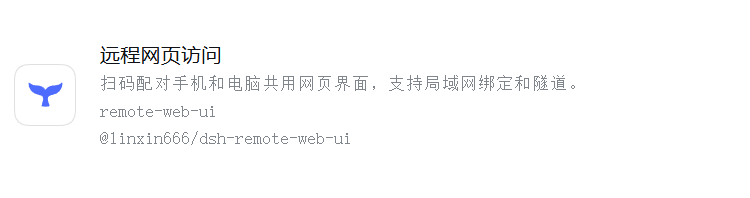
v0.7.0 起插件没有任何 UI 入口:没有「中文名」tab,也没有设置项。中文名由 host 覆盖官方显示元数据实现,管理与编辑走 HTTP API(见「使用」)。
官方插件页原地显示中文
v0.6.0 起,host 半边会在运行时包装宿主内部的显示元数据,把标签缓存里的中文名与一句话说明作为 {en, zh} 覆盖到官方页面上。这是纯显示层覆盖:不改任何插件包文件,也不影响包身份、安装、更新与卸载;默认开启。v0.6.1 起改用 symbol 标记识别 wrapper(Cordis 的 ctx.get 返回 traceable Proxy、函数引用每次不同),修复了 patched 状态误判与重复包装;v0.7.0 起同时包装 pluginManager.listBundles(),让插件包卡片也显示中文。
- 两处覆盖:
pluginPackages.metaOf()(官方「插件」页的已安装插件行 + 详情页标题/描述)和pluginManager.listBundles()(插件包卡片,它本来直接读readPluginMeta)。 - 效果:官方页面上的英文名原地显示为中文名,描述显示中文一句话;没有标签的插件回退英文(与原行为一致)。
- 原理:官方页面通过
pluginPackages.metaOf(specifier, parentURL)读取每个包的显示元数据(它会读该包locale/*.json的meta,缺省回退package.json的 name/description);插件包卡片则由pluginManager.listBundles()直接readPluginMeta。官方没有行级扩展点,所以这里在进程内包装这两个方法,用标签缓存补上title/description的{en, zh}语言映射,其余字段(如icon、error)原样保留。 - 失败安全:拿不到服务、方法不是函数、赋值失败或读缓存失败时,全部静默 warn 并回退宿主原返回值;包装可被 disposer 恢复,也能在服务实例被替换(HMR/刷新)后重新包装。
- 限制:依赖 DSH 内部服务,DSH 升级后可能失效(失效时自动回退英文,插件其它功能不受影响);仅影响显示,不影响包身份/安装/更新;若某些页面直接读
package.json而不走这两个方法,则不受影响。 - 关闭方式:启动 DSH 前设置环境变量
DSH_PLUGIN_LABELS_OFFICIAL_META=0,然后重启 DSH(会同时关闭上述两处覆盖)。未设置、设为1或其它值都保持默认开启。 - 生效方式:host 代码在进程启动时安装,需要重启 DSH 一次;重启后
GET /api/plugin-labels/list的响应里officialMeta字段({enabled, patched, service, bundles})可确认两处覆盖是否已生效,默认应为enabled:true, patched:true, bundles:true。
自动翻译新插件
host 启动约 4 秒后会自动补一次缺失标签:
- 默认开启;每次启动最多翻译 20 条(
MAX_PENDING_PER_CALL),只补空缺、不会覆盖手改标签,剩余的下次启动/手动调用再补。 - 关闭方式:启动 DSH 前设置
DSH_PLUGIN_LABELS_AUTO_TRANSLATE=0,然后重启 DSH;未设置/1/其它值均为开启。 - 与手动翻译共用同一个单飞锁与 120 秒超时;失败只写日志(warn),不抛错、不阻塞启动。
- 手动补翻译:
POST /api/plugin-labels/translate(见「使用」)。
安装
方式一:npm 包(推荐,npm publish 后)
在 DSH 插件页 → 添加插件 → 填包名 dsh-plugin-labels;或在创造模式会话里 plugin_manager → install_bundle → target: "dsh-plugin-labels"。发布后 profile 依赖形如
"dsh-plugin-labels": "dsh-plugin-labels@^0.8.0"。
方式二:从 Git 仓库安装
在 DSH 插件页 → 添加插件 → 填本仓库的 Git 地址(https://github.com/qyy2005/dsh-plugin-labels),DSH 会拉取并安装;此时 profile 依赖形如 github:qyy2005/dsh-plugin-labels。私有仓库需具备相应访问权限。
方式三:本机目录安装(开发用,link: 形式)
用 plugin_manager → install_bundle → target 填本目录绝对路径,profile 依赖形如 link:<本机插件目录绝对路径>,node_modules/dsh-plugin-labels 是指向本目录的符号链接。
- 适合开发:源码即已装内容,改完刷新/重启即可;源码目录不可删除或移动。
- 改 host
lib/index.js后需重启 DSH 才生效(v0.7.0 起 client 已无 UI)。 - 不建议手工编辑 profile 的
package.json来安装(易被 pnpm 清理)。
使用
v0.7.0 起没有 UI 入口,全部通过 4 个 loopback HTTP API 操作(也可以让 AI/脚本代改):
# 查看已装插件 + 标签 + 诊断字段(officialMeta)
Invoke-WebRequest -UseBasicParsing http://127.0.0.1:<端口>/api/plugin-labels/list

# 补翻译(无参 = 只补空缺;最多 20 条/次)
Invoke-RestMethod -Method Post -ContentType 'application/json' `
  -Body '{}' http://127.0.0.1:<端口>/api/plugin-labels/translate

# 显式重翻指定插件
Invoke-RestMethod -Method Post -ContentType 'application/json' `
  -Body '{"names":["@linxin666/dsh-remote-web-ui"]}' http://127.0.0.1:<端口>/api/plugin-labels/translate

# 手改一条(source=manual),或恢复 AI:{"name":"...","action":"reset"}
Invoke-RestMethod -Method Post -ContentType 'application/json' `
  -Body '{"name":"@linxin666/dsh-remote-web-ui","title":"远程网页访问","oneLine":"扫码配对手机和电脑共用网页界面。"}' `
  http://127.0.0.1:<端口>/api/plugin-labels/label

# 导入导出的 JSON(只保留已装插件名,保留 ai/manual 来源)
Invoke-RestMethod -Method Post -ContentType 'application/json' -InFile labels.json `
  http://127.0.0.1:<端口>/api/plugin-labels/import
端口就是当前 DSH Web GUI 的端口;这些路由只接受 loopback 请求且必须是 POST(/list 为 GET)。自动翻译会替你补空缺,手改过的条目不会被自动覆盖。
插件速查文档
node scripts/gen-doc.mjs 会在本地生成 PLUGINS.zh.md 与 PLUGINS.zh.html:中文名、原始包名、一句话作用、版本、说明(AI 生成 / 手改 / 待翻译)。HTML 是单文件、内联样式、可搜索、随系统深浅色,双击即可打开,无需联网。内容来自你本机的标签缓存与已装插件清单,默认不提交到仓库(已 gitignore)。
重新生成(装/卸插件,或翻译/手改标签之后):
node scripts/gen-doc.mjs                # 默认读取 $env:DSH_HOME(或 ~/.dsh)的 desktop profile
node scripts/gen-doc.mjs --home "$env:DSH_HOME" --profile desktop
npm run docs                            # 等价于 node scripts/gen-doc.mjs
生成器只读本地标签缓存与 profile 清单,产物不含本机路径、DSH_HOME、用户名或 token;生成的两个文件只留在本地(已 gitignore),不要手工编辑。
兼容性
- DSH 桌面版 0.2.1-rc.2(Web GUI);依赖官方 client 基座模块与 host 服务,只
require("react")。 - 本插件不依赖任何 UI slot:显示覆盖包装宿主的
pluginPackages.metaOf()(官方页行/详情)与pluginManager.listBundles()(插件包卡片),client 只注册locale字典。 - 拿不到这些内部服务时静默回退:不显示中文(回退英文),插件其它功能与 API 仍可用。
开发说明
- 无构建步骤:host 是 ESM 的
lib/index.js(inject: ["webServer"]);client 是手写的__ModuleLoader__bundlelib/client.js(v0.7.0 起只注册 locale,无 UI),仅require("react")。 - 管理 API(client 已无 UI,脚本/AI 直接调用):
GET /api/plugin-labels/listPOST /api/plugin-labels/translate(无参=补空缺;{names:[...]}=显式重翻)POST /api/plugin-labels/label({name,title,oneLine}或{name,action:"reset"})POST /api/plugin-labels/import
- 自动翻译:
apply里注册一个 4 秒后执行一次的定时器(unref),调用translatePending补空缺;可用DSH_PLUGIN_LABELS_AUTO_TRANSLATE=0关闭;异常只 warn。 - 显示覆盖:
installOfficialMeta/installBundleMeta用 symbol 标记识别 wrapper,幂等、可 dispose、服务替换后重打、失败静默回退。DSH_PLUGIN_LABELS_OFFICIAL_META=0同时关闭两处覆盖。 - 安全围栏:loopback 校验、
sec-fetch-site跨站拒绝、POST-only、翻译单飞锁(并发 409)、AbortSignal.timeout(120s)、未预期异常统一 500 不泄漏路径。 - 缓存:
<DSH_HOME>/plugin-labels.json,UTF-8 无 BOM,临时文件 +rename原子写;缓存version: 2,旧 v1 数据可迁移读取,单条非法条目丢弃。 - 验证:
node --check lib/index.js、node --check lib/client.js;host 可用桩ctx跑冒烟。 - 修改 host 后需重启 DSH 生效(本插件已没有需要刷新页面的 UI 改动)。
目录结构
dsh-plugin-labels/
├─ .gitignore              # 忽略 node_modules、日志与本地内部文档
├─ .github/
│  ├─ ISSUE_TEMPLATE/      # Bug / Feature 的 issue forms
│  └─ workflows/ci.yml     # GitHub Actions:node --check + JSON/BOM 校验
├─ docs/
│  └─ official-page.png    # 官方「插件」页原地显示中文名的截图
├─ package.json            # manifest(dsh.bundle 组合 patch、dsh.client 平台与 inject)
├─ cordis.patch.yml        # bundle 组合 patch
├─ lib/
│  ├─ index.js             # host:HTTP API + 显示覆盖 + 自动翻译 + 标签缓存
│  └─ client.js            # client:模块骨架,仅注册 locale(v0.7.0 起无 UI)
├─ locale/
│  ├─ zh.json              # 插件元数据(中文)
│  └─ en.json              # 插件元数据(英文)
├─ icon.svg                # 插件图标
├─ scripts/
│  └─ gen-doc.mjs          # 生成 PLUGINS.zh.* 速查文档(本地生成,已 gitignore)
├─ README.md
└─ LICENSE
License
MIT,见 LICENSE。Copyright (c) 2026 qyy2005
English summary
dsh-plugin-labels is a DSH (DeepSeek Harness) plugin that gives every installed plugin a Chinese name and a one-line explanation. The labels are shown in place on the official Plugins page: the installed-plugin rows, the detail pages and the plugin package cards (pluginManager.listBundles) all display the Chinese name and description, falling back to English for plugins without a label. The plugin has no UI entry point (no tab, no settings item): labels are managed through four loopback HTTP routes (or by an AI/script calling them), and results are cached under <DSH_HOME>/plugin-labels.json with manual edits never overwritten by automatic translation.
Each label is a Chinese name (≤10 characters) plus a one-line explanation (≤80 characters) that must explain how to use the plugin: the problem it solves, where in DSH the user enters or operates it, and a concrete first step. When the entry point cannot be inferred, the model is instructed to write 入口以界面为准 instead of inventing menus.
Newly installed plugins are translated automatically: about 4 seconds after host startup one pass fills up to 20 missing labels (set DSH_PLUGIN_LABELS_AUTO_TRANSLATE=0 and restart DSH to disable it). The display overrides can be disabled together with DSH_PLUGIN_LABELS_OFFICIAL_META=0; GET /api/plugin-labels/list reports officialMeta: {enabled, patched, service, bundles} for diagnostics. Both overrides require one DSH restart after installation.
The client half is a hand-written __ModuleLoader__ bundle with no build step that only requires react (v0.7.0: locale registration only, no UI); the host half is an ESM plugin exposing four loopback-only HTTP routes plus the display overrides and the startup auto-translate. Verified on DSH desktop 0.2.1-rc.2. MIT licensed.
No comments yet. Be the first to write one.