dsh-web-restart
DSH web 插件:从界面重启 dsh web 服务,不再需要人工重启;并可选地在重启后自动继续被中断的会话。
功能图示
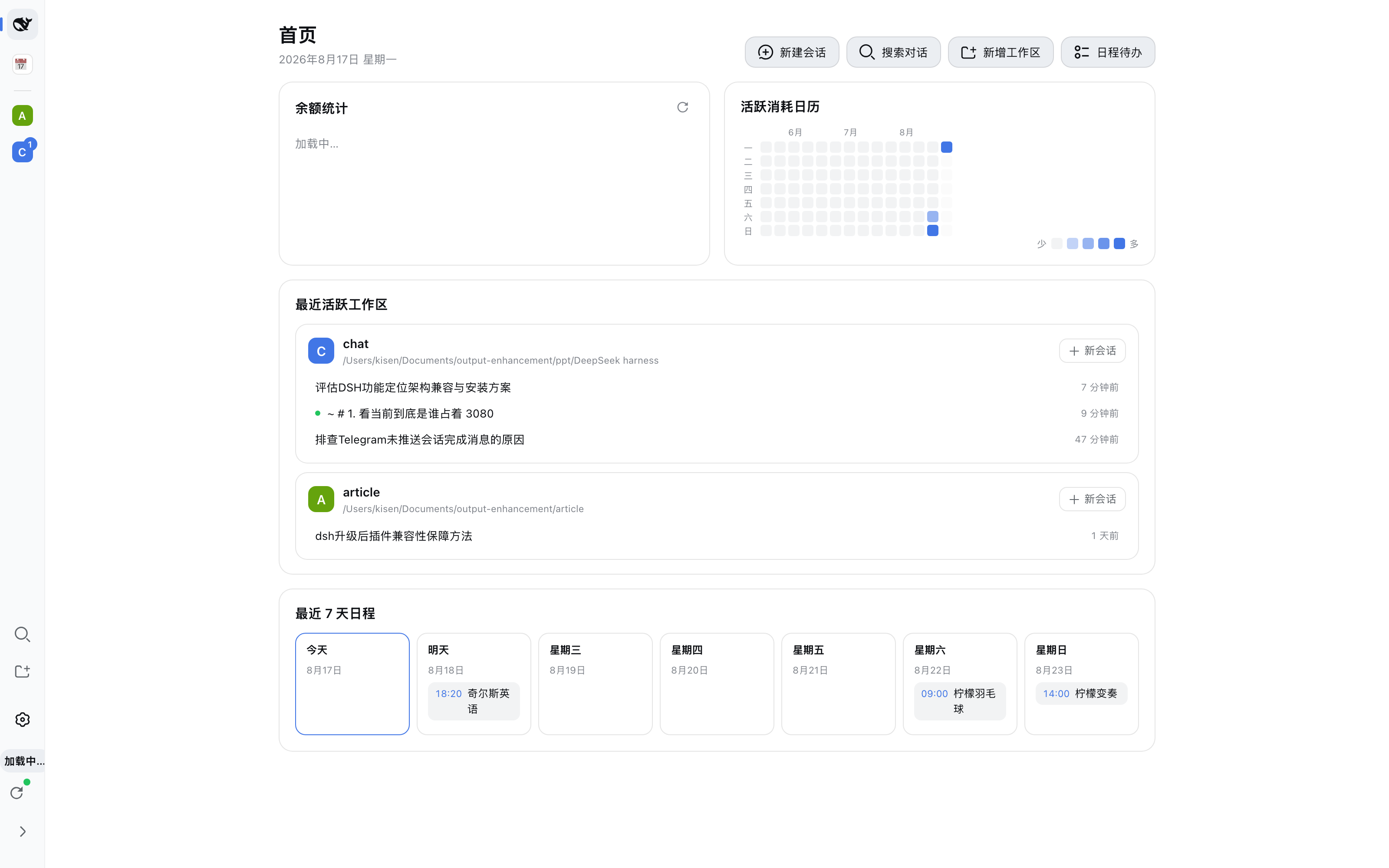
侧边栏底部重启按钮:任何布局(首页 / 会话 / 日历模式)下都固定在左 rail 最底部。 圆点颜色反映状态:绿 = 服务运行中、监督进程在线;黄 = 已有重启请求排队;红 = 监督进程未运行。
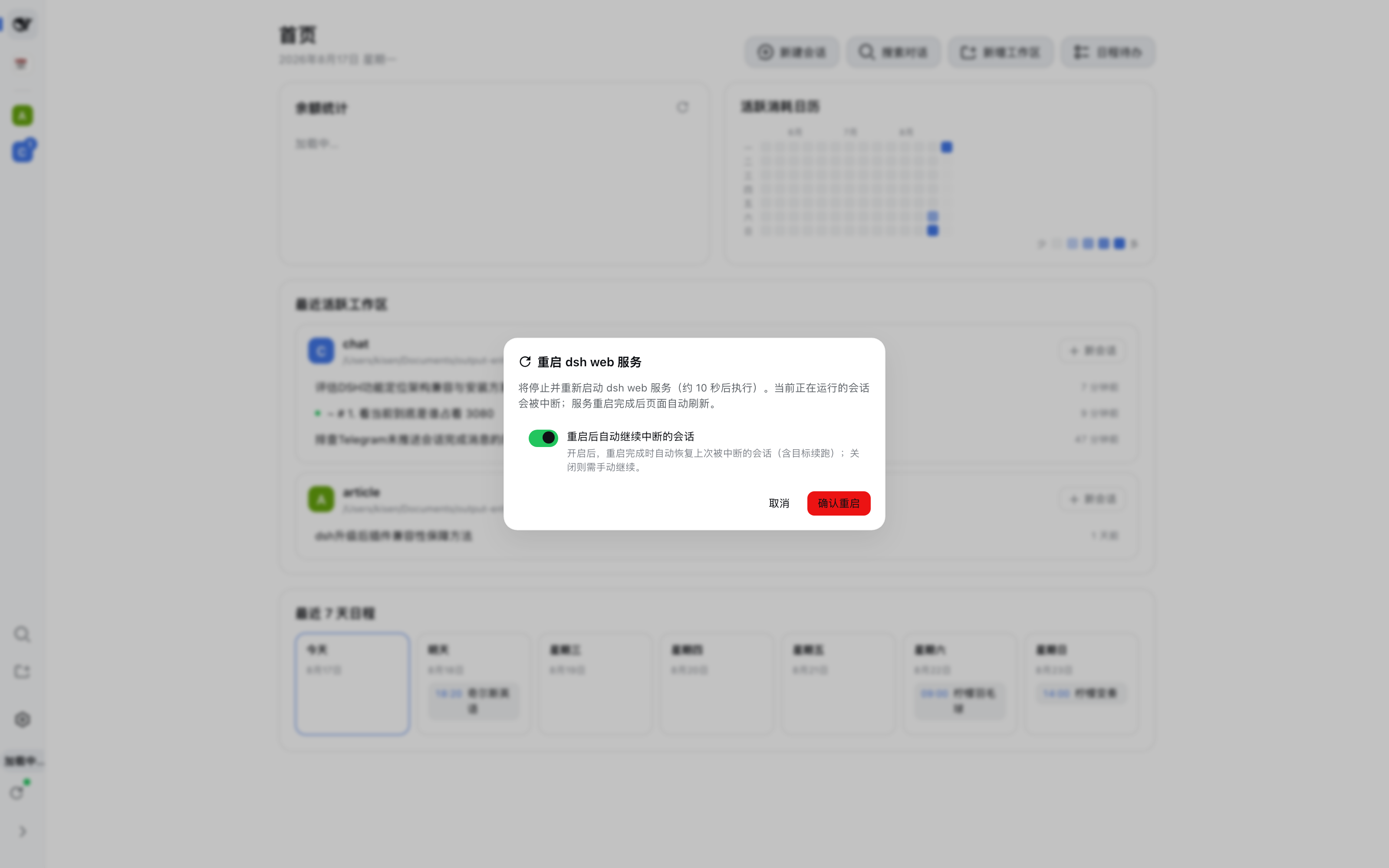
确认弹窗:点击按钮后居中弹出,说明操作影响并展示"重启后自动继续中断的会话"开关; 只有点击"确认重启"才会真正发出请求,杜绝误触。
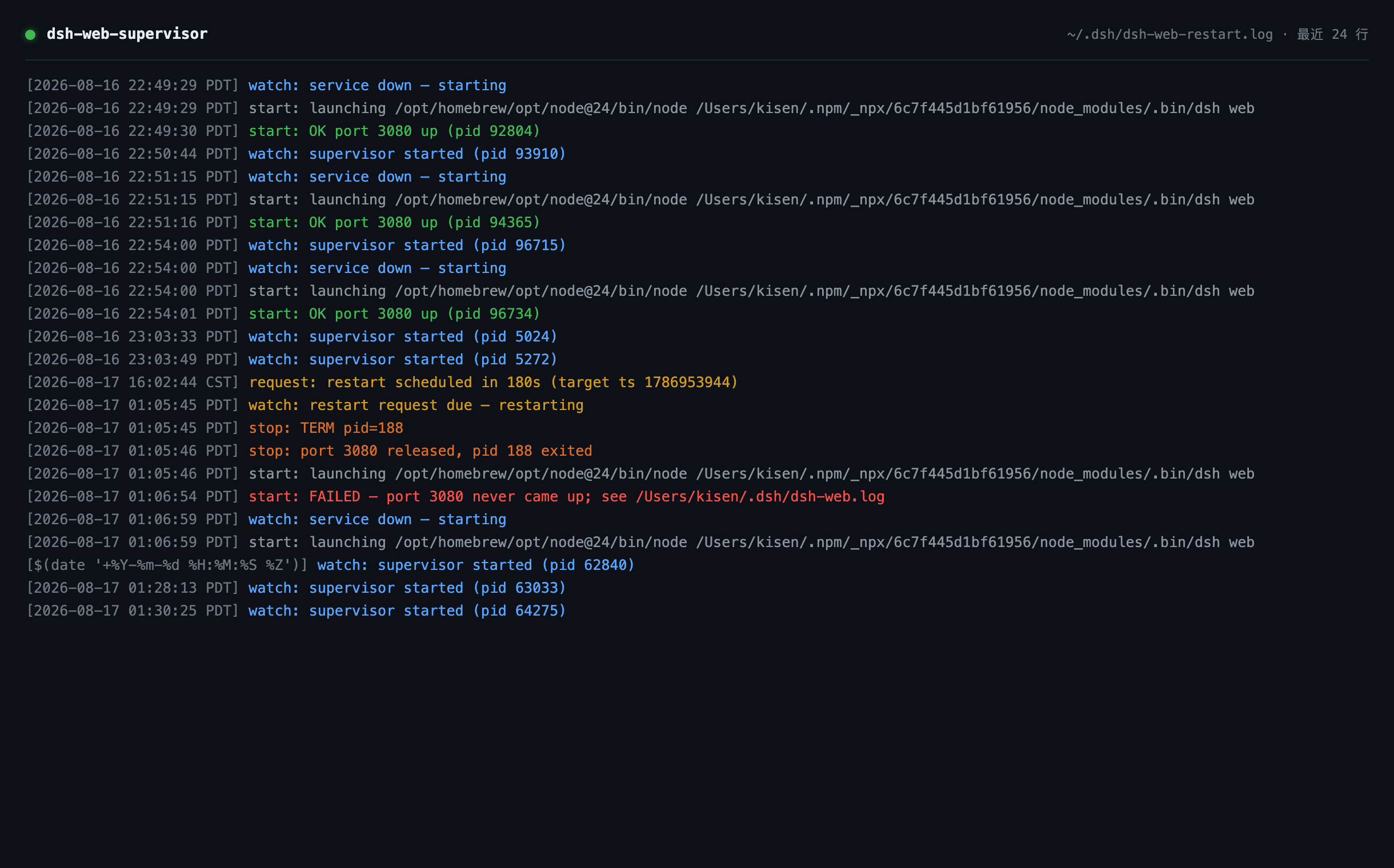
监督进程日志(~/.dsh/dsh-web-restart.log):完整记录 轮询 → 请求到期 → 停止(TERM)
→ 端口释放 → 重新拉起 的链路;服务意外掉线时 watch 直接拉起(崩溃自愈);启动失败会把
服务日志尾部一并落盘,方便定位(如插件依赖缺失)。
应用场景
- 升级 dsh / 插件后一键生效:host 半的改动需要重启 dsh web 进程。以往要在终端里手动 kill + 重启(还要担心会话中断);现在点一下按钮,约 10 秒后服务回来,被中断的会话自动继续。
- 长任务与目标续跑(autoContinueAfterRestart):夜间无人值守跑 goal 任务时,任何一次 服务重启(升级、掉线、手动)后,被中断的顶层会话与 active goal 会在下次启动时自动恢复续跑, 不用早上起来手动"继续"。
- 服务崩溃自愈:dsh web 意外退出后,launchd 监督进程 5 秒内自动拉起(无需登录终端); GUI 状态点实时反映监督进程是否在线。
- 无人值守 / 远程环境:监督进程独立于 dsh web 进程树(launchd 托管、KeepAlive 保活),
即使 dsh web 完全不可用,重启链依然可用;
halt命令一条命令彻底停掉守护进程。 - 本地开发迭代插件:改了插件 host 代码后点按钮重启即可生效;
ensure_deps会在启动前 自动补装缺失的插件依赖——曾因插件目录node_modules被清导致重启后起不来、服务宕机约 一小时,现在 supervisor 能自愈。
名字
- 插件包:
dsh-web-restart(host 行 id:web-restart) - 配套监督进程(launchd):
com.dsh.web-supervisor,脚本~/.dsh/scripts/dsh-web-supervisor.sh
功能
- Host 端(
lib/index.js,注入webServer/agents/goals/sessionQuery/sessionPersistence):GET /plugin/dsh-web-restart→ 返回当前进程 pid、监督进程是否存活、是否有待执行的重启请求、自动继续开关与上次扫描结果POST /plugin/dsh-web-restart(body{ "delay": 10 })→ 写入重启请求文件~/.dsh/dsh-web.restart-requestGET|POST /plugin/dsh-web-restart/config→ 读写自动继续开关(持久化到~/.dsh/dsh-web-restart.json)
- Client 端(
lib/client.js,注入slots、locale、settingsScope):- 在侧边栏(左 rail)最底部(
sidebar.rail.footer插槽,与余额等底部项并列;首页 / 会话 / 日历模式等任何布局都固定可见)放重启按钮:环形箭头 icon(rail 展开为宽栏时带文字标签),带状态圆点(绿=运行中 / 黄=重启排队中 / 红=监督进程未运行);- 绿 = 服务运行中、监督进程在线;黄 = 已有重启请求排队;红 = 监督进程未运行 / 状态获取失败
- 点击按钮弹出居中确认弹窗:描述操作效果(服务将停止并重启、运行中的会话会被中断、自动继续开关状态)与"确认重启 / 取消"按钮;只有点击"确认重启"才会发出请求,杜绝误触;确认后图标旋转表达"重启中",页面在延迟后自动刷新(Esc / 点击遮罩 / 取消可关闭弹窗,监督进程未运行时确认按钮禁用)
- 在侧边栏(左 rail)最底部(
- 设置卡片(client 半):在 设置 → 插件 → 插件配置 注册一张卡片(id
web-restart),就地展开后是"重启后自动继续中断的会话"开关,按 settings 领域惯例:暂存 → 保存 / 放弃修改 / 恢复默认,并标注是否"已覆盖"。已知限制:在 include 方式挂载的部署(如仓库
link:工作区插件)下,插件注册的 settings 命名空间可能不出现在 UI 的settings.describe列表里,卡片因此静默不显示。开关此时可用 重启弹窗内的同名开关,或直接编辑~/.dsh/settings.yaml的web-restart分节; 两条写入路径都走同一个 settings 文档,效果一致。
自动继续(autoContinueAfterRestart)
- 开(默认关):服务重启完成后(插件启动约 2 秒后)执行一次扫描:
- 枚举所有持久化的顶层会话(
delegationDepth === 0,子代理随父会话一起恢复); - 读取每个会话日志尾部,识别"被上次停机中断"的会话:开放的 turn(进程被强杀)或 turn/end 因非用户原因中止(SIGTERM 优雅停机时 agent 以
{kind:'disposed'}/ goal 驱动器以{kind:'parent'}中止;用户主动点"停止"是{kind:'user'},绝不会被自动继续); - 只处理上次启动标记之后被中断的会话(配置文件的
lastBootAt),更早的崩溃残留不会突然被拉起; - 对每个会话:
ctx.agents.resume恢复 agent(日志尾部的损坏由持久化后端的崩溃修复自动补齐,中断的工具调用会获得TOOL_OUTCOME_UNKNOWN/TOOL_NOT_STARTED结果); - 有 active goal →
ctx.goals.resume重新武装续行,goal-round-driver 自动排下一轮<goal_round>继续跑(暂停/阻塞的 goal 不动,尊重用户意图); 无 goal → 注入一条合成的用户消息"(服务已重启)请继续之前中断的工作…"触发新回合; - 结果写入
~/.dsh/dsh-web-restart.json的lastSweep,并输出到服务日志(~/.dsh/dsh-web.log)。
- 枚举所有持久化的顶层会话(
- 关:一切照旧——重启后需要人工打开会话继续(说"继续"即可,goal 会话也可
/goal resume)。
配置方式(二选一)
- 设置界面(推荐):设置 → 插件 → 插件配置 → 展开"重启服务设置"卡片 → 切换开关 → 保存。 (若卡片因部署差异未显示,用重启弹窗内的同名开关,效果相同。)
- 设置文档 / 补丁:用户覆盖写入
~/.dsh/settings.yaml的web-restart分节(直接编辑该文件也会被 watcher 热发布):
组装默认值在插件的web-restart: autoContinueAfterRestart: truecordis.patch.yml(config.autoContinueAfterRestart: false),机器级补丁(~/.dsh/cordis.patch.yml整行替换该行)可改默认值。 优先级(settings 领域标准):用户设置分节 > 注册方 base(entry 配置)> schema 默认 false。 旧版本写在~/.dsh/dsh-web-restart.json里的开关会在首次启动时自动迁移进设置文档(该文件此后只存运行状态)。
设计取舍
- 只继续"被上次重启中断"的会话,不自动拉起空闲会话,也不复活用户主动停止的工作;
- 恢复的 agent 与 GUI 打开会话是同一机制(
ctx.agents.resume,模型选择从会话日志的最近请求头继承),因此行为与手动打开一致; - 若重启后你已先打开了某个会话并开始新回合(agent 正在运行),扫描会跳过它,不会重复注入。
为什么重启动作不在插件里做
插件运行在 dsh web 进程内部,杀掉宿主进程等于自杀(脚本会随宿主一起死)。 因此插件只负责"请求",真正的 kill + 启动由 launchd 托管的监督进程(进程树之外)执行: supervisor 每 5 秒轮询请求文件,发现到期请求就执行 停止 → 等端口释放 → 启动 → 健康检查; 服务意外掉线时 supervisor 也会直接拉起(崩溃自愈)。
监督脚本(v0.3)要点:
ensure_deps:每次启动前检查 profile 里所有link:插件目录的依赖,缺失则自动npm install——修复了"插件目录 node_modules 被清后 dsh web 启动即崩、服务宕机数小时"的故障;- 失败诊断:
start失败时把~/.dsh/dsh-web.log尾部写进监督日志,根因不用翻文件; - 单实例锁(mkdir 原子锁 + 陈旧锁回收),避免 watch 重复运行;
- 失败退避:连续启动失败时轮询间隔 5s → 30s → 60s,避免空转;
halt命令:一条命令彻底停掉守护(launchctl bootout + 停服务);注意stop只是 临时停——watch 会在 5 秒内拉回(launchd KeepAlive 也会重生被杀的 supervisor)。
安装
dsh plugin --profile web add dsh-web-restart
# 或使用 GitHub Release tarball:
# dsh plugin --profile web add https://github.com/qschen86/dsh-web-restart/releases/download/v0.2.0/dsh-web-restart-0.2.0.tgz
dsh --profile web --dump-config   # 验证条目已加入 bundles
# 重启 dsh web(host 半生效),刷新页面(client 半生效)
初始化(首次安装必做)
重启按钮本身是"请求方"——真正的 kill + 启动由 launchd 监督进程执行
(按钮显示红色状态点 = 监督进程未运行)。监督脚本与 plist 模板已随包发布
(tarball 内 scripts/,或仓库 scripts/ 目录):
部署监督脚本:
mkdir -p ~/.dsh/scripts
cp scripts/dsh-web-supervisor.sh ~/.dsh/scripts/ && chmod +x ~/.dsh/scripts/dsh-web-supervisor.sh
~/.dsh/scripts/dsh-web-supervisor.sh status   # 此时应显示 stopped
部署 launchd 配置(按本机调整脚本路径;dsh 不在 PATH 时在
EnvironmentVariables里设DSH_BIN,例如 npx 缓存路径):cp scripts/com.dsh.web-supervisor.plist.example ~/Library/LaunchAgents/com.dsh.web-supervisor.plist # 编辑 plist:把 /Users/YOUR_USER 换成你的用户名 launchctl bootstrap gui/$(id -u) ~/Library/LaunchAgents/com.dsh.web-supervisor.plist验证:约 5 秒后
~/.dsh/scripts/dsh-web-supervisor.sh status应输出running;再刷新页面,重启按钮应变为绿色状态点。卸载插件时一并移除监督进程(可选):
launchctl bootout gui/$(id -u)/com.dsh.web-supervisor
rm ~/Library/LaunchAgents/com.dsh.web-supervisor.plist
dsh plugin --profile web remove dsh-web-restart
只装插件不装监督进程 = 按钮永远红色、重启请求不会被执行(插件与脚本设计上 分离,监督进程缺位不会影响 dsh web 本身)。
彻底停止 / 重新启用守护(可选):
~/.dsh/scripts/dsh-web-supervisor.sh halt                          # 停守护(bootout + 停服务)
launchctl bootstrap gui/$(id -u) ~/Library/LaunchAgents/com.dsh.web-supervisor.plist   # 重新启用
依赖说明
host 半静态导入 @deepseek-ai/schemastery(构造 settings 命名空间的 schema),
已在 package.json 声明为正式依赖(dependencies)。
- tarball /
dsh plugin add安装:依赖随包安装进 profile,由包管理器解析,无需额外处理。 - 本地
link:开发(仓库直接挂进 profile,如dsh-web-restart: link:...):pnpm 的link:只建符号链接、不会安装目标包自身的依赖——插件目录必须有自己的node_modules(cd dsh-web-restart && npm install)。依赖缺失时 dsh web 启动会因插件树 加载失败直接退出(ERR_MODULE_NOT_FOUND,曾导致重启后服务宕机约一小时)。 - 自愈:监督脚本 v0.3 的
ensure_deps在每次启动前检查并自动补装缺失依赖;即使插件 目录被git clean -fdx清空,下一次重启也会自动恢复。
相关文件
- 重启请求文件:
~/.dsh/dsh-web.restart-request(内容为到期 unix 秒时间戳) - 运行时状态(启动标记 / 上次扫描结果,非用户配置):
~/.dsh/dsh-web-restart.json;用户配置:~/.dsh/settings.yaml(web-restart分节) - 监督进程日志:
~/.dsh/dsh-web-restart.log、~/.dsh/dsh-web.log - launchd:
~/Library/LaunchAgents/com.dsh.web-supervisor.plist - 截图:
docs/screenshots/(01 重启按钮 / 02 确认弹窗 / 04 监督日志)
No comments yet. Be the first to write one.