
Incremind
Image and PDF recognition support SoMark OXR-1.0: select remote vision, set https://free-oxr.somark.cn/api/v1, model OXR-1.0, and placeholder key dummy. Save and enable vision sharing. Text and scanned PDFs retain the original file and use the parsed Markdown for organization and source evidence. Private PDFs and disabled sharing use local text extraction; scanned files without extractable text report a failure. Password-protected and damaged PDFs are rejected on upload.
Linux servers with a compatible NVIDIA GPU can run SoMark OXR on the same host.
A second brain that remembers what is new.
Give it the material you choose. It organizes and archives it, extracts what adds to what you already know, and turns proposed insights into long-term memory only after you confirm them.
Quick start · Features · Evaluation · Usage · Architecture · Privacy · Development






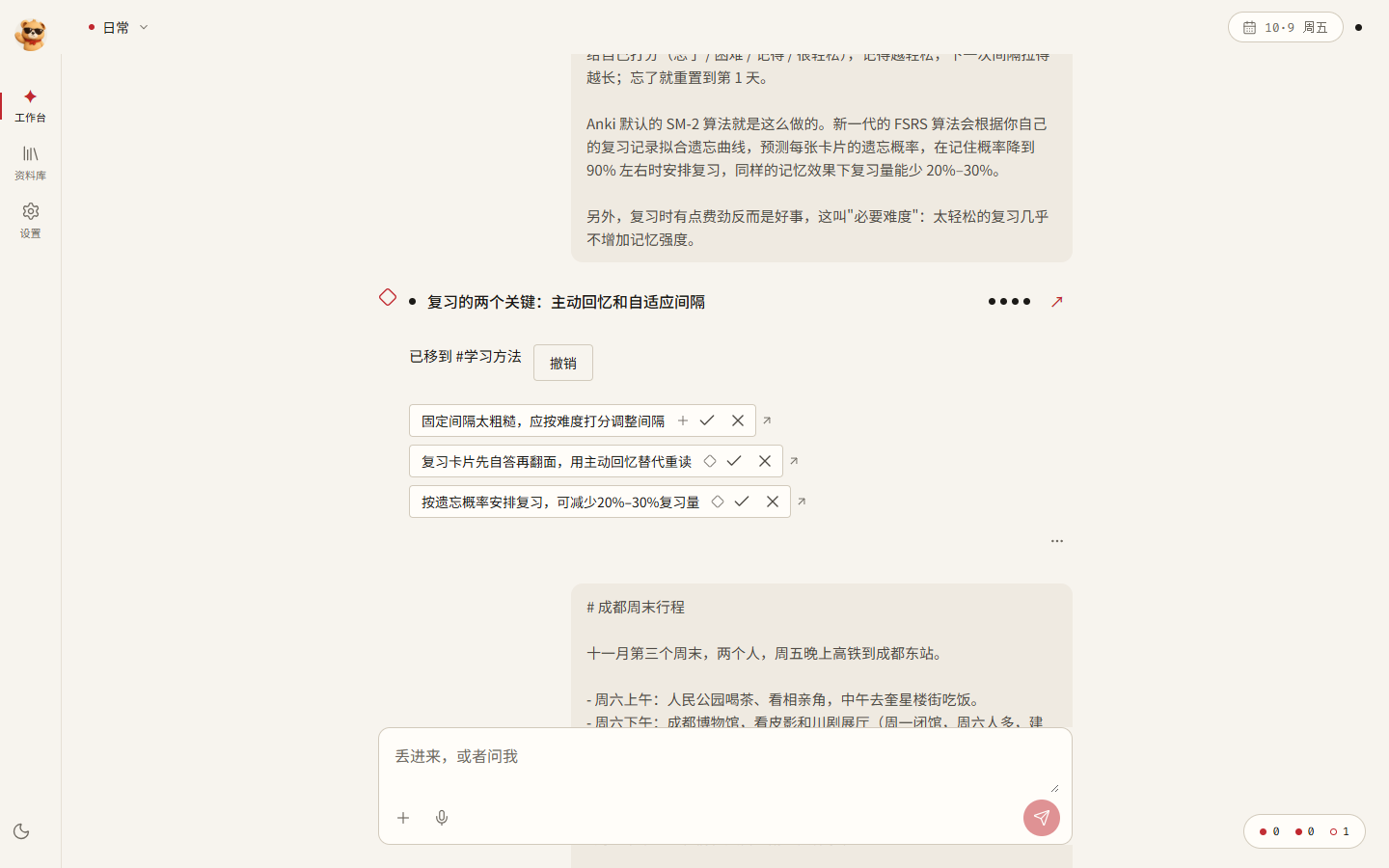
Watch the introduction
A 65-second introduction to Incremind, an incremental brain: add material, build layered memory, confirm insights, answer with sources, and connect external agents. Chinese visuals with English on-screen captions · 1080p30.
https://github.com/user-attachments/assets/6eaa6736-ee29-4c55-b72c-46b52b47d058
Download video · No-music version with sound effects · Video release
Why I am building it
I want a second brain that can work alongside me over time.
The idea comes from everyday research. Whenever I ask AI a question or give it a task about the same project, I have to explain the background, my existing judgments, and the material I have already found all over again. Knowledge accumulates, but conversations often start from scratch.
Incremind is designed around two goals:
- Turn things I share into lasting knowledge. Accept articles, personal judgments, recordings, videos, and ideas captured on the go; organize them by project and scene; and turn them into knowledge I can revisit and insights I can confirm.
- Use that knowledge to understand questions and complete tasks. Identify what I am asking, find the relevant projects and scenes, and give the model their existing insights, sources, and context so it can answer everyday questions and handle routine tasks with less repeated explanation.
Saving articles and videos does not automatically make their contents useful or memorable. Incremind therefore focuses on what each new source adds:
- Compare new material with existing insights. Extract three kinds of changes: additions such as new conditions, examples, or practices; differences from an existing claim; and new methods. Material that repeats what you already know adds a supporting source to the existing insight rather than creating another entry.
- Store methods with their conditions of use. Each insight says when it applies, so relevant methods can be recalled when you ask a question or work on a task.
- Let you decide what becomes established knowledge. Extracted insights start as pending confirmation. A single click on the receipt activates them. Confirmation, edits, and forgetting take effect immediately; further inference runs in the background.
- Remember and forget in a human-like way. Frequently used knowledge becomes stronger, while unused knowledge gradually leaves automatic recall. Originals remain in the Library and can be found and restored at any time.
For example, an introductory article on spaced repetition might produce an insight about reviewing on days 1, 2, 4, 7, and 15. A later article on active recall and adaptive intervals should add only the relevant differences and methods: adjust intervals to difficulty, and try answering before revealing the answer.
Features
The workbench lets you capture material immediately and shows when the original is saved and when processing finishes. The homepage shows pending insights and recent activity for the current project, with #, /, and @ input shortcuts. Settings organize models by purpose and offer templates when creating a project. Supported quick commands show a preview before applying changes. The shared UI conventions are maintained in DESIGN.md.
| Status | Feature | What it does |
|---|---|---|
| ✅ | One input box | Automatically handles remembering, asking, and doing tasks. Mixed requests are split and handled separately. Personal receipts support changing actions, merging adjacent parts, and removing parts, with source and state checks before execution. Original results are retained. |
| ✅ | Automatic organization | Builds memory in layers: original → organized note + summary → insight. Supports text, links, PDFs, and DOCX files. |
| ✅ | Automatic project assignment | Without an explicit #Project, assigns material to the most relevant existing project or creates one for a new topic. Everyday items stay in the Everyday space. Assignment can be undone with one click. |
| ✅ | Incremental insights | Compares material with existing insights and proposes additions, differences, and new methods for confirmation on the receipt. |
| ✅ | Answers with citations | Uses eligible insights, summaries, organized notes, and originals as evidence; citations open the original source. Questions in Everyday can be routed to the relevant project. |
| 🧪 | Agentic retrieval | The model decides whether to search or read again, can consult applicable skills enabled for the current project and configured web search, and asks for missing conditions before continuing in the same conversation. See Agentic RAG (Chinese) for the S1–S4 stages and validation scope. |
| ✅ | Task execution | Uses project memory, confirmed profile facts, and Library lookup to create output documents, which you can continue revising or regenerate. Real DeepSeek initial-draft and continuation runs have verified note facts, version history, and source provenance. |
| ✅ | Library | Browse insights, summaries, organized notes, and originals; confirm, edit, forget, or restore insights. Recover unsaved note edits in the same browser, with revision checks when saving. View saved revision metadata from the editor menu. |
| ✅ | Privacy controls | Keeps data on the computer or server hosting the application, excludes private projects from external model requests, and records a receipt for each external call. |
| 🧪 | More input formats | Image OCR, audio and video transcription, and Bilibili favorites import; requires the corresponding models to be configured. |
| 🧪 | Forgetting and daily organization | Adjusts recall weights by usage and a forgetting curve. Daily organization proposes patterns from recurring material for your confirmation. |
| 🧪 | Inspiration extraction | Daily extraction defaults to 09:00 China time and can be disabled or rescheduled. It selects up to three eligible notes from one project and scene; unread results appear in the existing tray and bear indicator. Reading clears the alert and leaves viewpoints awaiting confirmation. You can also choose notes manually. Proposed viewpoints retain explanations and exact source passages, and require your confirmation; runtime validation is pending. |
| 🧪 | Local embeddings | Install EmbeddingGemma from Settings, approximately 1.5 GB, for semantic retrieval without a network connection. |
| 🧪 | Claude Code, Codex, and DeepSeek Harness | Settings → Connections provides client setup guides and separate memory and task readiness. Servers also provide native remote MCP with scoped keys and OAuth. Workbench delegation saves new drafts, shows reported steps and usage, and supports stopping. Managed local Codex can use the configured official Terra model; server delegation is limited to DeepSeek Harness. See the agent guide (Chinese). |
| 🧪 | Servers and multiple users | Home or cloud server deployment, device pairing, backup, and recovery. See the server guide (Chinese). |
✅ Basic usage paths are implemented. 🧪 Optional dependencies or further real-environment validation are required. The table below states the actual validation scope; the icons do not establish coverage of every scenario.
Evaluation and verification
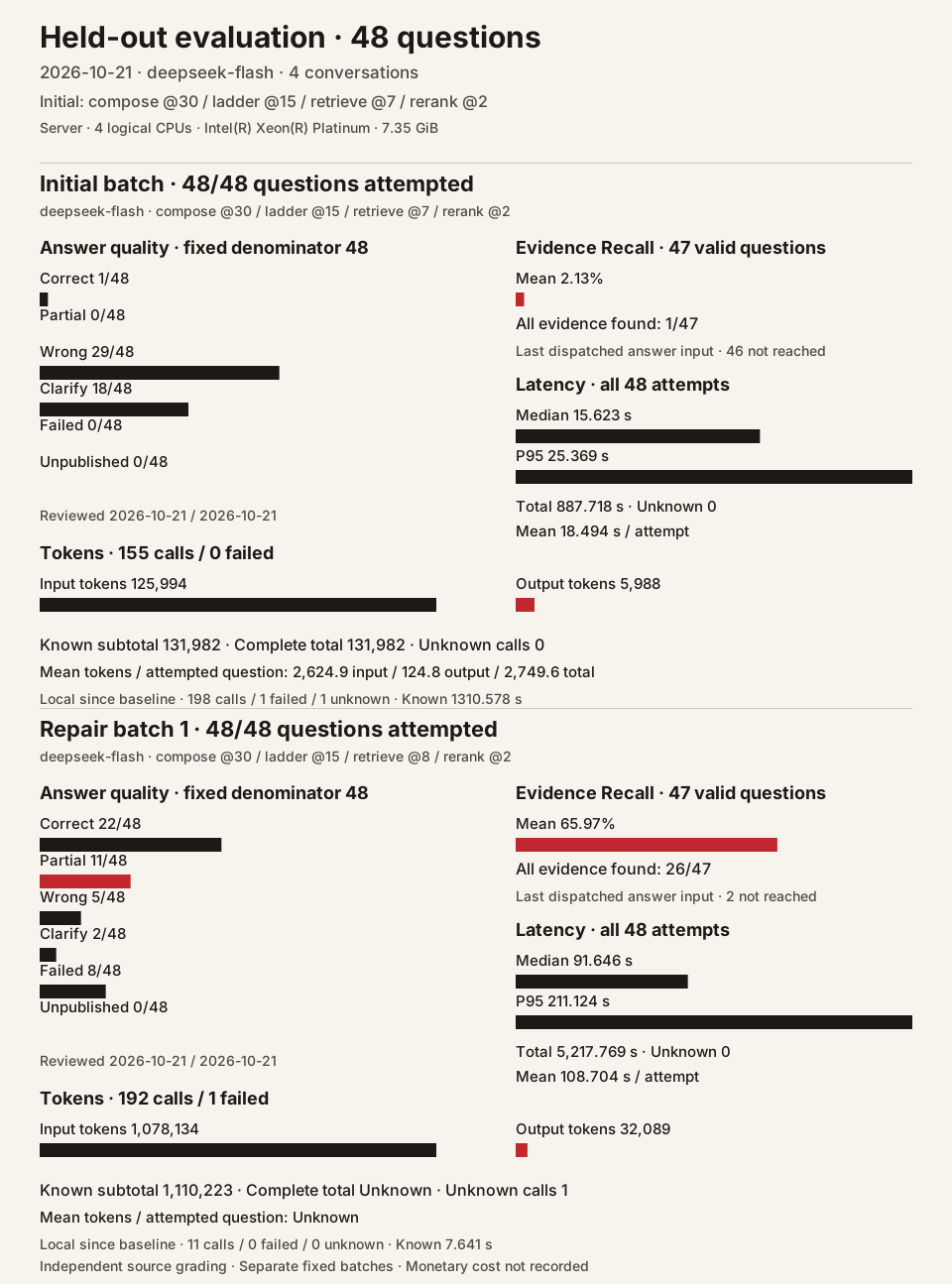
The same frozen 48 questions were run twice on a server with 4 logical CPUs and 7.35 GiB memory, using real DeepSeek Flash and CPU EmbeddingGemma 2 through the normal Workbench ask workflow. The dataset contains four conversations, 116 sessions, and 2,536 messages; it has no conversation or question-text overlap with the development set.
| Metric | Initial retrieve@7 |
Repair retrieve@8 |
|---|---|---|
| Attempted questions | 48 / 48 | 48 / 48 |
| Correct / partially correct / wrong | 1 / 0 / 29 | 22 / 11 / 5 |
| Clarifications / failures / unpublished | 18 / 0 / 0 | 2 / 8 / 0 |
| Mean evidence Recall, 47 eligible questions | 2.13% | 65.97% |
| All evidence found | 1 / 47 | 26 / 47 |
| Mean / median / P95 request time, all attempts | 18.494 / 15.623 / 25.369 s | 108.704 / 91.646 / 211.124 s |
| Known input / output tokens | 125,994 / 5,988 | 1,078,134 / 32,089 |
| Unknown-usage calls | 0 | 1 |
| Physical model requests | 155 | 192 |
Both batches used compose@30 / ladder@15 / rerank@2. The repair makes original material reachable when upper memory layers are empty; retrieve@8 was the repair batch's version. Two independent agents reviewed frozen answers against the complete original conversations. Recall measures evidence in the last dispatched answer input, with one invalid source annotation retained as null and excluded from its 47-question denominator. Time covers each complete server-side Workbench request, including failures and retries. The repair token count is a known subtotal; its complete total remains null because one transport failure has unknown usage. All 347 model attempts have terminal records. The eight Workbench 502 responses and all quality failures are retained.
Current defaults: compose@37 / ladder@15 / retrieve@9 / rerank@2.
The evaluation results above retain the versions used for their respective runs. Check the current defaults against the policy registry with python tools/check_doc_defaults.py; the commit guard checks the staged versions of these documents and ACTIVE together.
The evaluation guide (Chinese) records grading, source annotation issues, CPU encoding, failures, and reproduction commands. The aggregate JSON and tools/rag_report.py reproduce this chart without model calls. Presentation follows the OpenViking RAG report. Monetary cost was not recorded. tools/rag_dataset.py freezes the original inputs; tools/rag_holdout.py runs the normal application workflow on the server.
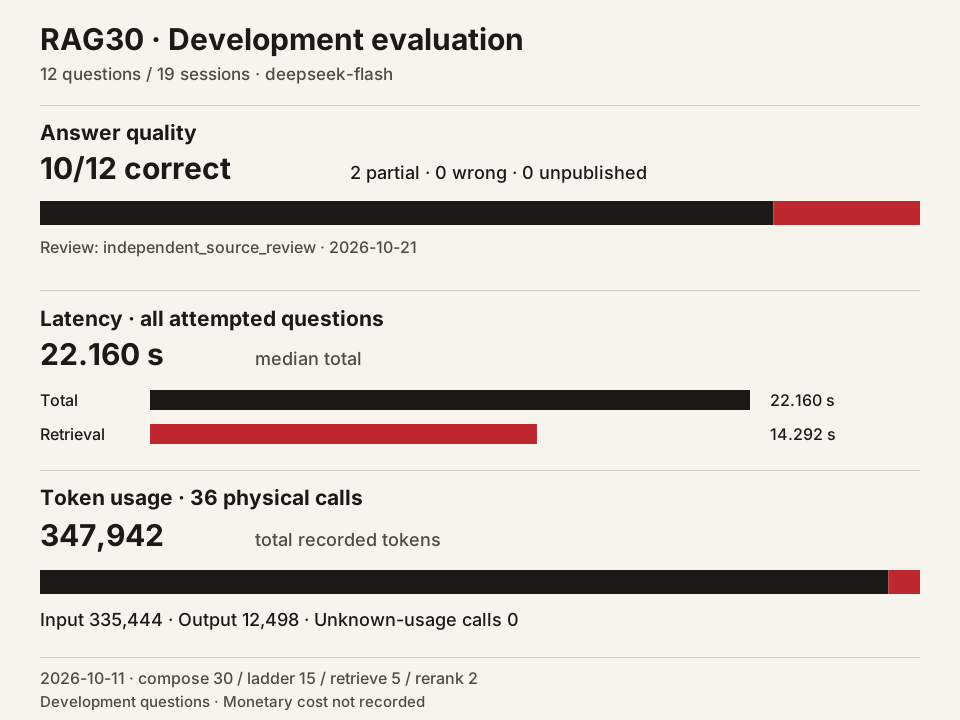
| Fixed development set | Observed result |
|---|---|
| Source review on 2026-10-21 | 10 correct · 2 partially correct · 0 wrong · 0 unpublished |
| Questions / conversation sessions | 12 / 19 |
| Median total / retrieval latency, all 12 attempts | 22.160 / 14.292 s |
| Recorded input / output tokens | 335,444 / 12,498 |
| Physical model requests | 36 |
RAG30-20261011 used DeepSeek Flash, local EmbeddingGemma 2, and compose@30 / ladder@15 / retrieve@5 / rerank@2. The review checked frozen answers against all source messages with no new answer requests. These questions were repeatedly used during development. Supported unknown answers can count as correct; partial answers omit required facts. Its original aggregate JSON remains available.
Real DeepSeek acceptance on 2026-10-15 used two synthetic scenarios with pre-indexed originals:
| Scope | Observed result |
|---|---|
Final attempt, retrieve@7 |
Three Workbench inputs returned HTTP 200; 17 functional checks passed, including retrieval, reading, clarification, and continuation after a reply without a question mark. |
| All three attempts | 38 real model requests; 51,797 input / 4,877 output tokens, including the earlier @6 decision failure and @7 follow-up failure. Unknown usage: 0. Monetary cost was not calculated. |
This acceptance run covers retrieval, reading, clarification, and continuation in two synthetic scenarios. Live web search, AI organization after upload, and vector quality need separate evaluation. See the actual attempts, timings, and validation limits (Chinese).
Engineering verification below is separate from answer quality:
| Area | Environment and scope | Observed result |
|---|---|---|
Agentic RAG isolated controls (retrieve@6) |
Full application factory using the then-active defaults without policy overrides; temporary SQLite and fixed local HTTP model responses | 31 assertions passed for repeated retrieval, layered reading, clarification continuity, unconfigured web search, and idempotency. These fixed-response controls do not measure live model or web-search quality. |
| Built-in task recall | Project retrieval, storage, read proofs, drafts, and receipts; synthetic model HTTP | 21 distinct controls passed, including profile and Library selection, prior-source revocation during retrieval, and a declared final draft. See scope and retained failures (Chinese). No new paid model requests. |
| DeepSeek Harness task to draft | Isolated data root on Ubuntu 22.04; real Harness and DeepSeek Flash, including authenticated MCP memory tools | After a fix, one real task passed 29 checks. Both real attempts used 4,017 input / 1,226 output tokens in total; the first MCP tool-call failure is retained. |
| Claude Code 2.1.316 MCP and connection UI | Official native client in isolated configuration for tool discovery; separate Python MCP SDK → stdio → HTTP → SQLite write checks; isolated UI and HTTP interactions | The native client discovered seven tools. Independently, the SDK saved one unreviewed original with client=claude and verified invalid-input and privacy/egress rejection; zero model calls; 12 connection and 4 model-warning DOM cases passed. Real configuration storage and recovery checks passed for provider drafts, endpoint validation, legacy API-mode recovery, plugin toggles, revision conflicts, and daily limits. Recording switches, snapshot generation, native clipboard writes, and frontend user-space invalidation also passed real interactions. Full build, clipboard byte readback, server user switching, paid execution, and remote HTTPS remain pending; verification scope. |
| Correction after Hy-ASR | Real SQLite, Turns, and confirmation; simulated ASR delivery and model transport | 30 new checks and 13 existing targeted checks passed; one pre-existing comment-fetch failure is retained. Real recognition and correction quality await evaluation. |
| Server CPU embeddings | Ubuntu 22.04 instance, real model assets, and device pairing | Loading, encoding, unloading, and reloading verified. GPU and standalone vector-service integration remain unverified. |
The material-analysis candidate has confirmed L1 notes for 7/19 sources; the next source failed quotation validation. No new 12-question answer evaluation was run. Candidates compose@31, @32 / ladder@16 produced wrong or unpublished answers in retests; the defaults at that checkpoint were compose@33 / ladder@15.
The RAG pilot report (Chinese) retains earlier protocols and results.
Quick start
Requirements:
- Windows 10 or 11.
- Python 3.12. Select Add python.exe to PATH during installation.
- Node.js: 20.x ≥ 20.19.0, 22.x ≥ 22.13.0, or ≥ 24.0.0. Version 22.x ≥ 22.13.0 is recommended.
- A model API key. DeepSeek is the suggested provider; OpenAI-compatible endpoints are also supported.
Three steps:
Clone the repository into a short path, such as
D:\incremind. Deep directory paths can encounter the Windows 260-character path limit.git clone https://github.com/qingmingyiyang/Incremind.git incremindDouble-click
start.batin the repository. The first run downloads and installs dependencies and takes several minutes. Later launches take about a minute. Your browser opens at http://127.0.0.1:4173. Closing the terminal window stops the application.Open Settings → Models and enter the endpoint URL, model name, and API key. The application interface currently uses Chinese; the names in this guide are English translations of its controls.
For OpenAI Terra, use https://api.openai.com/v1 and gpt-6.1-terra. This configuration uses the official Python SDK and Responses API for synchronous, asynchronous, structured, and streamed output. Keys use the existing encrypted store. See model configuration.
Send the example files in samples/ to the Workbench in order to try organization, project assignment, and incremental insights. The sample material is in Chinese.
- Data is stored in the repository's
runtime/directory by default and is excluded from Git. - Choose another location:
start.bat -DataRoot D:\IncremindData. - Close the running launcher before specifying a data location. Omitting
-DataRootreuses the running application. - Start without opening a browser:
start.bat -NoBrowser. - Startup logs are in
logs/. - To back up data, stop the application and copy the entire data directory, or use
tools/backup.py. See the backup and recovery section of the server guide (Chinese). - Settings → Data → Backup creates an online snapshot that includes managed originals. Restore it to a new directory with
tools/backup.py; retain separately any authorized local files outside the data directory.
Set up the dependencies from the repository root:
py -3.12 -m venv .venv
.\.venv\Scripts\python.exe -m pip install -r requirements-web.txt -r requirements-dev.txt
cd src/frontend
npm ci
cd ../..
Run each command below in a separate PowerShell terminal at the repository root:
.\run-web.ps1
The backend runs at http://127.0.0.1:8001. This script fixes the data root to runtime/.
.\run-ui.ps1
The Vite development server runs at http://127.0.0.1:4173 and proxies /api requests to port 8001.
For experiments with a temporary data directory, start the backend directly:
$env:CHRIPTMAS_APP_ROOT = "$PWD\work\try-root"
$env:PYTHONPATH = "$PWD\src"
.\.venv\Scripts\python.exe -m uvicorn backend.memory_app.app:app --host 127.0.0.1 --port 8001
One-click startup is currently available for Windows. For Linux server deployment, see the server guide (Chinese).
Optional Python installation sets
Create a Python 3.12 environment at the repository root, then choose the required set:
py -3.12 -m venv .venv
Check the environment's bundled SQLite before launching:
.\.venv\Scripts\python.exe tools/sqlite_check.py
The supported SQLite versions are 3.50.x from 3.50.7 onward, or 3.51.3 and later. If this check fails, use a Python runtime containing a supported SQLite version; installing Python packages does not update its bundled SQLite.
| Set | Install command | Includes |
|---|---|---|
| Web | .\.venv\Scripts\python.exe -m pip install -r requirements-web.txt |
Workbench, API, MCP, PDF and DOCX text extraction |
| Full media | .\.venv\Scripts\python.exe -m pip install -r requirements.txt |
Web plus local transcription, video/download adapters and their existing FastEmbed retrieval dependencies |
| Local vectors | .\.venv\Scripts\python.exe -m pip install -r requirements-web.txt -r requirements-local-vectors.txt |
Web plus SQLite vector support, PyTorch and EmbeddingGemma runtime dependencies |
The web set is included in the full-media set. Local vectors can be added to either set, including .\.venv\Scripts\python.exe -m pip install -r requirements.txt -r requirements-local-vectors.txt for all capabilities in one environment. Add -r requirements-dev.txt when development tools are needed. Installing packages does not download model weights; install and load the vector model in Settings separately.
The full-media set requires FastEmbed ≥ 0.7.4: versions 0.7.0–0.7.3 required huggingface-hub<1, while 0.7.4 permits Hub 1. Faster Whisper 1.1.1 imposes no upper Hub limit. The local-vector set uses the shared huggingface-hub>=1.31,<2 range required by Transformers 5.19 and Sentence Transformers 6.1, so these sets can be installed together.
Recommended synchronization: use local development commits as the code source, and publish filtered code changes along the public repository's existing clean AGPL history. Update servers to a fixed release, record deployment-version.json, back up code before restarting, check health, and retain a rollback path. Do not push private development history, runtime/, credentials, model configuration, or personal material from the server. Handle data backups and migration separately.
Load or unload the vector model on your computer, or use a standalone private server for vector computation while keeping the library on your computer. The standalone vector service and full application deployment are separate options. See Private server vectors (Chinese) for configuration and Linux templates. Self-hosted mode still follows the vector egress switch and privacy rules; it fills the cache on demand during questions. Real-server integration remains unverified.
Full server deployment keeps both the application and its data on the server. Users share the server's local vector model while retaining separate libraries and caches. The model starts unloaded; an administrator controls loading and unloading. See Server deployment (Chinese) for CPU/CUDA configuration, model installation, and device pairing. Installation, device pairing, CPU vector loading, encoding, unloading, and reloading, trusted HTTPS for the public IP address, and multi-user API isolation have been verified on an Ubuntu 22.04 instance. GPU and standalone vector-service integration remain unverified.
Server accounts use passwords and are created directly by an administrator. Administrators reset passwords, enter user spaces to manage content, and assign individual APIs or server APIs with CNY balances. Shared calls reserve funds before sending and settle using frozen administrator prices; supported providers and pending-usage handling are documented in Account login and API allocation (Chinese). Initial administrator setup retains the device-pairing flow.
Usage
The Workbench provides a single input box.
| Input | Result |
|---|---|
| Paste text or a link, or drop a file | Remember: create an organized note and summary, assign a project, and propose insights for confirmation. |
| Ask a question | Ask: answer using your memory, with citations. |
| Request a document or another piece of work | Do: create an output document using relevant memory. |
| Combine several requests | Split them into parts and handle each separately. |
Begin with #ProjectName or #ProjectName/Scene |
Specify the assignment or retrieval scope. Otherwise, the system infers it. |
While Ask or built-in Do is running, use the square Stop button on its receipt. Once it shows Stopped, Continue resumes the same task and keeps completed work. Model costs already incurred remain recorded.
Project constraints in Settings apply to ordinary Ask and built-in Do within that project. Enabled constraints and their validity dates are frozen with the request and included in its input budget. Start a new request after changing a constraint to use the new settings.
Stream delivery resumes from the last displayed cursor when the connection is interrupted or its notification queue fills. Accepted work continues in the background.
In Settings → Models, returning to a pending subscription sign-in restores its original authorization link until it expires or its callback is claimed. Shared consumption details retain reported zero values and label missing measurements as unreported.
If a reminder submission loses its connection, read its saved submission before continuing or abandoning it. Refreshing the reminder list clears recovered list errors while retaining unresolved submission errors.
After a note used in a clarification is edited or forgotten, new input uses the current materials. The original clarification and receipt remain available in the conversation.
Scene entry points and cross-project question suggestions preserve saved project and scene names containing spaces, slashes, or #.
If a file was accepted before a connection loss, resend the attachment still shown on the page to recover its original receipt. Once accepted, selecting the file again starts a new submission.
File uploads support UTF-8 TXT, Markdown (.md), and CSV, with or without a BOM. CSV keeps its original quotes, commas, and line breaks. PDF and DOCX files are also supported. DOCX extraction follows the order of paragraphs and tables, including nested tables. After a file is accepted, the receipt's More menu opens its full original text and download while organization is unfinished. Image groups list every original for download. Upload errors identify password-protected, text-free, or damaged documents and retain the text and attachment so you can replace the file and retry.
Unsaved Workbench note edits recover in the same browser after opening another original, navigating to the Library, refreshing, or reopening the browser. Saving checks the original revision; conflicts let you choose the content before saving again. Background task updates keep the selected source quotation highlighted.
Use the editor's download button to export a saved note or output as Markdown, HTML, DOCX, or PPTX. Save edits and resolve conflicts first; each file uses the exact saved revision.
Forgotten organized notes remain readable. Restore a note to edit or move it; its existing local draft is available again after restoration.
On a receipt, use ✓ to confirm an insight or ✕ to dismiss it. The project assignment receipt also offers an undo action.
Splitting or merging handwritten insights from the same scene keeps their scene for browsing and questions.
The Library groups insights, summaries, organized notes, and originals by project. Follow each layer down to its source evidence, or confirm, edit, forget, and restore insights here. Keyboard focus stays in the detail panel as you move between layers; Escape closes it and returns to the original list entry. Nested panels close one level at a time. If another client changes an insight during a split or merge, reload its current revision while keeping your text and selections, then submit explicitly.
Opening an insight's versions returns focus to its menu button. Tab enters the history, and Escape closes the detail panel.
Moving an organized note preserves its original source. If insight extraction fails, use Retry beside its assignment. After restoring the model configuration, it extracts insights from the same material and updates the original conversation and task list. Undo restores the previous project assignment.
Library and memo dates use your browser's local time zone. Date-only facts retain their recorded calendar date.
Administrators can edit a user's quota while disabling or restoring that account; unsaved quota fields remain available until explicitly saved or the account form is closed.
Sharing a result from a multipart turn includes that part's original question, answer, and selected citations.
When a method's sources change, you can refresh them, check the handwritten content, and save a new version without a model call. Review that version explicitly before exporting its ZIP. Refreshing restores focus to its button when focus has been lost, while preserving any control you selected during the request.
Inbox project suggestions file the complete suggested group, including members hidden by search. Retry in the same panel continues the accepted batch after a lost response.
Insight actions in multipart turns use the part's project. Confirming or discarding an insight immediately updates that part's receipt.
Opening an output's version list keeps keyboard focus in its panel. Escape closes the output and returns to its entry point.
Switching an editor between Markdown source and the organized view returns focus to its editor menu. Tab and Escape continue within the current panel.
Originals accepted through an external agent appear in the Library's Originals layer. You can open their full text before an organized note is available.
Select an accepted external original in Progress to open its full text. You can reopen it after closing or changing layers, and retry a failed read from the same place.
Uploaded files retain their extension when a long display name is shortened.
Workbench input and mobile sharing support links with Chinese paths and query text, while preserving existing percent encoding and signed query parameters.
Settings has six groups: Models, Connections, Projects, Privacy, Data, and Devices. Connections contains external agents and website logins; Data contains backups. The generation-provider form accepts HTTPS services; configure local generation through its Local mode. Provider drafts and typed keys are retained when model settings change: review the current configuration before saving again. External-agent daily limits use the same explicit review step, and plugin switches reread their saved state. The theme selector below the settings groups offers system, light, and dark modes on desktop and phones, and remembers the choice in the current browser.
Speech vocabulary: manage a personal vocabulary in Settings → Models → Transcription. Paste a batch or import UTF-8 TXT, CSV, or JSON, preview it, then add or update terms. Built-in faster-whisper transcription uses hotword hints for uploaded audio and video, prioritizes whole terms by weight, and records how many fit within the model's token capacity. Realtime Qwen uses its native vocabulary. The current Hy-ASR synchronous endpoint does not support hotwords. Local transcription still needs its dependencies and model assets; importing terms does not install or switch a model.
Individual vocabulary terms can be renamed, reweighted, deactivated, or restored through a preview and explicit confirmation. Concurrent changes preserve unsaved edits and require a fresh preview. Independent Hy-ASR accounts can save credentials from the web transcription settings; unknown results are recovered through the original operation, and successful saves clear the credential input.
Vocabulary correction after Hy-ASR: the default organize@1 pipeline sends uploaded audio or video transcripts and the same personal vocabulary to the configured auxiliary generation model for proposed local term corrections. The program validates allowed terms, original positions, overlapping edits, literal similarity, and protected content before applying edits. It accepts no free rewriting and preserves numbers, dates, negation, and already correct terms; ambiguous cases remain uncertainties. Organized notes include the corrected transcript and edit positions. Original media, raw transcripts, and quotation coordinates stay intact. Confirmation freezes the correction version, so later vocabulary changes cannot rewrite confirmed notes; retries reuse completed transcription.
Correction uses the existing transmission settings, privacy guards, receipts, actual auxiliary capacity, and shared context preparation. Model failures or invalid edit proposals retain the raw transcript; capacity and source changes have explicit states. Empty vocabularies, native local hotword transcription, and ordinary text add no correction call. Long inputs may require several calls, with known usage and unknown costs recorded separately. Automated checks use synthetic ASR delivery and model transport; real recognition and correction quality remain to be evaluated. Optional organize@2 / material_analysis@1–4 pipelines do not yet use this correction stage.
Agent data operations: ask the workbench to read your vocabulary or propose additions, renames, weight changes, deactivation, and restoration. Review the exact changes and confirm to save; Settings uses the same user-owned SQLite vocabulary. A bundled skill defines the allowed data, fields, confirmation steps, and verified readback through three scoped tools. Explicit TXT, CSV, and JSON-array imports remain supported. Tools accept scoped vocabulary operations. See Agent data operations (Chinese) for the workflow and permissions. Enabled route@4 / agent_data@4 identifies vocabulary tasks in automatic and explicit task mode, with real domain results required for completion. Vocabulary operations use data receipts; document editing retains its original delivery contract. Isolated real-model validation passed approval, cancellation, five-action batch maintenance, stale-preview cancellation, and read-only lookup, with 20 desktop/mobile theme checks. Saving also completed after a page refresh while approval was still processing, and replay preserved the same result. The production vocabulary is preserved.
Mobile sharing: use the Android app (Chinese) with a device invitation, install the HTTPS web app on Android, or use Shortcuts on iPhone. The share menu accepts text, links, images, and files. Full Xiaohongshu and Bilibili share text is accepted, and multiple images can form one original. See mobile sharing (Chinese) for pairing, retries, and shortcut setup.
Website login: import Bilibili or Xiaohongshu cookies in Settings → Connections so the server can reuse the session when reading that website. Bilibili also displays an official QR code for confirmation on your phone, then saves the session encrypted. Xiaohongshu browser login needs an optional runtime; a real QR code has not yet been obtained. See website login (Chinese) for usage and verification limits.
Open the Companion through the bear avatar in the upper-left corner to chat, review what you remembered this week, focus, or plan.
If a chat send loses its response, retry the original request or cancel its retry. Your newer draft and the pending request remain available in the same tab across navigation or reload; cancelling the retry keeps the draft and existing messages.
The screenshots below show the current Chinese interface.
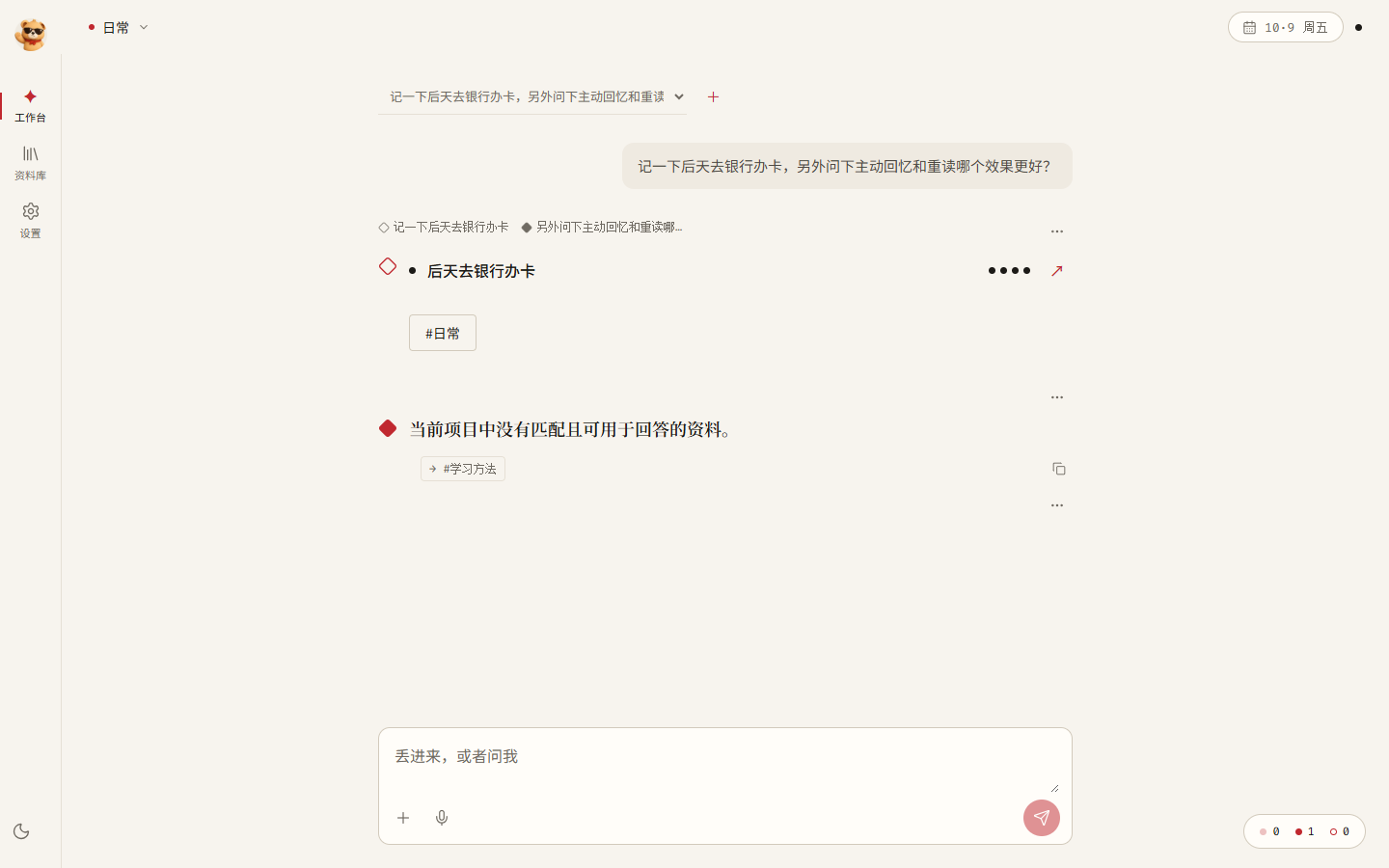 A mixed request is split; a question without an answer in Everyday is directed to the Learning Methods project. |
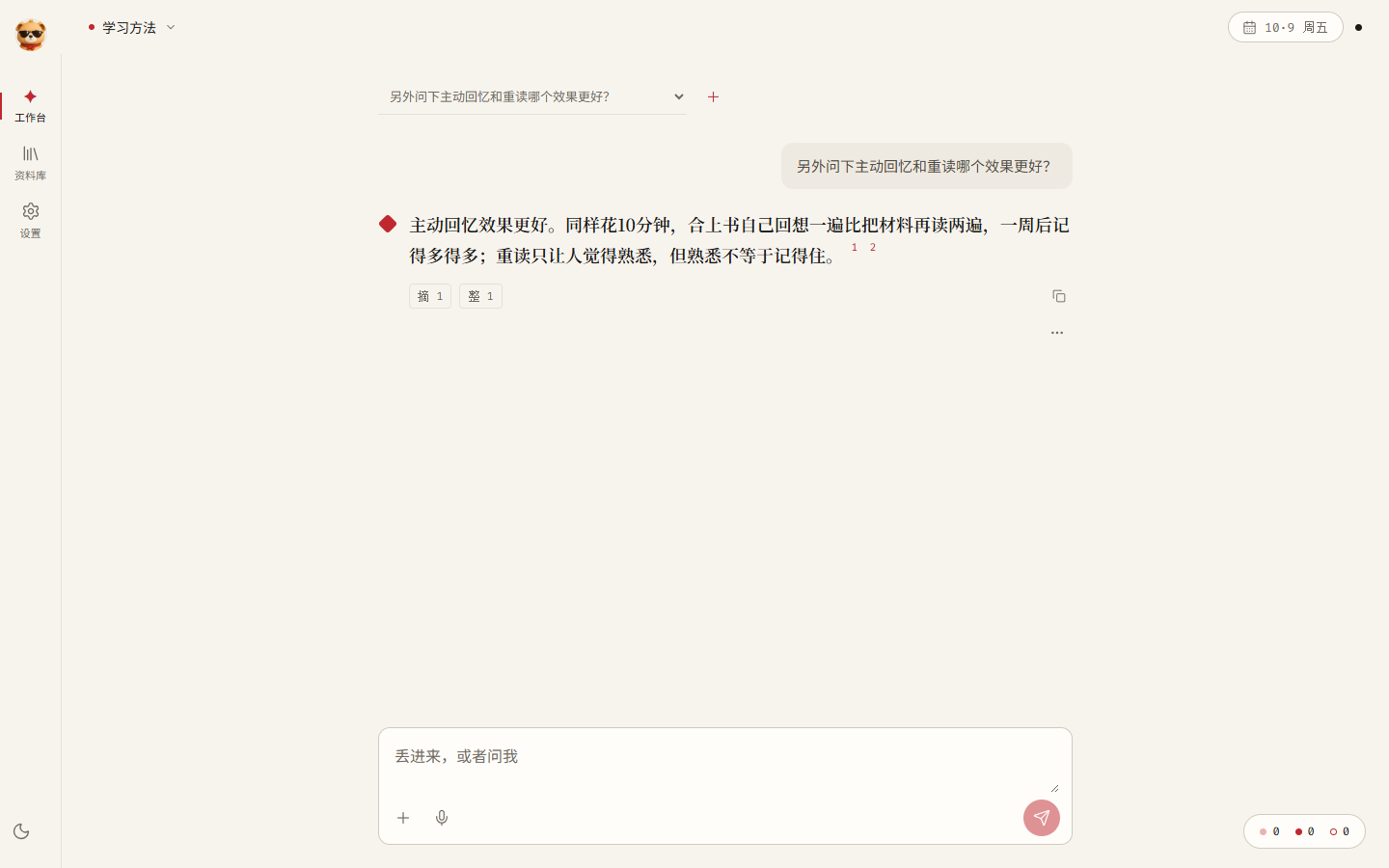 The relevant project supplies the answer. Superscript citations open the original sources. |
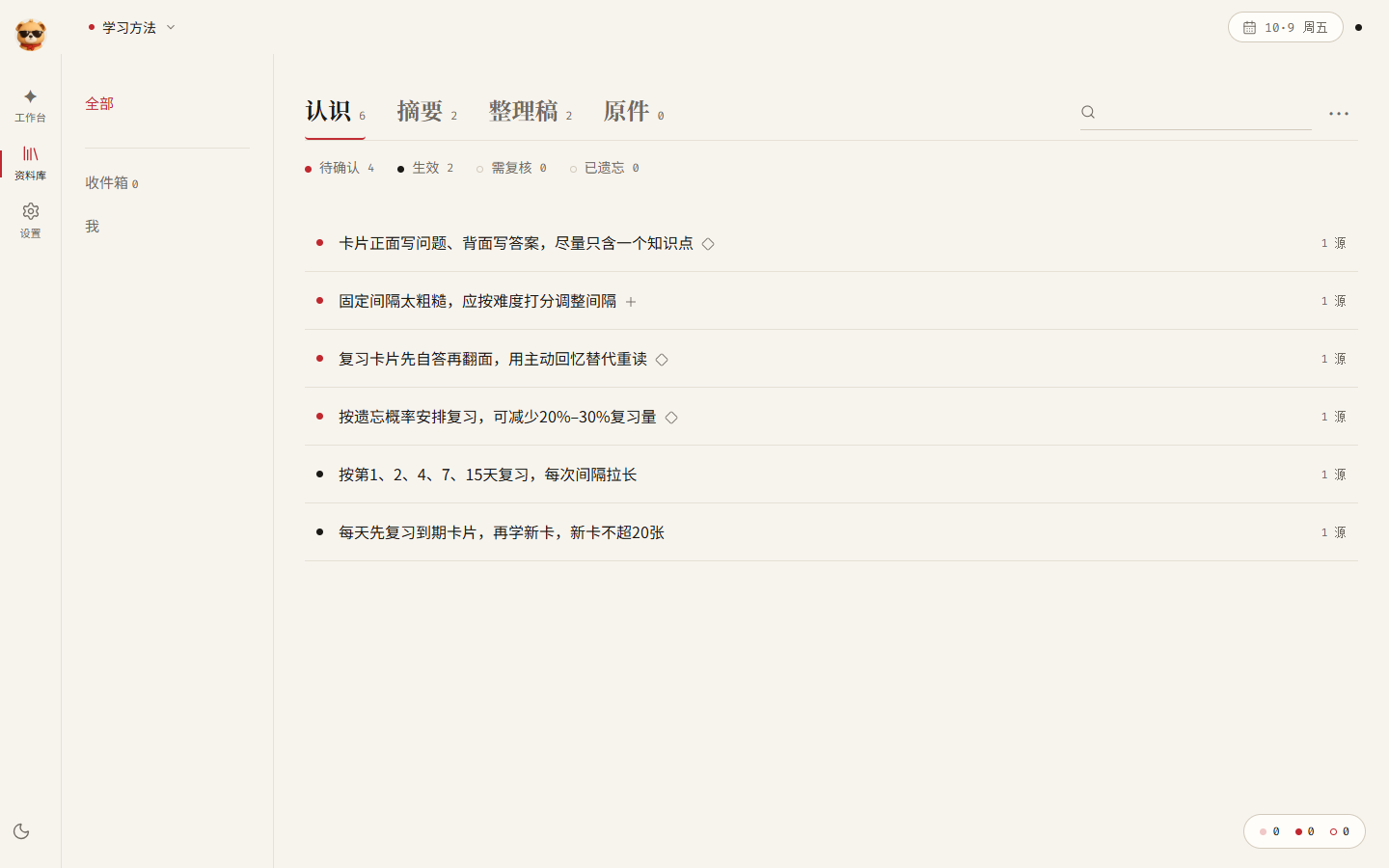 The Library separates pending and active insights and marks additions (+) and new insights (◇). |
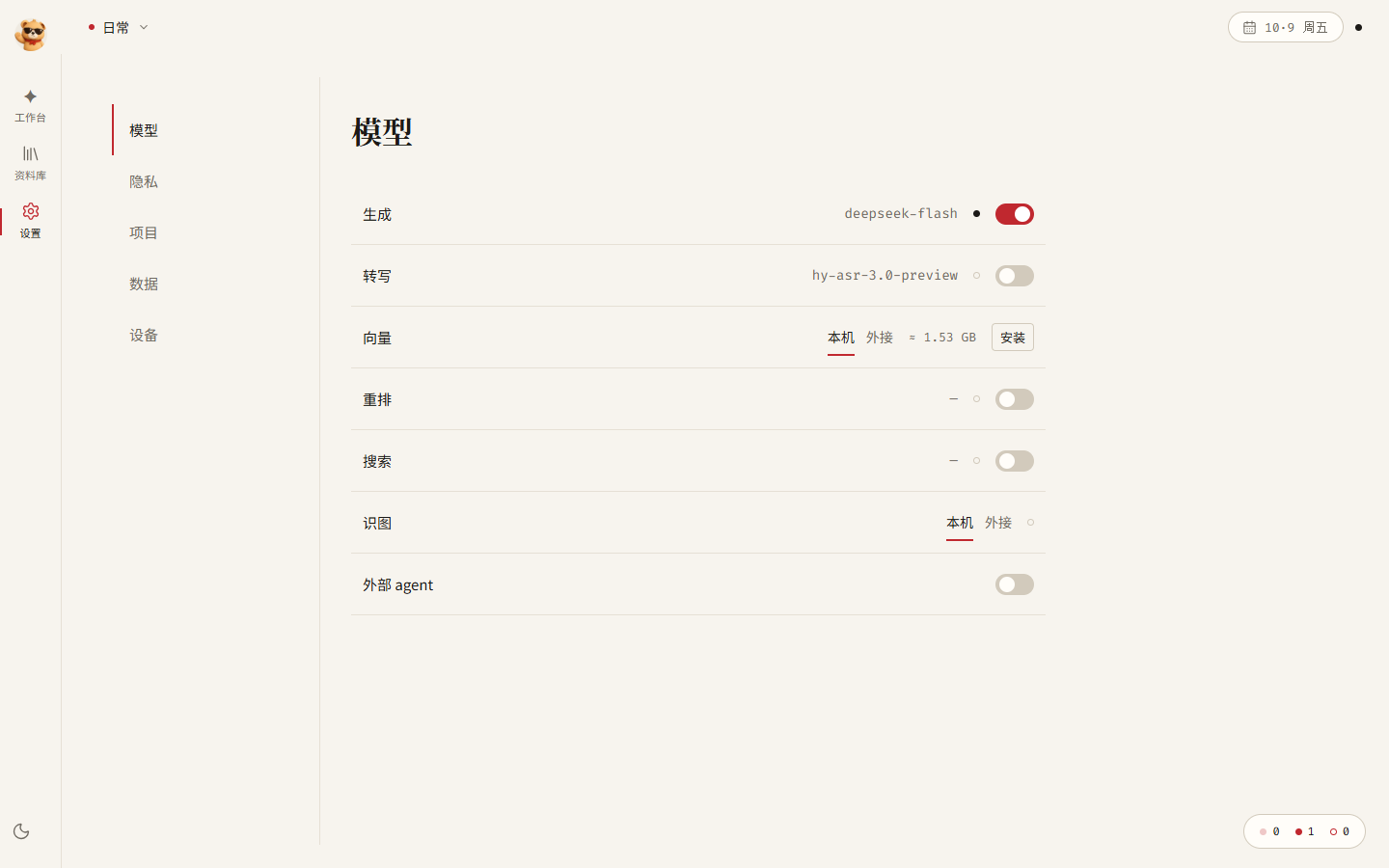 Choose models by purpose and control external transmission. |
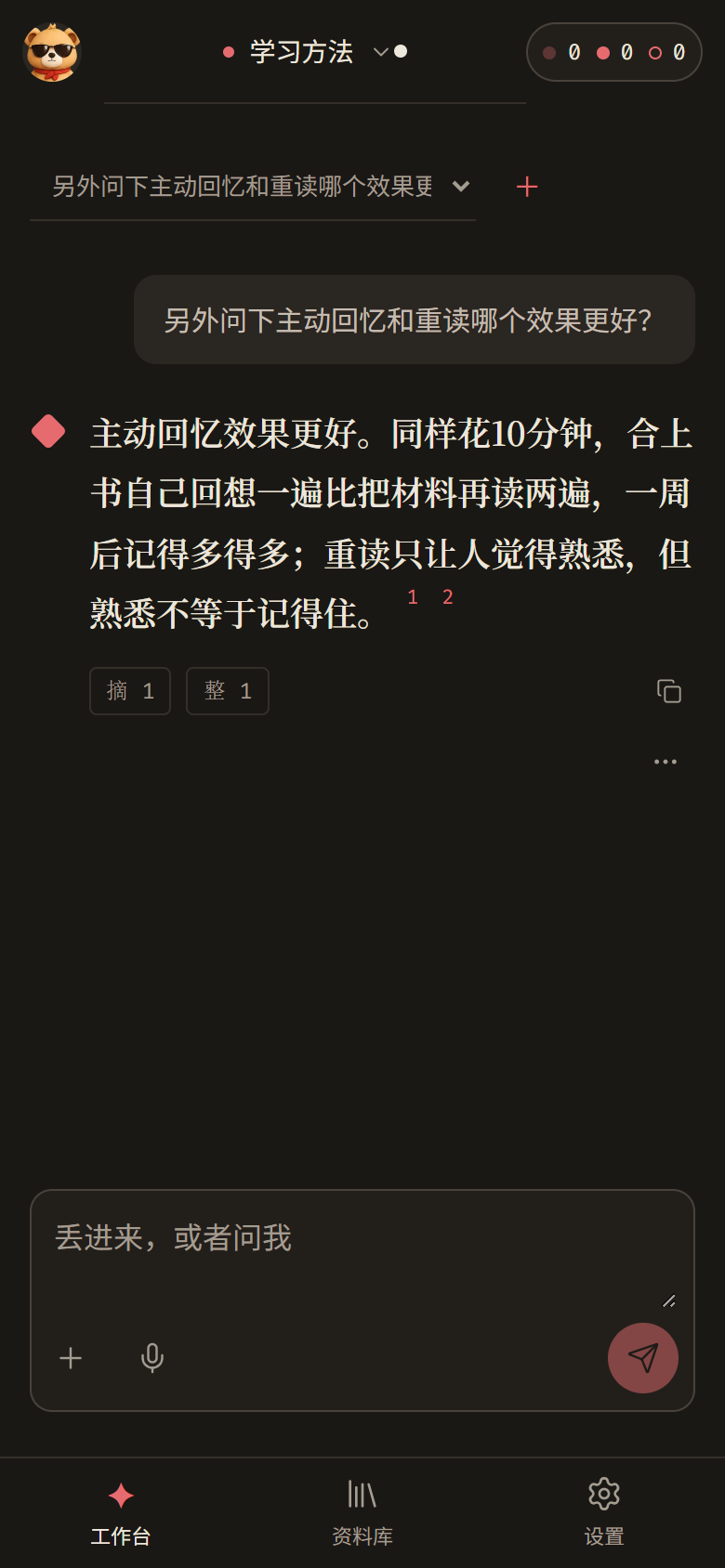 A mobile viewport in dark mode. |
Architecture
flowchart TB
  UI["Web UI: React + Vite<br/>Workbench · Library · Settings · Companion"] --> API["FastAPI · /api/v2"]
  API --> R["Intent routing<br/>Remember / Ask / Do; split mixed requests"]
  R --> M["Remember<br/>Original → Note + Summary → Project assignment → Incremental insights"]
  R --> Q["Ask<br/>Controlled retrieval → Answer → Citation checks"]
  R --> D["Do<br/>Research → Prepare → Output document"]
  M & Q & D --> K["AI kernel: Turn<br/>Frozen inputs · Transmission receipts · Retries · Recovery"]
  K --> P["Policy registry<br/>Prompts, thresholds, and formulas: name@version"]
  K --> G["Model gateway: LiteLLM<br/>DeepSeek / OpenAI-compatible / Local models"]
  M & Q & D --> S[("SQLite structured records<br/>Transactional writes with revision checks")]
Memory layers: original (L0) → organized note (L1) + summary (L2) → insight (L3). Material is organized from the bottom up. Retrieval follows the reverse order to select evidence by the question's needs and available budget.
Analyze material before extracting insights. Optional organize@2 / material_analysis@1, @2, @3, or @4 / extract@6 pipelines are registered; version 2 and later use context_preparation@1. Active defaults remain organize@1 / material_analysis@1 / extract@5. These candidate pipelines are not enabled by default.
- The model reads the material and plans suitable analysis angles, without reading later questions or reference answers.
- Long material is grouped into complete paragraphs; oversized paragraphs split at sentence boundaries. Each worker first receives the verified full body plus its focus and actual coordinates. If both exceed capacity, version 2 uses the shared text preparation entry point: semantic sections, paragraph and argument boundaries, hierarchical summaries, focus originals, and necessary adjacent originals. Version 1 retains its explicit capacity failure and existing replay behavior. Concurrency follows the actual auxiliary route: serial locally, at most two workers remotely. Results merge in frozen segment order.
- Segment analysis retains actors, conditions, negations, facts, inferences, plans, and unknowns. A final model synthesizes multiple segments while covering every original claim. The organized note retains all claims and evidence; synthesis inferences are labeled separately. Version 4 requests separate citations for discontinuous evidence. Only a unique exact join of adjacent complete single-line
[id] Speaker: bodyutterances can be split into actual original spans, with no additional model call. Skipped utterances, record headers, partial sentences, omissions, rewriting, and repeated bodies are rejected. Coordinates allow speaker readback; this check does not establish the semantic correctness of the claim or actor attribution. - Temporal analysis runs only when the material involves dates, ordering, or freshness. A deterministic calculator resolves relative dates against the closest preceding valid record header. Original expressions, coordinates, and precision remain available; dates cannot be borrowed across records or from historical quotations. Version 3 retains events with no time expression using
null: their time stays unknown, with no anchor or calculation, while event states such as asserted or planned remain intact. Non-null expressions use the existing parser. A limited guard rejects omitted recognizable direct relative expressions, sentence-leading dates, or explicitly introduced event dates, excluding record headers, historical quotations, and dates modifying source documents. A guard miss does not prove that the original contains no temporal information. - Extraction compares the analysis with existing insights and proposes complete additions according to independent information and actual budget. Counts vary with the material, and every proposal requires human confirmation. Comments retain separate provenance. Body boundaries, source revisions, and generation records are rechecked during extraction and display. Manual note edits retain the existing revision checks and leave analysis evidence frozen.
The pipeline reuses existing Turns, transmission receipts, leases, and confirmation transactions. Recovery reuses successful steps; auxiliary configuration changes fail explicitly. Automated checks use real temporary databases and domain flows with simulated model transport. Real answers, timings, and improvement on the same 12 questions still await evaluation.
Shared text context preparation. v2.context_preparation.prepare_context returns fitting messages unchanged, with zero compression calls. Oversized inputs use summaries that retain goals, concepts, facts, arguments, conditions, exceptions, unresolved issues, and original coordinates. Originals remain available for scoped readback. The shared entry point audits summaries against protected prior items and original text. The material_analysis@2 adapter and its successor @3 separately retain progress judgments, states, evidence, and follow-up links, audit that progress, and review cross-segment consistency, omissions, duplication, and broken reasoning. Other callers must arrange their own final analysis review. Semantic audits rely on model judgment. Programmatic checks verify complete audit participation and actual quotations; they do not guarantee perfect semantic detection.
Callers supply the actual auxiliary capacity, verified original spans, and their existing lawful Turn adapter. input_limit is the net input capacity after subtracting max(actual reserve, output_limit) from the window. Instructions, summaries, originals, and progress all count. This integration fragment uses variables supplied by the caller's budget and provenance checks:
from backend.memory_app.v2.context_preparation import prepare_context
from backend.memory_app.v2.policies.context_preparation import ContextPreparationInput

request = ContextPreparationInput(
    task=task, instructions=instructions, original_messages=messages,
    focus=verified_focus, fixed=fixed_original_spans,
    surrounding=compressible_original_spans,
    input_limit=net_input_limit, output_limit=output_limit,
)
prepared = prepare_context(
    request, read_original=read_verified_original, validate_current=validate_current,
    complete_stage=complete_via_existing_turn,
)
Each ContextSpan carries source identity and revision, coordinate space, actual bounds, and verbatim text. read_original returns the corresponding complete original; validate_current rechecks eligibility before dispatch and commit; complete_stage(stage, messages, parser) returns a parsed result through the existing Turn. The entry point currently supports text messages and spans. Images, audio, and tool-call messages require explicit future adapters. The first integrated version is material_analysis@2; @3 extends its temporal contract, and @4 adds strict separation of adjacent complete utterances. Both inherit the same entry point. Previous messages and replay remain frozen. Questions retain dynamic retrieval and current budgeting; insight extraction retains its capacity preflight. Other callers need explicitly versioned integration, preserving existing replay behavior.
Design principles:
- Facts are append-only; derived results can be rebuilt. Results that can be recomputed are treated as derived data.
- Decision policies are versioned pure functions. Prompts, thresholds, and assignment rules are registered as
name@versioninsrc/backend/memory_app/v2/policies/. Register a new algorithm version and switch the active selection; an earlier version can be selected again. - Three pipelines share one entry point. Remembering, asking and doing, and learning use separate paths with a shared entry point, model gateway, and fact log.
- Each fact has one owner. Domain services own memory facts; the AI kernel owns execution facts. The orchestration layer and interface do not own persistent state.
Repository layout:
| Path | Contents |
|---|---|
src/backend/memory_app/ |
Product application layer; ASGI entry point: backend.memory_app.app:app. |
src/backend/memory_app/v2/ |
v2 endpoints and orchestration for the Workbench, Library, Settings, and related features. |
src/backend/memory_app/v2/policies/ |
Versioned policies for intent, assignment, extraction, retrieval, ranking, and forgetting. |
src/backend/recognition/ |
Insight domain: proposals, confirmation, revision, and forgetting. |
src/core/ |
Domain and storage foundations, including the AI kernel, document engine, and SQLite storage; independent of the backend layer. |
src/frontend/ |
Web interface. |
apps/desktop-electron/ |
Desktop installer shell; release preparation is in progress. |
deploy/ |
Server deployment templates for systemd and Caddy. |
tests/ |
pytest and Vitest tests. |
samples/ |
Example material for trying the application. |
Further documentation is available in ARCHITECTURE.md for architecture and interface contracts, DESIGN.md for the interface, and COMPONENTS.md for reusable capabilities. These documents are in Chinese.
How a question finds its evidence
The active retrieval policy lets the model decide whether to retrieve, inspect actual tool results, then search or read again, answer, or ask for missing conditions. When the current memory layer has no eligible candidates, the same query checks successive lower layers and stops at the first nonempty layer. The loop retains the existing budgets, source eligibility, evidence selection, and answer checks. See the S1–S4 stages and validation scope (Chinese).
flowchart TB
  Q["Question and supplied conditions"] --> D{"Model decides"}
  D -->|Search or read| T["Controlled tools<br/>Memory layers · Eligible skills · Web search"]
  T --> O["Actual results and provenance"]
  O --> D
  D -->|Answer| A["Existing answer flow<br/>Fact draft → Review → Citation checks"]
  D -->|Missing conditions| C["Explicit clarification"]
  C --> U["Reply in the same project and conversation"]
  U --> D
How each layer matches
- Keywords. The question is split into the whole sentence (weight 5), Latin words (weight 2), and pairs of adjacent Chinese characters (weight 1), up to 32 terms; a match counts how many appear in the material. A question about remembering things well and material about spaced repetition can share no surface terms, so vectors are needed to connect them.
- Keywords first, meaning second for insights (default policy
rank@4). Insight recall scores start with the matched term count; available vectors break ties by similarity. Insights with no keyword match can also qualify at similarity ≥ 0.55, with a base score below keyword matches. Usage strength and explicitly expired conditions can further adjust the final ranking. Organized-note and original passages use the scoring described below. - Insights. In local mode, retrieval reads cached insight vectors and uses the rule above; methods whose conditions match the current situation can supplement the result. Insights found through either keywords or vectors can bring in eligible related, supporting, or contradicting insights.
- Summaries. Currently keyword-only, without separate summary vectors. This is an engineering choice; adding a summary prefix to block vectors does not establish that independent summary vectors would have no value.
- Optional reranking. Workbench questions can use a configured, enabled reranking model before evidence selection in each layer; remote services also require the reranking egress switch. Default
rerank@2selects limited excerpts by actual input cost, without a fixed first-12 cap. The question and excerpts still share a 6,000-token ceiling and the question's input budget; insights retain their complete statement and conditions. Original rank contributes 40% and model rank 60%; ordering changes only within the same connection and overview priority group, with scene preference breaking fused-score ties. Every submitted ID must receive a valid score; material not submitted within the budget retains its original order. Missing configuration, denied egress, or failure preserves the original order; the first failure disables further reranking for that question. Source revisions, privacy, forgetting, scenes, and excerpt coordinates are checked before and after dispatch, with reranking usage receipts. Read-only coverage and external-agent context do not gain additional remote calls. - Organized notes and originals. Each source is split into blocks of a few hundred characters.
rank@4weights terms by their rarity within that source and gives title and summary-prefix matches less weight. Available cached vectors give a score of 0.45 × weighted keyword score + 0.55 × similarity; without them selection uses keywords.ladder@15retains continuous text, question-and-answer context, and necessary conditions around matches, selecting passages by the question's needs and new information. Ordinary material has no fixed window count or width. Confirmed insights and non-dialogue text for ordinary topic questions retain incremental eligibility without terminal punctuation. Question, speaker, date-relation, and continuous-source boundaries remain; excerpts receive no invented punctuation. Selection remains heuristic and cannot guarantee semantic completeness. - Block vectors carry context. The exact text is
title + "\n" + summary[:120] + "\n" + block_text: 120 Python characters, with title and body retained when the summary is empty. Background indexing and question-time lookup use the same format; see EmbeddingIndex and chunk_vector_scores. This implementation uses a fixed title and summary prefix; Anthropic's Contextual Retrieval generates context for each individual block with a model. Their effects require separate evaluation.
How the ladder selects
- Default combination. Version numbers are listed in the marked Current defaults paragraph in Evaluation and verification. The model controls whether and where to search; local retrieval follows insights → summaries → organized notes → originals, checking lower layers within the same query when the current layer is empty. It selects limited evidence by the facts, dates, relationships, and list requirements in the question, without fixed ordinary-source counts. Your "Me" profile uses a separate background block of at most 600 tokens, retaining each insight and its conditions together. Related, supporting, and contradicting neighbors are admitted by new information and available budget, with contradicting neighbors expanded first. All require eligible sources and available capacity, so a tight budget can prevent both sides from reaching the model.
- Actual budget. Evidence uses the remainder after output reserve, instructions, Schema, the question, profile, history, and message framing; the complete input is checked too. The supported official
deepseek-flashroute atapi.deepseek.comhas a 200,000-token total cap; a 7,000-token output reserve leaves at most 193,000 input tokens. Unknown routes retain a conservative 16,000-token total window. If valid window and reserve information is unavailable, the input fallback is 4,000 tokens. UTF-8 bytes divided by three, rounded up, estimates the budget; it is not exact provider tokenization or billed usage. Filling the window is not a goal. - Investigation and stopping. The active retrieval policy returns actual search and reading results to the next model decision. Local reading follows eligible summary, body, and original-source links; skills provide read-only guidance, and web search requires its configured permission. Up to six decisions can choose another tool, the existing answer flow, or an explicit clarification. Repeated tools, two steps without new material or depth, exhausted capacity, a decision timeout, or the decision limit stop investigation. Only the latest verified clarification in the same project and conversation accepts a follow-up without a question mark; resolved questions do not reopen. Stopping does not prove answer sufficiency. Old retrieval versions remain available for explicit replay.
- De-duplication. Material without qualifying new information is checked for near-duplicates at similarity ≥ 0.8, using existing comparable cached vectors or adjacent-character overlap. Passages qualifying for a new demand or relationship under the dynamic policy are not merged merely because they share terms. Active contradiction pairs are also exempt from similarity-based removal, and layers of the same source are not compared with each other. De-duplication never computes new vectors; the new-information rules remain heuristic.
- How contradictions are identified. After insight confirmation and during startup maintenance, the model proposes supporting, contradicting, or superseding links. They become active only after you accept them in the Library. Retrieval reads these active
refuteslinks and asks the answer model to explain both sides' evidence and disagreement; vector similarity does not establish logical contradiction. Only related links can be created automatically.
Why these counts and budgets? Current defaults select evidence dynamically by question gaps, marginal information, and remaining capacity. These rules and retained special-purpose budgets are engineering choices, not established optima. Lost in the Middle shows that evidence position affects performance in long contexts, supporting task-specific evaluation. More capacity or evidence alone does not establish better answers; real answers and previously unused questions still need validation.
What the answer model receives: the rules (answer only from the evidence, cite it, say "I don't know" without support, plus notes for faded material, contradictions, and web search), your "Me" profile, numbered evidence (insights in full with their conditions, other layers as matched excerpts), the conversation history marked as "not evidence", and finally the question.
Two-stage answers and provenance checks
The recorded compose@33 implementation uses two primary model calls to draft facts, then review, correct, and answer; the active version retains this structure. Conversation-date context is checked against the same frozen source; event dates retain their validation. The draft requests each independent, relevant fact once. Fact questions preserve original terms where possible; inference questions provide supported premises; time questions refer to complete date ranges calculated by the program. Instructions require checking the full evidence catalog before unknown or negative answers, identifying people by the actual speaker, and retaining each independent item in open lists.
Fact and inference statements should use empty date_refs. If valid references are attached, the program first verifies their real units, quotations, and calculation records, then treats them as incidental metadata without calculation authority. Original model outputs remain unchanged. These references produce no derived date notes, calculation bindings, or later precision authorization. Converting relative time into absolute dates or ranges still requires an actual date statement and precise binding to the corresponding original text, relative expression, and record date. Invalid references, references borrowed across units, and calculations claiming authority from incidental references remain rejected.
Ordinary facts and inferences may explicitly identify a record or conversation date as context, provided it matches the complete support sentence in the same unit and the frozen source's real record anchor. This grants no authority to assign an event day, a same-day reference, or a narrower range. The source's last or next week remains relative; absolute calculations still require independent validation of date kind, precise references, and complete legal results.
In schema-valid drafts, invalid references, quotations, support roles, calendar text, and duplicates receive per-item diagnostics with field paths, failed conditions, and repair requirements. The original draft stays unchanged and the final call still reviews the full catalog. Final responses must actually correct or exclude invalid items; a reason alone changes no field, and emptying references does not repair unsupported absolute dates still in the text. Corrupted frozen material stops execution. Invalid final references, unsupported dates, and exact duplicate statements still prevent publication; ordinary statements cannot evade de-duplication by changing incidental references. Citations are generated by the program and the public response remains AskOutput. These checks validate structure and provenance; prompt instructions also cannot guarantee that a model never repeats or truncates output.
See the evaluation overview (Chinese) for each version's real answers, timings, and evaluation limits. Earlier results and the answer flow diagram retain their version context. Small samples and engineering controls do not establish overall accuracy.
Local vectors
- Runtime. EmbeddingGemma 2, text only, 256 dimensions, runs on a dedicated worker in the backend process with up to 8 CPU threads. Each process starts unloaded. Load or unload it explicitly in Settings → Models → Embedding. Unload waits for the running batch and releases encoder references while keeping weights and cached vectors; process RSS may not immediately return to its initial value. Questions take priority over background indexing, with at most 64 pending requests.
- Resources and setup. About 1.5 GB to download and about 580 MB once reduced to the text model; peak memory about 1.8 GB; about 0.16 s per question and 0.07 s per block. These are small-sample observations on the test machine; verify latency and memory on the machine being used. Install the optional dependencies in
requirements-local-vectors.txt, including torch, then download the model. Missing dependencies or weights make the vector path fall back to keywords. - Initialization fills the cache. Successful manual loading starts background indexing of existing insights (L3), organized-note blocks (L1), and original blocks (L0), with indexed counts shown in Settings. While loaded, remembering completion also triggers indexing; a pass already running repeats afterward. Further passes run about 60 seconds after startup and every 24 hours only when loaded; they never load the model implicitly. Weight loading and material indexing have separate status.
- What a question computes. The local foreground path encodes only the question, reusing results within the turn by model identity and question text; insights and blocks read the background cache. While unloaded, loading, or unloading, the turn uses keywords. Once the model is ready, individual unindexed items still use keywords; the foreground never fills their missing material vectors.
- Cache.
recognition-vectors.sqlite3, keyed by project, item, revision, and model, stores each insight vector and each L1/L0 block vector. Model identity includes the model name, dimensions, and vector policy version. Edits change revisions, preventing old-vector matches; a changed model identity is filled by background indexing. Edit, deletion, and privacy write paths clear affected derived cache entries. Forgetting changes recall eligibility; surviving cache rows do not make an item eligible for recall. Periodic maintenance removes invalid, damaged, or expired vectors without calling a model. Forgetting retains originals and historical text. - Why local computation still checks and records receipts. Before encoding and before accepting results, the system checks material eligibility, revisions, source availability, and vector configuration; a change prevents results from being accepted. Remote mode shares this path and additionally checks transmission switches and blocks private material. Local mode is not outbound and can use private material. Receipts record inputs, usage, and results, with local cost 0; the cache lets interrupted background indexing resume later.
The applicable turn snapshots record compose, retrieve, rerank, rank, ladder, vector, and elsewhere, and continuation uses those versions. Older versions remain explicitly selectable; see policies/pipelines.py.
Not settled yet
- The 0.55 meaning threshold is an initial engineering value, not yet calibrated against real EmbeddingGemma 2 similarity distributions.
- Dynamic evidence volume, continuous passages, and 200k capacity still need validation on real long documents and multi-source tasks, checking omissions, wrong answers, citations, latency, and usage separately.
Privacy and data
- Local first. Sources, organized notes, insights, and conversations are stored in the data directory on the computer or server hosting the application. SQLite stores structured records; uploaded originals such as PDFs, images, audio, and video are stored as separate files. Back up the entire data directory.
- Server permissions. Ordinary users have separate spaces. Administrators can enter user spaces according to their permissions, and access logs are visible to the affected user. Disabling an account preserves its content and access history; permanent deletion requires confirmation and removes the account, its space, and associated records. Private material is not hidden from administrators.
- Encrypted credentials. Model keys and website cookies use the existing encrypted secret store: DPAPI on Windows and the existing server store on servers. Saved values are not returned or logged. Website cookies are excluded from model inputs.
- Controlled external transmission. External models are called only for purposes whose transmission switches you enable in Settings → Models. Private projects and sources are excluded. Every external request leaves a receipt recording what was sent and which model received it. See the model guide (Chinese).
- Originals are retained. Forgetting affects automatic recall. Originals, organized notes, insight text, and revision history remain available for restoration.
Development
Run backend tests and dependency checks from the repository root:
.\.venv\Scripts\python.exe -m pytest tests/memory_app/v2 -q
.\.venv\Scripts\python.exe tools/run_import_linter.py
Run frontend tests and the build from src/frontend/:
npm test
npm run build
The HTTP smoke runner is available at tools/demo_smoke.py. Run .\.venv\Scripts\python.exe tools/demo_smoke.py --help for its parameters. It uses an isolated backend on port 8011, DeepSeek, sample material, and a PDF selected with --file; --check reads configuration and attempt records without submitting model work.
- For prompt or algorithm changes, register a new version in
v2/policies/, compare it offline, and switchACTIVEin a separate commit. - Use the design tokens in
src/frontend/src/styles.cssand the components inshared/ui/for frontend changes. - Keep
README.mdandREADME.zh-CN.mdin sync when updating the project description, feature status, or usage instructions. - The commit hooks in
tools/task_guard.pycheck for possible secrets, accidentally staged data directories, and newly added test-skip markers. After cloning, install them with.\.venv\Scripts\python.exe tools/task_guard.py --install.
Known limitations
- Speed: latency varies with material length, model, selection, and cache state. Individual runs are recorded in the evaluation overview. Startup maintenance, backups, and indexing also affect response times.
- Platform: basic complete flows have been checked on Windows. Application deployment, CPU embeddings, and real DeepSeek Harness execution in isolation have been checked separately on Ubuntu 22.04. The application interface is currently Chinese only.
- Mobile sharing and website login: OS sharing and iPhone Shortcuts await device validation; real-account QR confirmation has not been verified. Xiaohongshu sessions currently use cookie import.
- In progress: validation of the mobile shell, shared projects, production public-network task submission, and real-account execution and reconnection for Claude Code and Codex.
Acknowledgments
- Model integration draws on the protocol adapters and testing approach in pi-ai.
- MCP and agent integration ideas draw on Mem0 OpenMemory, Supermemory, basic-memory, and TencentDB Agent Memory.
- Dependencies include FastAPI, LiteLLM, LangGraph, React, Vite, ProseMirror (editor engine, MIT), and sqlite-vec. Dependency listings are in
requirements-*.txtandsrc/frontend/package-lock.json; consult the respective projects for their licenses.
License
Copyright (C) 2026 Incremind contributors.
This project is licensed under the GNU Affero General Public License v3.0 (AGPL-3.0-only). See LICENSE for the full terms.
If you offer a modified version over a network, you must provide its corresponding source code to users interacting with it, as required by the license.
Third-party components and data retain their own licenses and attribution requirements.
No comments yet. Be the first to write one.