dsh-plugin-dosage
English · 简体中文
A DeepSeek Harness plugin: one sidebar entry for multi-provider balances and peak/off-peak cost.


This plugin combines dsh-usage-stats account monitoring with dsh-usage-plugin per-call billing, then puts both behind a single sidebar popover. There is no extra tab next to Conversation / Trace.
Screenshots
Overview
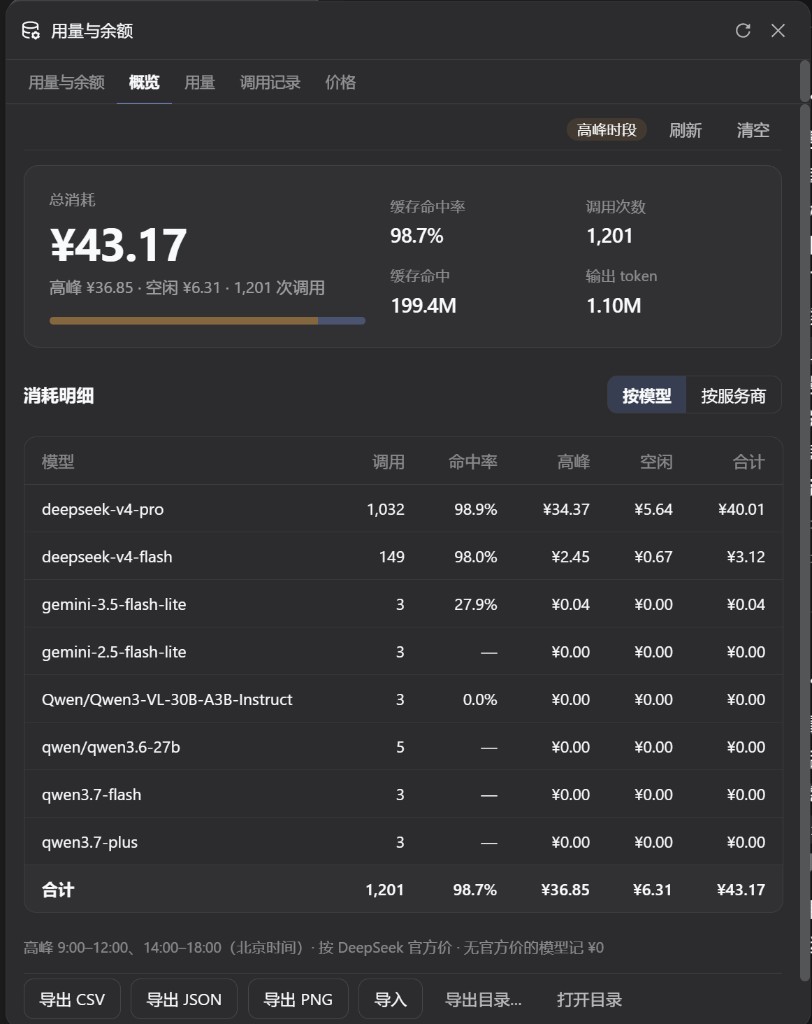
Usage
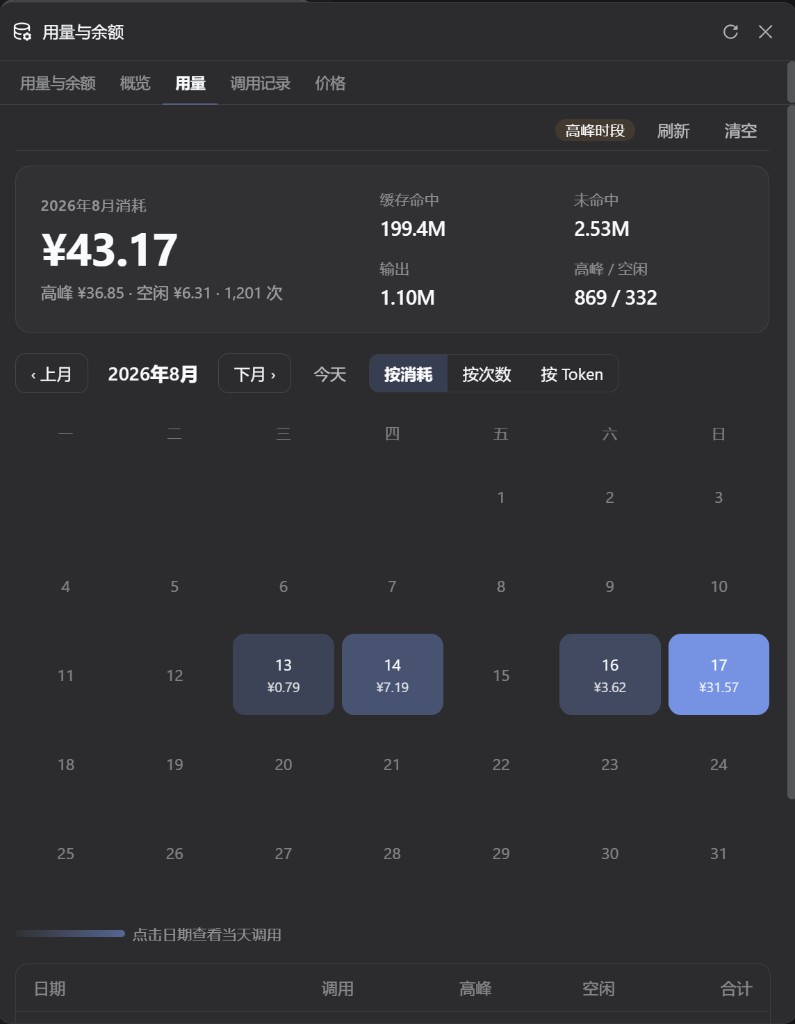
What you get
Click Usage/Balance at the bottom of the sidebar. The popover has five tabs:
| Tab | What it shows |
|---|---|
| Usage & Balance | Current provider balance or Token Plan, today / month / all-time tokens, cache hits, today's cost, last 14 days |
| Overview | Total spend, peak vs off-peak split, per-model totals |
| Usage | Monthly heatmap (cost, call count, or tokens); click a day for detail |
| Call log | Each call's model, hit rate, finish reason, and peak/off-peak cost; Today / 7 days / 30 days / All |
| Prices | Official DeepSeek unit prices for deepseek-v4-flash and deepseek-v4-pro, stacked vertically; the table is not editable |
The call log and the 14-day list read the same session logs. The sidebar footer token count refreshes every 5 seconds even when the popover is closed. While the popover is open, today's cost and the current provider balance also refresh every 5 seconds. The only usage entry is the sidebar footer.
Peak hours are 09:00–12:00 and 14:00–18:00 Beijing time. Models without an official price are counted as ¥0.
Install
Needs the DeepSeek Harness web profile, plus dsh and pnpm. npm is the recommended install.
dsh plugin --profile web add dsh-plugin-dosage
From GitHub (pin a tag; do not use dsh plugin update on a Git ref):
dsh plugin --profile web add -w github:qingfeng200410/dsh-plugin-dosage#v0.1.0
Restart a running dsh web and hard-refresh the browser. Usage/Balance appears in the sidebar footer.
For another profile, replace web. Local tarball:
dsh plugin --profile web add ./dsh-plugin-dosage-0.1.0.tgz
Upgrade
dsh plugin --profile web update dsh-plugin-dosage
If you installed from Git, add the latest tag instead:
dsh plugin --profile web add -w github:qingfeng200410/dsh-plugin-dosage#v0.1.0
Uninstall
dsh plugin --profile web remove dsh-plugin-dosage
Restart after uninstall. Files under ~/.dsh/dsh-usage/ are kept.
Do not install both
This package already includes those two plugins. Installing them together gives you two sidebar buttons or colliding routes:
dsh plugin --profile web remove dsh-usage-stats
dsh plugin --profile web remove @feiyang666/dsh-usage-plugin
Also delete leftover name: dsh-usage-stats or @feiyang666/... rows in ~/.dsh/profiles/web/cordis.patch.yml.
Accounts and credentials
The plugin uses providers already configured in Harness. Credentials are resolved on the host and never sent to the browser. DeepSeek uses the same DEEPSEEK_API_KEY as Settings → Models.
| Provider | Mode | Default credential |
|---|---|---|
| DeepSeek | Balance | provider apiKeyEnv |
| OpenRouter | Balance | OPENROUTER_MANAGEMENT_KEY (not the inference key) |
| Moonshot / Kimi API | Balance | provider apiKeyEnv |
| OpenCode Go | Subscription | OPENCODE_GO_API_KEY or local auth.json |
| Z.ai | Subscription | ZAI_API_KEY |
| Kimi For Coding | Subscription | KIMI_API_KEY |
| MiniMax Coding Plan | Subscription | MINIMAX_API_KEY |
| New API / Sub2API / custom | See monitors below |
credential ref |
Providers without a public account API still get token stats. The account card says “unsupported” instead of inventing a balance.
Put New API, Sub2API, or declarative monitors on this plugin's Cordis config. Do not also mount dsh-usage-stats:
# ~/.dsh/profiles/web/cordis.patch.yml
- insert:
    - id: plugin-dosage
      name: 'dsh-plugin-dosage'
      config:
        monitors:
          relay-a:          # must be a real Harness provider id
            adapter: new-api
Full adapter and security notes: dsh-usage-stats.
Data
All user-level; nothing is written into the current project:
| File | Path |
|---|---|
| Call records | ~/.dsh/dsh-usage/usage-records.json (cap 100,000) |
| Price config | ~/.dsh/dsh-usage/pricing.json |
| Default export | ~/.dsh/dsh-usage/{csv,json,images}/ |
| Token fold cache | ~/.dsh/storages/usage-stats-cache.json |
| Boot log | ~/.dsh/dsh-usage/dsh-usage-boot.log |
If DSH_HOME is set, paths are relative to that directory. The panel can export CSV / JSON / PNG and merge-import by timestamp.
FAQ
| Symptom | Fix |
|---|---|
| Two Usage/Balance buttons | Remove standalone dsh-usage-stats and its patch row |
| No sidebar entry after install | Restart dsh web and hard-refresh; confirm the package is listed for the web profile |
Unexpected end of JSON input |
Missing Cordis inject. Reinstall with dsh plugin add above; do not hand-edit a truncated row |
| OpenRouter shows not configured | Set OPENROUTER_MANAGEMENT_KEY in ~/.dsh/.credentials.yaml |
dsh plugin cannot find pnpm |
npm install -g pnpm or corepack enable |
Do not paste .credentials.yaml, API keys, or cookies into issues.
Acknowledgements
This plugin combines and builds on two MIT projects:
| Project | Author | License | Used for |
|---|---|---|---|
| dsh-usage-stats | Ychris12138 and contributors | MIT | Multi-provider accounts, token aggregation, loopback APIs, sidebar Usage/Balance entry |
| dsh-usage-plugin | feiyang-dev | MIT | Peak/off-peak billing, overview / usage / call log / prices, CSV/JSON/PNG export, POST /usage/api |
| DeepSeek Harness | DeepSeek | MIT | Host and Cordis plugin runtime |
On top of those, this repo mainly did the following integration, UI work, and extras:
- Both feature sets live in one sidebar Usage/Balance popover (five tabs); the extra tab next to Conversation / Trace is gone, and so is the Settings usage section
- Overview / Usage / Call log / Prices were redesigned: a single total with a peak/off-peak bar, empty calendar days stay unfilled, a shorter call-log table, and stacked price cards
- The account tab adds cache hits, hit rate, and today's cost; its monthly heatmap was removed (the calendar stays on Usage) and the heatmap gained a by token mode
- The call log uses the same session logs as the last-14-days list, instead of only stream snippets the plugin captured itself
- The sidebar footer token count refreshes every 5 seconds even when closed; while the popover is open, today's cost / the current provider balance also refresh every 5 seconds; click outside to close; height is locked to the Usage tab
- Records live at user-level
~/.dsh/dsh-usage/so switching projects does not split the data; the official price table is fixed (not editable); models without an official price are ¥0; model names are shown as requested
Full terms: LICENSE and NOTICE. DeepSeek is a trademark of DeepSeek. This is a community plugin and is not affiliated with DeepSeek.
Contributing
Issues and pull requests are welcome — UI tweaks, bug fixes, and new features all help.
This is my first public open-source project. The docs, code, and UX will have rough edges; please bear with them. If something is broken, or you believe any part infringes your rights and should be taken down, open an issue. I will look into it and remove or fix the material as soon as I can.
No comments yet. Be the first to write one.