READMESource: main@66eb3bd4
DSH 工作区会话链接插件

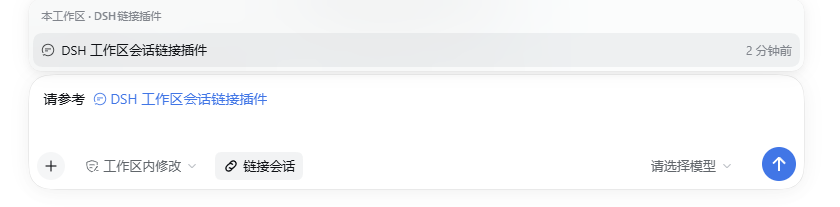
在 DSH 输入框里放一个「链接会话」按钮:写任务时点一下,只列出当前工作区里的其他会话,选中后插入一个会话引用 chip。发送时 DSH 自带的 session-reference 服务会把被引用会话的只读快照作为跨会话上下文交给模型,让模型在写这个工作区的任务时参考之前的会话。
这里的“工作区”指 DSH 侧边栏里的工作区分组,不要求两个会话的 cwd 完全相等:只要会话属于同一个工作区,即使它是在工作区的子目录里启动的,也会出现在菜单里。
它解决什么
- 工作区里文件很多、会话也很多时,不用离开当前会话去翻历史。
- 只显示当前工作区分组里的会话,避免误引用其他项目的会话。
- 插入的是 DSH 原生
dsh-session:引用,不是复制粘贴:模型收到的是带来源和「不可信背景」警告的快照。 - 不重复实现 Host 逻辑,完全复用官方
@deepseek-ai/dsh-session-reference。
使用
- 安装并重启 DSH(见下方)。
- 打开任意会话,在输入框左下方点「链接会话」。
- 菜单只列出当前工作区的其他会话;可上下键选择,Enter 插入,Esc 关闭。
- 会话标题会以一个会话 chip 的形式出现在草稿中;继续输入并发送即可。
如果当前工作区只有这一个会话,菜单会显示「本工作区暂无其他会话」。
安装
从 GitHub 安装
& "$env:LOCALAPPDATA\Programs\DeepSeek Harness\resources\runtime\cli\bin\dsh.cmd" plugin --profile desktop add github:qiaoyuzhou/dsh-workspace-session-link
从本地目录安装
Desktop 的 desktop profile 只允许 Desktop 随附的 dsh.cmd 管理;npm 版 dsh 会拒绝管理该 profile。因此使用安装目录下的命令:
& "$env:LOCALAPPDATA\Programs\DeepSeek Harness\resources\runtime\cli\bin\dsh.cmd" plugin --profile desktop add link:C:\path\to\dsh-workspace-session-link
安装完成后重启 DSH。重启后可在侧边栏「插件」页确认 dsh-workspace-session-link 已启用。
卸载:
& "$env:LOCALAPPDATA\Programs\DeepSeek Harness\resources\runtime\cli\bin\dsh.cmd" plugin --profile desktop remove dsh-workspace-session-link
从源码开发
git clone https://github.com/qiaoyuzhou/dsh-workspace-session-link.git
cd dsh-workspace-session-link
node --test test/smoke.test.mjs
用本地目录安装时,把上面的 C:\path\to\dsh-workspace-session-link 换成克隆目录的绝对路径。仓库没有构建步骤,GitHub 上的 lib/ 就是可直接加载的产物。
兼容性
- DSH
0.2.1-rc.3(当前 Desktop 运行时)。 - 依赖的官方包:
dsh-client-ui-conversation、dsh-client-ui-input-trigger、dsh-api-workspace-controller、dsh-session-reference。这些是 Web bundle 自带的客户端/Host 包,插件本身不额外安装运行时依赖。 - 只支持 Web/Desktop 客户端;headless 等没有 composer 的运行面不会显示按钮,但 package 仍可加载。
实现
lib/index.js:空 Host 入口,使插件进入 Host 配置树,从而让 Web bundle 扫描到dsh.client。lib/client.js:注册conversation.input.left按钮和一个只读@触发源。- 通过
workspaces.list找到当前会话所属的工作区,再用工作区的sessionIds过滤候选; - 无法确定工作区归属时回退到官方候选的
sameWorkspace(cwd 相同); - 按会话列表的
updatedAt倒序排列; - 选中后交给
inputTriggers的标准插入管线,生成真正的会话 chip; - chip 的序列化形式是官方
@[标题](dsh-session:...)mention。
- 通过
- 没有复制官方
dsh-client-ui-reference的文件/目录逻辑,也没有修改 Host 的 session-reference 服务。
开发与验证
没有构建步骤;lib/client.js 是可直接加载的 window.__ModuleLoader__ bundle。
node test/smoke.test.mjs
测试覆盖工作区成员过滤、按更新时间排序、空状态、会话 mention 的插入形状以及按钮 slot 注册。
已知边界
- 单条消息最多引用 3 个会话(官方
session-reference的硬限制);菜单一次插入一个,可重复点击。 - 只按会话元数据(标题、工作目录)发现,不搜索消息正文。
- 引用是发送时的快照,不是实时订阅。
No comments yet. Be the first to write one.