doublekeys
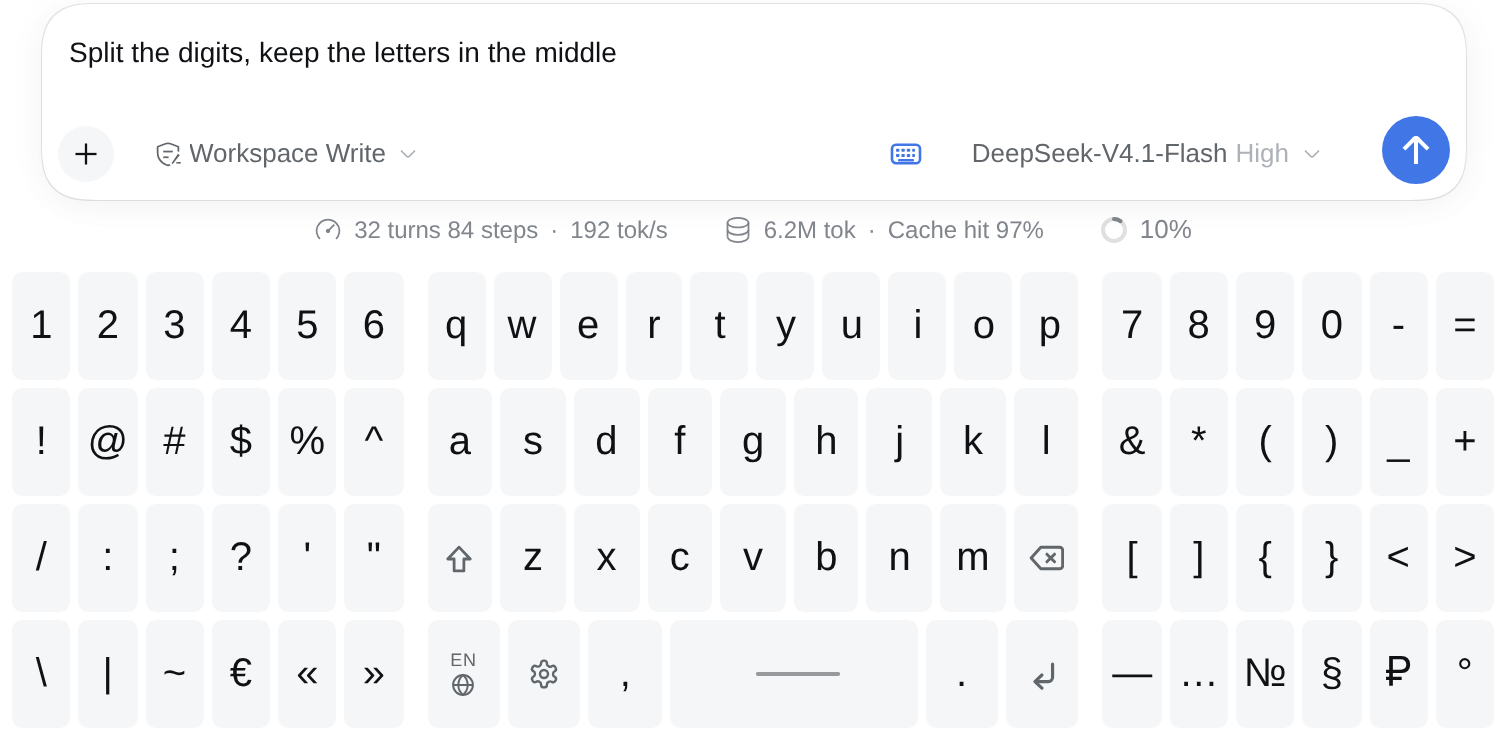
An on-screen keyboard for the DeepSeek Harness web composer — a full keyboard that lives inside the chat panel, built for phones and tablets. No predictions, no autocorrection, no T9, no automatic capitalisation: what you tap is what you get, and Shift is a manual sticky key.


Why
On a phone the system keyboard covers half the screen and keeps fighting the page: autocorrect rewrites words,
autocapitalisation turns i into I, and the composer loses the caret every other tap. doublekeys is a
plugin-side keyboard: it renders its own keys, types into the composer through the conversation plugin's
public editing API and suppresses the system keyboard while it is open.
It is also built for wide screens: on a tablet the keyboard can split into two halves with the digits on the sides, so both thumbs stay on the edges.
Features
- Four arrangements. One keyboard with pages, digits split to the edges, letters split to the edges, or digits and letters side by side. Three of them adapt to the composer width; the fourth never duplicates.
- 15 layouts, all in the standard four-row shape of a physical keyboard (three letter rows plus the control row), with the national letters of each language sitting on the keyboard as real keys.
- No assistive typing. No predictions, no completions, no autocapitalisation, no autocorrect, no T9. The inserted character is exactly the character that was tapped.
- Manual Shift. Sticky until a letter is typed; the state is visible on the key.
- Repeat on hold. Letters, space and Backspace repeat while held (first repeat after 420 ms, then every
70 ms), so
aaaaor a long delete take one gesture. - Real line breaks. The ↵ key inserts a newline into the draft, the composer grows, the message keeps the break.
- Word selection stays usable. Double click, double tap and long press select the word under the finger; the next key replaces it.
- Nothing to configure to start. English and one keyboard by default; everything else is in the gear.
Install
doublekeys is a regular DSH client-plugin bundle: a package.json with a dsh.client block and a plain
browser module, no build step.
Through the in-app Plugin Manager (recommended): install the bundle from this directory, for example with
plugin_manager → install_bundle and the path to the clone. That adds the dependency to the profile and puts
doublekeys into dsh.profile.bundles, so the web client picks it up.
By hand, in a profile:
cd ~/.dsh/profiles/web
pnpm add /path/to/doublekeys          # or: npm link /path/to/doublekeys
then add the bundle name to the profile package.json:
{
  "dsh": {
    "profile": {
      "bundles": ["@deepseek-ai/dsh-base", "@deepseek-ai/dsh-web-app", "doublekeys"]
    }
  }
}
Reload the panel (or restart dsh web). The keyboard toggle appears in the composer's tools row.
Using it
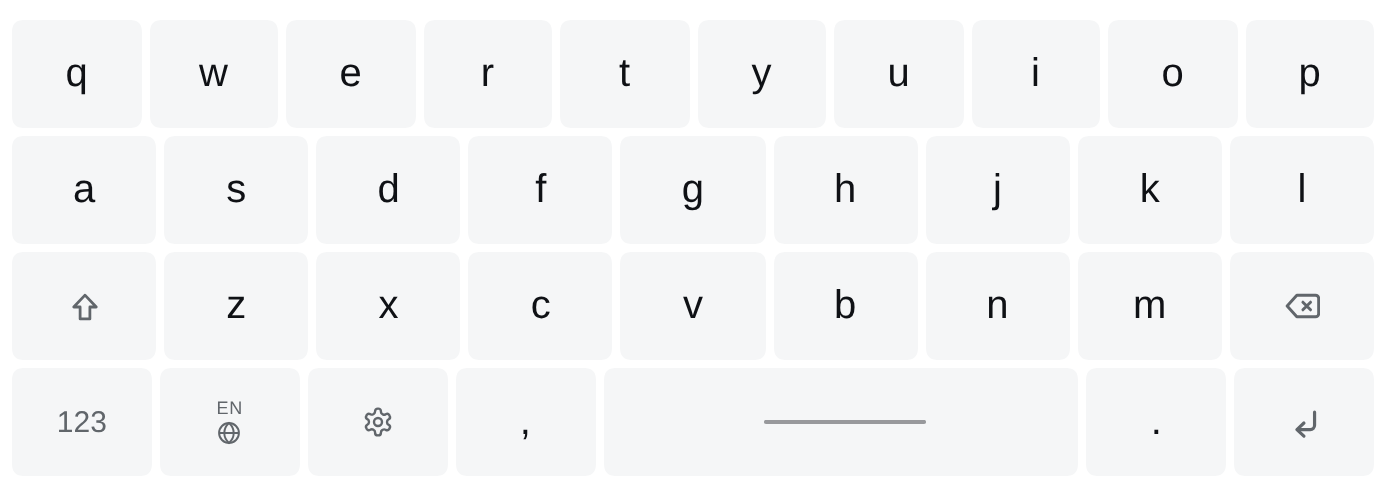
- The keyboard button in the composer toolbar shows and hides the surface.
- Globe — switches to the next enabled layout (with a single layout it opens the settings instead). The small code above it is the current language.
- Gear — settings: arrangements, split width and the language set.
- Shift is sticky: tap it, then a letter. 123 opens the digits-and-symbols page when the arrangement has no second block.
- The bottom row never squeezes its buttons: the space bar gives up width so every control key stays at least as wide as a letter key.
Layouts
| Arrangement | What you get |
|---|---|
| Always one | one keyboard with two pages: letters, and digits + symbols. Never duplicates, ignores the width |
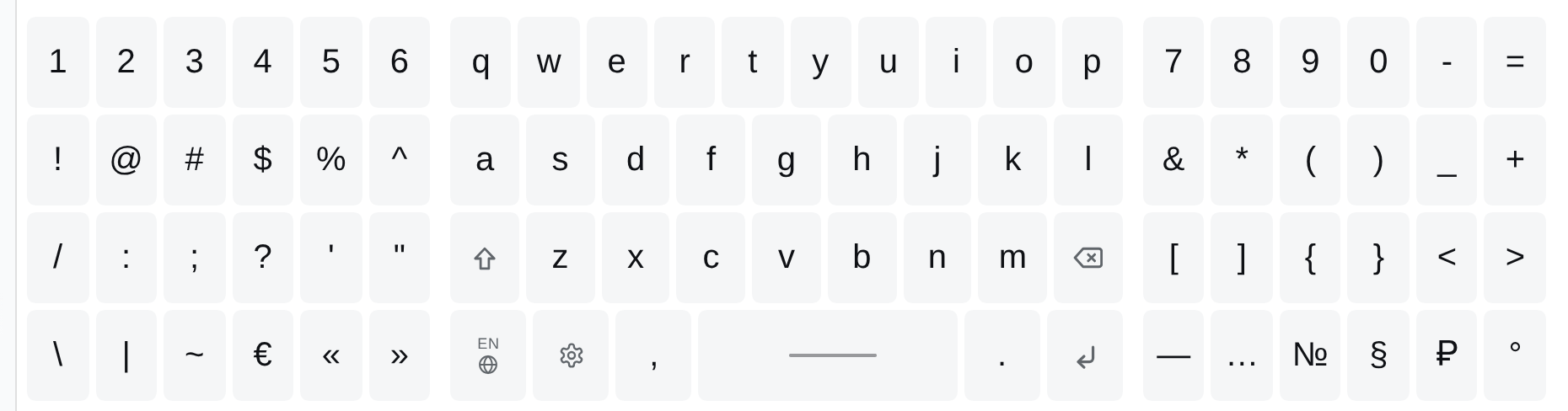
| Split the digits (default) | three blocks: the two halves of the numeric block on the edges, the letters in the centre |
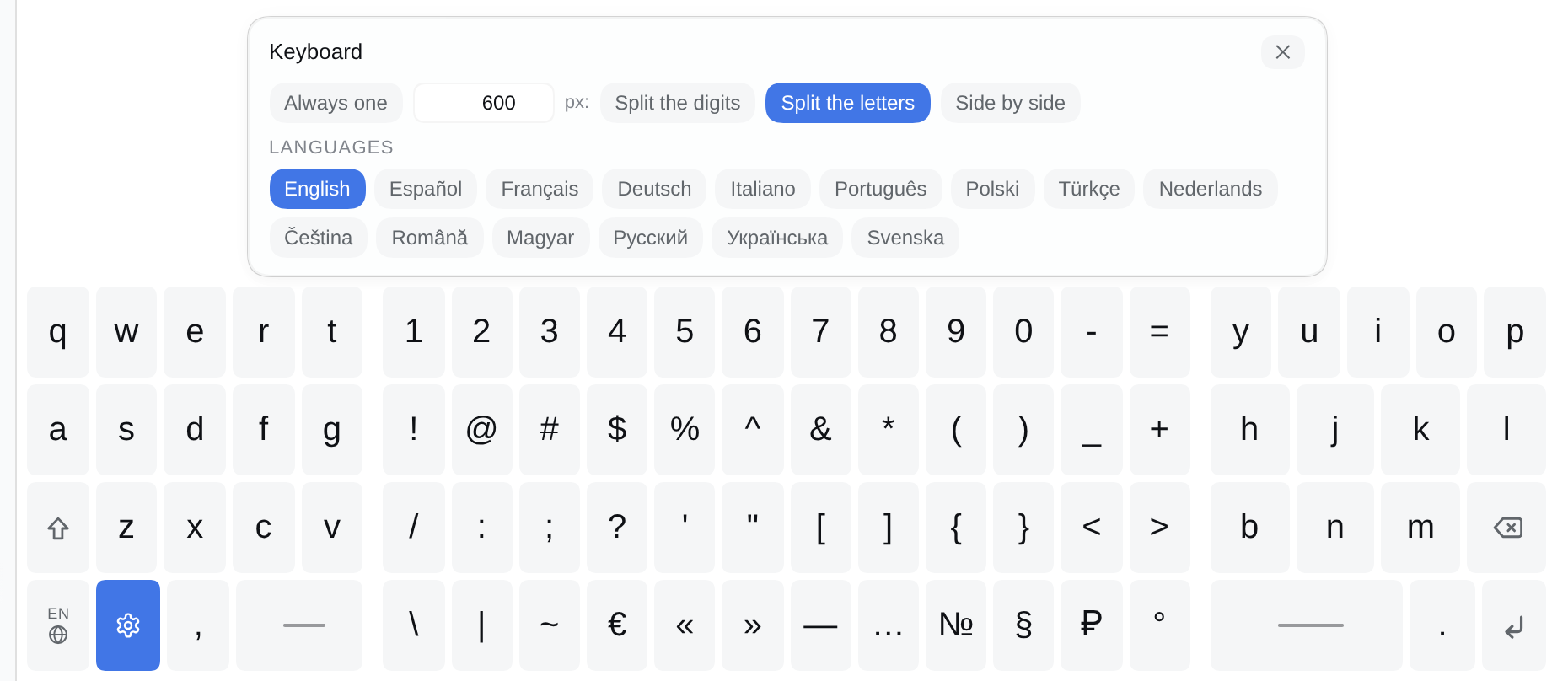
| Split the letters | three blocks: the left half of the letters, the numeric block in the centre, the right half. Shift stays left, Backspace right, and the space bar is on both sides |
| Side by side | two blocks: digits on the left, letters on the right |
The three split arrangements obey the split width setting (600 px by default, 320–1600): narrower than that, the panel falls back to one keyboard with pages.
The numeric block
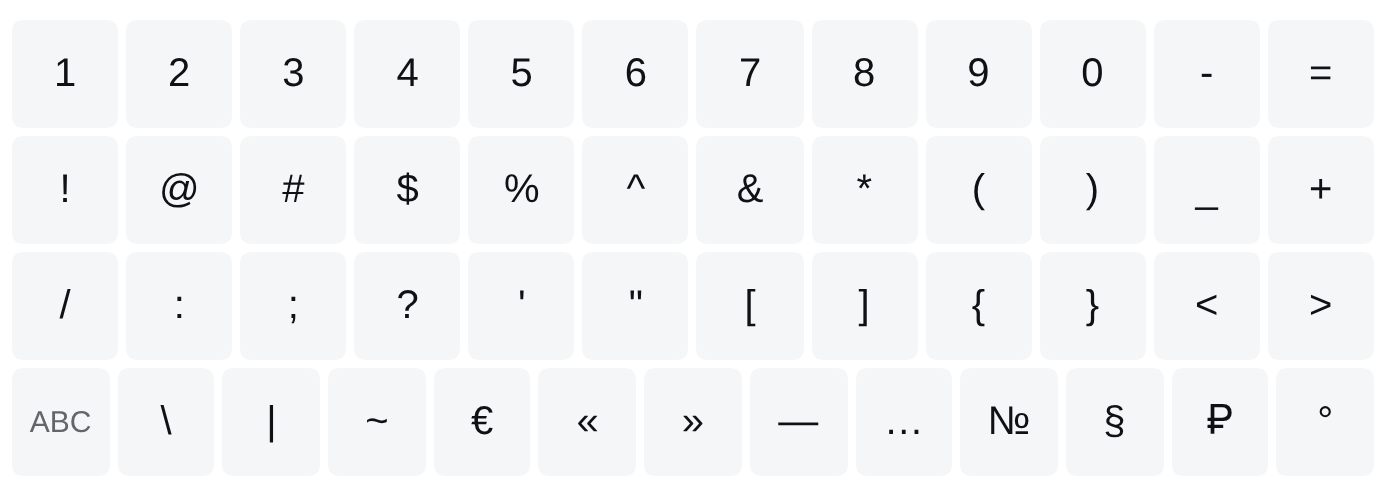
48 characters in four rows of twelve: the PC number row 1…0 - =, the same row with Shift
(! @ # $ % ^ & * ( ) _ +), then / : ; ? ' " [ ] { } < > and \ | ~ € « » — … № § ₽ °. Dot and comma live
on the letters layout, where they are typed far more often.
Languages
English is on by default; pick more in the settings. Layouts follow the national order of the letters (QWERTY, AZERTY, QWERTZ, ЙЦУКЕН) and every language stays at four rows — the national letters are real keys, appended to the spare places of the three letter rows, and whatever does not fit goes to the bottom row next to the comma (taking width from the space bar). On a phone the rows hold fewer characters and the rest are reachable from the bottom row.
| Code | Layout | Notes |
|---|---|---|
en |
English | QWERTY |
es |
Español | ñ on the letters, á é í ó ú ü as keys |
fr |
Français | AZERTY, é è ê ë à â ç î ï ô ù û ÿ as keys |
de |
Deutsch | QWERTZ, ä ö ü on the letters, ß as a key |
it |
Italiano | à è é ì ò ù |
pt |
Português | á à â ã é ê í ó ô õ ú ç |
pl |
Polski | ą ć ę ł ń ó ś ź ż |
tr |
Türkçe | ğ ü ş i ö ç, dotless ı; Shift gives İ |
nl |
Nederlands | é ë ï ö ü |
cs |
Čeština | QWERTZ, á č ď é ě í ň ó ř š ť ú ů ý ž |
ro |
Română | ă â î ș ț |
hu |
Magyar | QWERTZ, á é í ó ö ő ú ü ű |
ru |
Русский | ЙЦУКЕН |
uk |
Українська | ЙЦУКЕН with і ї є ґ |
sv |
Svenska | å ä ö on the letters, é ü as keys |
Settings
The settings panel is one row plus the language set:
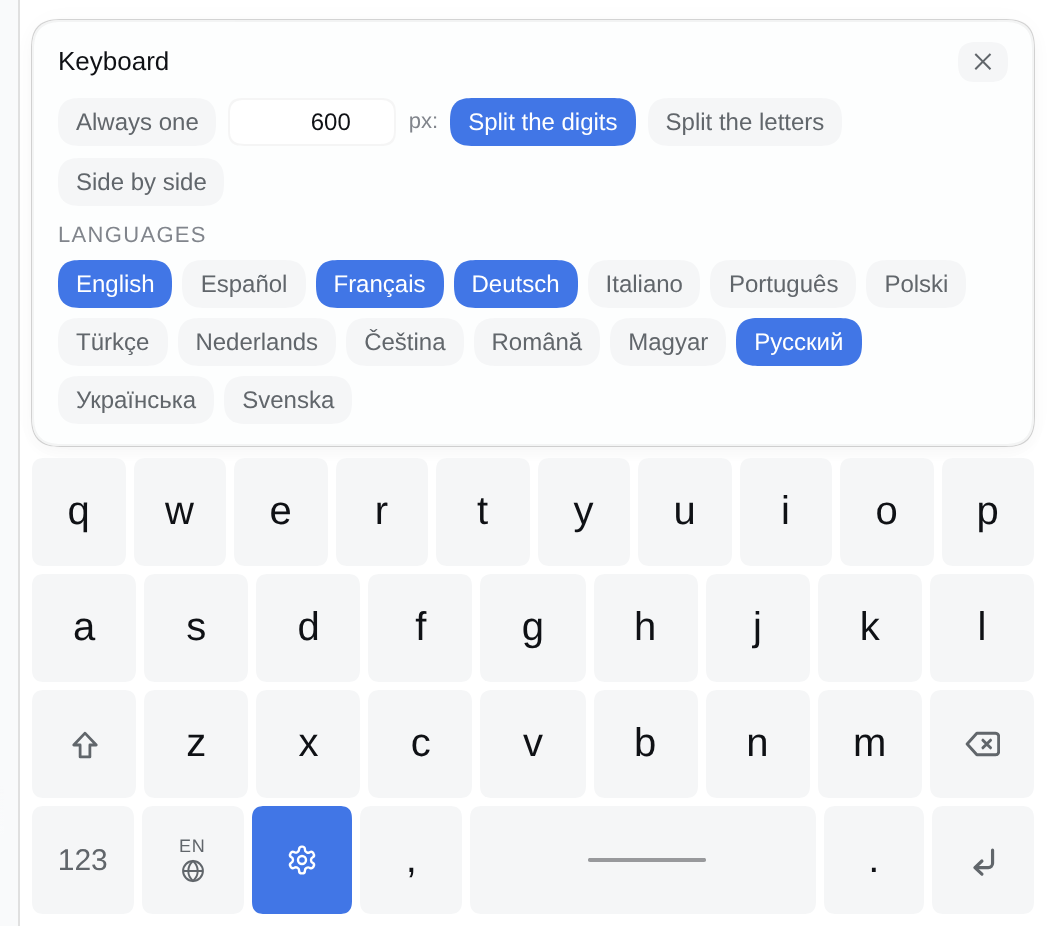
- Always one · split-width field ·
px:· Split the digits · Split the letters · Side by side - The split width field accepts 320–1600 px and applies on blur or Enter.
- Language chips: any subset of the 15; the globe cycles through the enabled ones.
Design notes
- Typing goes through the public API. The composer is a Lexical editor, not a textarea. The plugin takes
the slot's
inputActionsface, callscaptureInsertion()andinsertText(). Backspace is the same call with an empty string over the previous character; the line-break key inserts\n, which the composer renders as a real line. Sending stays the composer's own button — the keyboard never sends a message. - The system keyboard is suppressed, and there is a way out. While the surface is open the composer root
gets
inputmode="none"and autocomplete hints off. If a device still answers a focus by raising its own keyboard (the visual viewport shrinks by more than a quarter within 400 ms), the plugin stops focusing and keeps working without the caret — setdoublekeys.noFocustofalseinlocalStorageto re-enable it. - Carets and words. Focusing a Lexical editor needs
root.focus()pluseditor.focus(). A word is picked withcaretRangeFromPoint; on touch the composer'sclickcan arrive afterpointerup, so the range is re-applied after the click too. - Width is measured, not assumed. The available width comes from the composer container through a
ResizeObserver; slot anchors that aredisplay: contentsare skipped.
Local storage
| Key | Meaning |
|---|---|
doublekeys.open |
is the keyboard visible |
doublekeys.lang |
current layout |
doublekeys.langs |
enabled layouts (JSON array) |
doublekeys.mode |
arrangement |
doublekeys.breakWidth |
split width in px |
doublekeys.noFocus |
focus disabled after a device fought the plugin |
Compatibility
- DSH web panel (
@deepseek-ai/dsh-web-app) with@deepseek-ai/dsh-client-ui-conversation, any recent version that exposes theconversation.input.dockslot. - Chromium and Firefox, desktop and mobile. The panel is checked at 390, 570, 700, 834, 1280 and 1440 px wide, light and dark theme.
Development
client.js          the whole keyboard: data, rendering, typing, selection, styles (plain ES module, no build)
index.js           host half — intentionally empty
cordis.patch.yml   puts the package into a profile so the client roster sees dsh.client
locale/*.json      strings for the plugin manager and for the keyboard
icon.svg           the plugin icon
Editing client.js is picked up by the client HMR of a running panel without a restart or a reload. Turn the
feature off without uninstalling it:
- id: doublekeys
  disabled: true
License
MIT © PublicWWW Team
No comments yet. Be the first to write one.