
Inline Comment
Selection-based comments for DSH Web conversations.
Select text, write a note, and it travels with your next message — as a chip in the composer and in the sent message.
English · 简体中文
DSH Web client plugin · no runtime dependencies · zh / en
Preview
These are design mocks that mirror the plugin's light-theme tokens, not screenshots of a live session.
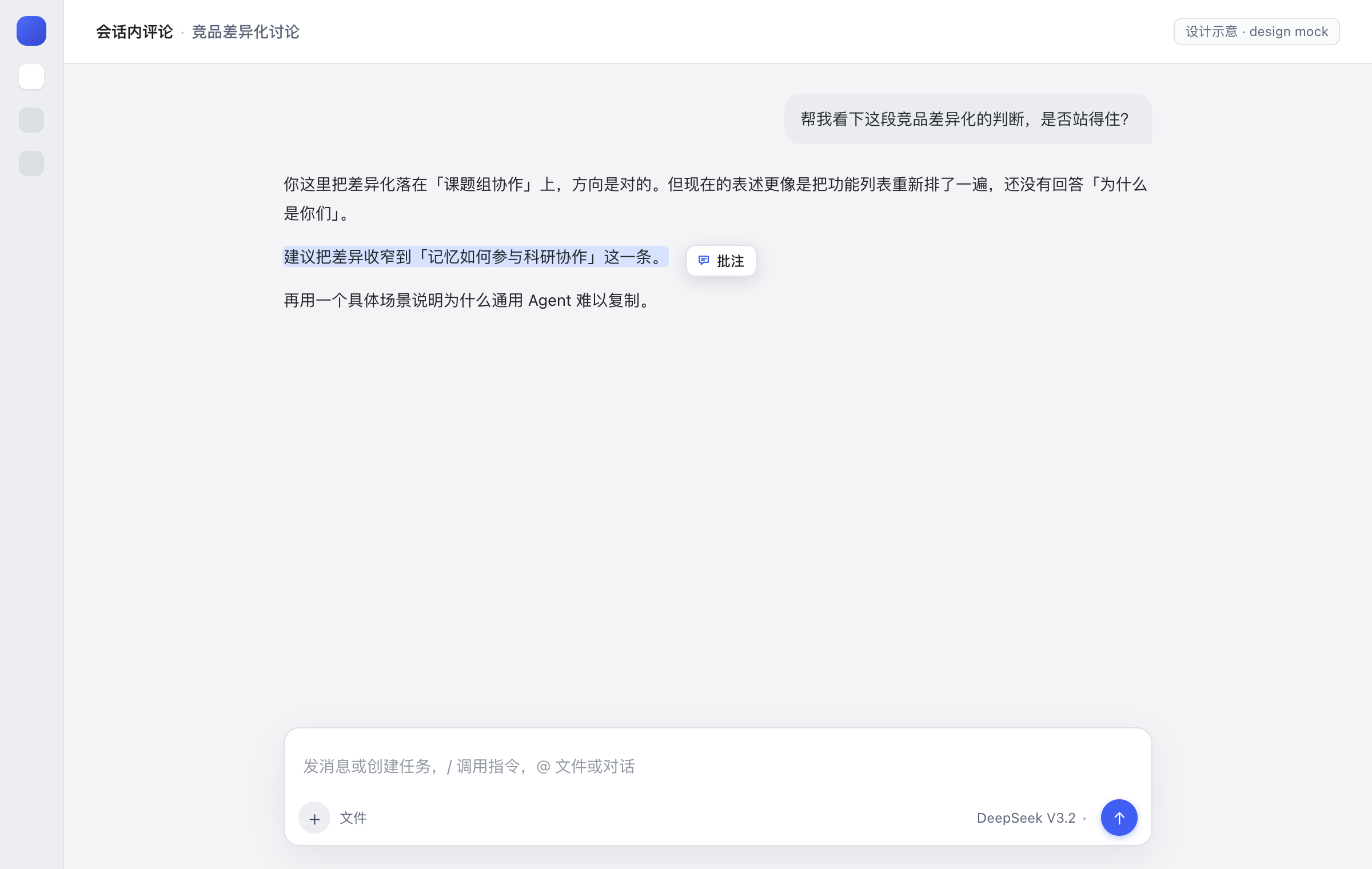
1 · Select. Drag over any text in a conversation; the Annotate pill appears next to the selection when you release.
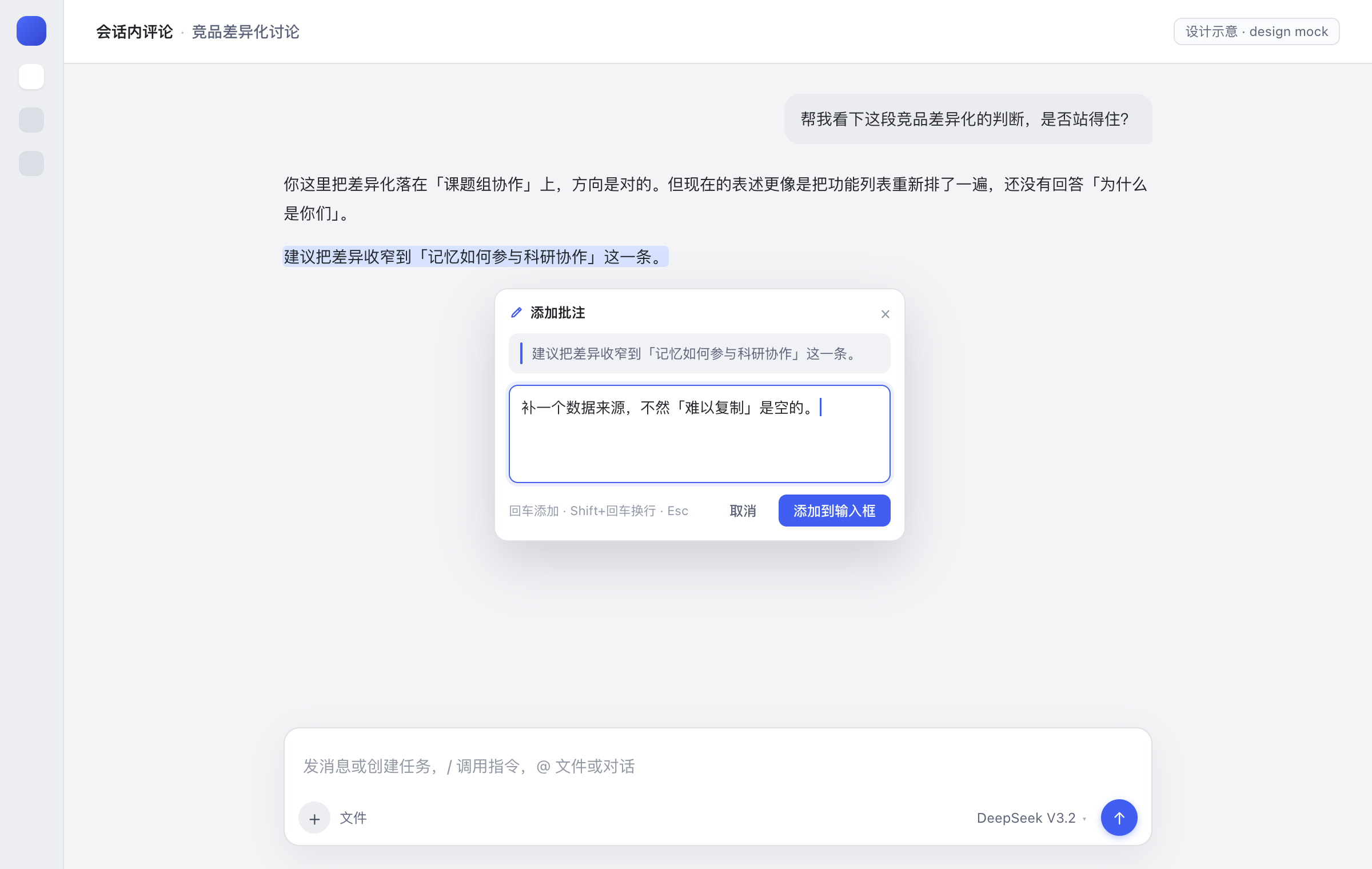
2 · Annotate. The quote is pinned in the card. Enter adds the note, Shift+Enter inserts a newline, Esc cancels.
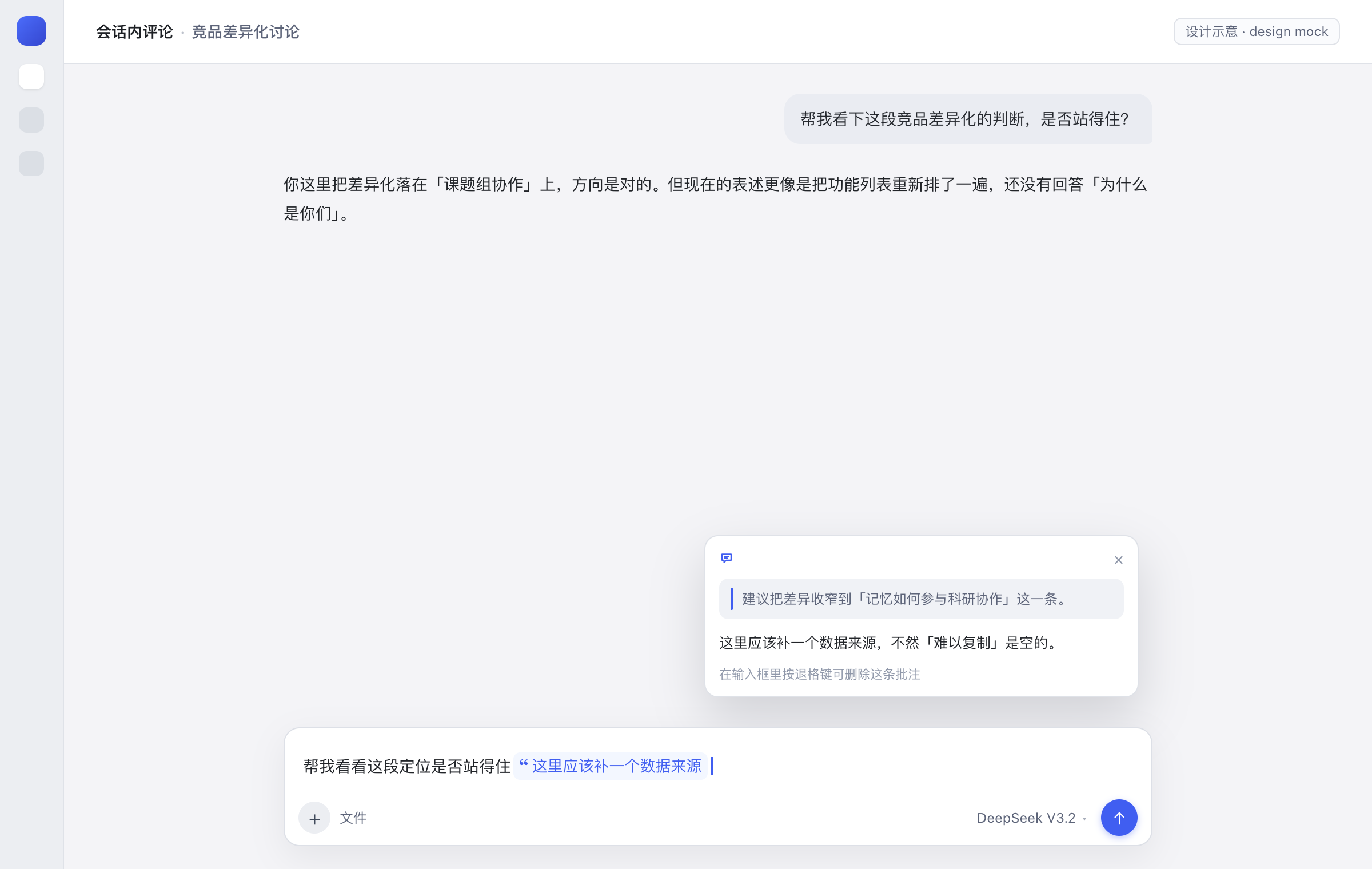
3 · Attach. The note lands at the end of the composer as one atomic chip, with the caret after it. Hover or click to re-read the quote and note.
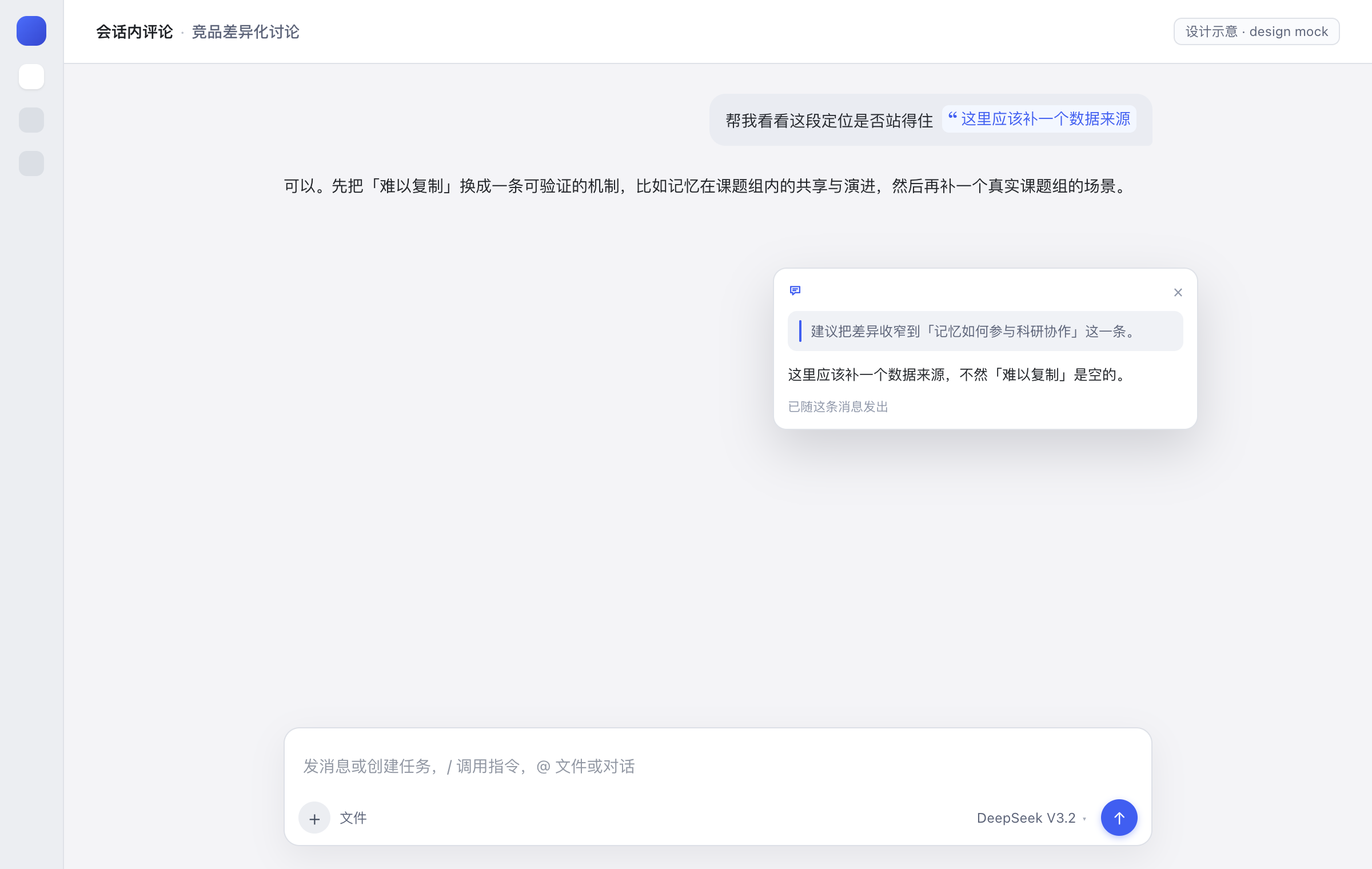
4 · Send. Sent messages keep the chip instead of spilling the quote block into the bubble. The model still receives the readable quote block.
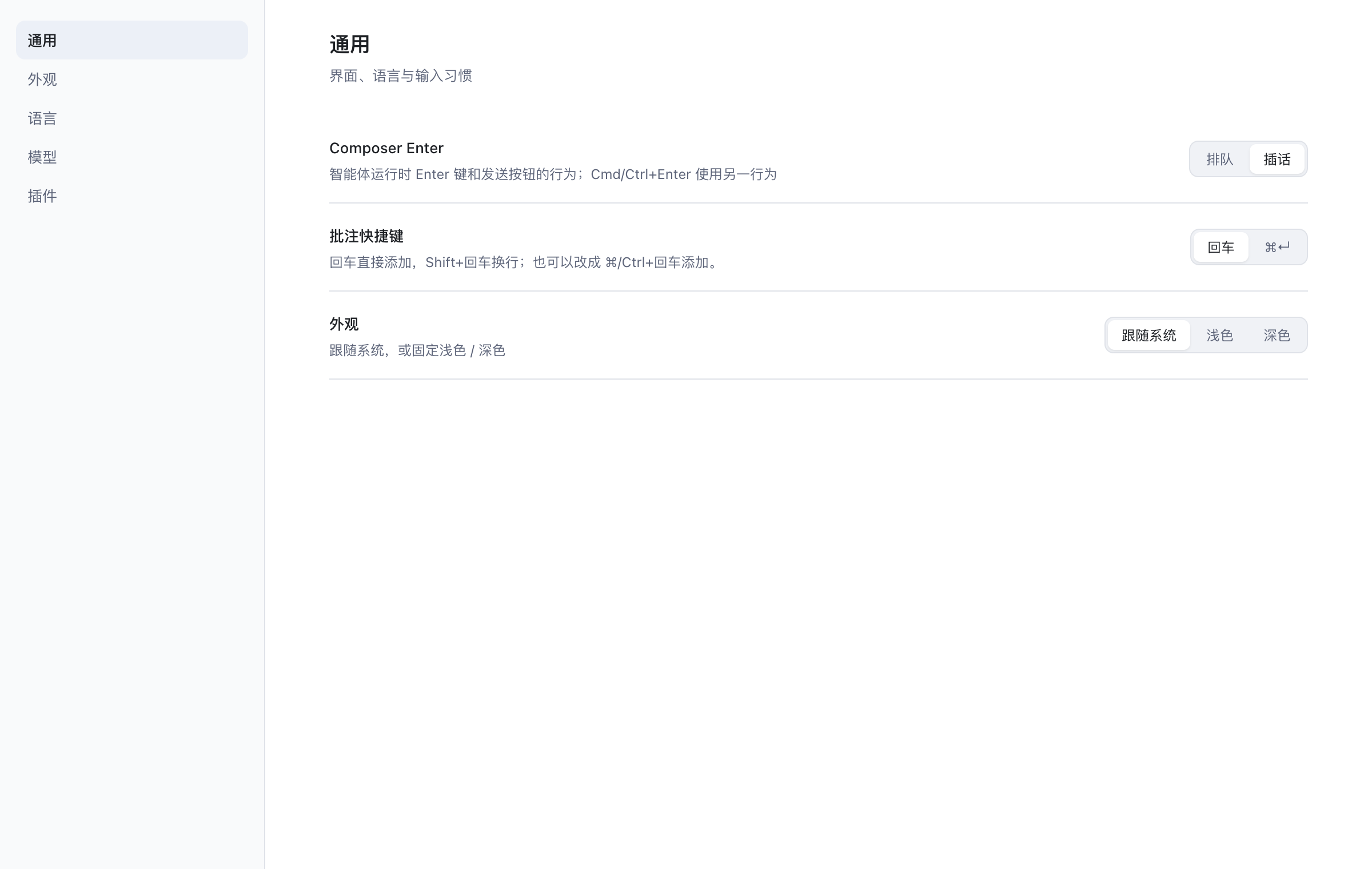
5 · Configure. Settings → General → Comment shortcut switches between Enter and ⌘/Ctrl+Enter.
Features
- Select-to-comment anywhere in a conversation — messages, replies, tool output.
- One atomic chip in the composer, appended at the end with the caret following it; backspace removes the whole note.
- Preview on hover or click, in the composer and after sending: quote and note side by side.
- Chips survive sending. A user-text rule turns the stored quote block back into the same capsule; the model still reads the block.
- Enter to add, Shift+Enter for a newline — switchable to ⌘/Ctrl+Enter.
- Theme-aware, localized, zero-config. Uses host theme tokens and the client locale service (zh / en).
- No Host surface. No service, tool, prompt, or session format change.
Install
Requires a DSH profile with the Web client. From the DSH plugin manager:
plugin_manager install_bundle
  target: /path/to/dsh-inline-comment
Point target at this checkout's absolute path — for example,
~/protocom/dsh-inline-comment.
Reload the Web window after installing; a full restart is only needed if the client bundle revision does not refresh.
Usage
Drag over text in a conversation. Release — the Annotate pill appears next to the selection.
Click it, write the note, and press Enter (or ⌘/Ctrl+Enter). The note is appended to the composer as a reference chip.
Keep typing, or send. The model receives:
> the selected sentence (up to 320 characters)
>
> Annotation: why it needs to change
Hover the chip at any time to see the quote and the note. Backspace deletes the whole chip from the draft.
Configuration
| Setting | Default | Where |
|---|---|---|
| Submit shortcut | Enter adds, Shift+Enter newlines |
Settings → General → Comment shortcut |
| Alternative | ⌘/Ctrl+Enter adds, Enter newlines |
Same row |
| Quote limit | 320 characters | MAX_QUOTE in client.js |
| Note limit | 4000 characters | MAX_COMMENT in client.js |
The shortcut preference is stored in the browser at
localStorage["dsh.inline-comment.submit-mode"] (enter or mod) and applies immediately.
How it works
| Surface | Extension point |
|---|---|
| Floating pill, compose card, preview card | shell.overlay |
Composer bridge (inputActions, useInput) |
conversation.input.overlay |
| Real reference chip | session-scope slash/input-insert-reference + an inputTriggers source |
| Sent-message chip | a uiConversation.userText rule + conversation.user.text.node |
| Shortcut row | settings.general.item |
A note is appended to the end of the draft by computing the detect offset of the draft end
(reference chips count as one character, command chips by claim.token), then inserted through the
same reference-chip path the @file picker uses. The chip's ref carries the quote and note as
base64url JSON, so the draft can be restored, previewed, and serialized after a reload. On send,
the plugin's serializer expands the chip into the quote block; on render, the user-text rule
recognizes that block and renders the capsule again.
Compatibility
- Built against the DSH desktop client bundled with
0.2.1-rc.5. - Client-only: no Host plugin behavior, no session format, no tools.
- The chip uses the composer's reference-chip shell (
appearance: file) with the file glyph hidden by a scoped CSS rule. If the host changes that DOM, the chip falls back to the file glyph; the feature keeps working.
Development
The profile installs this directory as a link, so there is no build step:
# edit client.js, then reload the Web window
node --check client.js
If a change does not appear, restart DSH so the client bundle generation is rebuilt. The UI mock
source lives at docs/mock/ui-mock.html; open it with ?s=1…?s=5 at 1200×760 to regenerate the
preview images.
Project layout
dsh-inline-comment/
├── client.js            # UI, chip source, sent-message rule, settings row
├── index.js             # Host half (no-op)
├── cordis.patch.yml     # bundle insertion row
├── locale/              # plugin manager title + description (zh / en)
├── icon.svg
├── docs/
│   ├── preview-*.png    # README previews (design mocks)
│   └── mock/ui-mock.html
├── README.md
└── README.zh-CN.md
Known limitations
- Sent-message recognition is text-level: any hand-written
> quote+> 批注:…block renders as a chip. This is intentional and mirrors how@filementions are recognized. - Uninstalling the plugin while a draft still holds an annotation chip makes that draft unsendable (the serializer is gone). Delete the chip first.
- The quote is truncated to 320 characters and the note to 4000 before they enter the chip.
- The previews are design mocks; visual output follows the host theme.
License
MIT © 2026 The Inline Comment Authors. See LICENSE.
No comments yet. Be the first to write one.