ohmydsh
One repository to aggregate, review and iteratively manage your whole DeepSeek Harness (DSH) configuration — from adding a plugin to removing it.


English · 简体中文 · Quick start · Plugins · Contributing · Changelog
What it does
ohmydsh turns the configuration of one person's DSH into a single, reviewable, reproducible repository and manages it across its whole lifecycle: add a plugin, review its trust surface, pin an exact version, build it into place, upgrade it later, disable it without losing it, and finally remove it.
- The repository is the source of truth. Everything that defines your setup lives here: the manifest, self-developed packages, skills, presets, patches and environment-level agent instructions.
~/.dshis a generated product.dsh buildmaterializes the repository into it idempotently. Never edit it by hand; change the repository and build again.dsh.yamlis the single switch. The DSH version, the auto-update policy and every customization are declared there.enabled: falsedisables an entry without deleting it.
Two kinds of readers, two entry points:
- You (or your AI) want to manage your own DSH — start at Quick start and Architecture.
- You (or your AI) want to know what the self-developed plugins solve — jump to the plugin index.
Quick start
Initialization requires Node.js 22+ and npm 10+; .nvmrc is the recommended Node version, not an exact-version gate. The launcher uses one Node implementation on Windows, macOS and Linux, without requiring Git Bash on Windows. Isolated builds and Host command workflows have passed on all three platforms; real terminal-close and desktop UI acceptance remain outstanding. See the three-platform acceptance record; this does not certify every third-party plugin on Windows. Pick one of three paths.
For native Windows paths containing non-ASCII characters, use the tested Node.js 24.20.0 release (the current .nvmrc recommendation). On 24.12.0, synchronous deletion can silently fail and cause EPERM when pnpm replaces plugin directories. This acceptance run uses pnpm 11.7.0; if the first build reports unresolved dependency build-script decisions, explicitly allow or deny each dependency before rerunning dsh build.
Path 1 — copy my full configuration
git clone https://github.com/prgrmrwy/ohmydsh.git
cd ohmydsh
node scripts/bootstrap.mjs # validate engines and run locked npm ci when needed
npm link                   # register the repository bin; separate from dependency installation
dsh build                  # materialize the configuration
dsh                        # start DSH
The same separate-line commands work in cmd and PowerShell on Windows. npm link creates dsh.cmd and dsh.ps1 in the npm global prefix; put that prefix on PATH. If PowerShell execution policy blocks .ps1 shims, use npm.cmd link, dsh.cmd build and dsh.cmd rather than weakening machine-wide policy. On POSIX, the global bin directory is <prefix>/bin. Check npm prefix -g and where.exe dsh / command -v dsh when another official dsh is already installed; do not use --force to overwrite an unrelated command. npm unlink --global ohmydsh unregisters this link. POSIX legacy install/bootstrap wrappers remain thin compatibility entries.
POSIX start/stop/restart require lsof and ps (for example, install lsof using your OS package manager); missing ownership tools fail before launching or killing a Host. Windows uses the built-in PowerShell TCP/CIM query and forcefully stops only a revalidated owned tree; graceful flush is not guaranteed. An explicit DSH_BIN is a single executable path: Windows accepts JS entrypoints or native .exe, not .cmd/.bat/.ps1 shims or a command string. Use the real JS CLI, not its npm shim.
Path 2 — pick parts
Start from path 1, then trim dsh.yaml: set enabled: false on what you do not want (it stays in the repository and is easy to re-enable) or delete the entry for good. The add-dsh-plugin and remove-dsh-plugin skills make the edit, run dsh build and ask before restarting. Run dsh build again after every change.
Path 3 — start from zero
Replace dsh.yaml with the minimal manifest below and run dsh build. No new command, script or template is involved.
dshVersion: 0.2.1-rc.5
autoUpdate:
  enabled: false
customizations: []
autoUpdate.enabled must be explicitly false. When it is absent, auto-update defaults to on, and the launcher would then edit dsh.yaml and commit the change on its own.
dsh reset is not the from-zero route. It only undeploys customizations from ~/.dsh; the manifest stays unchanged and dsh build restores everything.
Let an AI agent do it
Hand this prompt to your agent. It asks which path you want and then follows the guard rails.
You are installing ohmydsh, a DSH customization repository. Follow these rules in order:

1. [ASK-PATH] Ask me first which path I want: (1) copy the full configuration, (2) pick parts, (3) start from zero. Do nothing before I answer.
2. [VERIFY-IDEMPOTENT] After every change run `dsh build` twice; the second run must report no changes. If it does not, stop and report.
3. [NO-DEPLOY-EDIT] Never hand-edit anything under ~/.dsh. Change dsh.yaml or the repository sources, then run `dsh build`.
4. [NO-SECRETS] Never write credentials into the manifest, command arguments or this chat. Secrets belong in .env.local only.
5. [STOP-ON-FAIL-CLOSED] If sync fails closed (for example AGENTS.md drift), stop and report the exact error. Never delete files to get around it.
6. [ASK-RESTART] Ask me before restarting DSH. Inside a DSH session `dsh restart` disconnects it and exit 0 only means scheduled; verify with `dsh history` after reconnecting.
Command cheat-sheet
dsh build          materialize dsh.yaml into ~/.dsh without starting DSH
dsh stop           stop the running DSH
dsh restart        stop, wait for the port, start again (in a DSH session: scheduled, then detached)
dsh reset          undeploy customizations (the manifest is untouched)
dsh history        list previous startups and the plugins they loaded
dsh plugin-update  check remote plugins, confirm, edit dsh.yaml, build, commit
dsh doctor         check and repair host-level prerequisites
Architecture
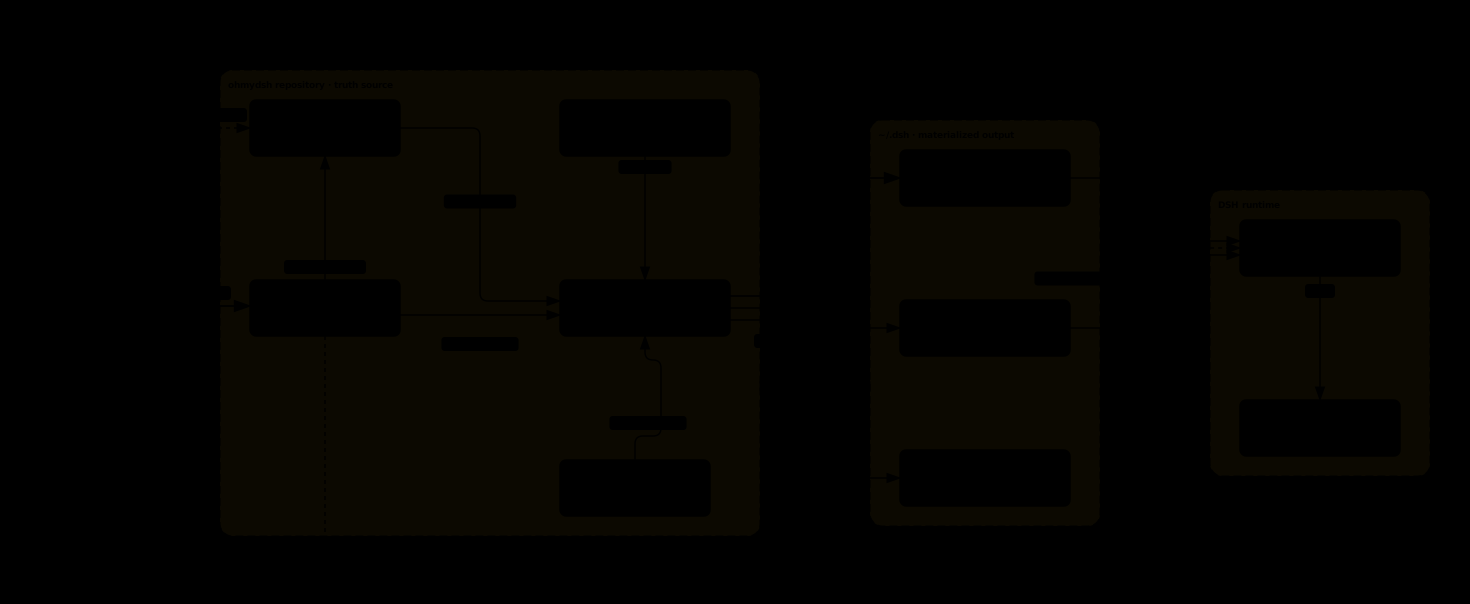
Mental model
The repository declares what should be installed. scripts/sync.mjs (run by dsh build) makes ~/.dsh match it, fails closed on anything it cannot prove, and changes nothing on the second run. DSH then loads ~/.dsh like any other deployment.
Where customizations come from
| Source | Declared as | Example |
|---|---|---|
| Third-party npm package | source: remote, exact version pin |
width-tiers |
| Self-developed package in this repository | source: local, code in packages/<id>/ |
dsh-memex |
| Self-developed package in another repository | source: remote, GitHub release tarball |
dsh-cockpit-bridge |
| Skill | type: skill, skills/<id>/ |
ws |
| Patch | type: patch, patches/<id>.yml |
connection-webserver |
| Preset | type: preset, presets/<id>/ |
dsh-pet-executor |
| Third-party resource | thirdPartyResources, pinned with integrity |
spec-superflow |
Directory layout
dsh.yaml                 the single switch surface
instructions/            environment-level agent instructions
packages/<id>/           self-developed DSH packages
skills/<id>/             skills synced to ~/.dsh/skills
presets/<id>/            agent presets
patches/<id>.yml         composition patches and overrides
scripts/                 sync, build, upgrade and maintenance scripts
openspec/                specs and changes: behavior is written down before it is built
docs/                    adr/ decisions, architecture/ mechanisms, assets/ diagrams
tests/                   repository-level tests
Lifecycle

Every customization follows the same loop: add the entry, review its source and trust surface, pin an exact version, build, verify that a second build changes nothing, and upgrade by repeating the loop. Finally disable it, or remove the entry and build again to uninstall it.
Private overlay
Entries that cannot be published (internal packages, machine-specific patches) go into a gitignored overlay. It is validated exactly like public entries and can only append. See private overlay.
More mechanisms: environment-level agent instructions and DSH plugin integration pitfalls (read it before touching host capabilities).
Multiple machines
Each machine does the same two things: clone this repository (plus your optional private overlay) and run dsh build.
dsh-cockpit lets you manage and view several machines from one place. It does not distribute configuration; the repository does.
Your configuration
dsh.yamlis the truth. Read it, not~/.dsh.node scripts/plugin-list.mjsprints what is actually loaded.- A private overlay (
dsh.yaml.local, or the file named byDSH_LOCAL_MANIFEST) appends entries that must not be public. .env.local(gitignored) holds literal single-lineKEY=VALUEsettings and secrets, never executable Shell. Quote paths containing spaces or backslashes; use absolute paths instead of$HOMEor~. Blank/full-comment lines, optionalexport, empty values and CRLF are supported.$, backticks, multiline values, bare operators and inline comments are rejected with redacted line diagnostics. Single quotes are completely literal; double quotes decode only\\and\". File values override inherited launcher env except explicit callerDSH_BIN. Bare sync/plugin-list consumers share the parser but retain their narrow allow-list, caller-first policy and tolerance for unrelated lines; the launcher is deliberately stricter. Migration never rewrites your file.thirdPartyResourcespins assets that are not plugins: the spec-superflow workflow skills, the Jev MCP server (itsTYPESAFE_API_KEYcomes from.env.localonly, never from the manifest) and the Anvil OpenSpec schema.
Plugins
Every enabled entry of dsh.yaml, grouped by origin. Third-party items link to their upstream; self-developed items link to their directory in this repository.
Third-party packages
- archify-dsh — Generates interactive architecture, sequence and data-flow diagrams from a conversation.
- llm-subscriptions — Adds subscription-based providers (Codex, Claude, Grok, Copilot) switchable from the input box.
- width-tiers — Switches the conversation width between five tiers.
- better-sidebar — Turns the sidebar into a service-backed workbench with tabs.
- dsh-opencode-session-header — Sends the session header that OpenCode Go requires, fixing missing-session errors.
- michengai-btw — Adds
/btwfor one-off side questions answered from the current context; by default it runs no tools and does not write back to the main conversation. - dsh-magpie-connect — Brings the models of a Magpie AI gateway into the model picker, alongside the direct providers.
Third-party resources
- spec-superflow — State-machine workflow skills for planned, spec-driven changes.
- jev — MCP server giving agents semantic judgment tools; the key stays in
.env.local. - anvil — OpenSpec schema for test-first change workflows.
- ponytail — Prompt-only skills for a minimal-change, low-bloat coding mode and its review and audit commands.
Adapted third-party skills
- i-have-adhd — Answer-first, short-step output mode, used only when explicitly requested.
- frontend-design — Design guidance that avoids templated, default-looking interfaces.
- eli5 — Explains any topic at the level of a chosen audience.
Self-developed packages
- worktree-session — Creates an isolated task branch and worktree on the first message of a session.
- dsh-openspec — Managed adapter exposing the official OpenSpec workflows as skills and commands.
- dsh-memex — Native persistent memory with per-workspace scopes and a memory settings page.
- dsh-pet — A resident desktop companion agent that runs management skills on a trusted snapshot.
- dsh-sidebar-session-provider-icon — Shows the selected model's brand logo on every sidebar session row.
- dsh-session-id-copy — Adds a short session-id badge next to the title that copies the full id.
- system-clock — Shows the DSH host's clock, time zone and hostname at the bottom of settings.
- sidebar-session-resources — Collects links and produced files of the current session into a sidebar panel.
- home-network-model-guard — Disables Claude models in the input box when the host egress region is restricted.
- subscriptions-sandbox-shim — Strips sandbox escalation fields and orphan tool calls for subscription providers.
- dsh-magpie-connector — Connects a self-hosted Magpie gateway with one real provider route per upstream owner (
Magpie (Claude),Magpie (Codex), … on stock DSH), multiple auto-selected connection lines (LAN at home, Cloudflare Access/public outside; per-line keys/Access), usage cards grouped by upstream provider, visibility, default effort and per-session fast mode. - cockpit-worktree-open-shim — Connects the cockpit remote editor to Worktree Session's open action.
- cockpit-memex-browse-shim — Connects cockpit port forwarding to the memory card browser.
- dsh-collab — Lets existing independent sessions share a collaboration ledger by invitation and wakes members on their next turn.
- dsh-auto-model-routing — In AUTO, keeps the main model and adjusts only its reasoning effort per turn, selects model + effort for fresh sub-agents and shows each decision; a failed judgment turns AUTO off and says why, and model families are data in
src/strategies/. Standalone repository.
Self-developed skills, preset and patch
- case-verify — Plans independent-oracle browser acceptance trails and records append-only, precisely linked evidence; optional trusted executable adapters supply external cases and report sinks.
- ws — Inspects, promotes and cleans Worktree Session bindings.
- jev-workflow-router — Advisory routing: one ignorable suggestion line when work may need a formal workflow; never blocking, never acts on its own.
- memex-recall-report — Reports memory recall statistics and which cards are never recalled.
- memex-eval — Runs or reads the fixed fictional memex selftest; a pipeline check, not an effectiveness evaluation.
- weekly-insights — Local session retrospective like Claude Code
/insights: streams session logs, tags each session and caches the result, writes an HTML report with improvement prompts. - publish-dsh-plugin — Owns the self-developed plugin publishing SOP: README, automatic mirrors, npm and GitHub Releases, and marketplace verification.
- add-dsh-plugin — Adds a remote plugin to the manifest, builds it and asks about a restart.
- remove-dsh-plugin — Removes a plugin from the manifest, builds and asks about a restart.
- dsh-sandbox-notes — Notes on sandbox permissions and the "not strictly wider" error.
- subagent-model-routing — Delegates with the official fresh tools and passes only user- or lead-specified model/effort; route_subagent is an optional preview, and failures pause and ask.
- dsh-pet-executor — Preset for Pet execution sessions without the global skill provider.
- locus-base — Fixed nondelegating preset for the Locus coordinating session.
- locus-child — Read-only variant of locus-base (no write/edit) that bounds the tools of each Locus per-entry child.
- memex-eval-judge — Minimal native-only preset for the memex selftest judge, with no coding tools.
- memex-eval-config — Adds fixed selftest workspace closures without replacing user scope or workspace settings.
- connection-webserver — Composition patch that restores Connection RPC channel registration.
- dsh-collab-config — Config patch for dsh-collab: invite-based admission and the
pet-locusmanaged channel that lets Pet Locus join as a proxy member. - home-network-model-guard-config — Config patch that exempts each Magpie owner route (
dsh-magpie-connector-<owner>) from the host egress gate, listed one by one by exact provider id. - websocket-heartbeat — Config patch that relaxes the official gateway's WebSocket heartbeat to 5 seconds so large histories survive short network hiccups.
- ponytail-skills — Composition patch that mounts a dedicated skill provider for the ponytail package only.
Self-developed, separate repository
- dsh-cockpit-bridge — Bridge between DSH and the dsh-cockpit multi-machine manager, installed from a GitHub release.
Contributing
Issues and pull requests are welcome. Read CONTRIBUTING.md first. Security vulnerabilities go through GitHub private vulnerability reporting, never a public issue. Behavior changes go through an OpenSpec change. Any change to README.md must update README.zh.md in the same commit, and the other way round.
License
MIT. Third-party plugins keep their own licenses; their upstream links are in the plugin index.
No comments yet. Be the first to write one.