dsh-sidebar-session-provider-icon

English · 简体中文
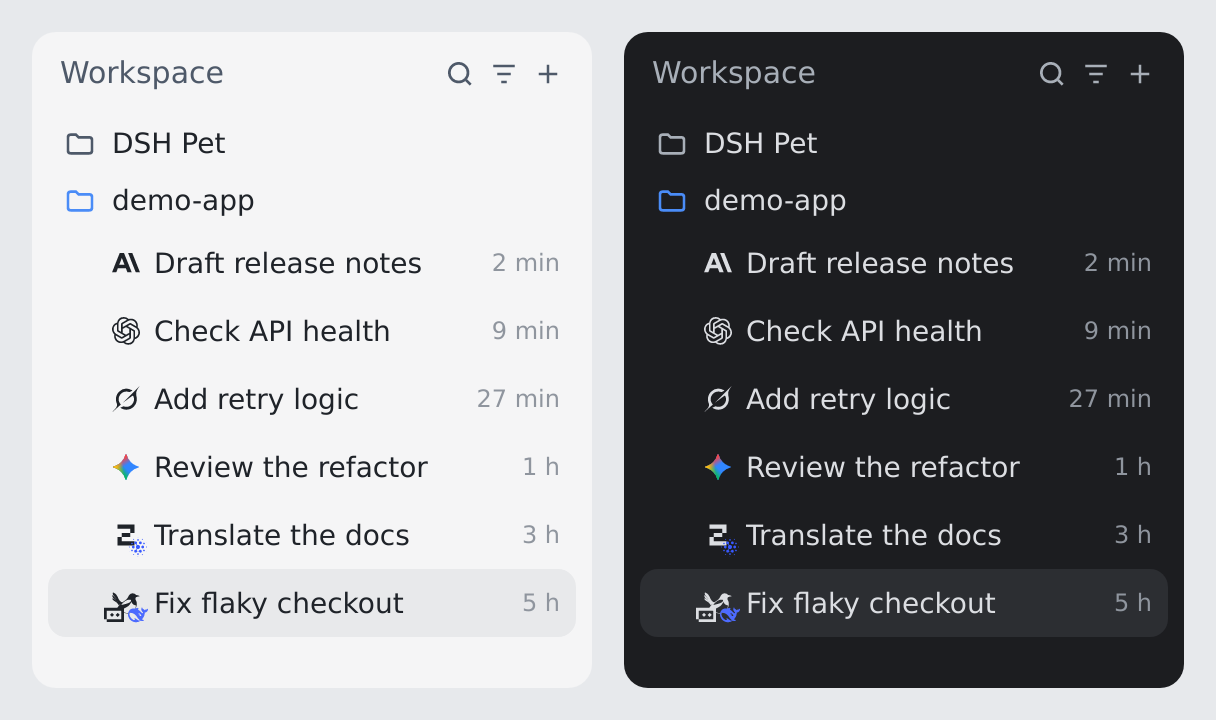
Synthetic English sidebar illustration, light theme on the left and dark theme on the right with the same rows: single vendor marks for Claude, GPT, Grok and Gemini, an aggregator route mark for OpenCode with the GLM vendor corner, and the composite badge for Magpie behind a gateway — Trae in the bottom-left transit corner, DeepSeek in the bottom-right vendor corner. currentColor marks follow the theme while Gemini, GLM and DeepSeek keep their brand color in both. It renders an isolated DSH instance that has no model credentials, so badges and rows come from the plugin's own output rather than a recorded live session.
In the DeepSeek Harness (DSH) sidebar every session row looks alike, so you cannot tell which provider and model a conversation uses without opening it. This plugin shows a provider + model icon in front of each session title, read from the model currently selected in the composer, and updates it the moment you switch. When the provider and the model come from different vendors (for example opencode-go/deepseek-v4-flash), the provider logo carries a small model logo in its bottom-right corner.
- Real brand marks, nothing generated. Logos are pinned, vendored SVGs chosen from the actual provider route and model id; nothing is generated or fetched at runtime.
- Follows the composer live. The open session tracks the input-box selection immediately; other rows keep their next selection, and cold history falls back to the last real request.
- Gateway-aware composite. Aggregator routes show the route logo with the model vendor in the corner, and gateways such as Magpie can add the transit platform as a third layer — all inside the original 14×14 footprint.
Install
DeepSeek Harness 0.2.0-rc.2, Node.js >=22.19.
# from npm — prebuilt, no build approval
dsh plugin --profile web add dsh-sidebar-session-provider-icon

# or straight from source — builds locally, approve the build when dsh asks
dsh plugin --profile web add prgrmrwy/dsh-sidebar-session-provider-icon
Restart DSH and refresh the Web page. Nothing else is needed: no configuration, no network access, and no files written outside the DSH profile that installs it.
How it behaves
The logo shown for a session comes from three sources, in this order:
- Live selection (preferred, while verifiable). The official
dsh-client-ui-model-selectionstore, read asctx.modelDirectories.directoryFor(sessionId).store.current. It is the single per-session state shared by the input-box selector and the/modelcommand, and it publishes{ provider, model }as soon assession.selectModelsucceeds. The open session, including a blank one that has not sent a message yet, therefore follows the input-box selection. That store belongs to a client Session scope, so every session-list and DOM signal re-resolves it: when the runtime hands out a new store for the same session (leaving the session and coming back is enough) the badge re-subscribes and re-reads it, and it re-reads the snapshot even when the identity did not change. An observation is kept only while its session is the open one; once the view moves on — or the directory cannot be resolved any more — it is dropped, so a value the client can no longer verify never decides a row. - Selected model (durable). The official
modelSelectionprojection'snext: the selection the session will use for its next request. The host maintains it and it also covers a model the user picked but has not sent with yet, which is what keeps a row right after you leave its session. - Last request (cold-history fallback). A Host
providersession projection folds therequest/headerevents of the session log, so a history session whose selector has not been loaded in this browser still shows the provider of its most recent real request. It survives restarts and uses nolocalStorage.
Brand resolution has two independent dimensions: the provider route picks the main logo, the model id picks the corner logo.
| Selection | Shown |
|---|---|
claude/claude-opus-5, codex/gpt-6-luna, deepseek-official/deepseek-v4-pro (same vendor) |
a single Anthropic / OpenAI / DeepSeek logo |
opencode-go/deepseek-v4-flash, opencode-go/qwen3.8-flash, opencode-go/kimi-k2.7-code |
OpenCode, with DeepSeek / Qwen / Kimi in the corner |
traex/GPT-5.6-Sol[1m], traex/DeepSeek-V4-Flash, traex/Gemini-3.1-Pro-Preview |
Trae, with OpenAI / DeepSeek / Gemini in the corner |
traex/openrouter-3o[1m], traex/Seed-2.1-Pro-0915 |
Trae, with OpenRouter / ByteDance in the corner |
dsh-magpie-connect + opencode-go/deepseek-v4.1-flash, opencode-go/glm-5.3-flash (Magpie gateway, via a platform) |
Magpie, with OpenCode bottom-left (transit) and DeepSeek / GLM bottom-right (vendor) |
dsh-magpie-connect + claude/claude-haiku-5-5, codex/gpt-6-luna (Magpie gateway, direct to vendor) |
Magpie, with Anthropic / OpenAI bottom-right; the bottom-left corner stays empty |
known route + unrecognized model (e.g. opencode-go/omen-alpha) |
the route logo only, no corner logo |
| unknown or generic route | a single logo from the model name; if that also fails, a neutral single-letter badge |
- Route first.
opencode-go/deepseek-v4.1-flashshows OpenCode as the main logo; DeepSeek can only appear in the corner. - Behind a gateway, up to three layers. The primary is the gateway, the bottom-right corner is the model vendor, and the bottom-left corner is the transit platform —
dsh-magpie-connect / opencode-go/deepseek-v4.1-flashexpresses Magpie, OpenCode and DeepSeek at once. The transit corner only appears when the upstream segment is a known brand that differs from the vendor, soclaude/*,codex/*,opencode-go/private-modelandauto|group|customstay at two layers or one. - No impersonation. A model whose vendor cannot be identified gets no corner logo, and never a letter badge in the corner.
- Size. The composite keeps the 14×14 footprint of a single logo, so the row layout does not move. Both corner logos are bare 10px glyphs overhanging their corner by 4px, with no plate, ring or padding: at this scale any decoration eats the pixels the glyph needs. The bottom-left glyph sits in the gap between the badge and the official status dot, never covering the
StateDot. - Tooltip. Hovering always shows the exact
provider · model.
| Layer | Implementation |
|---|---|
| Host | src/provider.ts registers the provider projection (it requires the sessionProjections service) and folds request/header; it only serves the cold-history fallback |
| Client data | selection-binding.ts observes the open session's store of ctx.modelDirectories (re-resolved per signal); provider-map.ts prefers a verifiable observation, then the official modelSelection selection, then the provider fallback |
| Client DOM | row-locator.ts holds all knowledge of the official row DOM: each row is identified by its official data-row-key="session:<id>" (the title reverse lookup remains only as the fallback for a runtime without it), so two sessions sharing a display title never receive each other's badge; a MutationObserver maintains a separate badge <span> in front of the title |
| Brand art | src/client/assets/*.svg, downloaded once and bundled; logos.ts resolves the provider brand and the model brand separately and renders the composite when they differ |
The badge content is derived only from (provider, model); index.ts rebuilds a badge only when those values or the tooltip change.
Configuration
None. The plugin row carries no config fields and the package reads no environment variables.
Provider / model → icon
The table lists recognized provider route aliases and model-name examples, not a fixed model catalog. Matching ignores case and strips an npm scope and a leading dsh- / dsh_. A known provider determines the main icon; a different known model brand determines the corner icon. — means that dimension is not recognized for that brand. The exact rules live in logos.ts.
| Icon | Brand | Provider routes / aliases | Model names / families |
|---|---|---|---|
 |
DeepSeek | deepseek, deepseek-official |
deepseek-* |
 |
OpenAI | openai, codex |
gpt-*, codex-* |
 |
Anthropic | anthropic, claude |
claude-*, names containing anthropic |
 |
Grok / xAI | grok, xai |
grok-* |
 |
Kimi / Moonshot | kimi, moonshot |
kimi-*, moonshot-* |
 |
GLM / Zhipu | glm, z-ai, zai, zhipu |
glm-* |
 |
MiniMax | minimax |
minimax-* |
 |
Pi | pi, pi-ai |
pi, pi-* |
 |
OpenClaw | names containing openclaw |
names containing openclaw |
 |
Hermes Agent | hermes, hermas, nousresearch, nous |
names containing hermes, hermas, nousresearch |
 |
OpenCode | opencode, opencode-go, opencode-zen |
names containing opencode |
 |
Trae | trae, trae-ai, traex* |
— |
 |
Magpie | magpie, magpie-*, dsh-magpie-connect |
— (gateway rule below) |
 |
Qwen | qwen, dashscope, bailian |
qwen*, qwq* |
 |
Tencent Hunyuan | hunyuan, tencent |
hunyuan*, hy<digit>* (e.g. hy3, hy4-preview) |
 |
Meituan LongCat | longcat, meituan |
longcat-* |
 |
Xiaomi MiMo | xiaomi, mimo |
mimo-* |
 |
Google Gemini | gemini, google, google-* |
gemini-*, gemma* |
 |
NVIDIA | names containing nvidia |
names containing nemotron |
 |
Meta | meta, meta-ai, meta-llama* |
muse-spark*, names containing llama |
 |
Ant Group | ant-ling, inclusionai, antgroup |
ling-*, ring-* |
 |
OpenRouter | — | openrouter-* (e.g. TraeX openrouter-3o[1m]) |
 |
ByteDance | — | seed-* |
Trae and Magpie routes match exact names / prefixes, never arbitrary substrings. OpenRouter and ByteDance are model-only mappings: a provider route named openrouter does not by itself select the OpenRouter icon.
Behind a gateway route (Magpie) a model id is <upstream provider>/<model>, and the two segments own one corner each: the bottom-right corner is the model vendor (the model name after the slash first, falling back to the upstream segment read as a provider route — opencode-go/private-model → OpenCode); the bottom-left corner is the transit platform (the upstream segment, drawn only when it is a known brand that differs from the bottom-right one — opencode-go → OpenCode). Non-brand segments (auto, group, custom) produce no transit corner. With neither recognizable the row shows Magpie alone. Other routes keep reading the whole model id. See openspec/changes/archive/2026-10-25-sidebar-provider-icon-gateway-transit-tier/design.md for the geometry and the trade-offs.
The model dimension covers every identifiable model family in the OpenCode Go / Zen catalogs, plus the GPT, DeepSeek, Gemini, OpenRouter and ByteDance Seed families in the current TraeX catalog.
Brand art is pinned and vendored, never hand-drawn and never fetched from a CDN at runtime:
- every brand except OpenCode and Magpie:
@lobehub/icons-static-svg@1.94.0, MIT; the color variant is used where one exists; - OpenCode: the official provider SVG from
anomalyco/opencodeat commit5e75e5e9901f0d178f425bfb47f1bd46cbe78a59, MIT; - Magpie: the official mark
internal/provider/magpie.svgfromyetone/magpieat commitba1dc7f975666e50308ef7bf8173c8a8e91c553b, MIT.
Per-file source URLs and SHA-256 checksums are listed in src/client/assets/README.md. Some color SVGs carry gradient/clip ids; the corner instance suffixes them with -sub so copies on the same page never resolve each other's definitions.
To add a brand: put the SVG in src/client/assets/, record source, pin, license and SHA-256 in the assets README, then add rules and tests to providerBrandOf / modelBrandOf in logos.ts.
Boundaries & safety
- The official
StateDotis never replaced, moved or hidden; times, row menus and drag behavior stay official. - The badge is a standalone
<span>in front of the title. If the row DOM cannot be located reliably, the plugin silently shows nothing and leaves the page intact. - No network requests of its own: the logos ship with the bundle and the data comes from DSH's own stores and session log.
- Code is MIT-licensed (LICENSE). The brand icons are vendored from MIT-licensed upstreams; their copyright notices, the exact rendering changes, and the trademark position are in THIRD-PARTY-NOTICES.md. Brand owners retain their trademark rights; the marks only identify the selected provider route and model and imply no endorsement.
Development
lib/ is a gitignored build artifact. In a standalone checkout:
npm install
npm run typecheck
npm test
npm run build
In the ohmydsh monorepo this package is a workspace member: install once at the repository root and add --workspace dsh-sidebar-session-provider-icon to the last three commands. dsh build / sync also builds lib/ on demand before installing the local package; refresh the Web page to pick up a new client bundle.
Under vitest, small SVGs are inlined as data URLs with attribute quotes rewritten to '. Any regex that rewrites SVG attributes must accept both " and '.
Removal
dsh plugin --profile web remove dsh-sidebar-session-provider-icon
Restart DSH and refresh the page; the badges disappear. The plugin keeps no settings or files of its own.
Source, license and contributing
This plugin is developed in ohmydsh (packages/sidebar-session-provider-icon); this repository is its release mirror, published to npm and GitHub Releases automatically. Current behavior is specified in openspec/specs/sidebar-session-provider-icon; design history lives in the archived changes sidebar-session-provider-icon and sidebar-provider-icon-composite-model-badge.
Code is MIT; vendored brand icons are listed in THIRD-PARTY-NOTICES.md. Issues and pull requests are welcome at prgrmrwy/dsh-sidebar-session-provider-icon — missing brands and unrecognized model names especially.
No comments yet. Be the first to write one.