DSH Turn Notifier
English | 中文
A DeepSeek Harness (dsh) plugin for Windows: a topmost toast card + sound when
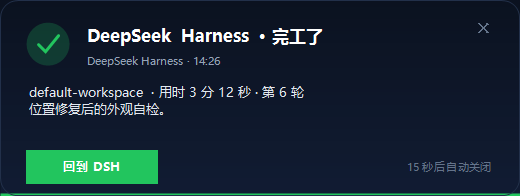
- a turn finishes (green check),
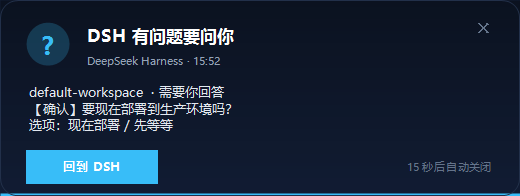
- the agent asks you a question (
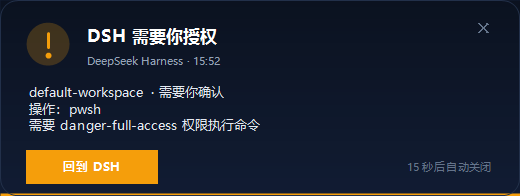
ask_user_question, blue question mark), - an approval / permission request waits for you (amber exclamation mark).
Click the card (or Back to DSH) to focus DeepSeek Harness; × / Esc just closes the card. The card is drawn locally by PowerShell (WinForms) — no network, no API keys.
| Agent question | Approval request |
|---|---|
 |
 |
Features
- Completion card with workspace, elapsed time, turn number and the last answer's summary.
- Question card shows the question text and its options; approval card shows the tool and the reason.
- Auto-close countdown progress bar (
seconds: 0makes a card sticky until closed). - Positioned bottom-right of the primary screen, double-buffered so the countdown never flickers.
- Hover states, fade-in, and an
×close button; every close path stops the countdown. - Skips sub-agent chatter, aborted turns and blocked turns.
- Installs as a real profile bundle, so it shows up in the DSH sidebar Plugins page and can be switched on/off there.
Requirements
- Windows 10 / 11
- DeepSeek Harness Desktop (tested with
0.2.1-rc.3; other0.2.xbuilds should work) - No admin rights, no network calls, no extra dependencies (uses Windows PowerShell 5.1)
Install
Option A — one-click installer (recommended for the desktop app)
- Download
dsh-win-notifier-<version>-windows.zipfrom Releases. - Extract it, make sure DeepSeek Harness has been opened at least once, then double-click
install.cmd. - Open the sidebar Plugins page → Installed plugins → Completion alert.
Option B — dsh plugin manager
dsh plugin --profile web add github:poetfushi/dsh-win-notifier#v1.3.5
After the install, enable the bundle in the profile (the plugin manager writes it into
cordis.patch.yml), or add:
- insert:
    - id: turn-notifier
      name: "dsh-win-notifier"
Option C — from a git checkout
git clone https://github.com/poetfushi/dsh-win-notifier.git
cd dsh-win-notifier
powershell -NoProfile -ExecutionPolicy Bypass -File installer\install.ps1
Verify
Ask the agent to call notifier_test (the plugin registers it), finish a turn, or ask it a question.
Logs: %USERPROFILE%\.dsh\toolkits\turn-notifier\notifier.log (events) and notify.log (the popup script).
Enable / disable
- Sidebar Plugins → Installed plugins → Completion alert:
- bundle switch: whole plugin on/off
- open it →
turn-notifierrow switch: only the notifier itself
- Or edit
%USERPROFILE%\.dsh\profiles\<profile>\cordis.patch.yml:
- id: turn-notifier
  name: "dsh-win-notifier"
  config:
    minSeconds: 0        # skip turns shorter than N seconds (0 = notify every turn)
    notifySubagent: false
    notifyQuestions: true # ask_user_question cards
    notifyApprovals: true # approval/permission cards
    askSeconds: 45        # question/approval card lifetime; 0 = sticky
    seconds: 15           # completion card lifetime; 0 = sticky
    sound: true
    includeSummary: true
    summaryMaxChars: 140
    toast: false          # try a native Windows toast first (unpackaged processes are often refused)
How it works
The host plugin listens to DSH's session/event feed:
| Event | Card |
|---|---|
turn/end (root session, completed / error) |
completion card |
tool/call or tool/ptc-dispatch-start with name: ask_user_question |
question card |
approval/asked |
approval card |
Each trigger spawns notify.ps1 (PowerShell 5.1, WinForms) in a hidden process that draws the card
and exits; the plugin itself never blocks the agent.
Uninstall
- Sidebar Plugins → Completion alert → Remove, or
installer\uninstall.ps1(manual cleanup, does not run pnpm), or- delete the
dsh-win-notifierdependency,dsh.profile.bundlesentry,node_modules\dsh-win-notifierlink and theturn-notifierrows from the profile patch.
Privacy & security
- Runs entirely offline; no telemetry, no downloads, no credentials.
- Reads session events only to render text; it does not modify the session.
- Writes only under
%USERPROFILE%\.dsh(plugin copy, logs, profile registration) with backups under%USERPROFILE%\.dsh\plugins\.backup\<timestamp>.
Development
The card is pure WinForms inside notify.ps1; render it off-screen for design changes:
powershell -NoProfile -ExecutionPolicy Bypass -File notify.ps1 -NoToast -NoSound -PreviewPath preview.png
中文说明
给 DeepSeek Harness(DSH)桌面版 用的 Windows 提醒插件:右下角弹置顶卡片 + 提示音。
- 一轮完成 → 绿色对勾卡片(工作区 / 用时 / 轮次 + 最后一段回答摘要)
- agent 提问(
ask_user_question)→ 蓝色问号卡片(问题 + 选项) - 权限 / 审批申请(
approval/asked)→ 橙色感叹号卡片(工具 + 原因)
点卡片或「回到 DSH」切回 DeepSeek Harness 窗口;右上角 × 或 Esc 只关卡片。 卡片由本地 PowerShell(WinForms)绘制,不联网、不需要 API Key、不需要管理员权限。
安装(推荐):下载 Release 里的 dsh-win-notifier-*-windows.zip,解压后双击 install.cmd,
然后打开侧边栏 插件 → 已安装插件 → 完工提醒。
dsh CLI:dsh plugin --profile web add github:poetfushi/dsh-win-notifier#v1.3.5
开关:插件页里的总开关/行开关,或改 profile 的 cordis.patch.yml 里 turn-notifier 的 config
(notifyQuestions、notifyApprovals、askSeconds、seconds、sound 等)。
日志:%USERPROFILE%\.dsh\toolkits\turn-notifier\notifier.log、notify.log。
卸载:插件页 Remove,或运行 installer\uninstall.ps1。
License
MIT — see LICENSE.
No comments yet. Be the first to write one.