DSH Balance
中文 · Releases · Report a problem
See the balances of your configured providers from the sidebar, without leaving DeepSeek Harness.
Unofficial community plugin. Independently developed and maintained; not affiliated with or endorsed by DeepSeek.
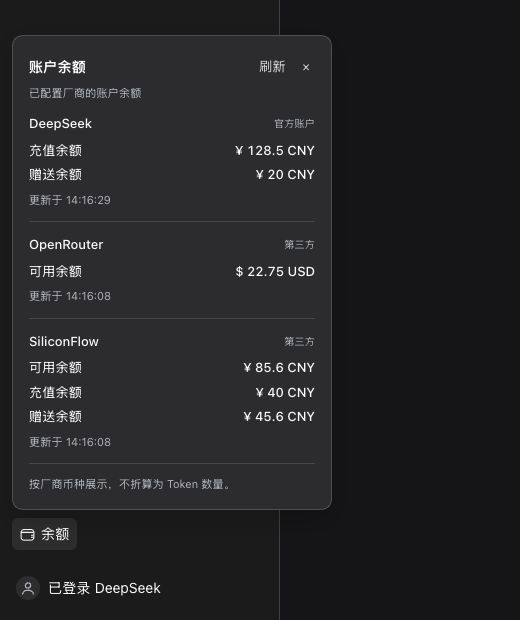
The screenshot uses demonstration balances in a real, isolated Harness instance. It does not show a real account or prove a live provider query.
What it does
- Hover or focus the wallet button to open balances; click to pin the panel.
- View your DeepSeek signed-in account, DeepSeek API, OpenRouter and SiliconFlow configuration in one place.
- Refresh on demand. While the panel is open, refresh once a minute; stop polling when it closes.
- Keep currencies and wallet categories separate. No currency conversion or estimated token counts.
- Show missing credentials, unsupported providers, rate limits and errors explicitly, never as a zero balance.
Compatibility
Version 1.0.0 targets DeepSeek Harness 0.2.1-rc.5. Later Harness versions are not claimed compatible. The sidebar uses the public footer slot, with a separate row above the account button.
Release validation uses the actual package in an isolated Harness Web profile on macOS. See validation for the exact checks and limitations. Real DeepSeek API Key, OpenRouter and SiliconFlow credentials are not part of the automated tests.
Install
Download
pipilu123566-dsh-balance-1.0.0.tgzfrom the release. This is the installable package; GitHub's automatic source archives serve a different purpose.Fully quit Harness before changing its desktop profile. In the download directory, run:
dsh plugin --profile desktop add ./pipilu123566-dsh-balance-1.0.0.tgz --ignore-scriptsReopen Harness. Look for the wallet button above the account area at the bottom of the sidebar. Configure your providers using Harness's normal settings.
On macOS, if dsh is not on your PATH, use the CLI included with the application:
'/Applications/DeepSeek Harness.app/Contents/Resources/runtime/cli/bin/dsh' plugin --profile desktop add ./pipilu123566-dsh-balance-1.0.0.tgz --ignore-scripts
For an existing Web profile, replace desktop with its name and stop/restart that instance around package changes. Use only one balance bundle in a profile. To upgrade, install the new release package using the same procedure; do not widen the declared Harness compatibility range yourself.
To uninstall, quit the target instance, run the following, and reopen it:
dsh plugin --profile desktop remove @pipilu123566/dsh-balance
Provider support
| Provider | Source | Requirements and limits |
|---|---|---|
| DeepSeek signed-in account | Harness account service | Sign in using Harness; topped-up and bonus wallets are shown separately |
| DeepSeek API | Official /user/balance |
A configured official API key; available, topped-up and granted balances |
| OpenRouter | Official /api/v1/credits |
A management key is required; ordinary keys may be denied; displays purchased credits minus usage |
| SiliconFlow | Official /v1/user/info |
A configured key for api.siliconflow.cn; balances are in CNY |
| Other configured providers | No speculative requests | Shown as unsupported; unconfigured catalog entries are hidden |
Official endpoints: DeepSeek, OpenRouter, SiliconFlow.
Custom proxies, nonstandard ports, embedded URL credentials and redirected API requests are rejected. The plugin only sends each provider's credential to its matching allowlisted HTTPS endpoint. Keys stay on the host; the client receives a limited balance/status response. No analytics or separate backend is added by this plugin.
Development
Use Node 22.21.1 and pnpm 10.33.2, as declared in this repository. Runtime dependencies use the target Harness version.
pnpm install --frozen-lockfile --ignore-scripts
pnpm test
pnpm pack --out /path/to/output/dsh-balance.tgz
The bundle registers a Cordis host service, exposes a read-only Typert method and uses the sidebar.footer.action client slot. The client reuses Harness React, theme and locale services. Disposal clears timers, listeners, the popup, caches and in-flight network requests.
Test an actual tarball in a new DSH_HOME with no copied account data before releasing. Development link: installs are not package validation. See contributing and validation.
License
MIT. Third-party dependencies retain their own licenses.
No comments yet. Be the first to write one.