
Local Wispr
Standalone local voice input for the DeepSeek Harness composer.
Click the microphone → speak → the transcript lands in your draft — transcribed by a Whisper model running on your own machine. No cloud, no browser speech API, no experimental voice stack, no model downloads from the plugin.



한국어 | English

한국어
DeepSeek Harness 웹 GUI의 컴포저에 음성 입력 버튼을 추가하는 플러그인입니다.
하네스에 이미 존재하는 실험적 음성 입력 스택(dsh-experimental-*speech*, ui-voice-input)을
전혀 사용하지 않고, 마이크 버튼부터 녹음, 전사, 작성란 삽입까지 이 패키지 하나가 전부 처리합니다.
동작 방식
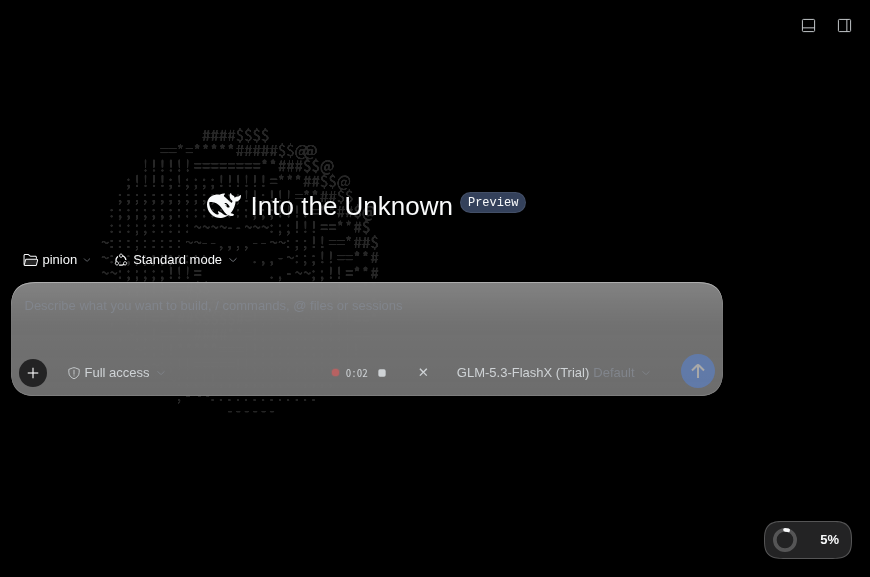
- 컴포저 도구 행의 마이크 버튼 클릭 → 브라우저 마이크로 즉시 녹음 시작
(빨간 펄스 점 + 타이머, 240초 자동 정지,
Escape로 취소) - 정지(■) 클릭 → 녹음 blob을 같은 오리진의 호스트 라우트로 전송
- 호스트 절반이 로컬 Whisper 게이트웨이로 전사를 위임
- 전사 텍스트가 녹음 시작 시점의 캐럿 위치에 삽입됩니다 (그 사이 초안이 변했으면 현재 캐럿에 삽입, 거부되면 조용히 포기 — 자동 전송은 절대 없음)
전체 화면:
아키텍처
브라우저 (Harness Web UI)
│  MediaRecorder 녹음 (webm/ogg/mp4)
▼
POST /local-wispr/transcribe          ← dsh 웹서버의 same-origin 라우트
│  (호스트 절반이 trust-fence 검증 후 프록시)
▼
Whisper 게이트웨이 (예: pi-voice-board, 127.0.0.1:8813)
│  POST /api/transcribe?lang=ko
▼  faster-whisper large-v3-turbo (int8, CPU)
{ text, seconds, elapsed }  →  InputActions.insertText() → 작성란
- 호스트 절반 (
index.js): dsh 웹서버에/local-wispr/transcribe,/local-wispr/health두 라우트를 등록하고 게이트웨이로 프록시합니다. 브라우저는 게이트웨이(8813)에 직접 접속하지 않으므로 CORS 문제가 없고, 게이트웨이는 루프백에만 바인딩된 채로 두어도 됩니다. - 클라이언트 절반 (
client.js):conversation.input.right슬롯에 마이크 버튼을 렌더링하는 React 컴포넌트. 녹음 상태 기계(idle → recording → transcribing → idle/error), 리비전 가드가 걸린 초안 삽입, 권한 거부·무음·타임아웃 처리를 포함합니다.
요구 사항
| 필요한 것 | 비고 |
|---|---|
| DeepSeek Harness 0.2.x | 웹 프로필 |
| 로컬 Whisper HTTP 게이트웨이 | POST /api/transcribe?lang= (오디오 원본 → {text, duration, elapsed}), GET /health. 예: pi-voice-board 스타일의 faster-whisper 서버 |
| 마이크 허용 가능한 오리진 | 브라우저 정책상 HTTPS 또는 localhost 필요 — http://127.0.0.1:3080은 OK, 일반 http IP 주소는 차단. 원격 접속은 테일스케일 serve 등으로 HTTPS를 여세요 |
설치
git clone https://github.com/pinion05/dsh-local-wispr.git
그 뒤 DeepSeek Harness에서 Plugins → Install bundle에 클론 디렉터리 경로를 넣거나, CLI를 쓰는 경우:
dsh plugin --profile web add <클론-경로>
설치되면 행 하나(local-wispr)가 삽입되고 컴포저에 마이크 버튼이 나타납니다.
설정 (선택)
프로필 패치에서 이 행의 config를 고칩니다:
- insert:
    - id: local-wispr
      name: '@local/dsh-local-wispr'
      config:
        endpoint: http://127.0.0.1:8813   # Whisper 게이트웨이 기준 URL
        lang: ko                          # 전사 언어 힌트 ("auto" 가능)
        timeoutMs: 240000                 # 전사 한 건 타임아웃
        maxBodyBytes: 31457280            # 녹음 본문 상한 (30MB)
문제 해결
| 증상 | 원인 · 해결 |
|---|---|
빨간 ! 다시 시도 — "마이크는 HTTPS(또는 localhost)에서만…" |
보안 컨텍스트가 아닌 오리진(일반 http + IP). 127.0.0.1:3080으로 접속하거나 HTTPS를 여세요 |
| "Whisper gateway unreachable" | 게이트웨이가 죽어 있음 — 예: systemctl --user start pi-voice-board |
| 전사가 오래 걸림 | CPU 추론은 RTF≈1 (30초 녹음 → ~30초+). GPU 게이트웨이로 바꾸면 빨라집니다 |
English
Adds a voice input button to the DeepSeek Harness web composer. It uses none of the
harness's experimental voice packages (dsh-experimental-*speech*, ui-voice-input) —
this single package owns the whole path: mic button → recording → transcription → draft
insertion.
How it works
- Click the microphone in the composer tool row → recording starts immediately
(pulsing red dot + timer, auto-stop at 240 s,
Escapeto cancel). - Click stop (■) → the recording blob is POSTed to a same-origin host route.
- The host half forwards it to a local Whisper gateway.
- The transcript is inserted into the draft at the caret captured when recording started (falls back to the current caret if the draft changed; gives up silently if refused — it never submits anything for you).
Architecture
Browser (Harness Web UI)
│  MediaRecorder capture (webm/ogg/mp4)
▼
POST /local-wispr/transcribe          ← same-origin route on the dsh web server
│  (host half verifies the trust fence, then proxies)
▼
Local Whisper gateway (e.g. pi-voice-board, 127.0.0.1:8813)
│  POST /api/transcribe?lang=ko
▼  faster-whisper large-v3-turbo (int8, CPU)
{ text, seconds, elapsed }  →  InputActions.insertText() → draft
- Host half (
index.js): registers/local-wispr/transcribeand/local-wispr/healthon the dsh web server and proxies to the gateway. The browser never touches the gateway directly, so no CORS is needed and the gateway can stay loopback-only. - Client half (
client.js): a React component rendering the mic button into theconversation.input.rightslot, with a recording state machine (idle → recording → transcribing → idle/error), revision-guarded draft insertion, and handling for denied permission, silence, and timeouts.
Requirements
| Need | Notes |
|---|---|
| DeepSeek Harness 0.2.x | web profile |
| Local Whisper HTTP gateway | POST /api/transcribe?lang= (raw audio → {text, duration, elapsed}) and GET /health — e.g. a pi-voice-board-style faster-whisper server |
| Mic-capable origin | Browser policy requires HTTPS or localhost — http://127.0.0.1:3080 works; plain http over an IP is blocked. For remote access, expose HTTPS (e.g. tailscale serve) |
Install
git clone https://github.com/pinion05/dsh-local-wispr.git
Then in DeepSeek Harness: Plugins → Install bundle, pointing at the cloned directory
(or dsh plugin --profile web add <path> from the CLI). One row (local-wispr) is
inserted and the mic button appears in the composer.
Configuration (optional)
Edit the row's config in your profile patch:
- insert:
    - id: local-wispr
      name: '@local/dsh-local-wispr'
      config:
        endpoint: http://127.0.0.1:8813   # Whisper gateway base URL
        lang: ko                          # transcription language hint ("auto" allowed)
        timeoutMs: 240000                 # per-request transcription deadline
        maxBodyBytes: 31457280            # max recording body size (30 MB)
Troubleshooting
| Symptom | Cause · fix |
|---|---|
Red ! retry — "Microphone requires HTTPS (or localhost)…" |
Insecure origin (plain http + IP). Open 127.0.0.1:3080 or serve HTTPS |
| "Whisper gateway unreachable" | Gateway is down — e.g. systemctl --user start pi-voice-board |
| Transcription feels slow | CPU inference runs at RTF≈1 (30 s recording → ~30 s+). A GPU gateway makes it fast |
No comments yet. Be the first to write one.