dsh-token-stats
Token usage dashboard for the DeepSeek Harness web GUI — displayed directly inside the app. No extra collection: it reads the 365-day local ledger the built-in Wallet plugin already records (every AI call: model, provider, day, input/output/cache tokens, cost when priced).
English · Tiếng Việt · 中文
Features
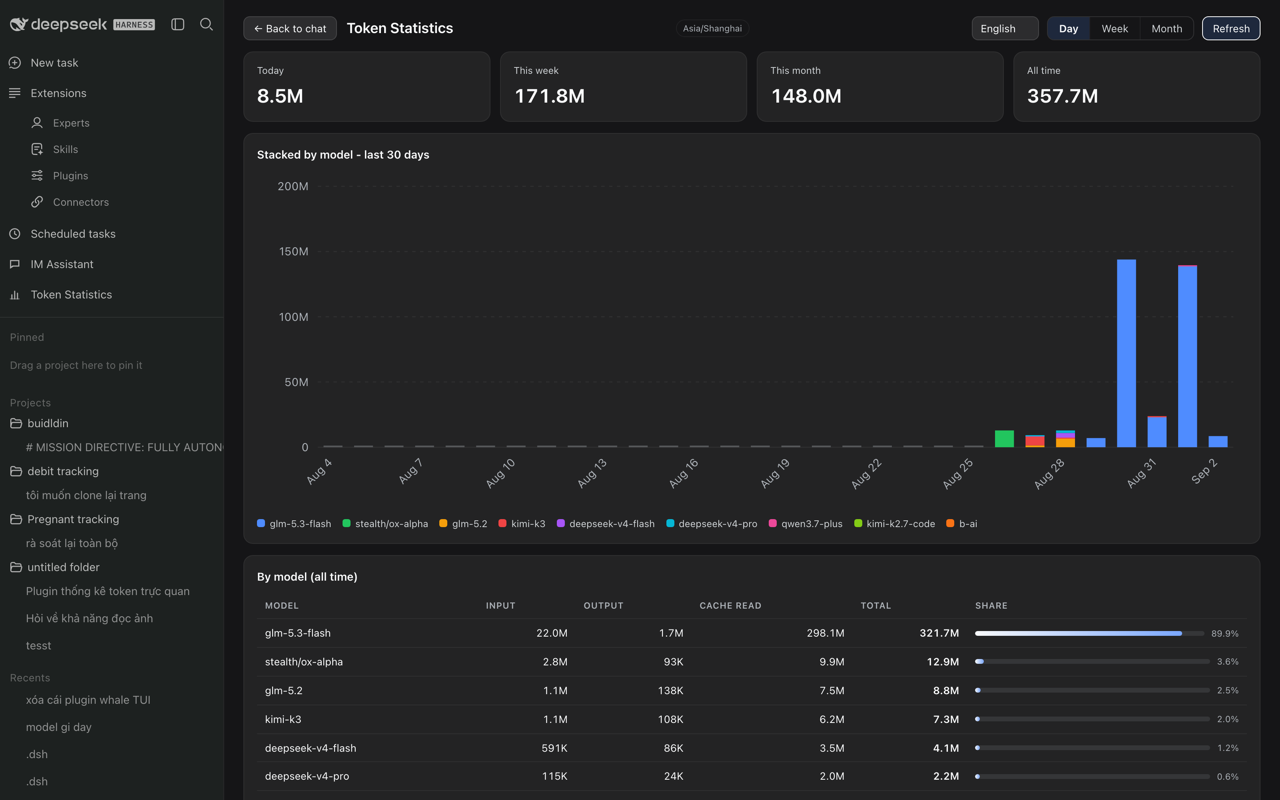
- Sidebar entry "Token Statistics" — opens a full-width dashboard in the center column (same interaction model as the Task Board plugin); works in both the expanded sidebar and the compact rail.
- Four summary cards — Today / This week / This month / All time (tokens + cost when pricing data exists).
- Stacked bar chart — pure SVG, one color per model, daily (30 days) / weekly (12 ISO weeks) / monthly (12 months), hover tooltips per model, K/M-scaled axis.
- Per-model table — input, output, cache read, total, share bar; sorted by total.
- 4-language UI — Tiếng Việt, English, 中文, 日本語. Language picker in the dashboard header; auto-detects the browser language on first run and remembers the choice.
- Auto-refresh — refetches every 30 s while the dashboard is open, plus a manual refresh button.
- Zero dependencies, no build step — host half is plain ESM Node; client half is a single pre-bundled CJS module.
Install
dsh plugin --profile web add dsh-token-stats
Restart dsh web (or use the Market's one-click restart), then look for Token Statistics in the left sidebar.
Requires dsh ≥ 0.1.1-rc.2 (the sidebar DOM it integrates with). Read-only: the plugin never writes to the Wallet ledger.
How it works
- Host half registers
GET /api/token-stats/summary: all-time totals from~/.dsh/storages/wallet.jsonsessions, and day/week/month series from itshistory.events(timezone-aware, mtime-cached). - Client half mounts the sidebar entry (self-healing DOM injection) and the dashboard React view; charts are hand-rolled SVG — no chart library.
Data notes
- All-time totals come from the Wallet session ledger; the day/week/month series come from the Wallet event ledger (capped at 20,000 events / 365 days by the Wallet plugin). Models without pricing show tokens only.
Tiếng Việt
Dashboard thống kê token cho web GUI của DeepSeek Harness — hiển thị trực tiếp trong ứng dụng. Đọc sổ ghi 365 ngày có sẵn của plugin Wallet (mỗi lần gọi AI: model, ngày, token input/output/cache, chi phí khi có). Thẻ tổng quan Hôm nay / Tuần này / Tháng này / Tổng tất cả; biểu đồ cột xếp lớp theo model; bảng chi tiết từng model. Giao diện đa ngôn ngữ: Tiếng Việt, English, 中文, 日本語 — đổi ngay trong dashboard. Cài đặt: dsh plugin --profile web add dsh-token-stats, khởi động lại dsh web, mở mục "Thống kê Token" ở thanh bên.
中文
DeepSeek Harness Web GUI 的 Token 用量仪表盘 — 直接显示在界面内。读取内置 Wallet 插件的 365 天本地账本(每次 AI 调用:模型、日期、输入/输出/缓存 token、可用时的费用)。今日 / 本周 / 本月 / 累计四张汇总卡片;按模型堆叠的柱状图;模型明细表。界面支持越南语 / 英语 / 中文 / 日语,可在仪表盘内切换。安装:dsh plugin --profile web add dsh-token-stats,重启 dsh web,在侧边栏打开 "Token 统计"。
Submit to the Plugin Market
See docs/market-submission.md — publish to npm, then PR one entry into the awesome-dsh-plugin catalog (the Market picks it up automatically, usually within a day).
License
MIT — see LICENSE.
No comments yet. Be the first to write one.