description: "Optional bundle for adding and managing MCP servers through profile patches." kind: "package-bundle"
@tinyforge/dsh-mcp-settings
English | 中文
An optional DSH bundle for configuring Streamable HTTP and stdio MCP servers from DSH Settings.
Quick start
From the directory containing this checkout, adjust the local path if your checkout folder has a different name:
pnpm dsh plugin --profile <profile> add file:./dsh-mcp-settings
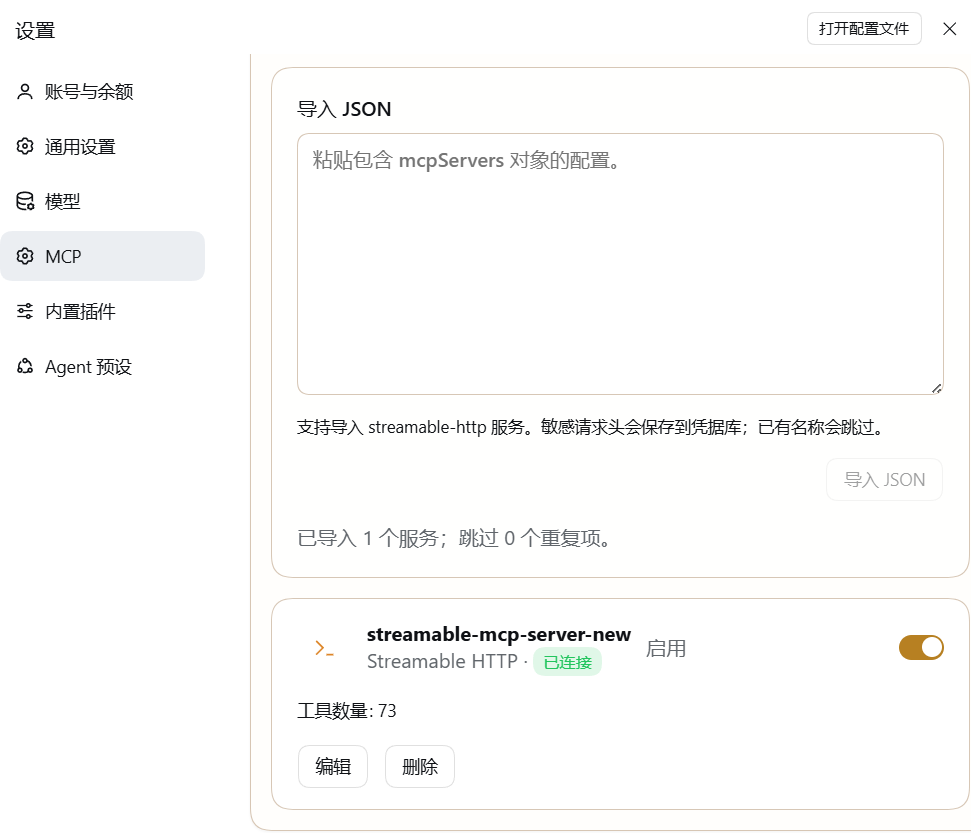
Then open Settings → MCP Servers to add a server or import a configuration.
Features
- Configure Streamable HTTP and stdio MCP servers.
- Import Streamable HTTP entries from an
mcpServersJSON object. - Search and filter servers by name, connection state, and transport; inspect tool names and descriptions while connected.
- Preview JSON imports before saving, and reveal individual secret fields only when needed.
- Export managed settings as JSON. Credential values stay in the local credential store and must be configured separately in another profile.
- Store sensitive headers, including
Authorization, in DSH's credential store. - Check a server connection before saving its settings.
- Get fixed next-step guidance for authorization failures, connection failures, and timeouts.
- Keep
project-memoryservers separate from model-facing tools.
Runtime behavior
The default server list is empty. Installing the bundle does not preconfigure or start an MCP service. Configured servers start when the profile loads. Only successfully connected servers with purpose model-tools publish tools to the model; project-memory servers remain with their registered consumer.
Compatibility and implementation
This release requires DSH 0.2.2-alpha.2 or a later stable 0.2.x release. The MCP client runtime is included under vendor/. The bundle disables the built-in MCP settings page, adds the managed server manager, and exports Host Typert metadata for connection checks. The base MCP client provides live connection status.
Import limitation
JSON import accepts Streamable HTTP entries in an mcpServers object or managed server entries in a servers array. Add stdio servers from the settings form or import them in the managed format. Entries with duplicate names are skipped.
No comments yet. Be the first to write one.