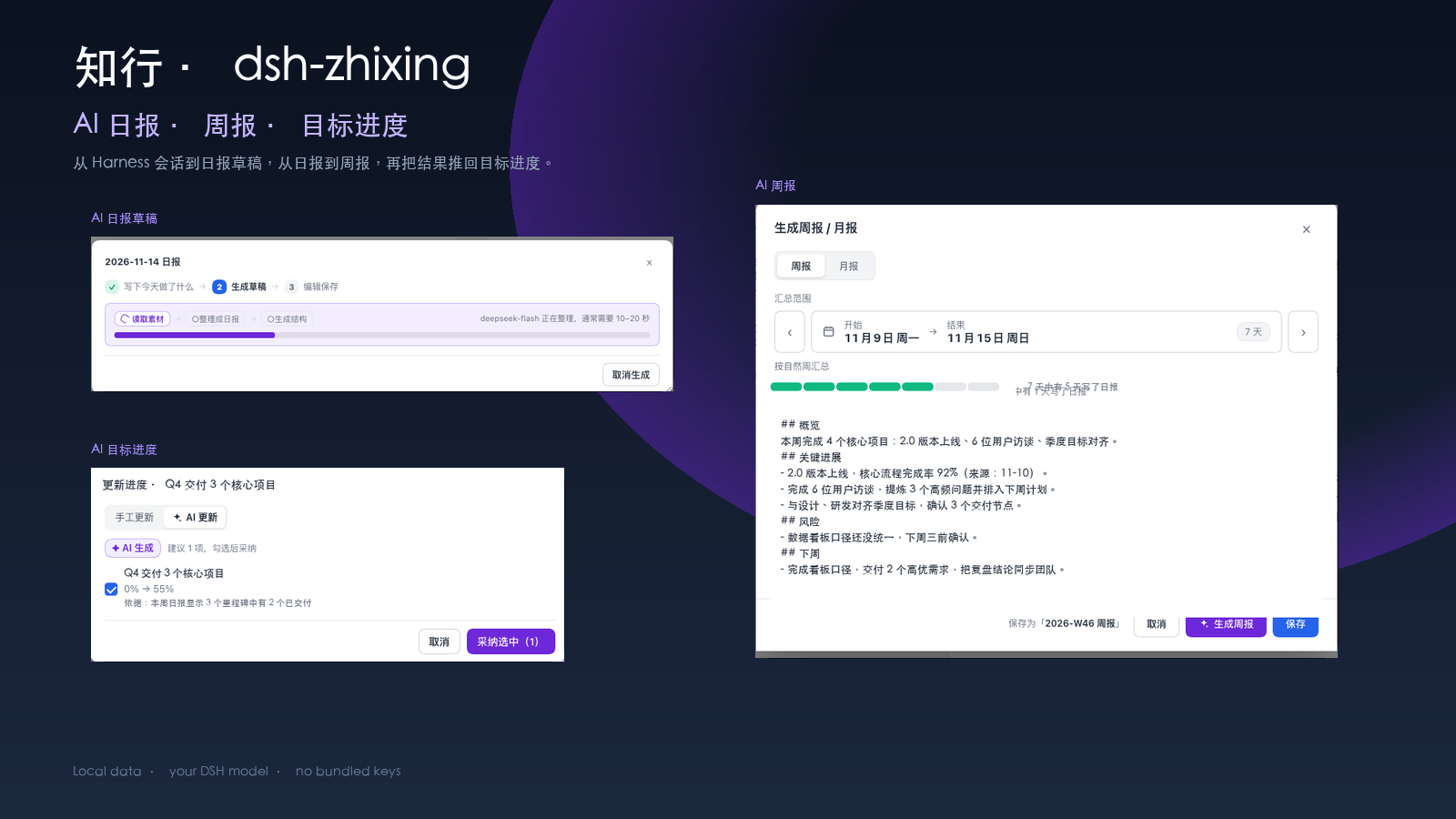
知行 · dsh-zhixing
AI daily reports, weekly reviews, and goal progress for DeepSeek Harness.
Work in Harness. AI drafts the daily report from your sessions, turns the week into a weekly review, and pushes the result back into tomorrow's todos and goal progress.
简体中文 · Quick start · The AI loop · AI daily report · AI weekly report · AI goals · Privacy


The AI loop
The point of 知行 is not another todo list. It is an AI loop around the work you already do in Harness:
| You work in Harness | AI does | You get |
|---|---|---|
| Chat sessions, notes, and files | Reads the day's material, keeps the sources, and drafts a structured daily report | A daily report to edit and save |
| Save the daily report | Turns “tomorrow I will…” into tomorrow's todos, and suggests goal progress from the evidence | Tomorrow's action list + updated goals |
| Pick a week or a month | Aggregates that period's daily reports into a weekly / monthly report in your voice | A report ready to share |
| Paste a paragraph or upload a file | Splits it into year → month → week goals with measures, and later updates progress from reports | A goal tree that keeps moving |
The AI is optional. Without a configured model you can still write reports manually, manage todos and goals, and use the small lucky features. With a model, the loop above is the default way to work.
AI daily report
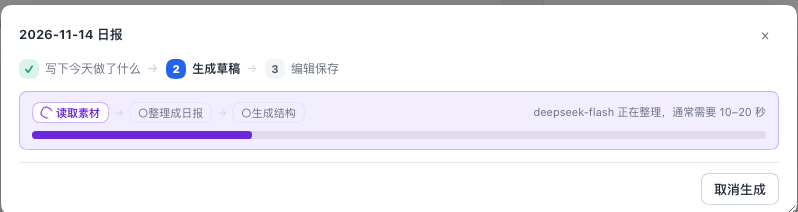
AI is reading the day's Harness sessions and turning them into a daily report draft.
- The editor collects the day's Harness sessions, your notes, completed todos and attachments. Each source is listed before generation, and you can uncheck what should not be used.
- 生成日报草稿 asks the configured DSH model to write the report. The result is a normal Markdown draft you can edit; nothing is saved until you confirm.
- The same flow can run without AI: write the report manually or start from the collected material.
- Saving the report writes
日报/YYYY-MM-DD.mdand turns the “明天准备干什么” section into tomorrow's todos. The report also carries goal tags, so later reviews can find the relevant goals. - After saving, AI can propose goal progress updates from the report's evidence; nothing changes until you accept.
AI weekly / monthly report
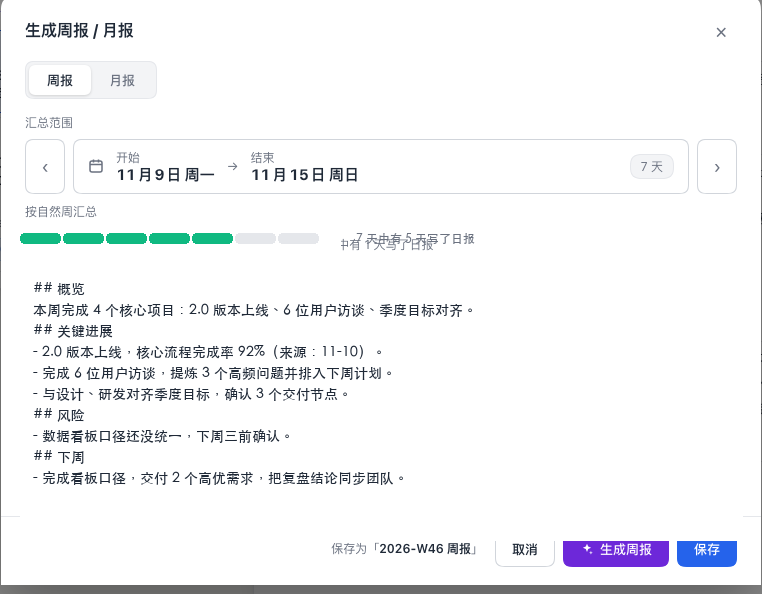
AI weekly report: pick the range, choose the audience, then edit the generated Markdown.
- Pick a week or a month; AI reads that period's daily reports and writes the weekly / monthly summary.
- Choose the audience (自己 / 团队 / 上级) and generate one or more versions in a single run. Each version stays editable.
- The generated report inherits the goal tags from the period, so the weekly review and the goal tree stay connected.
- Edit inline, save as
2026-W46/2026-11in the same日报/folder, then copy, export to PDF / PNG / HTML, or reuse it in the next report. - This is the “weekly review” part of the loop: daily work in, a shareable summary out.
AI goals
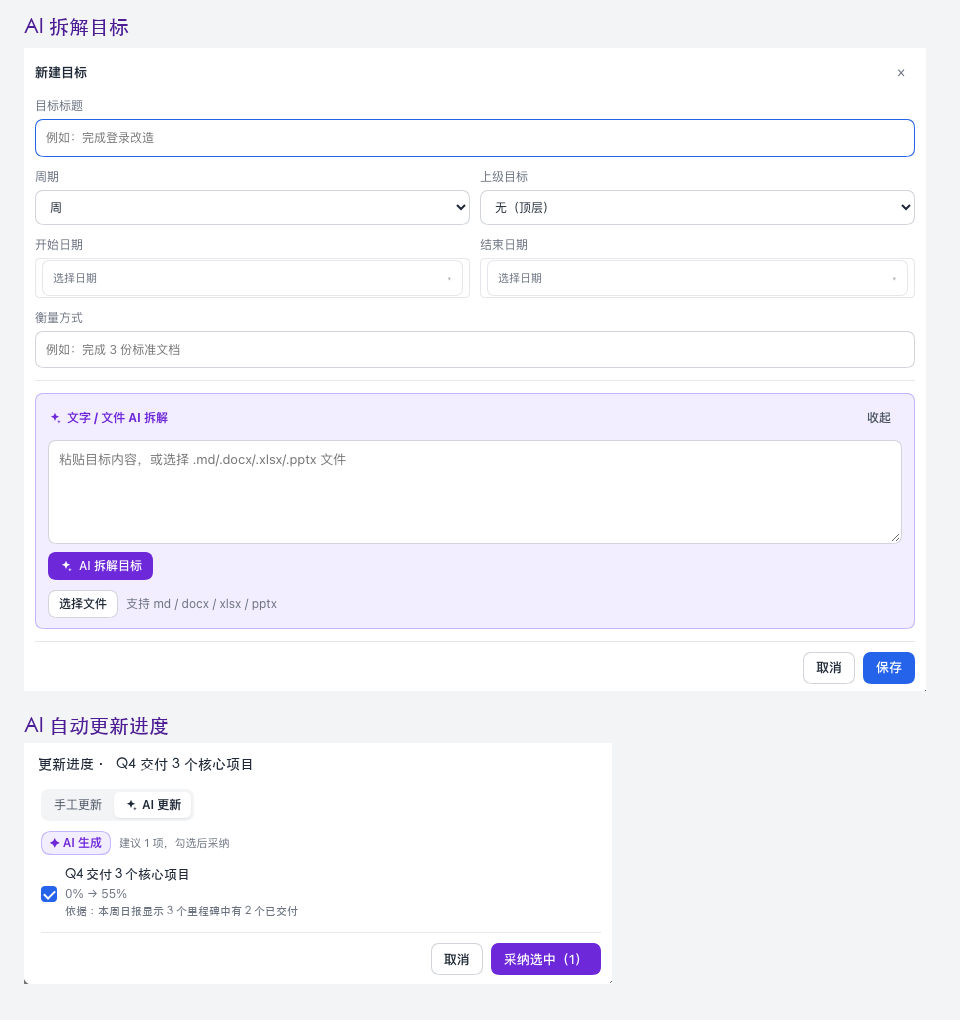
AI goal breakdown (top) and AI progress suggestions from a report (bottom).
- AI goal breakdown: paste a paragraph, a plan, or upload a
.md/.docx/.xlsx/.pptxfile. AI splits it into year → month → week goals with a measure for each, shows a preview, and only writes目标.jsonafter you confirm. - A goal tree can be arbitrary depth: yearly goals, monthly goals under them, weekly goals under those. Child progress automatically rolls up; leaf goals can be updated manually or from AI.
- AI progress updates: after a report is saved, AI reads the evidence and suggests a new progress for the leaves it can justify. Each suggestion shows the old → new percentage and the evidence; check the ones to accept, then apply.
- Goal stall reminders, list / timeline views, and linked reports make the goals part of the daily routine, not a separate spreadsheet.
- This is the “life / work goals” part: AI generates the structure once, then keeps the progress current as you report.
AI assistant on Today

Paste a paragraph (or a URL / attachment); AI turns it into todos you can edit and add.
- A paragraph, a URL, or an attachment can be broken into multiple todos; preview them, adjust the dates, then add.
- Todos can be linked to goals; the calendar and the daily report share the same data.
- Morning / evening reminders and the daily quote keep the Today page useful even when you are not asking AI anything.
The four pages
| Page | What it does |
|---|---|
| 今日 / Today | Todos, calendar, AI assistant, reminders, and the two small lucky entries |
| 日报 / Reports | AI daily / weekly / monthly reports, history, export, goal tags |
| 目标 / Goals | AI goal breakdown, progress updates, hierarchy, timeline |
| 设置 / Settings | Reminders, region / clock, theme, and the DSH model the plugin uses |
A little luck
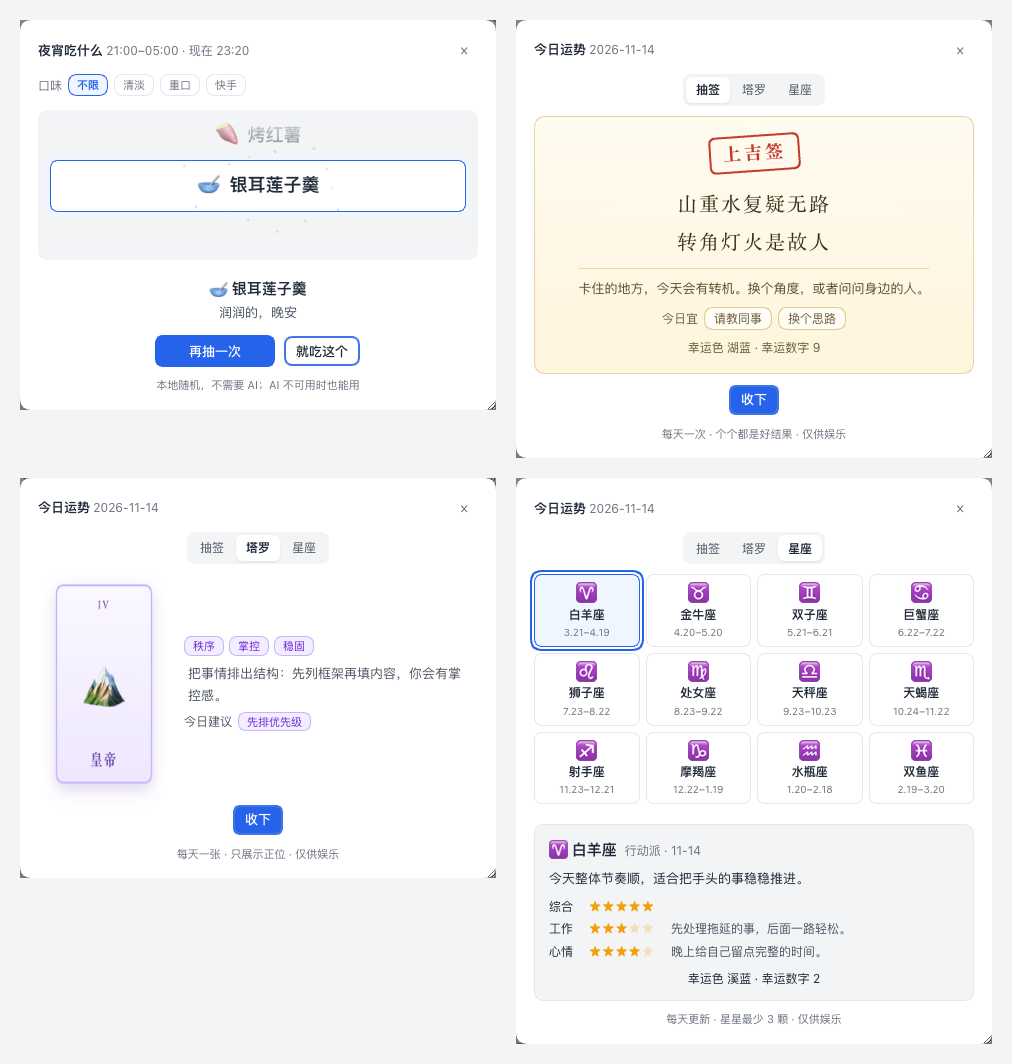
The Today banner also has two offline features: 今天吃什么 (a time-aware lunch picker) and 今日运势 (a daily sign, a tarot card, and a 12-sign horoscope). They use the built-in content and local storage only — no AI, no network. A small bonus, not the main loop.
Quick start
- Install DeepSeek Harness Desktop 0.2.x and make sure plugins are enabled.
- Install the plugin:
- npm:
dsh plugin --profile desktop add dsh-zhixing(installs 1.0.2), or - from source: clone
https://github.com/pawvis/dsh-zhixing.gitand select the cloned folder in Plugins → Add plugin.
- npm:
- Restart DSH and open 知行 in the sidebar.
- Open 设置 to set reminders, region and clock. If you want AI, make sure a DSH model is configured; the model picker in the plugin header controls which one the plugin uses.
- Try the loop: open a day's report, click 生成日报草稿, edit, save; then open 目标 and use 文字/文件 AI 拆解 on a plan.
The npm package is published; the latest version is
1.0.2. The GitHub source is for development or offline install. The plugin works without AI; the AI features simply stay unavailable.
Privacy & data
- Local data. Todos, goals, reports, imported files and settings live under
~/.dsh/data/知行/(or$DSH_HOME/data/知行/). Reports are plain Markdown. - No bundled keys. The plugin ships no API keys. AI features use the model already configured in DSH; only the content you send to an AI feature (report material, report draft, goal import, progress suggestions, assistant input) goes to that model.
- Sources stay visible. The report editor lists the sessions and materials used for a draft; you can uncheck them before generating.
- Weather is optional. The weather line makes a weather request for the configured region; turn it off in Settings. The daily quote is built in.
- Lucky features are offline. They use the built-in content and a few
localStoragekeys. No network, no AI. - No telemetry. The plugin adds no analytics or remote logging.
- Screenshots in this README are illustrative and use demo content; real todo / report / goal content is never committed.
All screenshots above are captured from the plugin's UI with demo data.
Troubleshooting
- AI is unavailable: the banner says “AI 暂时不可用” when no model is configured or the model is unreachable. You can still write reports manually, manage todos / goals, and use the lucky features.
- No 知行 entry: check DSH Desktop 0.2.x, the plugin is enabled under Plugins, and DSH was restarted after installation.
- Where is my data?
~/.dsh/data/知行/:日报/YYYY-MM-DD.md, weekly / monthly files in the same日报/folder (2026-W46.md,2026-11.md),待办.json,目标.json,settings.json,导入/andlog.md. - A generated report looks off: edit it before saving; the AI draft is a draft, not an automatic commit.
- Goal progress did not change: progress changes only after you accept a suggestion (or edit it manually); child goals then recompute automatically.
- Updating: replace the plugin or pull the repository and restart DSH. The data lives outside the plugin folder, so it is kept.
Development
Requires Node.js 22.19+ for the checks; the plugin runs inside DSH.
npm run check
The check runs node scripts/check-components.mjs, node --check index.js and node --check client.js. There is no build step: DSH serves client.js directly, and the CSS is a template string inside the client.
index.js            # plugin entry / server routes
lib/                # store, routes, AI, reports, goals, reminders, ...
client.js           # the whole web UI (React h(), CSS)
locale/             # zh / en UI strings
cordis.patch.yml    # DSH bundle manifest
icon.svg
docs/DETAIL.md      # full feature notes (Chinese)
docs/readme/        # README assets
docs/lang/          # translations
scripts/            # checks
Full feature notes: docs/DETAIL.md (Chinese). Issues and ideas: GitHub Issues.
Languages
English · 简体中文
The plugin UI is Simplified Chinese; the Chinese README is the primary user guide.
License
MIT © dsh-zhixing contributors
No comments yet. Be the first to write one.