PPT Studio for DeepSeek Harness
A left-sidebar PPT workbench plugin for DeepSeek Harness:
it renders <workspace>/.ppt-studio/deck.json as real 16:9 thumbnails, lets you edit the deck
in place (click a slide's text, type, click away to save), imports existing .pptx files
as they are instead of re-flowing them into template layouts, and hosts a continuous AI chat
column that can rewrite the deck for you.
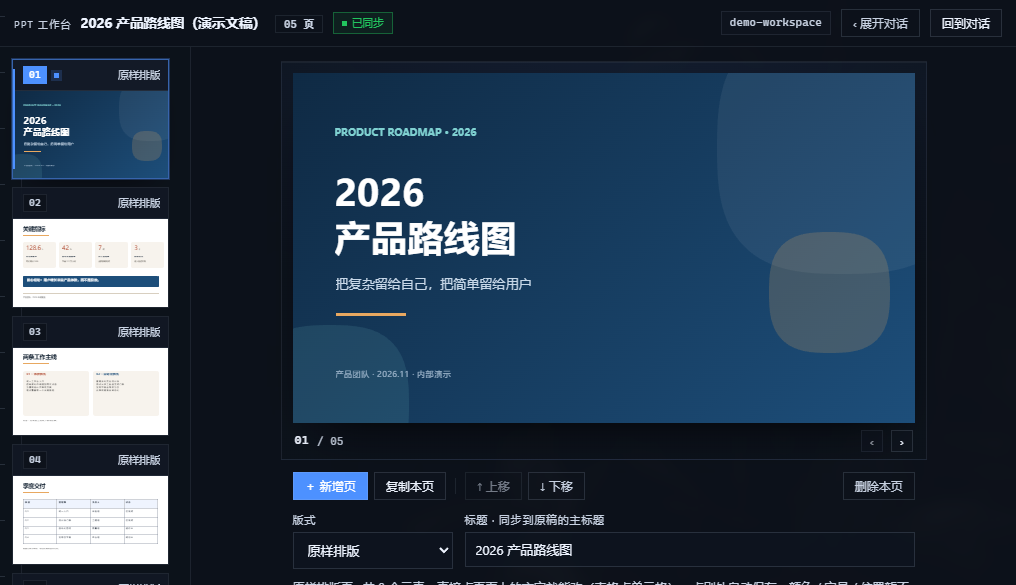
Everything you see above runs on the synthetic demo deck in examples/demo-deck.json
— no real presentation content is used in these screenshots. Copy it to <workspace>/.ppt-studio/deck.json
to try the panel without touching your own deck.
中文说明见 README.zh-CN.md。
What it does
- Live 16:9 preview — thumbnails and the big preview are real DOM renders of
deck.json(absolute element positions in inches on a 13.333 × 7.5 canvas), not screenshots. - Edit the way you see it — click a text block (or a table cell) right on the slide, type, click elsewhere to save. The editor keeps the original font size, weight, alignment and colour.
- PPTX import, not PPTX re-typesetting —
/importruns a python-pptx importer that copies every page element by element: absolute geometry, font sizes, colours resolved from theme XML (includinglumMod/lumOff/tint/shade), gradients with per-stop transparency, rounded corners and ellipses, pictures deduplicated by content hash, tables, group transforms, and the decorations that live on the slide master / layout. - Charts and SmartArt never disappear — pages containing chart, SmartArt or OLE objects are rendered wholesale through LibreOffice → PDF → PNG and embedded as one full-bleed image, so fidelity is 100% (those pages are read-only by design).
- AI chat column — the middle column talks to the current session: Markdown rendering,
attachments (paste / drag / picker) dropped into
.ppt-studio/inbox, a live "process" tab showing tool calls with durations, and one-click prompts. - File watching that respects you — the panel polls
deck.json; external edits highlight the changed page, but the panel's own saves are never flagged as "AI changed this". - One proportional splitter fills the page and keeps both halves usable at any window size.
Editing, metrics and imported tables
 |
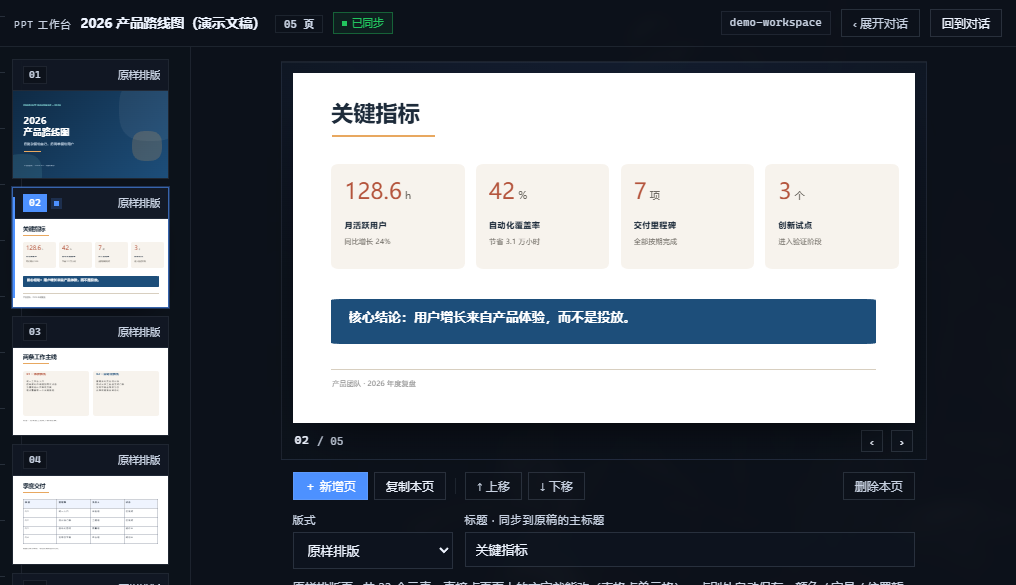 |
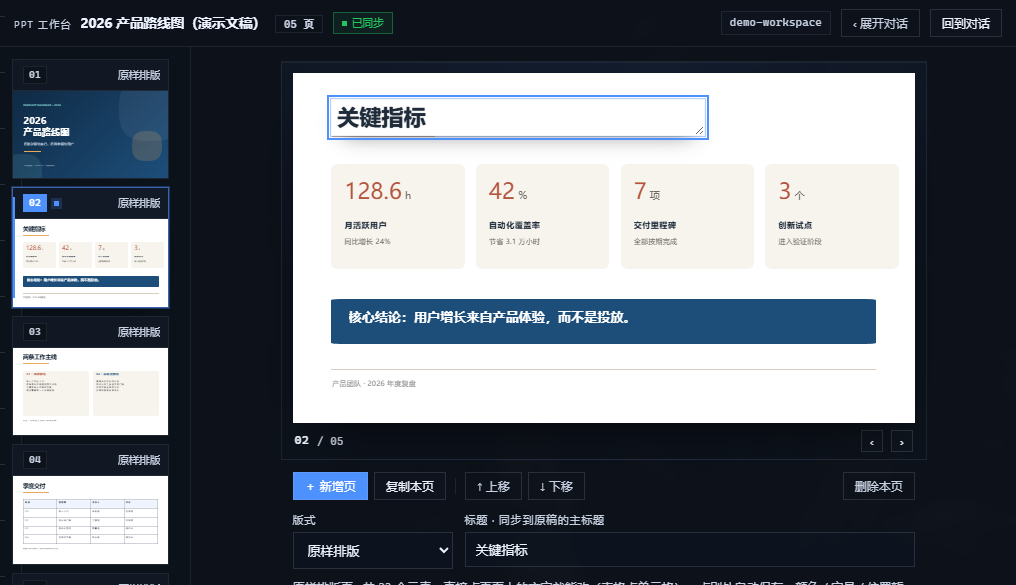
| Click any text block (or table cell) and type — click away to save. | Mixed run sizes (spans) and rounded shapes survive the PPTX import. |
 |
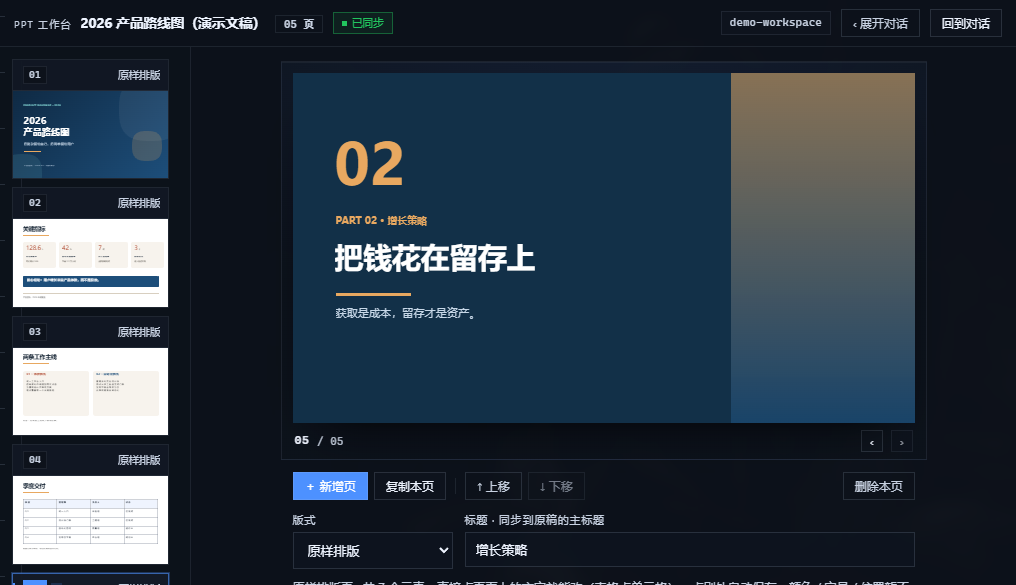 |
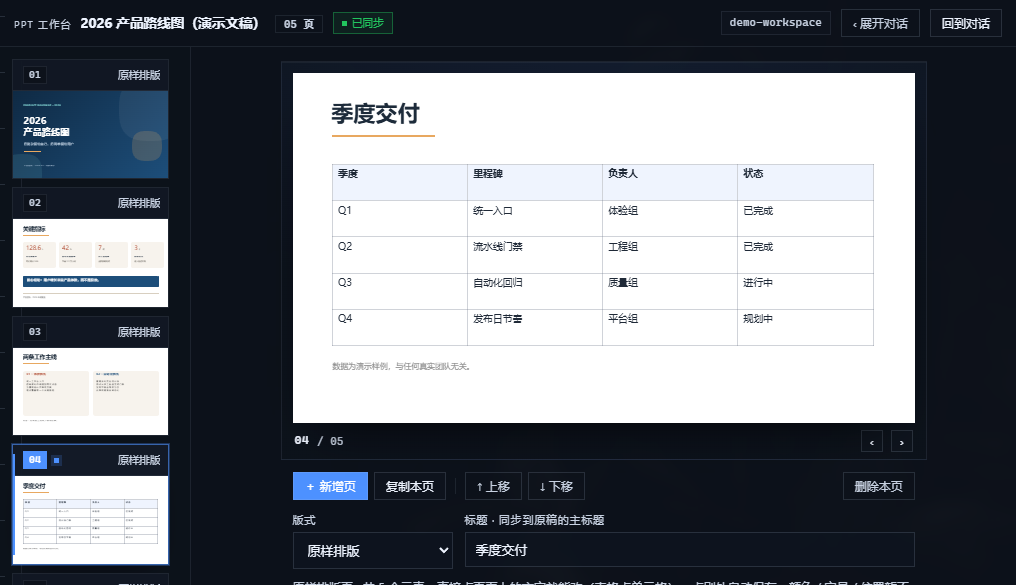
| Tables are first-class elements, editable cell by cell. | Section pages keep their gradients and typography. |
Install
The plugin ships as a single tarball with no runtime npm dependencies (the importer needs
Python 3 with python-pptx, and optionally LibreOffice + poppler for chart pages).
dsh plugin --profile web add \
  https://github.com/p8054076283-del/dsh-ppt-studio/releases/latest/download/dsh-ppt-studio.tgz

Or install the tarball you built locally:
node build2.mjs && npm pack
dsh plugin --profile web add file:$(pwd)/dsh-ppt-studio-<version>.tgz
Restart the app once after the first install. The sidebar then shows PPT 工作台.
Python requirements for .pptx import
python-pptx and lxml are required; LibreOffice + pdftoppm (poppler) are optional and only
used to rasterize chart/SmartArt pages. The plugin looks for an interpreter in this order:
DSH_PPT_PYTHON env var → the runtime bundled with the desktop app → ~/.dsh/dsh-runtimes →
python / python3 / py on PATH.
Quick start
- Open a workspace that contains a deck (
.ppt-studio/deck.json), or click 新建示例文稿. - Click any text on the slide to edit it;
Esccancels, clicking elsewhere saves. - Drop a
.pptxinto the chat column and press 导入 on the attachment chip to replace the deck with an element-faithful import. - Ask the chat column for changes; it can rewrite
deck.jsondirectly.
Deck format (deck.json)
{
  "version": 1,
  "theme": { "bg": "#FFFFFF", "fg": "#1F2328", "accent": "#2F6FED", "font": "Microsoft YaHei" },
  "meta": { "title": "Quarterly review" },
  "slides": [
    {
      "id": "s1",
      "layout": "imported",          // imported = keep absolute geometry (no re-layout)
      "title": "Cover",
      "elements": [
        { "type": "shape", "x": 0, "y": 0, "w": 13.333, "h": 7.5,
          "fill": "linear-gradient(90deg, #5E1216 0%, #8F1D22 100%)", "radiusPct": 0 },
        { "type": "image", "x": 8.3, "y": 0, "w": 5, "h": 7.5, "src": "assets/imported/ab12cd34ef.png", "fit": "cover" },
        { "type": "text", "x": 0.8, "y": 2.6, "w": 6, "h": 1.6, "text": "Hello\nworld",
          "size": 40, "color": "#FFFFFF", "bold": true, "align": "left", "valign": "top",
          "nowrap": true, "spans": [{ "t": "24", "size": 40 }, { "t": " pts", "size": 16 }] },
        { "type": "table", "x": 1, "y": 4, "w": 6, "h": 2,
          "columns": ["A", "B"], "rows": [["1", "2"]], "size": 14 }
      ]
    }
  ]
}
Coordinates are inches on a 13.333 × 7.5 canvas; the renderer converts them to percentage
positions and font sizes to cqw, so a slide scales exactly with its container.
Architecture
lib/index.js         host half — HTTP routes under /ppt-studio (loopback only)
lib/client.js        client half — built artifact loaded by the Harness slot system
src/bundle/*.js      panel, chat, markdown, styles, registration (source of the client half)
src/client/render.js deck validation + slide renderer (shared by bundle and tests)
scripts/import-pptx.py      PPTX → deck.json importer (python-pptx + lxml)
scripts/selftest-*.mjs/.py  self-tests (no browser needed)
build2.mjs           builds lib/client.js from src/bundle + src/client
Host routes: /health, /state, /session, /sessions, /answer, /cancel, /report,
/diag, /upload, /import, /deck (PUT), /asset (GET). They refuse non-loopback peers and
resolve every workspace path through the same guard as the rest of the panel.
The client half registers two slots: a sidebar.panellist entry (id ppt-studio) and a main
page (key ppt-studio). It talks to the host half over the routes above and to the session
through the Harness session binding.
Development
node build2.mjs                 # rebuild lib/client.js, then install the packed tarball
node scripts/selftest-client.mjs    # client bundle pre-flight (jsdom-free, structural)
node scripts/selftest-host.mjs      # host routes
node scripts/selftest-render.mjs    # deck validation + renderer
node scripts/selftest-markdown.mjs  # markdown renderer
python scripts/selftest-import.py   # importer (+ rasterization when LibreOffice/poppler exist)
dev-live-*.mjs scripts drive a running desktop app over the Chrome DevTools Protocol
(port 9222) for visual checks; they expect a Chinese Windows workspace and are development-only.
Known limitations
- No shadows, glows, 3-D, rotation, WordArt or animations — shapes are drawn as rectangles, rounded rectangles, ellipses or gradients.
- One text box can hold mixed run styles (
spans), but editing a box in place flattens it to the base style. - 4:3 decks are scaled into the 16:9 canvas.
- Chart / SmartArt / OLE pages are images (read-only).
- Re-importing a
.pptxoverwrites in-panel edits, because the source of truth is the file.
Feedback
- Bug? Open an issue — the
forms ask for the plugin build id, OS and a repro. Please redact personal or confidential slide
content;
examples/demo-deck.jsonreproduces most panel bugs. - Import looks wrong? Use the PPTX import fidelity issue form: it asks what the page is built from (theme fill, group, gradient overlay, chart, ...), which is usually enough to fix it.
- Question / setup help? Discussions → Q&A.
- Pull requests are welcome — run
npm testandpython scripts/selftest-import.pyfirst; the repository also carriesexamples/demo-deck.jsonso screenshots and repros never need a real deck.
License
MIT — see LICENSE.
No comments yet. Be the first to write one.