COMMAND//DECK · DSH 指挥台插件
dsh-plugin-command-deck 是 DeepSeek Harness(DSH)的插件包(bundle)。它为 dsh web 加上四样东西:
| 模块 | 内容 |
|---|---|
| 启动动画 | 电影感开机序列:透视地面网格、旋转光环、解码 Logo、系统日志。注入 DSH 的 index.html,首帧即出现,DSH 就绪后退场,配色跟随所选设计语言。 |
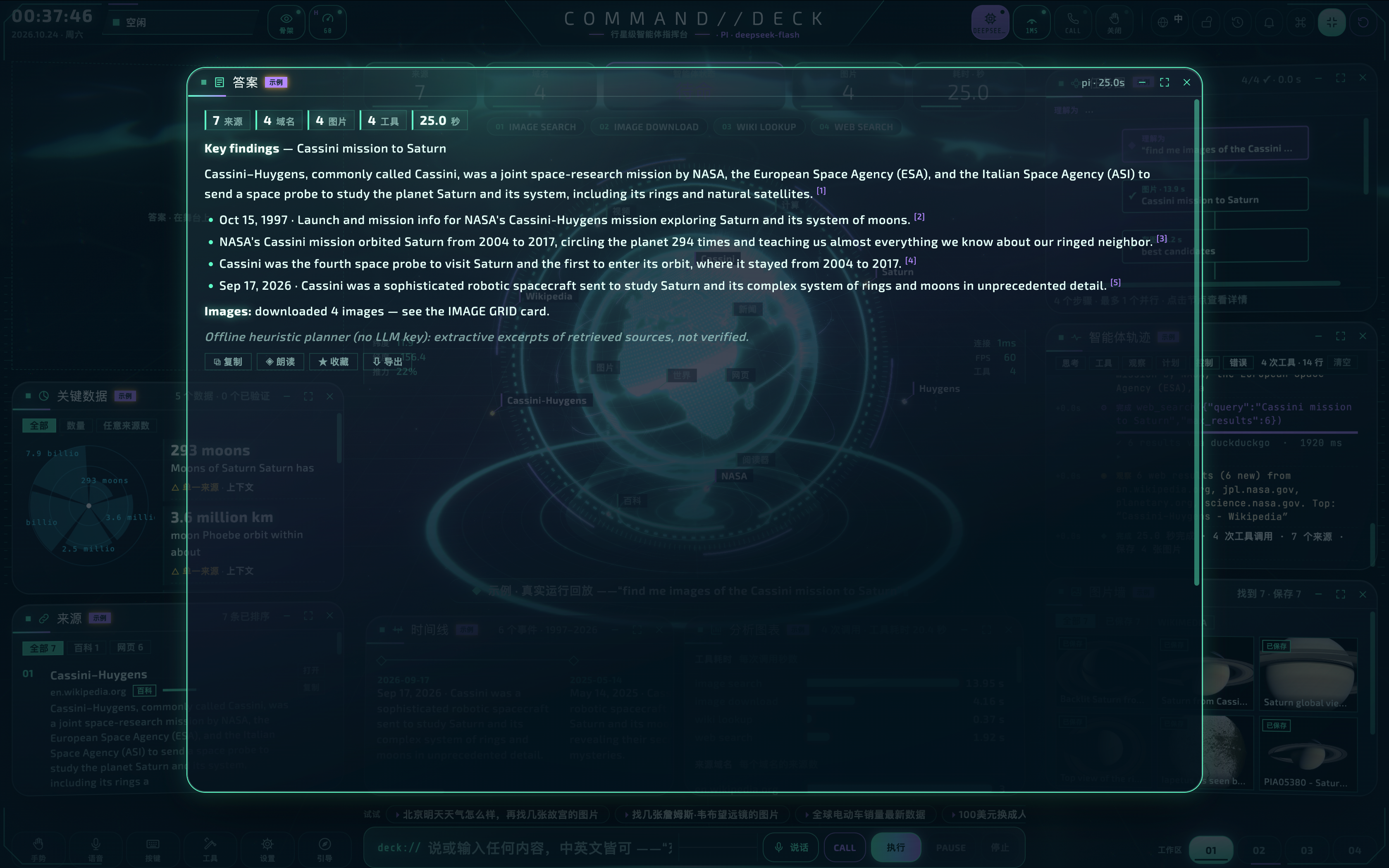
| 指挥台面板 | 侧边栏 指挥台 里是完整的 3D 任务控制台:在指挥台里输入或说出的指令会在真实的 DSH 会话中运行,每一轮、流式思考、工具调用、工具结果和最终答案实时驱动指挥台;每个对话标题栏还有 在指挥台中可视化 按钮,把指挥台挂到该会话上。 |
| DSH 皮肤 | 13 种设计语言重塑 DSH 自身(对话、侧边栏、输入框、菜单、对话框、设置):轨道、极光、合成波、阿波罗 69、霓虹黑色、机甲、蓝图、终端、粗野主义、黑曜石、玻璃、面罩、极地。改变的不只是颜色,还有字体、圆角几何和焦点效果。可选 HUD 叠层提供四角括号、缓慢扫描线和暗角。 |
| 可视化控制台 | 设置 → 指挥台 与 插件 页中本插件的页面:指挥台实时预览、按家族分组的主题画廊、启动控制、集成开关和动效控制。修改即时生效,保存在 DSH profile 里。 |
🤝 友情链接 / Friend Links
| 站点 Site | 链接 Link |
|---|---|
| 🤖 Ai 资源网 | https://human.rlybtd.com/ |
📸 截图 / Screenshots
指挥台面板 · 3D 任务控制台 / Deck Panel · 3D Mission Control
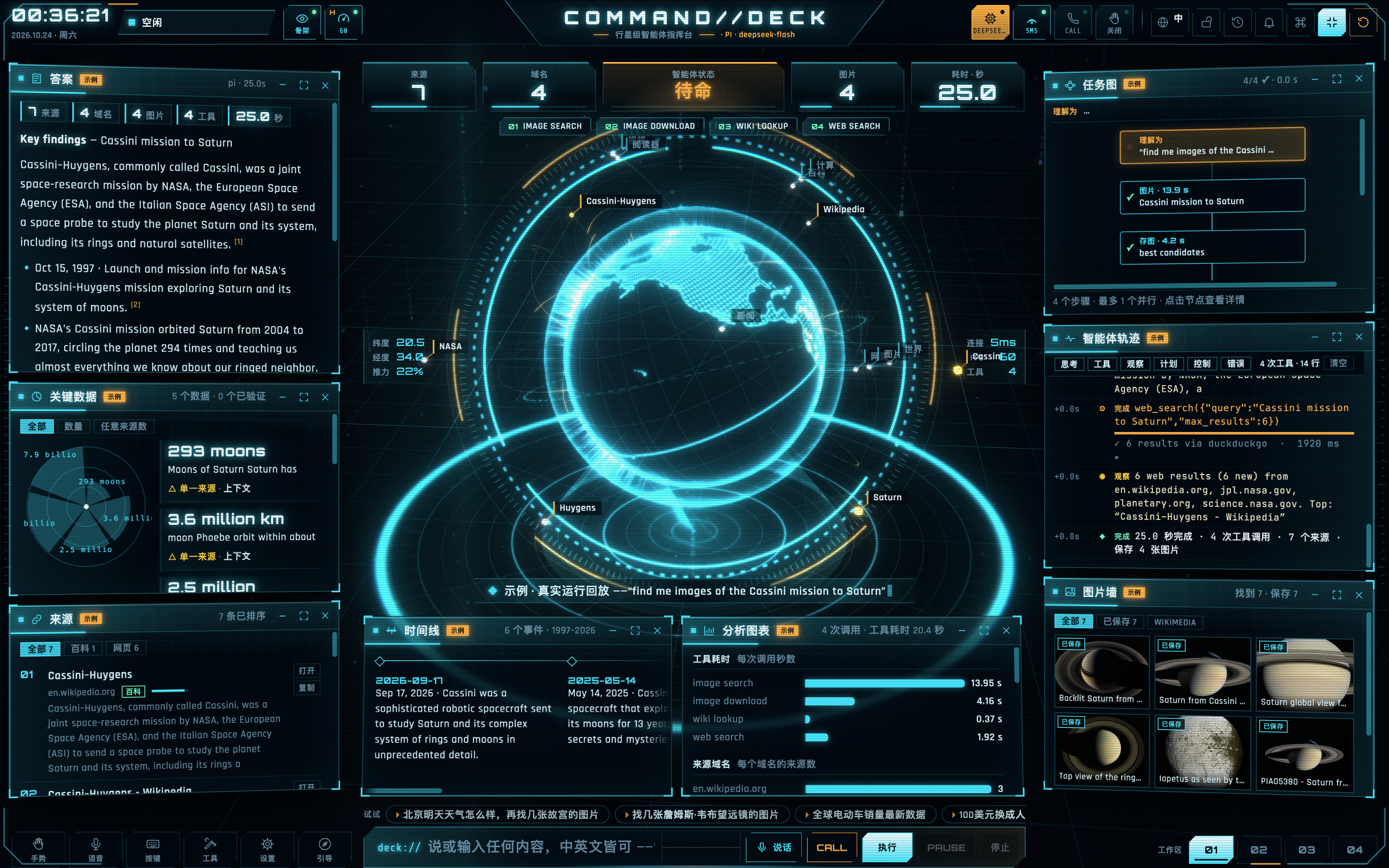
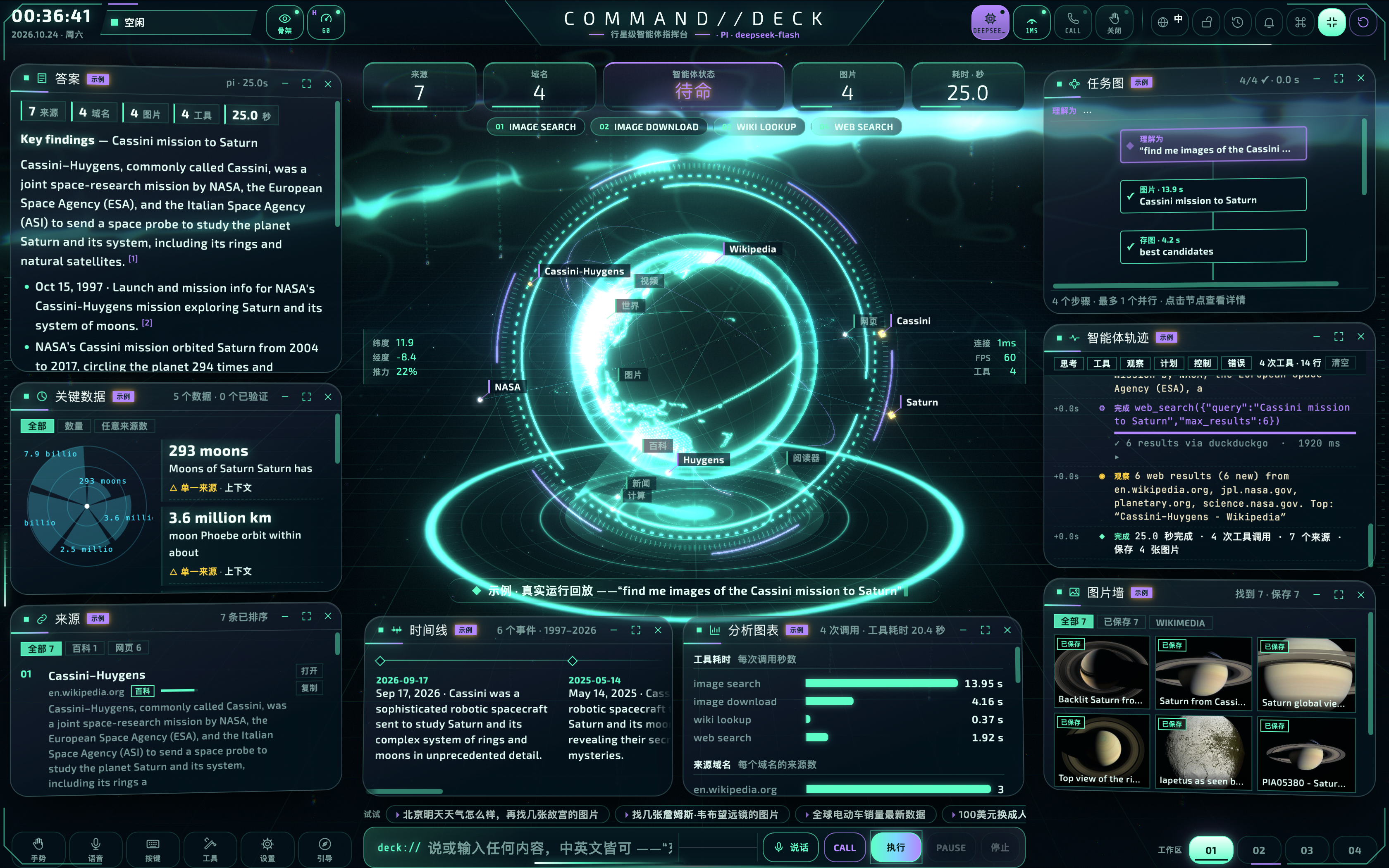
跟随会话 · 全息投影可视化 / Following a Session / Holographic View
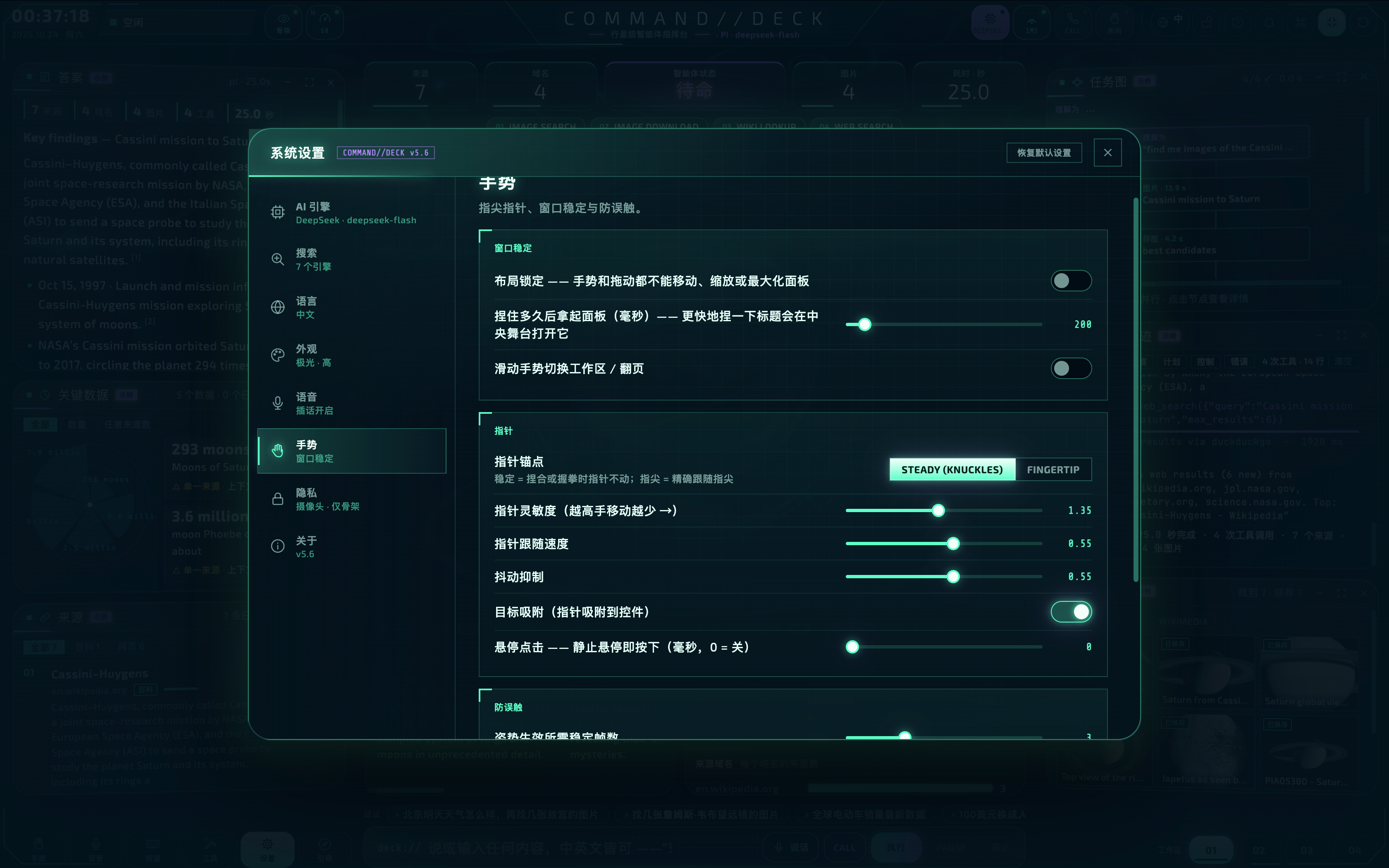
DSH 皮肤 · 对话界面 / DSH Skin · Chat Interface
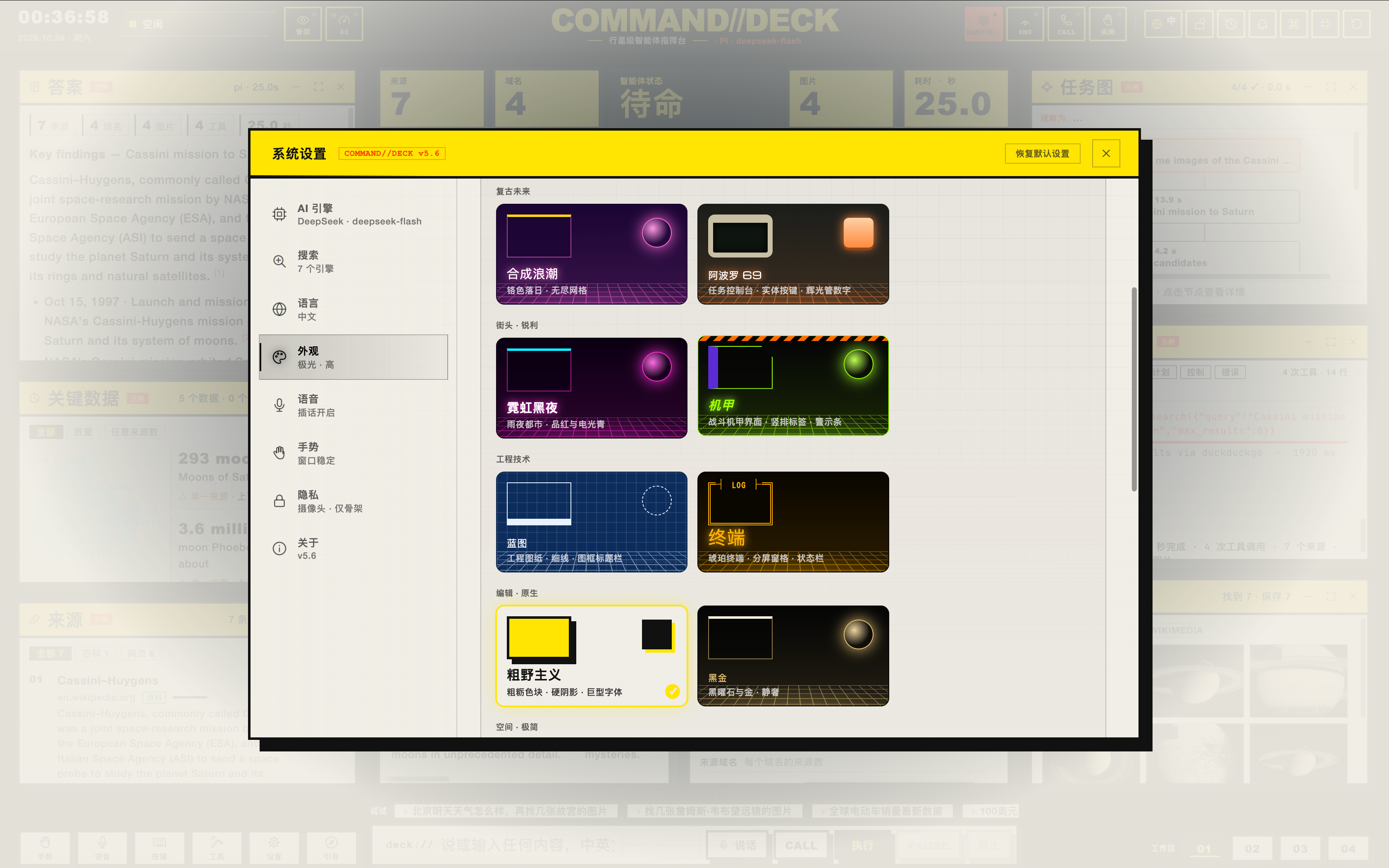
可视化控制台 · 主题画廊 / Visual Console · Theme Gallery
环境要求
- DeepSeek Harness
>= 0.2.0-rc.2 < 0.3(在@deepseek-ai/dsh0.2.0-rc.2 的dsh web上实测;桌面版共用同一运行时,标题栏安全区按 36px 模拟验证) - Node.js
>= 22.19.0(DSH 自身要求) - 3D 指挥台需要支持 WebGL 2 的浏览器;插件其他部分没有此要求
安装 / 升级 / 卸载
# 安装到某个 profile(`dsh web` 用的通常是 web,桌面端是 desktop)
dsh plugin --profile web add /绝对路径/dsh-plugin-command-deck-1.0.1.tgz

# 然后照常启动
dsh web
dsh plugin 会在 profile 目录里转交给 pnpm,所以 .tgz 请用绝对路径(或 file: 形式)。不需要额外的服务器、端口或 API Key:指挥台由 DSH 自己的 Web 服务挂在 /command-deck/ 下,受 DSH 登录保护。
- 升级:用新版本 tgz 再执行一次同样的
add。 - 卸载:
dsh plugin --profile web remove dsh-plugin-command-deck,或在 插件 页点 卸载;也可以只关掉开关而不卸载。 - 改动何时生效:宿主半边(
lib/*)在 DSH 启动时加载,改完源码必须重启一次 DSH。
使用说明
装好后你会看到的名字
- 插件页(
插件 → 已安装)里的名字是 DSH指挥台UI-泥嚎糕手; - 侧边栏入口 与 设置 → 分区 仍叫 指挥台(对应英文
Command Deck)。
1. 打开指挥台
点侧边栏 指挥台。在 DSH 里它直接进入面板:不再弹欢迎屏,也不会自动跑任何示例任务。首次打开会自动跟随 DSH 当前正在看的那个会话;如果你停在空白的新会话页,指挥台为空并列出全部会话。
2. 会话与消息
左栏最上面的 会话 / SESSIONS 卡片就是 DSH 自己的会话目录(实时刷新,含运行中脉冲):
- 点一行 → 指挥台跟随该会话,并把它的对话回放成轨迹:
› 你、计划、工具调用与结果、答复; - 带 DSH 小标签的那一行 = DSH 界面上正在显示的会话;
- 新建 = 断开会话,下一条指令会在 DSH 侧新建一个;
- 切换会话会先清空再回放,两段对话不会混在一起;DSH 注入的上下文消息(
<system-reminder>、运行时上下文)不会显示成你说的话; - 会话在 DSH 里被归档/删除后,指挥台会提示并从列表里消失,不会对着空气发呆。
3. 退出与回来
- 顶栏最右的 退出键 → 关闭指挥台面板,回到 DSH 的会话界面(侧边栏、会话列表都在)。
- 运行中退出不会中断 DSH 那一轮;重新点回「指挥台」(或切视图、DSH 重渲染、整页刷新)会把整段轨迹原样重建,直播继续。
- 底栏 视图 01–04 是同一套界面的四个画布,切换时轨迹不会丢。
4. 在指挥台里下指令
命令栏(deck://)输入,或语音 / 通话模式。指令进入真实的 DSH 会话;运行中再输入会作为 steer(引导) 发给 DSH,STOP 取消本轮。
5. 调整外观
设置 → 指挥台(或 插件 → DSH指挥台UI-泥嚎糕手):画廊里选一种设计语言,DSH 界面、指挥台、启动动画和 HUD 一起切换;在指挥台自己的设置里换主题,也会同步更新 DSH 皮肤。
项目说明
设置台:哪些归 DSH
在 DSH 里运行时,指挥台自带的这些页签不再自己管配置,而是显示「由 DeepSeek Harness 托管」和一个 打开 DSH 设置 按钮(真能拉起 DSH 自己的设置面板):
| 页签 | 处理 |
|---|---|
| AI 引擎 | 模型与提供方归 DSH |
| 搜索 | 搜索提供方归 DSH |
| 语音 → 服务端转写 | 归 DSH;指挥台的通话仍用浏览器语音识别 |
| 关于 | 显示「智能体 DeepSeek Harness / AI 引擎 由 DSH 管理」,不再有框架切换开关 |
| 语言、外观、语音、手势、隐私 | 纯前端设置,照旧 |
DSH 内也不再向 /api/llm、/api/search、/api/asr 发探测请求(打开设置台时后端请求数为 0)。
皮肤的作用范围
皮肤与 HUD 只作用于 DSH 自身界面和指挥台。一旦中心区换成其他插件的面板,皮肤与 HUD 会立刻暂停(body[data-cdeck-skin-paused]),那个页面拿到的样式与 DSH 原版完全一致——这是为了避免和其他插件页面的排版/字体冲突。回到会话或指挥台会自动恢复。
- 皮肤是一张真正的样式表
/command-deck/skins.css(同源、需 DSH 登录 Cookie,no-cache),不再塞进index.html的内联行; - 不改变全局字号,不给标题加字距,焦点环只作用于可交互控件——这些都可能压坏第三方页面的固定行高布局;
- 指挥台面板贴合 DSH 中间栏(不再覆盖侧边栏和窗口标题栏),Windows 标题栏 / macOS 窗口 chrome 都有安全区。
控制台设置
所有设置即时生效,保存在 profile 的 cordis.patch.yml 的 command-deck 条目下,DSH 设置里点 打开配置文件 也能看到。
| 设置 | 默认 | 作用 |
|---|---|---|
theme |
jarvis(轨道) |
指挥台、DSH 皮肤、启动动画和 HUD 的设计语言 |
skin |
开 | 重塑 DSH 界面;关闭后保持 DSH 原有的浅色/深色主题 |
hud |
开 | HUD 叠层(从不拦截输入) |
boot |
session |
启动动画:every 每次启动、session 每个浏览器会话一次、off 关闭 |
bootStyle |
cinematic |
cinematic 电影感(约 2.6 秒)或 quick 快速(约 1 秒) |
motion |
100 | 动效强度 0–100(0 为静止) |
scanlines |
开 | 指挥台和 HUD 的 CRT 扫描线 |
sound |
开 | 指挥台音效(运行时合成,无音频文件) |
tilt |
开 | 3D 座舱:两侧停靠区向你弯曲 |
brand |
开 | 侧边栏中的 COMMAND//DECK 标识 |
系统开启「减少动态效果」时,启动动画和 HUD 停止动画。
快捷键(在 DSH 里)
Ctrl/⌘K 命令面板、Esc 关闭浮层/停止本轮、/ 聚焦命令栏、L 切语言、Shift+L 锁布局、H/G 手势、V/C/M 语音、1–4 切视图、T 切主题、Shift+F 全屏、R/Shift+R 重置。
不可用:S(运行示例任务)与 P(暂停/继续)——DSH 里没有示例任务,也没有「暂停中的轮次」,帮助面板里这两行也会隐藏。
兼容性
下列各项均在真实的 dsh web 上验证过。会话 → 指挥台的事件翻译另有离线测试(源码中的 node test/bridge.test.mjs)。
| 范围 | 状态 |
|---|---|
| 首帧启动动画、就绪后交接、跳过、每次/每会话/关闭、电影感/快速 | ✅ |
| 侧边栏指挥台面板、全屏、键盘、鼠标、手势(摄像头)、语音与通话模式 | ✅ |
| 指挥台指令 → 新 DSH 会话 → 实时轮次(计划、流式正文与推理、工具调用/结果、耗时、最终答案、来源) | ✅ |
会话卡片:DSH 会话目录实时刷新、跟随、DSH 当前徽标、新建 |
✅ |
| 跟随已有会话 → 回放整段对话(用户消息、计划、工具、答复),过滤 DSH 注入的上下文 | ✅ |
| 退出键回 DSH;重进 / 切视图 / 切页 / 整页刷新后轨迹原样恢复,运行中继续直播 | ✅ |
| 切换会话先清空再回放;会话被归档/删除时提示并断开 | ✅ |
| DSH 工具(web_search、web_fetch、bash/pwsh、read/write/edit、grep/glob、run_code、todo_write、present、团队工具…)路由到对应卡片 | ✅ |
| 设置台 AI/搜索/转写/关于 → 由 DSH 托管 + 打开 DSH 设置;DSH 内零后端探测请求 | ✅ |
| 皮肤:对话、侧边栏、输入框、气泡、菜单、对话框、设置、滚动条、焦点环、圆角与字体;浅色设计切浅色,深色设计保深色 | ✅ |
| 皮肤作用域:其他插件面板上自动暂停,页面零样式注入 | ✅ |
| 设置页与插件页的控制台、实时预览、主题画廊、即时生效并持久化、恢复默认 | ✅ |
| 指挥台主题 ⇄ DSH 主题双向同步 | ✅ |
| 指挥台 暂停/继续 | ➖ DSH 没有「暂停中的轮次」,指挥台会说明;请用引导或停止 |
| 智能体框架切换(Pi / OpenAI Agents / Hermes) | ➖ 在 DSH 中智能体就是 DSH 自己 |
| 关键数据、实体、时间线组件 | ➖ 只有结果带相应结构时才填充;DSH 工具多返回文本,这些面板常为空 |
隐私与安全
- 插件不保存任何密钥,自身不发起网络请求。指挥台只与父级 DSH 页面通信(同源、校验来源的
postMessage);/command-deck/下的所有请求都经过 DSH 自己的浏览器准入(没有登录 Cookie 返回401),静态文件有路径穿越防护并设frame-ancestors 'self'。 - 皮肤、HUD、启动动画只写入 DSH 自己的文档;其他插件面板上会被暂停,不会向它们的页面注入任何内容。
- 摄像头只在本机做手部骨架追踪:视频帧从不绘制到页面、从不上传,屏幕上只显示 21 个手部关键点及其连线。
- 模型、搜索、转写等凭据都保存在 DSH 的凭据存储中。
排错
- 装好后看不到入口:重启 DSH,插件在启动时加载。
- 侧边栏名字没变:侧边栏一直是「指挥台」;新名字只出现在 插件页。
- 指挥台显示 OFFLINE / 「无法连接 DeepSeek Harness」:请从 DSH 内部打开指挥台(侧边栏或标题栏按钮),不要在新标签页直接打开
/command-deck/。 - 皮肤看起来「回退」了:你当前停在别的插件面板上(皮肤按设计暂停),回到会话或指挥台即可恢复。
- 会话卡片是空的:DSH 里还没有会话;发一条指令就会有一个。
- 「could not start a session」:检查 DSH 是否有可用模型(设置 → 模型),指挥台会显示 DSH 自己的错误信息。
- 诊断:DevTools 里
__CDECK_BRIDGE__是实时桥接对象(sessionId、log、lastError),__CDECK_BOOT__.play()可重放启动动画。
包结构
lib/index.js          宿主半边(Node):设置 schema、index.html 注入、/command-deck/ 静态路由与 skins.css
lib/client.js         浏览器半边(DSH 客户端模块):面板、标题栏按钮、会话桥、退出、控制台、标识
lib/boot.js           启动动画与 HUD(CSS、HTML 模板、早于插件的启动脚本)
lib/skins.js          13 种设计语言映射到 DSH 设计 token
deck/                 指挥台 Web 应用(嵌入式构建:?host=dsh)
deck/js/cards/sessions.js  会话卡片(DSH 会话目录 + 跟随)
deck/js/core/clipboard.js  剪贴板(iframe 内带 execCommand 兜底)
cordis.patch.yml      插件包补丁:挂载 `command-deck` 条目
更新记录
1.0.1
- 会话卡片与消息回放:跟随会话即回放它的对话;切换会话不混;会话被删/归档有提示;
- 退出键 与回到指挥台后的轨迹恢复(运行中退出不中断 DSH 那一轮);视图切换保留轨迹;
- 去掉全部示例任务入口,DSH 内不再自动弹欢迎屏;
- 设置台 AI/搜索/转写/关于 → 由 DSH 托管,并停止后端探测请求;
- 皮肤作用域:其他插件面板上自动暂停皮肤与 HUD;皮肤改为
skins.css,移除全局字号缩放与标题字距; - 面板贴合 DSH 中间栏(含窗口标题栏安全区);iframe 权限补齐弹窗/下载/剪贴板;
- 帮助里的工具清单换成 DSH 工具;快捷键隐藏 S/P;插件页名改为「DSH指挥台UI-泥嚎糕手」。
许可证:MIT(见 LICENSE)。第三方组件见 THIRD_PARTY.md。
COMMAND//DECK · DeepSeek Harness plugin
dsh-plugin-command-deck is a DeepSeek Harness (DSH) plugin bundle. It adds four things to DSH:
| What you get | |
|---|---|
| Startup | A cinematic boot sequence: perspective floor grid, rotating rings, a decoding logo and a system log. Injected into DSH's index.html, so it is on screen from the first frame and leaves as soon as DSH is ready. It follows the selected design language. |
| Deck panel | A Command Deck panel in the sidebar holds the full 3D mission-control deck. Prompts typed or spoken there run in a real DSH Session, and every turn, streamed thought, tool call, tool result and final answer animate the deck live. Each conversation header gets a Visualise in Command Deck button that attaches the deck to that Session. |
| DSH skin | 13 design languages re-skin DSH itself (chat, sidebar, composer, menus, dialogs, settings): Orbital, Aurora, Outrun, Apollo '69, Neon Noir, Mecha, Blueprint, Terminal, Brutalist, Monolith, Glass, Visor and Arctic. The skin changes colour, type, corner geometry and focus treatment. An optional HUD overlay adds corner brackets, a slow scan line and a vignette. |
| Visual console | Settings → Command Deck and the bundle's page under Plugins show a control console: live preview of the deck, a theme gallery grouped by family, startup controls, integration switches and motion controls. Changes apply live and are saved in your DSH profile. |
🤝 Friend Links / 友情链接
| Site 站点 | Link 链接 |
|---|---|
| 🤖 Ai Resource Hub | https://human.rlybtd.com/ |
📸 Screenshots / 截图
Deck Panel · 3D Mission Control / 指挥台面板 · 3D 任务控制台
Following a Session · Holographic View / 跟随会话 · 全息投影可视化
DSH Skin · Chat Interface / DSH 皮肤 · 对话界面
Visual Console · Theme Gallery / 可视化控制台 · 主题画廊
Requirements
- DeepSeek Harness
>= 0.2.0-rc.2 < 0.3(verified on@deepseek-ai/dsh0.2.0-rc.2 runningdsh web; the desktop app shares the runtime — its title-bar clearance was verified with a 36 px simulation) - Node.js
>= 22.19.0(DSH's own requirement) - A browser with WebGL 2 for the 3D deck. The rest works without it.
Install / update / remove
# into a profile (web for `dsh web`, desktop for the desktop app)
dsh plugin --profile web add /absolute/path/to/dsh-plugin-command-deck-1.0.1.tgz

dsh web
dsh plugin forwards to pnpm inside the profile, so use an absolute path to the .tgz (or a file: spec). No extra server, port or API key: the deck is served by DSH's own web server under /command-deck/, behind DSH's sign-in.
- Update: run the same
addwith the newer tarball. Remove:dsh plugin --profile web remove dsh-plugin-command-deck, or Uninstall on the plugin page (you can also switch it off without uninstalling). - When changes take effect: the host half (
lib/*) loads at DSH start-up, so restart DSH after changing it.
Usage
Names you will see
- The Plugins page lists this bundle as DSH指挥台UI-泥嚎糕手;
- the sidebar entry and the Settings section stay Command Deck (
指挥台in Chinese).
1. Open the deck
Click Command Deck in the sidebar. Inside DSH it opens straight into the panel: no welcome screen, no canned task. On first open it follows the conversation DSH is showing; if DSH sits on a blank new session the deck starts empty and lists every Session.
2. Sessions and messages
The SESSIONS card at the top of the left dock is DSH's own Session directory, refreshed live (running Sessions pulse):
- click a row → the deck follows that Session and replays its conversation into the trace (
› you, plan, tool calls/results, answer); - the row tagged DSH is the conversation DSH itself is showing;
- NEW detaches; the next prompt creates a fresh Session on the DSH side;
- switching Sessions clears first, so two conversations never mix; harness-injected context (
<system-reminder>, runtime context) is not shown as something you said; - when a followed Session is archived or deleted in DSH the deck says so and detaches.
3. Leaving and coming back
- The exit button at the far right of the top bar closes the panel and returns to DSH's session view.
- Leaving while a turn runs does not interrupt that turn. Reopening the deck (or switching a view, a DSH re-render, a full page reload) rebuilds the whole transcript and live updates continue.
- The bottom views 01–04 are four canvases of the same UI; switching keeps the transcript.
4. Prompting
Type in the command bar (deck://) or use voice / call mode. Prompts run in a real DSH Session; a new prompt while a turn runs is sent as steer, and STOP cancels the turn.
5. Look and feel
Settings → Command Deck (or Plugins → DSH指挥台UI-泥嚎糕手): pick a design language and the DSH interface, the deck, the boot sequence and the HUD all follow. Choosing a theme inside the deck also updates the DSH skin.
Project details
What DSH owns
Inside DSH these deck tabs no longer configure anything themselves; they show Managed by DeepSeek Harness plus an Open DSH settings button:
| Tab | Handling |
|---|---|
| AI engine | models and providers belong to DSH |
| Search | search providers belong to DSH |
| Voice → server transcription | DSH's; the deck's call mode still uses the browser recogniser |
| About | shows "agent: DeepSeek Harness / AI engine: managed by DSH"; the framework switcher is gone |
| Language, appearance, voice, gestures, privacy | deck-local, unchanged |
The deck also stops probing /api/llm, /api/search and /api/asr inside DSH (zero backend requests when the console opens).
Skin scope
The skin and the HUD apply only to DSH's own interface and to the deck. As soon as the centre column shows another plugin's panel, both are suspended (body[data-cdeck-skin-paused]) and that page gets exactly the styles DSH gives it — so the skin can never fight another plugin's layout. Returning to a conversation or to the deck restores it.
- The skin is a real stylesheet,
/command-deck/skins.css(same origin, behind DSH's sign-in,no-cache), no longer an inline row inindex.html; - no global font scaling, no heading letter-spacing, focus rings only on interactive controls — each of these can break fixed-height layouts on third-party pages;
- the deck panel fills DSH's centre column (it no longer covers the sidebar or the window title bar) and respects the Windows title bar / macOS window-chrome clearance.
Console settings
All settings are live and stored under the command-deck entry of the profile's cordis.patch.yml.
| Setting | Default | Effect |
|---|---|---|
theme |
jarvis (Orbital) |
Design language for the deck, the DSH skin, the boot sequence and the HUD |
skin |
on | Re-skin DSH. Off leaves DSH's own light/dark theme untouched. |
hud |
on | HUD overlay (never intercepts input) |
boot |
session |
every launch, once per browser session, or off |
bootStyle |
cinematic |
cinematic (~2.6 s) or quick (~1 s) |
motion |
100 | Motion intensity 0–100 (0 = still) |
scanlines |
on | CRT scanlines in the deck and the HUD |
sound |
on | Deck sound effects (synthesised; no audio files) |
tilt |
on | 3D cockpit: the side docks curve toward you |
brand |
on | COMMAND//DECK mark in the DSH sidebar |
prefers-reduced-motion is honoured: the boot sequence and the HUD stop animating.
Shortcuts inside DSH
Ctrl/⌘K palette, Esc close overlay / stop the turn, / focus the command bar, L language, Shift+L lock layout, H/G gestures, V/C/M voice, 1–4 views, T theme, Shift+F full screen, R/Shift+R reset.
Not available: S (sample task) and P (pause/resume) — DSH has no sample task and no paused turn; the help panel hides both rows.
Compatibility
Everything below was exercised on a live dsh web. The Session → deck translation also has an offline test (node test/bridge.test.mjs).
| Area | Status |
|---|---|
| Boot sequence in the first frame, hand-off when DSH is ready, skip, every/session/off, cinematic/quick | ✅ |
| Deck panel in the sidebar, full screen, keyboard, mouse, gestures (camera), voice and call mode | ✅ |
| Deck prompt → new DSH Session → live turn (plan, streamed text and reasoning, tool calls/results, latency, final answer, sources) | ✅ |
SESSIONS card: live directory, follow, DSH current marker, NEW |
✅ |
| Following a Session replays its conversation (user messages, plan, tools, answer) with harness context filtered out | ✅ |
| Exit returns to DSH; reopen / view switch / page switch / reload rebuilds the transcript and keeps streaming | ✅ |
| Session switch clears first; archived or deleted Sessions are reported and detached | ✅ |
| DSH tools (web_search, web_fetch, bash/pwsh, read/write/edit, grep/glob, run_code, todo_write, present, team tools…) routed to the right card | ✅ |
| Console AI/Search/transcription/About → managed by DSH + Open DSH settings; zero backend probes inside DSH | ✅ |
| Skin: chat, sidebar, composer, bubbles, menus, dialogs, settings, scrollbars, focus rings, radius and fonts; light designs switch DSH light, dark designs hold DSH dark | ✅ |
| Skin scope: suspended on other plugins' panels — those pages receive no styling from us | ✅ |
| Console in Settings and on the Plugins page, live preview, theme gallery, every setting live and persisted, reset to defaults | ✅ |
| Deck theme ⇄ DSH theme kept in step both ways | ✅ |
| Deck PAUSE/RESUME | ➖ DSH has no paused turn. The deck says so; use steer or stop. |
| Agent-framework switcher (Pi / OpenAI Agents / Hermes) | ➖ Inside DSH the agent is DSH itself |
| Key-data, entity and timeline widgets | ➖ Filled only when results carry that structure; DSH tools mostly return text, so these panels often stay empty. |
Privacy and security
- The plugin stores no keys and makes no network calls of its own. The deck talks only to the parent DSH page (same origin, origin-checked
postMessage); every request under/command-deck/goes through DSH's browser admission (401without the sign-in cookie), with path-traversal protection andframe-ancestors 'self'. - The skin, HUD and boot sequence are written into DSH's own document only; on other plugins' panels they are suspended, so nothing is injected into those pages.
- The camera is used only for on-device hand-skeleton tracking: frames are never drawn on the page and never uploaded; only 21 hand landmarks and their connections are shown.
- Model, search and transcription credentials stay in DSH's credential store.
Troubleshooting
- No entry after installing: restart DSH; plugins load at start-up.
- The sidebar label did not change: the sidebar has always said Command Deck; the custom name appears on the Plugins page.
- Deck shows OFFLINE / "DeepSeek Harness unreachable": open the deck from inside DSH (sidebar or header button), not
/command-deck/in its own tab. - The skin looks "reverted": you are on another plugin's panel — the skin pauses there by design. Return to a conversation or the deck.
- The SESSIONS card is empty: DSH has no Sessions yet; send one prompt and one appears.
- "could not start a session": check that DSH has a working model (Settings → Models); the deck shows DSH's own error.
- Diagnostics:
__CDECK_BRIDGE__(sessionId,log,lastError) is the live bridge;__CDECK_BOOT__.play()replays the startup.
Package layout
lib/index.js          host half (Node): settings schema, index.html injection, /command-deck/ static route, skins.css
lib/client.js         browser half (DSH client module): panel, header button, Session bridge, exit, console, brand
lib/boot.js           boot sequence and HUD (CSS, HTML template, pre-plugin boot script)
lib/skins.js          the 13 design languages mapped onto DSH design tokens
deck/                 the Command Deck web app (embedded build: ?host=dsh)
deck/js/cards/sessions.js  SESSIONS card (DSH directory + follow)
deck/js/core/clipboard.js  clipboard with an execCommand fallback for iframes
cordis.patch.yml      bundle patch: mounts the `command-deck` entry
Changelog
1.0.1
- SESSIONS card and message replay: following a Session replays its conversation; switching never mixes; archived/deleted Sessions are reported;
- exit button plus transcript restore on reopen (leaving mid-turn does not interrupt DSH); view switches keep the transcript;
- all sample-task entry points removed; no welcome screen inside DSH;
- console AI/Search/transcription/About → managed by DSH, backend probes stopped;
- skin scope: suspended on other plugins' panels; skin served as
skins.css; global font scaling and heading tracking removed; - panel fills DSH's centre column (window-chrome safe area); iframe permissions include popups/downloads/clipboard;
- help lists DSH tools; S/P hidden from shortcuts; the Plugins page name is now "DSH指挥台UI-泥嚎糕手".
License: MIT (see LICENSE). Third-party components: THIRD_PARTY.md.
No comments yet. Be the first to write one.