DSH MCP Apps Host
MCP Apps Host plugin for DeepSeek Harness. Connects to an MCP server that declares the io.modelcontextprotocol/ui extension, preserves _meta.ui in tool results, renders interactive HTML cards in sandboxed iframes, and bridges postMessage between cards and the MCP server.
Features
- Tool discovery with
_metapreservation — MCP tools registered with full_meta.uipayloads intact - Interactive HTML cards — sandboxed iframe rendering with per-card CSP
- postMessage bridge —
ui/initialize,tools/call,resources/read,ui/update-model-context,ui/message - Result replay notifications — after the
ui/initializereply the host postsui/notifications/tool-inputandui/notifications/tool-resultin FIFO order; new-spec cards ignorelastToolResultand subscribe to these notifications only, so late-mounting cards (replay / injected sessions) still restore the tool result - Session ID injection — automatically injects
session_idinto card-initiatedtools/call - Invisible context injection —
ui/update-model-contextcontext injected as a plugin-sourced message viaagent.inject(), classified as a collapsed context row (not a visible user message bubble) - HTTP bridge endpoint —
/mcp-apps/<serverName>/bridgefor secure iframe-to-MCP-server proxying (CORS-enabled for sandboxed cards that fetch it directly) - Bridge debug log —
GET /mcp-apps/<serverName>/debugreturns the last 64 bridge exchanges; bridge calls bypass the agent pipeline and never reach the session JSONL, so this endpoint is the only place card-initiatedtools/calls are observable - Multi-instance safe — each plugin instance registers its own per-server bridge route, so several MCP Apps servers can coexist in one DSH profile
- stdio + streamable-http — supports both MCP transport types
Demo
What a tool result carrying an embedded card looks like in the conversation:
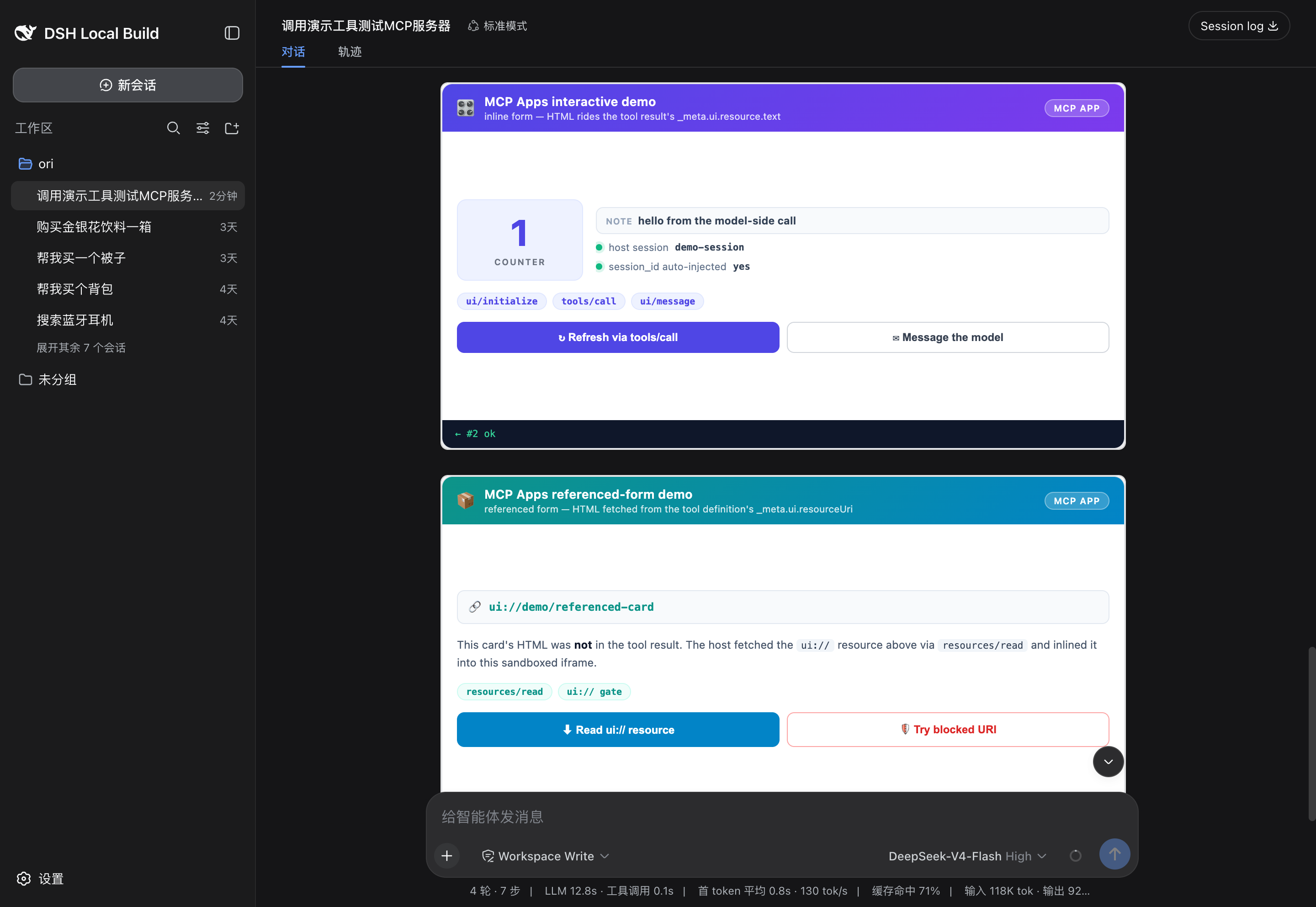
The screenshot shows both cards of the bundled demo server (demo/server.mjs — zero dependencies, Node stdio only):
demo_interactive(inline form): the tool result carries_meta.ui.resource.text, so the card HTML rides the result. Its buttons exercise the full bridge round trip: atools/callthat refreshes the card (the host auto-injectssession_id), andui/update-model-context+ui/messagetalking back to the model.demo_referenced(referenced form): the tool definition carries_meta.ui.resourceUri(ui://demo/referenced-card); the host resolves the HTML once viaresources/readand inlines it. The card also demonstrates the bridge'sui://security gate — afile:///etc/passwdread is refused.
Try it:
# Protocol-level self-check: spawns the demo server over stdio and asserts
# the handshake, both card forms, session_id echo, and the ui:// resource
# table (8 checks, no DSH needed).
node demo/selftest.mjs

# Full E2E: launch dsh web with the demo overlay, then ask the model to call
# demo_interactive and demo_referenced. Run from the PARENT directory of this
# repo (the overlay's server path is cwd-relative); or adjust the !!js path in
# the overlay to your layout.
dsh web --patch dsh-mcp-apps-host/demo/mcp-apps-demo.cordis.yml
Install
Not on npm yet — install from GitHub. The DSH host provides all @deepseek-ai/dsh-* peer packages at runtime, so no peer install is needed:
npm install github:oriliz/dsh-mcp-apps-host
From source
All dsh peer packages resolve inside the deepseek-harness pnpm workspace, so build there (this also matches the layout the bundled lib/ was built in):
git clone https://github.com/deepseek-ai/deepseek-harness.git
cd deepseek-harness
git clone https://github.com/oriliz/dsh-mcp-apps-host.git packages/mcp/mcp-apps-host
pnpm install
npx tsc -b packages/mcp/mcp-apps-host
pnpm --filter @deepseek-ai/dsh-mcp-apps-host bundle
Usage
1. Configure the connection
Declare one plugin instance per MCP Apps server in your overlay (serverName picks both the tool prefix mcp__<serverName>__* and the bridge path /mcp-apps/<serverName>/bridge). A ready-to-edit template ships in examples/connect-server.patch.yml:
- insert:
    - id: mcp-apps-host-my-server
      name: '@deepseek-ai/dsh-mcp-apps-host'
      config:
        transport: stdio
        serverName: my-server
        command: my-apps-server
        args: []
        env: {}
        cwd: ''
        toolCallTimeoutMs: 60000
transport: streamable-http with a url field is also supported.
2. Start DSH
dsh --profile web --patch ./examples/connect-server.patch.yml
3. Verify
Ask the agent to call one of your server's tools. The tool result renders as an interactive card inside the conversation instead of a plain result row — and the card's own buttons reach back to your server through the bridge (tools/call, resources/read, ui/message). No server at hand? Use the bundled demo first.
Architecture
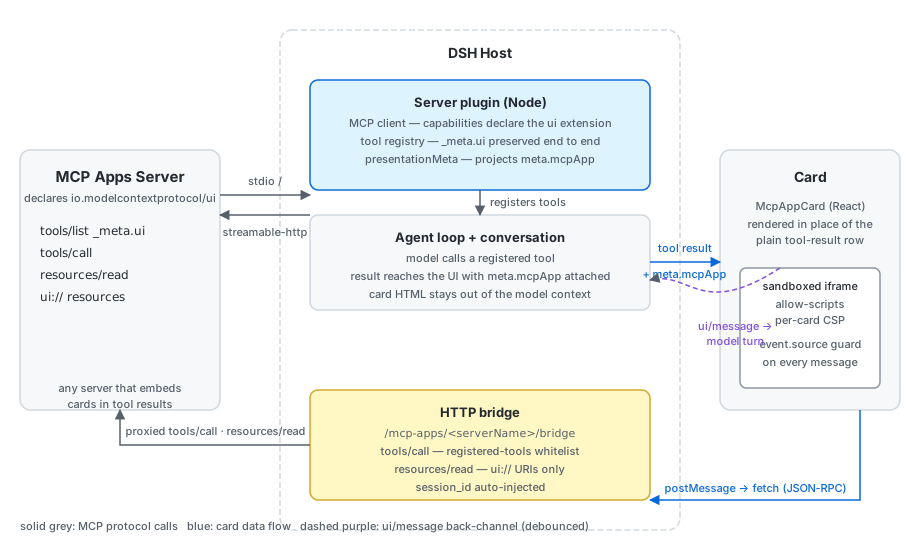
Tool results flow left to right (server → tool registry → conversation → card), and card interactions loop back through the HTTP bridge to the server. Card HTML never enters the model context, and the bridge only lets the iframe call tools registered on that server and read ui:// resources.
Files
| File | Role |
|---|---|
src/index.ts |
Server-side: MCP connection, tool registration, HTTP bridge |
src/client/McpAppCard.tsx |
Card component: iframe, postMessage handling |
src/client/index.ts |
Client plugin: slot registration, sendUserMessage |
src/invariant.ts |
Cordis companion (no runtime invariant) |
demo/ |
Zero-dependency demo server + protocol self-test + overlay |
examples/ |
Connection overlay template |
Development
# Build
npx tsc -b packages/mcp/mcp-apps-host/tsconfig.json
pnpm --filter @deepseek-ai/dsh-mcp-apps-host bundle

# Run DSH with the plugin
dsh --profile web --patch ./examples/connect-server.patch.yml --port 8089
Pitfalls Fixed
| # | Issue | Fix |
|---|---|---|
| P0 | Server strips _meta.ui |
Declare mimeTypes in client capabilities |
| P1 | Card renders but shows no tool data | presentationMeta() wraps result as CallToolResult-shaped object |
| P2 | session_id injection fails |
readSessionId() prefers meta.lastToolResult.structuredContent |
| P3 | External images blocked by CSP | buildCsp() adds https: to default img-src |
| P4 | ui/update-model-context was TODO |
_stagedContext Map stores and prepends context |
| P5 | Context visible as user message text | ui/inject-context bridge injects via agent.inject() as plugin-sourced message |
See FINDINGS.md for detailed root cause analysis.
License
MIT
No comments yet. Be the first to write one.