dsh-notice-hooks
Lifecycle command Hooks for DeepSeek Harness




Configure automation Hooks for user and project scopes to run commands on session, tool, permission, and context-compaction events. Manage Hook authorization manually in Hooks setting.
Highlights
- 14 lifecycle events: session, tool, permission, subagent, stop, and context-compaction events.
- User/project scopes: user Hooks run before Hooks from the registered Workspace.
- Explicit authorization: configuration enablement is separate from fingerprint-bound execution approval.
- Fail-closed execution: unauthorized, changed, or invalid Hook definitions never start commands.
- One compact activity row: one ignorable Chat row summarizes triggered and blocked Hooks.
- Optional CC Notice integration: route events to desktop notifications, sounds, Webhooks, and hardware feedback.
Requirements
- DeepSeek Harness with Node.js 24.9.0 or newer
@deepseek-ai/dsh-session>=0.2.1-rc.1 <0.2.2 || >=0.2.2-0 <0.3.0; the official plugin-record API is required for Chat activity feedbackpnpm11.28.5 when building from source- A working Session and persistence stack in the target Host profile
Quick start
Desktop
- Open Settings → Plugins in DeepSeek Harness.
- Search for
dsh-notice-hooks. - Install the package from npm and enable it.
- Open Hooks setting.
Desktop profiles are managed exclusively by the Electron application. The ordinary dsh plugin --profile desktop command is intentionally rejected.
CLI profiles
Each DSH profile has an independent plugin installation. Install the package into the profile you actually run:
dsh plugin --profile web add dsh-notice-hooks
dsh plugin --profile headless add dsh-notice-hooks
dsh plugin --profile tui add dsh-notice-hooks
These commands use the npm registry configured by the user. An optional mirror may lag behind the canonical npm publication; do not publish the package separately to a mirror.
After installation
- Create or edit
~/.dsh/hook.jsonusingexamples/hook.jsonas a starting point. - Open Hooks setting and reload the configuration.
- Enable the intended Hook configuration.
- Review the command and explicitly authorize its current execution fingerprint.
Recommended companion: CC Notice
dsh-notice-hooks provides lifecycle Hooks and explicit command authorization. Pair it with CC Notice to turn DeepSeek Harness events into configurable desktop notifications, sounds, Webhooks, and hardware-device feedback. CC Notice includes DeepSeek Harness Hook setup; command authorization remains under your control in Hooks setting.
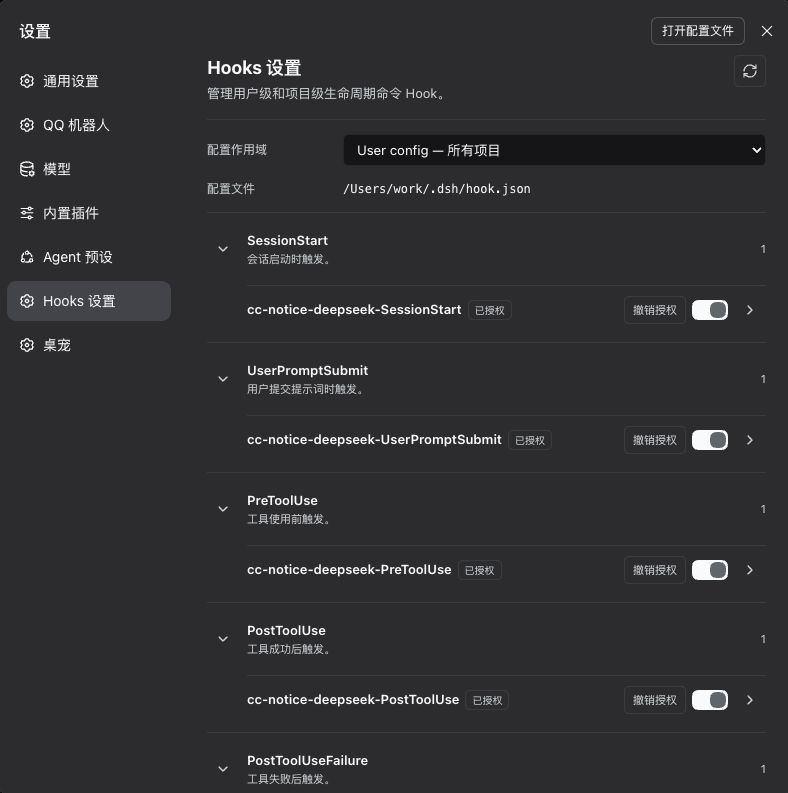
Settings preview
The Hooks setting page shows every supported lifecycle event, configuration scope, command details, enable state, and fingerprint authorization state.
Install from source
git clone https://github.com/oliverCJ/dsh-notice-hooks.git
cd dsh-notice-hooks
pnpm install
pnpm run check
pnpm pack
Install the generated tarball into a non-Desktop profile, replacing the version when necessary:
dsh plugin --profile web add ./dsh-notice-hooks-0.1.3.tgz
Packing is preferred to installing the source directory because it validates the same file set used by npm. If you do install a local directory, run pnpm run build first because the runtime entry points are under lib/.
Profile support
| Profile | Installation | Host Hooks | Web Settings | Requirements and notes |
|---|---|---|---|---|
web |
dsh plugin --profile web add ... |
Yes | Yes | The Web workspace provider enables user and project scopes. |
desktop |
Electron Plugin Manager only | Yes | Yes, in the embedded Web UI | Do not manage this profile through the ordinary CLI. |
tui |
dsh plugin --profile tui add ... |
Yes | No | Requires an already working TUI profile with its Session stack; terminal UI does not mount Web Settings. |
headless |
dsh plugin --profile headless add ... |
Yes | No | User Hooks work without a workspace provider; project Hooks require one. |
| custom | Profile-specific plugin manager | Conditional | Conditional | Host Hooks require Session lifecycle services. Settings additionally requires the Web server and compatible locale, renderer, and Settings client services. |
workspaceRegistry is optional. When it is available, the plugin exposes registered project scopes; when it is absent or invalid, the plugin continues with the user scope only. The Bundle does not insert a fallback workspace provider and never infers a trusted project scope from an arbitrary Session cwd.
The Session plugin-record runtime is also optional at activation. If the profile cannot resolve the Harness-owned @deepseek-ai/dsh-session module, Hooks, authorization, and Settings continue normally; only the compact Chat activity rows are disabled, with one Host warning. The plugin never installs a second Session runtime to fill this gap.
After installation, enable dsh-notice-hooks. The Settings navigation label and page title are both Hooks setting in English and Hooks 设置 in Simplified Chinese.
The plugin reads the user configuration from ~/.dsh/hook.json, which applies to every project. If the user file does not exist, the user Store creates an empty configuration with no enabled Hooks. Start with examples/hook.json, and replace every example absolute path before enabling a Hook. Project configuration is described under Configuration scopes; the plugin never creates a project hook.json or its .dsh directory automatically.
Configuration
{
  "version": 1,
  "hooks": {
    "PostToolUseFailure": [
      {
        "matcher": "^(bash|edit)$",
        "hooks": [
          {
            "id": "notify-tool-failure",
            "type": "command",
            "command": "node \"/absolute/path/to/notify.mjs\" --failed",
            "enabled": true,
            "timeoutMs": 10000,
            "maxConcurrent": 1
          }
        ]
      }
    ]
  }
}
versionmust be1.hooksis keyed by a supported event name. Each value is an array of matcher groups.matcheris an optional case-insensitive JavaScript regular expression. Missing or empty matches every value.idis required, non-empty, and unique within its configuration file. User and project files are separate scopes and may use the same display ID.typemust be"command".enabledmust be exactlytrueto declare that a Hook may be enabled. It does not grant execution authority; authorization must be granted through an explicit user action in Hooks setting or the session review dialog.timeoutMsdefaults to10000and accepts integers from100through60000.maxConcurrentdefaults to1and accepts integers from1through4for each Hook.
The plugin watches and reloads configuration files automatically. Invalid JSON, invalid regular expressions, duplicate IDs, and invalid fields fail closed: no Hook from that scope runs until its configuration is valid again. Unknown fields are retained when Settings changes enabled. Writing enabled: true directly, in either configuration file, never authorizes a Hook.
Configuration scopes
The plugin supports two independent configuration scopes:
- The user configuration is always
~/.dsh/hook.jsonand applies to every project. If it does not exist, the user Store creates an empty configuration with no enabled Hooks. - A project configuration is always
<workspace-root>/.dsh/hook.jsonand applies only to the exact root of that registered DSH workspace. The plugin does not scan parent directories, and unregistered directories do not receive a project scope. - For a session in a registered workspace, matching user Hooks run first, followed by matching project Hooks. Document order is preserved within each file. A missing project file behaves as an empty scope with
exists: false; selecting the workspace in Settings never creates the file or its.dshdirectory. - A session's workspace association is fixed when first observed. Later directory changes or workspace registry changes do not rewrite that session's scope association.
- User and project configurations are validated independently. An invalid user configuration disables only user Hooks, while valid project Hooks continue to run. An invalid project configuration disables only that project's Hooks, while valid user Hooks continue to run. A failure in either scope does not propagate into Agent or tool execution.
- The same Hook display ID may appear in different scopes, but it must remain unique within each configuration file. Execution, statistics, cancellation, and mutation are isolated by scope.
Authorization
Execution authority is stored separately in ~/.dsh/dsh-notice-hooks/authorizations.json. This user-owned file is created with mode 0600 under a 0700 plugin directory. Project files cannot grant project Hook authority, and existing enabled: true configurations are not grandfathered after an upgrade.
A Hook runs only when its configuration declares enabled: true and the user has approved the current execution fingerprint through Hooks setting or the session review dialog. The fingerprint binds the scope, Hook ID, event, matcher source, command, timeout, and concurrency limit. Changing any of those values invalidates the approval and requires another manual enable action. The Settings state distinguishes not-approved from fingerprint-changed; both fail closed.
Configuration and authorization are separate operations. The enable switch changes only the enabled declaration: enabling never grants authority, while disabling revokes authority before writing enabled: false. The authorization action and review dialog grant or revoke only the current fingerprint; revoking leaves the configuration enabled and does not change its revision. Granting requires an enabled configuration, performs revision and fingerprint checks, and compensates with a revoke if final verification fails. All mutation transactions are serialized.
Events and matcher values
| Event | Trigger | Value tested by matcher |
|---|---|---|
SessionStart |
A main session is created | Session origin, or empty |
UserPromptSubmit |
A user message is accepted | user |
PreToolUse |
Before a tool call | Tool name |
PostToolUse |
After a successful tool result | Tool name, or empty if unavailable |
PostToolUseFailure |
After a failed tool result | Tool name, or empty if unavailable |
PermissionRequest |
A tool approval is requested | Tool name or type |
SubagentStart |
A subagent session is created | Agent preset, or subagent |
SubagentStop |
A subagent session is disposed | Agent preset, or subagent |
Stop |
A turn ends without an error reason | Turn-end reason kind |
StopFailure |
A turn ends with an error reason | error |
PreCompact |
Context compaction starts | manual or automatic |
PostCompact |
Context compaction succeeds | manual or automatic |
PostCompactFailure |
Context compaction fails | manual or automatic |
SessionEnd |
A main session is disposed | Disposal reason, or empty |
Matching uses normal regular-expression semantics against the complete matcher value. Use anchors such as ^bash$ when an exact tool name is required.
Command execution
command is one command-line string parsed into an executable and argument vector. The process is spawned with shell: false in the session working directory.
"command": "node \"/path with spaces/notify.mjs\" --channel desktop"
Quotes group arguments. Shell syntax is not interpreted: pipes, redirects, globbing, $VARIABLE, ~, &&, and command substitution do not work implicitly. When shell behavior is intentional, invoke the shell explicitly and quote its script as one argument:
"command": "/bin/sh -c \"printf '%s\\n' done >> /tmp/dsh-hook.log\""
Prefer a direct executable whenever possible. Hook commands are fire-and-forget from the Agent's perspective. There is no queue or retry. A Hook over its concurrency limit is skipped. Disabling or deleting a Hook, invalidating its configuration, unloading the plugin, or reaching the timeout terminates its active process tree. Exit failures and command output never enter the Agent conversation.
Stdin contract
Every process receives one newline-terminated JSON object on standard input. Schema version 1 has the following fields; unavailable values are null, not omitted.
| Field | Type | Meaning |
|---|---|---|
schema_version |
1 |
Payload schema version |
source |
"deepseek-harness" |
Payload producer |
hook_event_name |
string | One of the 14 event names above |
session_id |
string | Harness session ID |
cwd |
string or null |
Session working directory |
timestamp |
string | ISO 8601 event timestamp |
turn_id |
string or null |
Turn ID when available |
agent_id |
string or null |
Agent ID when available |
agent_type |
string or null |
Main or subagent preset information |
tool_name |
string or null |
Tool associated with the event |
tool_use_id |
string or null |
Tool call ID |
tool_input |
any JSON value or null |
Parsed tool arguments |
tool_response |
any JSON value or null |
Tool result content |
prompt |
string or null |
Submitted user text |
last_assistant_message |
string or null |
Latest assistant text observed for this live session |
reason |
string or null |
Turn, session, or approval reason |
error |
string or null |
Normalized failure text |
compaction_id |
string or null |
DSH compaction identity for compact lifecycle Hooks |
source_command_id |
string or null |
Manual compact command identity; null for automatic compaction |
Example consumer:
const chunks = []
for await (const chunk of process.stdin) chunks.push(chunk)
const event = JSON.parse(Buffer.concat(chunks).toString('utf8'))
if (event.hook_event_name === 'StopFailure') {
  await sendNotification(event.error ?? 'Agent turn failed')
}
examples/capture-hook.mjs is an executable independent consumer that validates stdin and atomically writes the latest payload:
node examples/capture-hook.mjs /tmp/dsh-hook.json
Settings
The Settings navigation label and page title are Hooks setting in English and Hooks 设置 in Simplified Chinese. The scope selector sends only a public scope ID (user or workspace:<id>) to the Host; it never sends a Client-provided path or an internal runtime ID.
The page always renders all 14 event groups in a fixed order, including during initial loading or when the service is unavailable. Controls remain disabled until status is available. Configured groups are expanded by default; empty groups stay compact but can be expanded. Reloading preserves expansion state independently for each scope. Every Hook has a configuration enable switch and a separate authorization action. Enabling a configuration leaves it unauthorized; revoking authorization keeps the switch on. Both states enter pending review. Disabling the configuration revokes authorization and suppresses review prompts. A selected scope with pending authorization shows a review banner and per-Hook status; its Review action opens the same authorization dialog used by the current session. The composer shows a compact review icon only when the current session's user or project scope has configured-but-unauthorized Hooks. The dialog displays command, matcher, timeout, concurrency, scope, and fingerprint-change status before the user explicitly authorizes selected or all currently shown Hooks. These actions never authorize future Hooks or changed fingerprints. Expanded Settings details continue to show the command, matcher, timeout, concurrency limit, authorization state, recent aggregate status, and public scope.
The configuration path has an open-file button that asks the Host to open the verified scope file with the platform's default associated editor; the Client never sends an arbitrary filesystem path.
Scope switching, reloads, and revision-conflict recovery reject stale responses, so a late response from an old scope cannot overwrite the current page. If a workspace is removed from the registry, the page falls back to the user scope and shows a localized notice. A missing project configuration shows an empty state without creating files. The page also reports the configuration path, invalid configuration, and service availability, but it is not a raw JSON editor.
Configuration writes use revision and content-hash checks, reject symlinks and non-regular files, and replace the file atomically in the same directory. An external edit detected before replacement is rejected. Portable Node.js filesystem APIs do not provide conditional rename, so an uncooperative writer changing the file between the final hash check and rename remains a narrow race.
Authorization review
The composer review icon is scoped to the current Session. It always checks the user configuration and adds only the registered Workspace that owns the current Session; it never scans cwd or shows pending Hooks from unrelated projects. The icon appears only for configured-enabled Hooks whose current fingerprint is not authorized.
The review dialog defaults to no selection and shows scope, event, command, matcher, timeout, concurrency, and the reason authorization is required. Authorize selected processes checked Hooks; Authorize all processes only the Hooks currently shown. Both actions call the existing per-Hook Host transaction in user-before-project and configuration order. A failure stops later Hooks in that scope while other scopes may continue; successful items disappear immediately and failed items remain visible.
Status is refreshed on mount, dialog open, window focus, connection reset, and every 15 seconds while a Session review control is mounted. Generation checks prevent older responses from replacing newer Host-confirmed state. The dialog traps focus, closes on Escape or its mask when idle, returns focus to the opener, and stays open while authorization is being submitted.
Chat activity feedback
Each Hook event invocation that matches at least one configured Hook produces one compact, ordered activity row in conversation.chat.flow. The row uses the concise Hook · <event> · <scope/id> <status> format, follows the configured code font-size axis while retaining the regular interface font, and aggregates successfully triggered and blocked Hooks while retaining user-before-project order. Blocked entries distinguish a disabled declaration, missing approval, and a changed execution fingerprint.
The Host transports this feedback with the official appendPluginRecord() API. Records are ignorable, are excluded from model context, and may be retained with the Session as an implementation consequence. Malformed, unknown-owner, and future-version records render nothing. SessionEnd Hooks still execute, but intentionally produce no activity row because the Session has already left the active Store.
Limits and isolation
- Serialized stdin payload: 128 KiB maximum
- Retained stdout and stderr: 64 KiB each; remaining output is drained
- Command length: 8192 characters
- Timeout: 100 to 60000 ms
- Per-Hook concurrency: 1 to 4
- Configuration watch coalescing: 100 ms
- No shell unless explicitly invoked
- No command queue, retries, or output history
Hook spawn, exit, timeout, and parsing failures are diagnostic only. They do not reject or alter Harness Agent or tool operations.
Troubleshooting
A Hook does not run
Check that enabled is exactly true, the Settings configuration switch is on, the authorization state is Authorized, the event name is supported, the regular expression matches the documented value, and the executable can be resolved without shell expansion. A direct configuration edit cannot grant authorization. Reload Settings and inspect the configuration diagnostic.
ENOENT is reported
Use an absolute executable or script path and verify the session cwd exists. Remember that ~ and environment variables are not expanded without a shell.
A command works in a terminal but not as a Hook
Remove terminal shell syntax or invoke /bin/sh -c, cmd.exe /d /s /c, or another shell explicitly. Keep the shell script as one quoted argument.
A Settings switch is rejected
The file may have changed after the page loaded, or it may not be a safe regular file. Reload, resolve the configuration error, and retry.
Development and release checks
Local checks:
pnpm run typecheck
pnpm run typecheck:test
pnpm run test
pnpm run check:coverage
pnpm run build
pnpm pack --dry-run
Pull requests and pushes to main run the same frozen-lockfile checks in GitHub Actions and upload the coverage report to Codecov. Pushing a numeric version tag such as 0.1.3 runs the checks again, creates a GitHub Release, and attaches a prebuilt .tgz for manual installation. The release workflow does not publish to npm automatically; npm publication remains a deliberate maintainer action.
License: MIT.
No comments yet. Be the first to write one.