READMESource: main@65682bf5
dsh-tps-ttft
为 DeepSeek Harness 提供每轮 TPS / TTFT 统计:模型耗时、工具耗时、首 token 延迟(TTFT)、输出速度(TPS)。
效果
每轮对话结束后,turn tail 里会出现一个速度表图标的 timing 胶囊(显示模型耗时)。点击它展开一个浮层,看到完整 timing 统计:
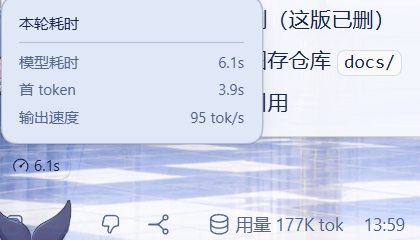
- 模型耗时:模型推理的墙钟时间(step/start → assistant/message)
- 工具耗时:工具调用的总耗时(tool/call → tool/result,没调工具就不显示)
- 首 token:首 token 延迟(TTFT,step/start → 第一个 token)
- 输出速度:输出速度(TPS,decodeTokens / decodeMs,无数据就不显示)
完全自包含:插件自带 client 组件(注册到 conversation.chat.turnTail slot),无需修改 DSH 核心代码,装完即用。
原有的"本轮用量"(token 用量)面板不受影响,两者独立。
安装
从 GitHub 直接安装(一条命令,无需额外配置):
dsh plugin --profile <你的profile> add "github:oldzhang82/dsh-tps-ttft#<commit-sha>"
参数要带引号:PowerShell 里
#是注释符,不加引号会把#后面的 SHA 丢掉。
<commit-sha>用 仓库 commits 页 的最新完整 SHA。锁 commit 是为了防止后续推送悄悄改变安装内容。
本插件是纯 JS、无构建脚本,安装不会触发 pnpm 的 allowBuilds 授权提示,一条命令装完。
装完重启 DSH,开一轮对话,turn tail 里出现速度表图标的 timing 胶囊即成功。
工作原理
本插件由两部分组成,都不改动 DSH 核心:
server 端(
index.js):注册一个 session projection(perTurnStats),对会话事件流做纯函数折叠(fold):- 监听
step/start、assistant/attempt、assistant/message、tool/call、tool/result、turn/end事件 - 按 Turn 累计模型耗时、工具耗时、TTFT、输出速度
- 在
turn/end时清理该 Turn 的临时状态,保证视图有界
- 监听
client 端(
lib/client.js):注册一个 React 组件到conversation.chat.turnTailslot,读取perTurnStats投影并渲染 timing 胶囊。
兼容性
- DSH
>=0.2.0-rc.1 <0.3.0-0(见engines.dsh)
依赖
zod^4.6.5(schema 校验)
License
MIT
No comments yet. Be the first to write one.