DSH Achievement Hall
Local usage statistics and 81 achievements for DeepSeek Harness: 72 public achievements and 9 hidden challenges. The Hall reads persisted session events, tracks real DSH capabilities, and gives 19 cumulative achievements their own levels.
Preview
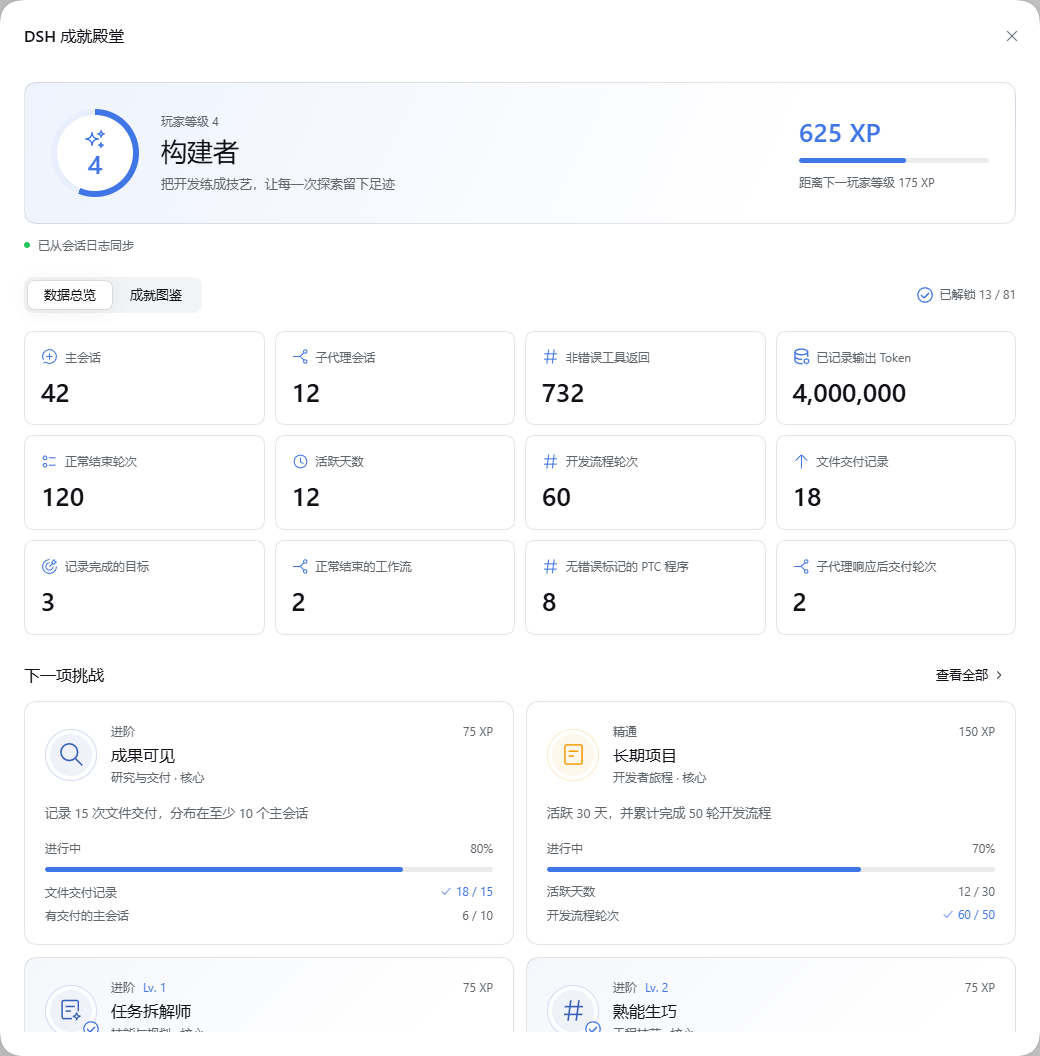
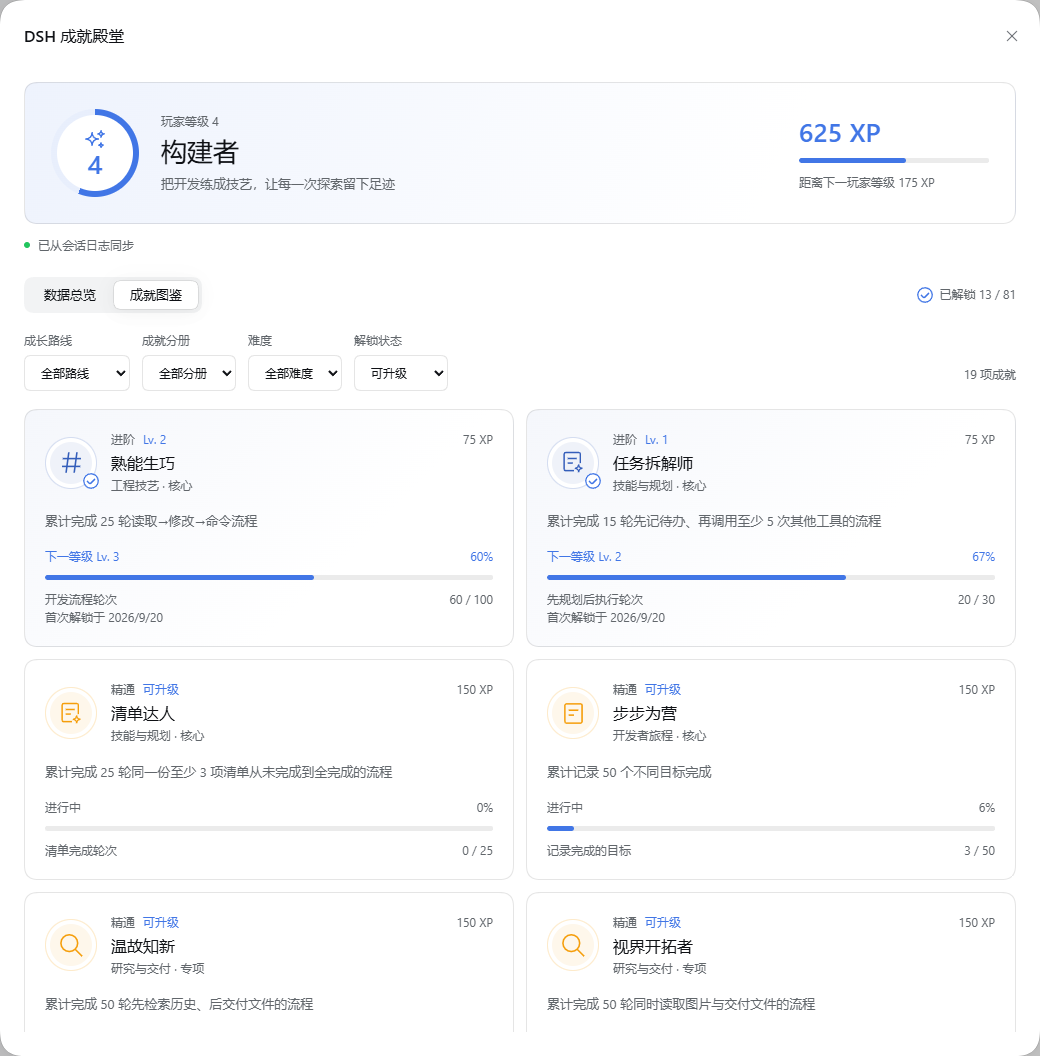
Screenshots show the Chinese interface with sample data.
Usage statistics
View main and subagent sessions, recorded deliveries, PTC programs and output tokens alongside player progress.
Achievement records
Browse achievement badges, unlock dates and progress, with filters for category and unlock status.
Install
Requires DSH 0.1.7-rc.2, its Web profile, and Node ^22.19.0 || >=24. DSH APIs are pre-stable; other releases require verification.
From a DSH source checkout
Prepare and build DSH following its source setup instructions first. Run the following commands from the deepseek-harness repository root, not from the plugin directory. If dsh-achievements already exists, skip cloning it.
git clone https://github.com/oiuv/dsh-achievements.git
pnpm dsh plugin --profile web add ./dsh-achievements
pnpm dsh web
pnpm dsh web is shorthand for pnpm dsh --profile web: both start the same Web profile. pnpm runs the DSH repository's launcher; it does not select a different profile. Keep these commands in the DSH repository root.
To install a release tarball instead, download it to the DSH repository root and run:
pnpm dsh plugin --profile web add ./local-dsh-achievements-0.2.0.tgz
pnpm dsh web
The plugin checkout may also live outside the DSH repository: pass its path to add. Copying a folder into the repository alone does not activate it. Installation belongs to $DSH_HOME/profiles/web/.
With a globally installed DSH CLI
If dsh is installed and available on PATH, omit pnpm. From the directory containing the plugin checkout, run:
dsh plugin --profile web add ./dsh-achievements
dsh web
After installing or updating the plugin, stop and restart DSH, then refresh the browser; refreshing alone can connect the new client to the old Host. If the Hall reports differing achievement versions, press Ctrl+C in the launch terminal, rerun the appropriate Web launch command, then refresh the page. Open Achievements in the sidebar. The Hall shows level progress, illustrated achievement badges, tool usage bars, and hourly activity in the current DSH theme.
The repository includes the built client.js; installation does not run a build script. Keep the package name @local/dsh-achievements consistent in package.json and cordis.patch.yml. From a DSH source checkout, remove with pnpm dsh plugin --profile web remove @local/dsh-achievements; with the global CLI, omit pnpm.
Statistics and achievement rules
- Manual, appended user messages determine activity dates and the hourly chart. Tool messages, replacement messages and subagent prompts do not count as manual activity. An active date with development, research or delivery requires both a manual message and the corresponding recorded work on that date.
- Output tokens sum recorded
assistant/message.usage.outputTokens. Missing usage is excluded and its message count is displayed. This is not total token consumption or a billing estimate; input tokens, failed attempts and provider-side retries are excluded. - Main sessions and subagent sessions count separately once they contain an owned, ended step. Work totals include both. Inherited fork prefixes are excluded; an ended step is not a completed development task.
- Native calls and PTC subcalls both contribute tool usage. The outer
run_codeis a separate call. PTC program challenges require at least one subcall, every started subcall to settle without an error flag, and a non-error outer result. - Tool attempts and non-error returns are separate. A shell exit code other than zero can still be a non-error tool return. Neither a build sequence nor an error-free program certifies passing tests or artifact quality.
- Ordered development and research sequences count once per normally completed turn, rather than once per session. Repeating a sequence inside that turn counts once; a later completed turn can count again. Cancelled, blocked and failed turns earn no turn-completion credit.
- Planning requires an unfinished todo snapshot before at least five other tool calls. Checklist completion requires at least three items whose text and order stay unchanged; the plugin hashes their text instead of storing it. Whole-list snapshots never count as new individual tasks.
- File deliveries come from non-empty
deliverables/presentedevents, deduplicated by call ID within the session. Repeated presentations of a file are delivery records, not distinct works. Coverage challenges count main sessions containing the required activity, not unrelated sessions. - Standard delegation tools include
subagent,subagent_fork,subagent_codexandsubagent_claude_code. Collaborative delivery requires a parent-owned child catalog entry and a recorded child turn completion within the parent turn, before delivery by log time. Starting a background child alone earns no delivery credit. - Workflows require paired start/end records with a completed stop reason. Member challenges also require all recorded members to complete; phase challenges count named phases. Goals count completed goal IDs; these are recorded lifecycle states, not independent quality assessments.
- Terminal challenges match the terminal ID across successful send → read → close calls. Feature groups recognize shipped tool names; arbitrary renames remain in usage totals without inferred capability credit. Optional specialties require their corresponding DSH tools.
- History imports silently. Unlock dates record detection time, not the original event date. Current-format counters survive restarts and source-log deletion. The configured timezone determines calendar dates; changing it requires a fresh database.
Statistics follow persistence flushes and polling rather than every live streaming chunk. Unreadable history displays a partial-import status with a retry action. There is no remote analytics, conversation upload or model-facing tool.
Achievements and levels
The 72 public achievements include 24 core challenges, 47 specialties and one platinum award, alongside nine hidden challenges. First-unlock XP determines player level; 19 cumulative achievements have independent upgrade levels. Filter the collection by capability path, difficulty, collection or unlock state.
See Player levels and public achievements for the complete player-level table, XP rewards, upgrade rules and public catalog. The reference reveals no hidden achievement names, requirements or hints.
Configuration and data
The bundle stores statistics at $DSH_HOME/achievements/stats.sqlite, using the system timezone. Override the complete plugin configuration in the profile's cordis.patch.yml:
- id: dsh-achievements
  config:
    database: !!js dshHomePath('achievements', 'stats.sqlite')
    timeZone: Asia/Shanghai
    pollMs: 3000
    pageSize: 512
    busyTimeoutMs: 5000
The database path must be absolute. Polling accepts at least 1000 ms; pages contain 1–4096 events; SQLite busy timeout accepts 1–30000 ms. The timezone is an IANA name validated at load. Use the same database for profiles sharing one session history.
SQLite stores counters, checkpoints, dates, turn timestamps, tool/Skill identifiers, hashed checklist and terminal identities, goal/workflow IDs and parent/child relationships. It does not copy prompts, responses, file paths, command text or tool result bodies. The authenticated DSH connection owns the endpoint. On unload, pending reads close before SQLite closes.
The current statistics format is v2. Opening a development v1 database clears its counters, checkpoints and unlocks, then imports the session logs still available; deleted source logs cannot be reconstructed. Stop all Hosts using the database before upgrading. To rebuild manually, stop those Hosts, remove only the plugin statistics file and restart. DSH session logs are never modified.
Develop and release
npm ci
npm test
npm run build
npm run check
npm pack
Edit src/client.js, src/client.css, and the bilingual dictionaries for UI work. src/catalog.js owns achievement requirements and XP. Commit the generated client.js with its sources. The build uses explicit compiler options and ignores parent tsconfig files. CI verifies tests, reproducible builds and packaging on Windows and Linux using Node 22.19 and 24.
src/events.js reduces native, PTC and domain events; src/engine.js owns aggregation, atomic checkpoints and unlocks. src/collector.js reads history and handles cancellation. Tests cover replay, failed and unpaired outcomes, correlated children, upgrade thresholds, database reset and teardown. The checked-in PTC fixture retains relevant durable events from DSH's ptc-node-workspace recording. No new model input or DSH persistence schema is introduced; checkpoint and reduced state commit in one SQLite transaction.
Publish the sources as a standalone repository and attach the generated tarball to its release. Never include a statistics database, DSH home, node_modules, or local test output. The MIT license applies.
No comments yet. Be the first to write one.