dsh-meow
Hear when DSH needs you — or is done. A DeepSeek Harness web plugin that plays a short synthesized meow in the browser at four moments, with an enable/disable toggle in Settings → General.
No audio file ships with the plugin: each meow is generated live with the Web Audio API, so there is nothing to download and no binary asset to trust.
Compatibility
Built and verified against DeepSeek Harness 0.1.7-alpha.2 with Cordis 4.0.4 on macOS and Node 24. It uses only published extension points — the approval/request and user-questions/request waterfalls, session/event, the webServer route registry, the slot registry, and the dsh.client bundle format — so it should keep working across patch releases.
The four moments
| Moment | Host observation point | Meow character |
|---|---|---|
| Confirmation needed | a prepended listener on the approval/request waterfall | questioning rise, bright |
| Input needed | a prepended listener on the user-questions/request waterfall | softer triangle |
| Something wrong | turn/end with reason error | low and long |
| Task done | turn/end with reason completed | content, slightly higher |
The approval listener is prepended so it fires only when an answerer is actually consulted: the approval service resolves the never policy before dispatch, so a session that auto-rejects approvals stays silent. The question listener is prepended and delegates with next(), so it observes the request without claiming it from the browser answerer.
Settings
Open Settings → General and find Meow notification sound. The master switch is the enable/disable control. While it is on, the row also offers:
- one checkbox per moment (confirmation, input, error, done);
- Include subagent sessions — off by default, so a delegated child's turn end does not meow;
- a volume slider;
- Test to hear the meow immediately.
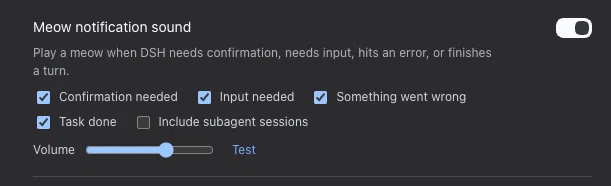
The Settings → General row: master switch, one checkbox per moment, the subagent opt-in, volume, and Test.
Settings are stored in a plugin-owned file at $DSH_HOME/dsh-meow.json (by default ~/.dsh/dsh-meow.json), so toggling needs no profile reload.
Install
Install straight from GitHub (the built lib/ is committed, so no build step runs on install):
pnpm dsh plugin --profile web add git+ssh://git@github.com/nonmean/dsh-meow.git
Or, from a local checkout, point the profile at the directory:
pnpm dsh plugin --profile web add link:/path/to/dsh_meow
This appends dsh-meow to the web profile's bundle list and mounts its cordis.patch.yml host row. The browser half ships through the package.json dsh.client declaration and needs no separate roster row.
Then restart dsh web (or reload the page if the profile HMR picked the row up) and hard-refresh the browser so the new client bundle is fetched. The Settings row appears under General.
To remove it:
pnpm dsh plugin --profile web remove dsh-meow
How it works
- Host half (lib/index.js) observes the four moments, keeps a bounded, per-kind-deduplicated queue, and serves three same-origin JSON routes: GET /meow/state, POST /meow/state, and GET /meow/events?since=N.
- Browser half (lib/client.js) polls /meow/events every 700 ms and plays one synthesized meow per queued event, and registers the Settings row. The first poll adopts the host cursor without playing, so reloading a page never replays an old backlog.
- Routes refuse cross-site callers (Sec-Fetch-Site: cross-site).
Browsers block audio until a user gesture. The player resumes its AudioContext on the first pointer or key event, and only schedules while the context is running, so a meow plays from the first event after you interact with the page.
Development
pnpm install     # or symlink node_modules as described below
pnpm build       # tsdown -> lib/index.js + lib/client.js (committed)
pnpm typecheck   # tsc --noEmit
pnpm smoke       # host- and browser-half smoke tests, no DSH runtime needed
The browser bundle is emitted in the DSH client module system's lazy-CJS factory format (window.ModuleLoader.load), with only the frozen platform-module table kept external. lib/ is committed on purpose so the plugin installs from a checkout or a git URL without a build step.
Troubleshooting
| Symptom | Fix |
|---|---|
| No sound at all | Click or type in the page once (browser autoplay policy), then Test. |
| Settings row missing | Restart dsh web and hard-refresh; confirm the bundle is in the web profile's dsh.profile.bundles. |
| Meows too often | Turn off individual moments, or keep Include subagent sessions off. |
| Meows on every tool error | The plugin only meows on a turn that ends in error, not on recoverable tool errors; if a turn ends in error repeatedly, that is the signal. |
No comments yet. Be the first to write one.