dsh-lan-access
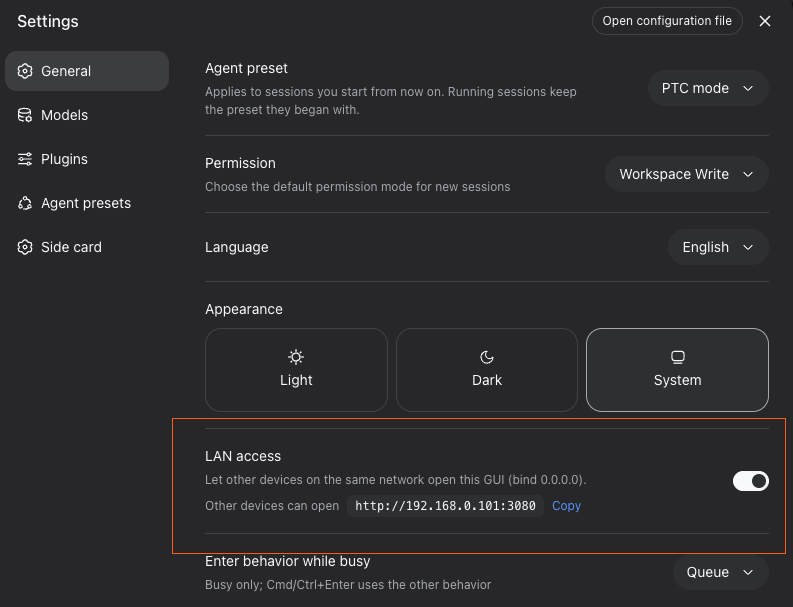
A DeepSeek Harness Web plugin that adds an explicit local IP selection and LAN access toggle to Settings → General. Requires Node.js 22.19+ or 24+.
Tested with DeepSeek Harness
v0.2.1-rc.2(the current release) — peers^0.2.1-rc.2.
- On — binds one selected IPv4 or IPv6 address assigned to this machine. Other devices can use that address; the loopback listener is replaced.
- Off — binds
127.0.0.1(loopback only). - Wildcard addresses such as
0.0.0.0and::are never used. Loopback, scoped IPv6, link-local IPv4/IPv6 (169.254.x,fe80::/10), and OS-reported temporary/deprecated IPv6 privacy addresses are excluded from the selector, so it lists only usable LAN endpoints; IPv4 addresses come first.
Migrating saved LAN settings
An older $DSH_HOME/lan-access.json containing only {"enabled": true} starts on loopback and reports that an address must be selected. The file remains unchanged until you apply a setting. Open the local GUI, select a local IP in Settings → General, and enable LAN access again.
The saved format is now {"enabled": true, "bindHost": "192.168.1.7"}. An enabled selection unavailable on the machine fails with an actionable error rather than exposing another interface. To recover after a network change, stop DSH, set enabled to false in that file, restart locally, and select an available IP.
Screenshots
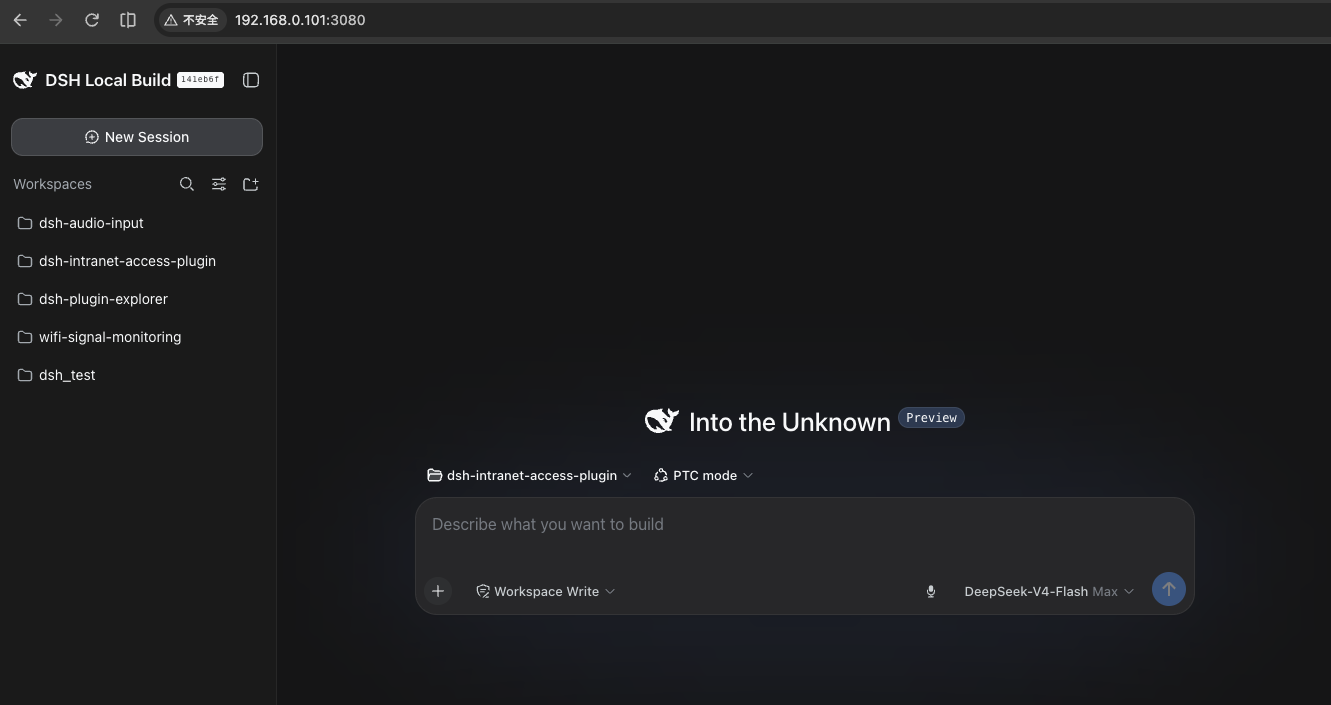
The DSH web GUI opened from another machine on the same network
(http://192.168.0.101:3080):
The LAN access toggle in Settings → General, showing the address other devices can open:
How it works
| Half | File | Role |
|---|---|---|
| Host | src/index.ts |
Owns a plugin-local persisted flag ($DSH_HOME/lan-access.json), the fenced /lan-access JSON route (GET state / POST set), a loopback-only /lan-access/handoff that mints the tokenized target URL before the rebind, the bind controller, and the lanAccess bind-host service. The webserver row's composed host expression reads that service, so every webserver (re)start — boot, toggle, or a post-boot user-patch re-apply — converges to the persisted setting. A toggle restarts the webserver fiber only when the bind differs, using fiber.update(config, noSave): the no-save path keeps the composed tree out of cordis.yml, which would otherwise trigger an HMR subtree reload. |
| Client | src/client/ |
Registers the General-settings row (settings.general.item, order 15) with a native-styled switch, the concrete IPv4/IPv6 selector, the bound listener URL and copy button, and zh/en copy. A same-origin restart is polled; when the bind moves away from the current origin (which can never reconnect) the row navigates to the tokenized new address automatically, replacing the stuck DSH reconnect loop. |
The route fence accepts loopback, the listener's concrete bind IP, or the deployment's trusted authorities read live from the connection row's resolved config. Cross-site requests are refused.
Install from GitHub
The built artifacts (lib/) are committed, so installation needs no build
step and no modification of the DeepSeek Harness checkout:
# From GitHub
dsh plugin --profile web add git+https://github.com/nonmean/dsh-lan-access.git

# ...or clone and install the local checkout (link: keeps your rebuilds live)
git clone https://github.com/nonmean/dsh-lan-access.git
dsh plugin --profile web add link:/path/to/dsh-lan-access

# Restart the GUI
dsh web
The install appends dsh-lan-access to dsh.profile.bundles; its
dsh.bundle.patch inserts the host row and overrides the webserver row's
host with the lanAccess service expression. The client half is picked up
by the client-modules scanner automatically. No harness change is required
for the core feature — the toggle, the LAN bind, and the live /api trust
fence all ship inside the plugin.
Local development — rebuild with
pnpm build(ornpm run build) after changingsrc/, then reinstall/restart. The repo'snode_modulesmirrors the DSH profile's package farm (TypeScript/tsdown come from the harness checkout).
Migrating from a manual patch — remove any
webserverhost: 0.0.0.0override from the profile'scordis.patch.yml(and the bundle patch layers) so the plugin is the single owner of the bind host.
Use
- Open the local GUI and go to Settings → General.
- Select one available local IPv4 or IPv6 address and enable LAN access. Disable LAN access before changing the selection.
- The listener restarts on the selected address. The original loopback page loses that origin, so the row first asks the loopback-only handoff route for a tokenized target URL, then navigates there automatically: the launch token is exchanged for the new authority's session cookie and the app reconnects for real (no "Reconnecting…" loop). If the handoff is unavailable, the row falls back to showing the new address as a link. A fresh browser still needs the launch token printed by DSH; the displayed URL does not include it. HTTPS listeners retain TLS and use HTTPS URLs; IPv6 literals use brackets.
- To return to loopback, disable LAN access and open the local address. Disabling from another machine disconnects it.
The selected address is retained when LAN access is disabled. The plugin also supplies a crypto.randomUUID polyfill for plain-HTTP LAN pages. The bind controller preserves the resolved listener's port, TLS and compression settings during a toggle. The bundle patch restates the shipped Web defaults because a patch replaces the complete webserver config; deployments that customize these values must restate their complete listener config in a later patch layer.
Limitations
- Disabling from a remote machine cannot reconnect that page. The listener
returns to
127.0.0.1, which only exists on the server machine, so the remote tab keeps retrying a dead origin. Re-enable from the server machine (or the loopback page); the row states this when it applies. - The automatic handoff is loopback-only. The process launch token is
minted into the target URL only for a loopback page, so it never leaks to a
remote LAN browser. A bind change started from a non-loopback page (rare —
the selector is disabled while enabled) falls back to the plain address
link, and you must supply the launch token printed by
dsh web. - A fresh browser on the new origin needs the launch token. The URL shown
in the row omits
?token=, by design. The automatic handoff carries it only for the page that performed the switch. - One concrete address, never a wildcard. The listener binds exactly one
selected IPv4/IPv6 address;
0.0.0.0,::, link-local, and OS-temporary IPv6 addresses are never offered. Change the selection by disabling first. - Other tabs on the old origin do not follow. Only the page that toggles navigates to the new origin. Any other tab still open on the old address keeps retrying until it is refreshed at the new address or closed.
- A saved address that disappears fails visibly. If the machine loses the
selected interface (network change, VPN drop, IPv6 privacy rotation), startup
refuses the bind instead of falling back to another interface. Set
"enabled": falsein$DSH_HOME/lan-access.json, restart locally, and reselect an available address.
Upgrading from 0.1.x
Version 0.4.0 targets DeepSeek Harness v0.2.1-rc.2 (peers
^0.2.1-rc.2). The harness now gates each bundle by its declared DSH peer
range, so this release is skipped on older harnesses — install the plugin
version that matches the harness you run (0.2.0 was the v0.1.7-rc.2 line).
On v0.2.1-rc.2+, upgrade in place:
A full upgrade needs both halves (host + client) and a dsh web restart. The
host half now owns its persistence, so the harness settings namespace is no
longer used:
- The toggle value moved to
$DSH_HOME/lan-access.json. The oldlan-access:section in~/.dsh/settings.yaml.importedis not read; flip the switch once after upgrading. - Reinstall (or rebuild
lib/) so the host and client halves match; the client bundle is cached until the nextdsh web.
Remote Settings pages and workspace — no harness change needed
Everything the plugin serves works from a LAN browser with zero modification of the DSH checkout:
- The current
/apigateway trusts the served LAN authority, so the configuration plane (settings.*,credentials.*) reaches the host directly — the Host/Origin fence admits the LAN host and the ordinary browser-session auth authenticates it. The Models page provider directory, the Plugins configuration cards, and the Language/Appearance rows therefore work remotely with no extra hop. - On non-loopback origins the client settings persistence degrades to
memory mode (surfaces render empty). The browser bundle widens
connection.isLoopbackto "loopback OR served LAN authority" at runtime. The client entry injectsconnectionand is markeddsh.client.immediately, so its bundle is prefetched and itsapplyruns right after the connection row provides the handle — before any settings surface (which waits onremote) readsremote.$host.isLoopback. Thatinject-ordered widening is what keeps the scope in host mode on a LAN page: without it, a surface that binds early sees the unpatchedisLoopbackand its persistence stays memory-mode — the plugin configuration cards render nothing. crypto.randomUUIDdoes not exist on plain-HTTP LAN origins. The bundle installs agetRandomValues-based polyfill (same CSPRNG).
Harness compatibility (v0.2.1-rc.2)
The 0.2.1 line added a plugin admission gate: before a profile imports a
bundle, DSH checks that bundle's peerDependencies on @deepseek-ai/dsh and
@deepseek-ai/dsh-* against the single runtime version and skips the bundle
when any declared range does not match (prereleases participate in range
matching). A plugin that declares only the previous harness line is therefore
silently dropped at startup with a skipping profile bundle line. This
release targets the current runtime line — every DSH peer is
^0.2.1-rc.2 — so the bundle is admitted. The concrete-IP bind also calls
webServer.getOrigin(), which first appears in 0.2.1-alpha.3; the peer
range deliberately excludes the earlier alphas where that method is absent.
The host and client contracts it consumes (webServer, settings,
credentials, loader, connection, slots, locale, and the
settings.general.item slot) are current for this release. Rebuild lib/
after upgrading.
Harness API changes this plugin tracks
The harness replaced its standalone, file-backed settings provider with
profile-backed Config forms in v0.1.7-alpha.1:
@deepseek-ai/dsh-settingsdroppedsettings.register(ns, schema)/SettingsScope(and thedsh-settings-filepackage) in favour ofSettingsForms, which projects each plugin entry's volatileConfig. A settings write runs inside an HMR transaction (configEditor.edit→hmr.runExclusive) that reconciles the whole profile. Because this plugin must restart the web server to change the bind, routing the toggle through that plane would restart the server inside the transaction and taint its async context. The plugin therefore persists its own flag ($DSH_HOME/lan-access.json) and restarts the web server fiber directly (fiber.update(config, true)), staying off the harness settings plane.
Earlier, the harness evolved the settings/connection APIs between
0.1.0-rc.5 and 0.1.5-alpha.1; the plugin was updated accordingly:
@deepseek-ai/dsh-settingsdropped thesettingsNamespace(ns)helper —settings.register/.update/.replace/.mutatenow take the raw namespace string (validated at runtime and by a compile-time guard).- The client
ConnectionHandleno longer carries anapimember — remote methods go throughconnection.rpc.call('/api', '<ns>/<method>', …)— so the plugin no longer patchesconnection.api.settings.*/connection.api.credentials.*. - The
/apigateway stopped pinning the configuration plane to loopback: it now trusts the served LAN authority, so the settings/credentials RPCs reach the host directly. The plugin therefore widensconnection.isLoopbackearly (viainject: ['connection']plus a synchronous patch) to keep the client settings persistence in host mode on a LAN page; the fenced/lan-access/rpcproxy is no longer required for the remote Settings surfaces.
Remaining loopback-only (hardcoded in the harness, not patchable from a
plugin): host.pickDirectory / host.openPath (native dialogs and host
file opens) and llm.discoverModels (the Models page "discover" button).
The workspace's own add/browse flow does not need them, and chat file
opens route into the sidebar editor.
Debug aids
The host exposes GET /lan-access/diag (fenced like the other routes) with
the latest browser boot reports: slot-registration counts, whether the
connection patch is active, and the plugin-item slot ledger. During the first
minute after boot the browser also posts a
2-second poll of the Plugins cards' own injected snapshots (available
flags), the slot ledger view, and the declared spec — the exact data that
separates "cards gone", "cards abdicated", and "cards present but rendering
null" when a Settings page misbehaves on a remote machine.
Optional: dsh-better-sidebar compatibility patch
dsh-better-sidebar's trust fence matched the connection row by the wrong
name and read the raw !!js config, so its panels (explorer / editor /
terminal / git) only ever accepted loopback. The repo ships the fix as a
profile-level pnpm patch (no harness change):
./scripts/install-patches.sh web
This copies patches/dsh-better-sidebar.patch into the profile's
patches/ directory, registers it under patchedDependencies in
pnpm-workspace.yaml, and runs pnpm install.
Security notes
- Default is off (loopback). The DSH launcher itself refuses
--host 0.0.0.0for the same reason: the listener exposes the agent's tools to the selected network. Only enable it on a trusted network. - The toggle is only reachable through the fenced route, and disabling from a remote machine cuts that machine off (expected — re-enable locally).
/lan-access/handoffreturns the process launch token, so it refuses every non-loopback Host header: a remote LAN page never receives the token and cannot mint a cookie for another authority.- The bind survives plugin reloads and patch re-applies; a full process restart re-applies the persisted value at boot.
Development
pnpm build        # tsdown: lib/index.js (host) + lib/client.js (browser bundle)
pnpm typecheck    # tsc --noEmit
pnpm test         # after build: address validation and controller regressions
The client bundle is a __ModuleLoader__.load closure-factory artifact (same
format as the DSH monorepo's tsdown client preset); only the frozen
platform-module table words stay external. After changing client code, rebuild
and restart dsh web (the client-modules package metadata cache expires only
on restart).
No comments yet. Be the first to write one.