dsh-linux-shortcut
给 DeepSeek Harness 网页端在 Linux 上补上键盘快捷键:默认键位、设置页键帽、改键持久化、菜单里的快捷键提示,全部沿用 core 给 web:windows 的那一套,不另建第二份键位表。
一、Linux 为什么没有快捷键
四条判据,全部来自 core 源码:
| # | 位置 | 事实 |
|---|---|---|
| 1 | packages/client/shortcuts/src/client/dom.ts:18 |
网页端用 navigator.platform 判平台,"Linux x86_64" → platform = 'linux' |
| 2 | ui-workspace / ui-layout / ui-sidebar-* / ui-settings-general / ui-open-in-app 等 9 个注册点 |
只登记 desktop:{macos,windows,linux} + web:{macos,windows},没有 web:linux |
| 3 | shortcuts/src/configuration.ts resolveShortcutDefault() |
严格按 ${runtime}:${platform} 取值,取不到即「未绑定」 |
| 4 | shortcuts/src/binding.ts isWebBindingAllowed() |
Linux 只放行 Ctrl+/、Ctrl+Shift+,、Ctrl+Shift+.;其余组合 bindingIssue() 返回 unsupported-browser,编辑器不落盘 |
净结果:Linux 网页端唯一能按的是 Ctrl+/(快捷键面板),面板里其它项全是「暂无快捷键」,而且手工改绑也存不进去。
二、做法:让浏览器把自己认成 Windows
宿主半挂 webServer.tapIndex(),在首页 <head> 首部注入一行脚本:仅当 navigator.platform 以 Linux 开头(且不是 Android)时,把它遮蔽成 "Win32"。
<head><script data-dsh-linux-shortcut="platform">!function(){try{var p=navigator.platform||"";if(!/^Linux/i.test(p))return;if(/Android/i.test(navigator.userAgent||""))return;try{Object.defineProperty(navigator,"platform",{configurable:true,get:function(){return "Win32"}})}catch(e){try{Object.defineProperty(Navigator.prototype,"platform",{configurable:true,get:function(){return "Win32"}})}catch(e2){}}}catch(e){}}();</script><meta charset="utf-8">…
为什么这样能修好整条链:
detectEnvironment()只看navigator.platform(网页端),于是platform = 'windows'、runtime = 'web';- 全部 9 个注册点的
web:windows默认值立刻生效,isWebBindingAllowed()也按 Windows 规则放行; - 设置 → 快捷键 的目录由
effectiveShortcuts()现算,所以键帽、改键、冲突检测、localStorage里的dsh.keybindings.v1全部回到 core 的同一事实源。
为什么注入点在 <head> 首部就够早:renderIndex() 先渲染 webserver/index-inject 的结构化行,再跑 taps(字符串替换)。index-inject 只能追加到表尾(落在 bootstrap <script src> 之后,太晚),而贴 <head> 起始排在 window.__ModuleLoader__ 队列脚本之前。
对照 docs/DESIGN.md:客户端插件读 ShortcutRegistry 私有字段那条路能按得动,但不用——catalog 仍按 effectiveShortcuts 算,设置页会继续显示「暂无快捷键」,键帽也不出现,等于界面与行为对不上,还要自己再维护一份键位表。
三、键位表(与 Windows 网页端完全一致)
| 动作 | 键 |
|---|---|
| 新建会话 / 搜索会话 / 添加工作区 | Ctrl+Alt+N / Ctrl+Alt+K / Ctrl+Alt+O |
| 重命名 / 分叉 / 归档会话 | Ctrl+Alt+G / Ctrl+Shift+F / Ctrl+Alt+A |
| 折叠左栏 / 右面板 | Ctrl+Alt+B / Ctrl+Shift+B |
| 工作区文件 / 本地打开 / 浏览器页签 | Ctrl+Alt+P / Ctrl+Shift+O / Ctrl+Alt+T |
| 终端 / 分屏 / 面板全屏 | Ctrl+` / Ctrl+\ / Ctrl+Alt+Enter |
| 刷新页签 / 关闭页签 / 设置 | Ctrl+Alt+R / Ctrl+Alt+W / Ctrl+Alt+, |
| 快捷键面板 | Ctrl+/ |
会被上游先吃掉的三组(不是插件的问题):Ctrl+Shift+B(Edge 书签栏)、Ctrl+Shift+O(Edge 书签管理器)、Ctrl+Alt+T(GNOME / KDE 开终端)。装上后可在 设置 → 快捷键 里改绑,例如右面板改成 Ctrl+Alt+Y。
四、安装
# 本地源码目录(当前工作区)
dsh plugin --profile web add link:/data/ai_copilot/dsh-plugins/dsh-linux-shortcut

# 或从远端仓库(首次会走 GitHub 连接检查)
dsh plugin --profile web add git+ssh://git@github.com/nohappiness/dsh-linux-shortcut.git
dsh plugin add 会自动把带 dsh.bundle.patch 的包追加进 profile 的 dsh.profile.bundles(见 @deepseek-ai/dsh-plugin-manager 的 reconcile 逻辑),不需要手改 package.json。
生效:
systemctl --user restart dsh.service   # 会断开当前会话,空闲时做
# 浏览器 Ctrl+Shift+R 强刷(客户端 chunk 按 rev 缓存在进程内,不强刷会拿到旧包)
卸载(映射随之消失,回滚到「Linux 无快捷键」):
dsh plugin --profile web remove dsh-linux-shortcut && systemctl --user restart dsh.service
五、验证
服务端确实注入了脚本(端口换成本机实际监听端口):
curl -s http://127.0.0.1:<PORT>/ | head -c 300
# 期望:<head><script data-dsh-linux-shortcut="platform">… 出现在第一个 <script src> 之前
浏览器 Console:
navigator.platform   // "Win32"
navigator.userAgent  // 仍含 "Linux x86_64" —— 这正是映射生效的特征
设置 → 通用 最下方「Linux 快捷键」一行显示绿色结论;设置 → 快捷键 里每个动作都有键帽且可改绑。
实按:
Ctrl+Alt+N新建会话、Ctrl+Alt+B收左栏、Ctrl+/打开面板。
五点五、效果截图
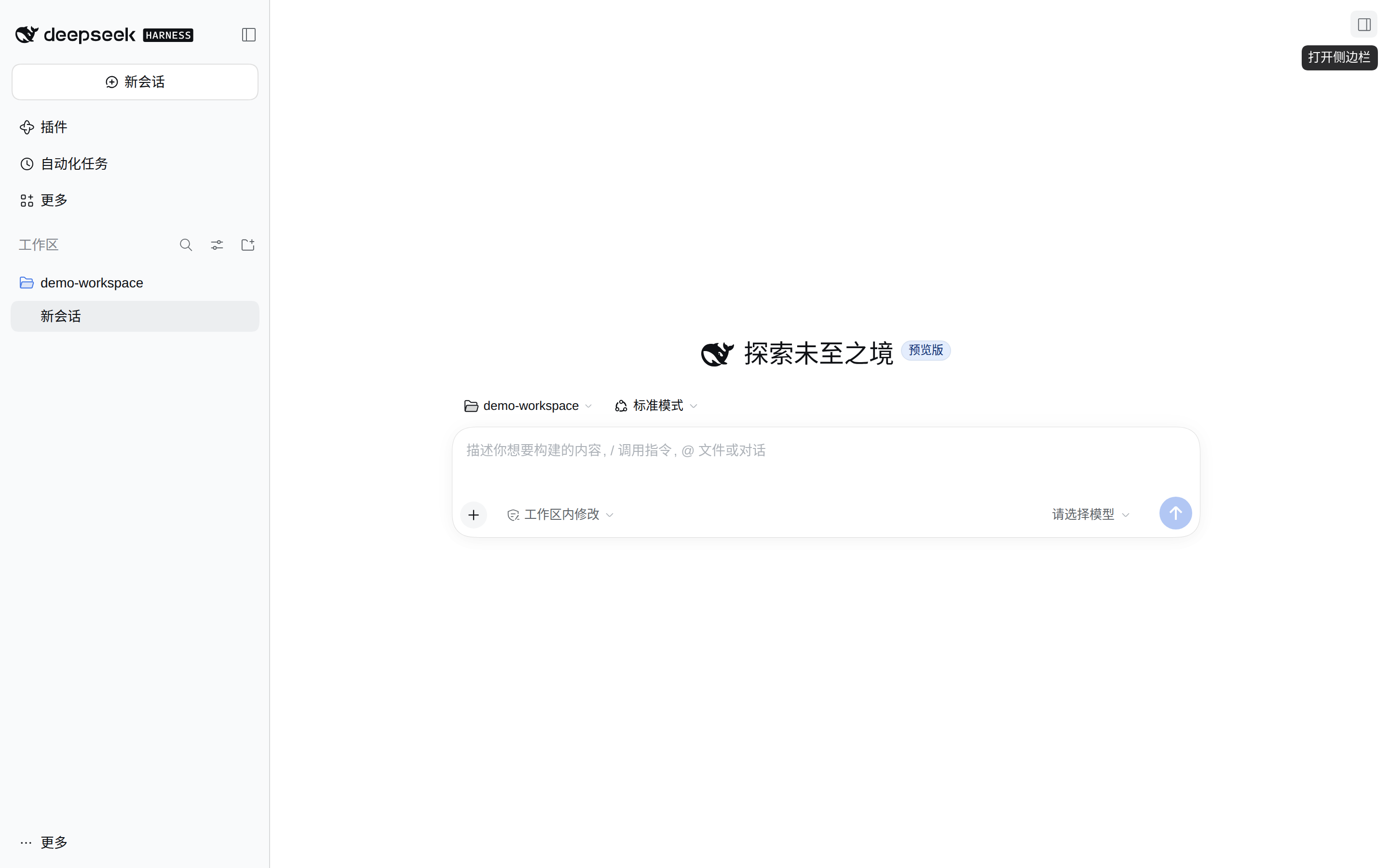
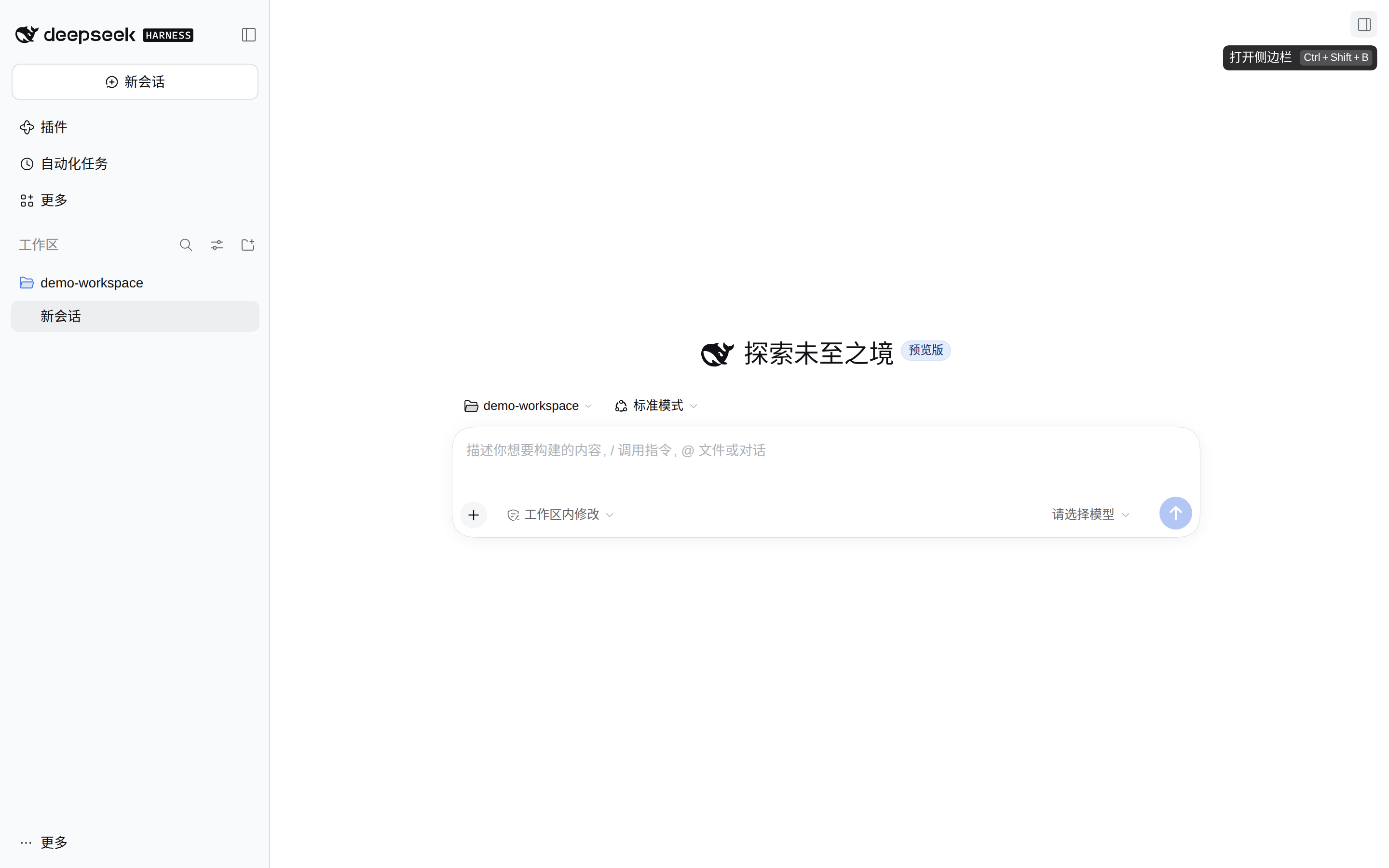
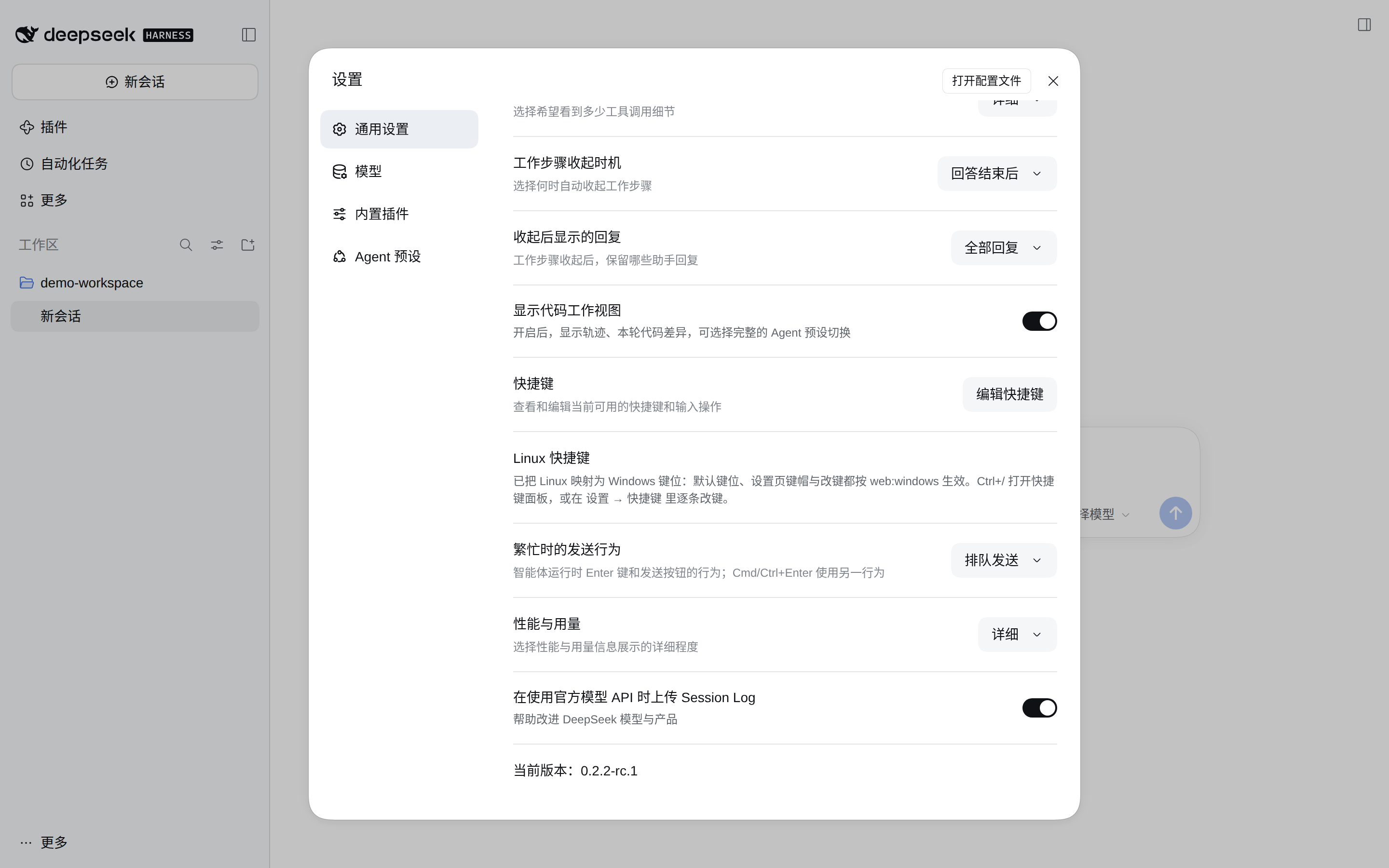
三张图来自同一个演示实例(DSH_HOME 指向临时目录,全新 profile、零第三方插件),顺序就是验证顺序:
1)没有插件时:右上角「打开侧边栏」的提示只有文案,没有任何键位。
2)装上本插件后:同一个按钮的提示补上了 Ctrl + Shift + B。
3)设置 → 通用:底部多出一行「Linux 快捷键」,说明映射已生效,并指向 Ctrl+/ 面板与改键入口。
截图对应的复现条件:dsh --profile web 由临时 DSH_HOME 启动,浏览器语言 zh-CN,视口 1440×900、deviceScaleFactor: 2。
六、已知限制
- 当前 dsh 发行仍未含
web:linux:@deepseek-ai/dsh-client-shortcuts的isWebBindingAllowed()里 linux 不在白名单、resolveShortcutDefault()也没有回退,所以在这个版本上本插件是唯一修复入口。 - 桌面客户端不适用:Electron 端走
documentElement.dataset.platform+ 原生菜单,本来就有键位。 - Android 排除:其
navigator.platform也是Linux …,脚本里已用 UA 排除。 tapIndex是官方 escape hatch,不是承诺 API。升级 dsh 后若方法改名,插件装载即报错(可见,不会静默);核对点:@deepseek-ai/dsh-host-webserver的tapIndex、shortcuts的detectEnvironment。- 不改 dsh 安装树:插件只在首页注入一段脚本,
@deepseek-ai/*里的任何文件都不动,所以dsh plugin update/ 重装 dsh 都不会把它冲掉,卸载即恢复。 - 上游发行版若自己补了
web:linux,映射仍然生效且结果一致(platform变成 Windows 只影响默认值来源,不改变命令语义),无需卸载;只是在那种版本上插件不再必要。 - 映射只改
navigator.platform,不改 UA:这一步的影响面在仓库内只有shortcuts一处消费(grep navigator.platform packages/client仅shortcuts/src/client/dom.ts:18)。
七、开发
npm test # node --test:宿主 index 改写 + 注入脚本行为 + 浏览器半状态判定,17 条
目录:
lib/index.js    宿主半:tapIndex 注入平台映射(纯函数 injectPlatformMapping 可单测)
lib/client.js   浏览器半:设置 → 通用 的一行状态(判断映射是否真的生效)
cordis.patch.yml  插入 linux-shortcuts 行
test/           node --test
docs/DESIGN.md  A/B/C 三条路线的取舍记录
文档修订记录
| 日期 | 版本 | 变更 |
|---|---|---|
| 2026-11-07 | 0.1.0 | 首版:宿主 tapIndex 注入平台映射;浏览器半只做状态可见性。此前草稿曾走「客户端插件读 ShortcutRegistry 私有字段 + 自建键位表」,因设置页/键帽不一致而废弃(见 docs/DESIGN.md)。 |
| 2026-11-07 | 0.1.1 | 文档:删掉针对旧部署树的补丁叠加说明与回滚命令(那棵树已停用),改为「不改安装树」的通用表述;补「当前发行未含 web:linux」这条现状。代码未变。 |
| 2026-11-07 | 0.1.2 | 修正 package.json 的 description:原文写「在浏览器侧接管同一套组合键」,与最终实现不符(现在是首页注入平台映射,键位仍由 core 解析)。代码未变。 |
| 2026-11-07 | 0.1.3 | 补三张效果截图(无插件 / 启用后 / 设置页)与 screenshots.json,供插件市场与 awesome-dsh-plugin 收录展示。代码未变。 |
No comments yet. Be the first to write one.