DSH Vibecode Studio
A visual feedback loop for DeepSeek Harness: preview your local web app inside DSH, point at what is wrong, and hand structured notes to the coding agent — no screenshot ping-pong.
📖 第一次使用?直接看图文使用说明(5 分钟上手 + 界面导览)
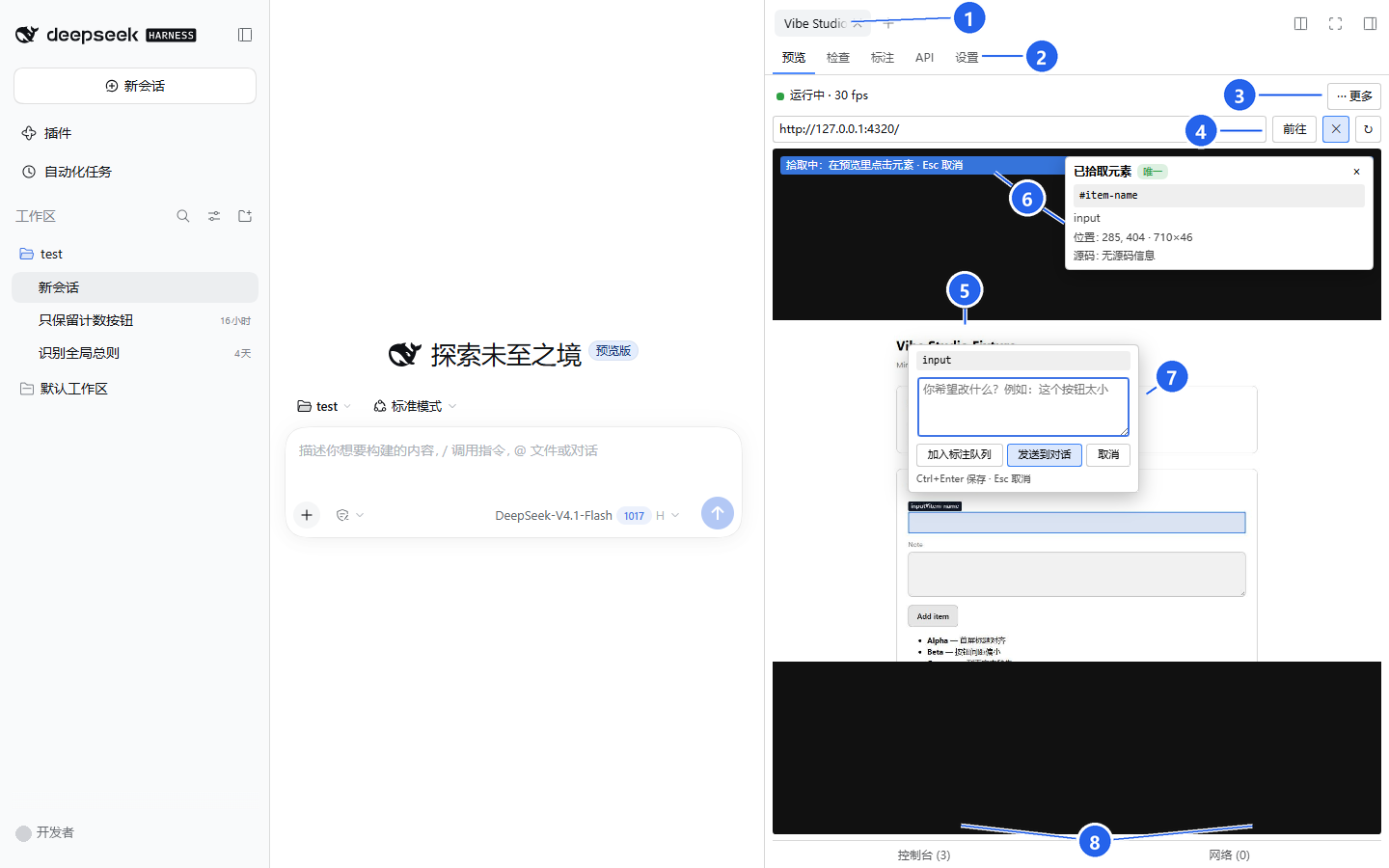
界面导览(真实预览截图,已脱敏;点图看完整说明):① Studio 标签页 ② 五个页签 ③ 状态行/更多 ④ 地址栏 ⑤ 预览画布 ⑥ 拾取提示/元素卡片 ⑦ 批注气泡 ⑧ 底部抽屉。
The killer feature: live preview + click-to-annotate.
Point at the exact element, describe the change, and send it to the agent as structured context —
selector, source location, DOM snapshot — not a screenshot.
最大特色:实时预览 + 点选页面元素,直接让 DSH 改。
不用截图、不用描述“左边那个蓝色按钮”。点中它,写一句要改成什么,Agent 收到的是选择器、源码位置和 DOM 上下文。
最大特色:实时预览 + 点选元素,直接改
- 在 DSH 右栏实时预览本地应用 —— 流式 JPEG 约 30 fps,页面可点击、输入、滚动。
- 点选出问题的元素,写下修改意见 —— 自动带出选择器、role / 可访问名称、DOM 片段, 以及 React / Vue / Svelte 开发态源码位置。
- 一键发送到对话 —— 批注进入 composer 草稿,Agent 用
vibe_annotation_get/vibe_observe/vibe_preview读取结构化上下文并修改代码;不会自动发送,也不会自动提交。

点「发送到对话」只写入 composer 草稿;改完后状态行提示「文件已改动」,刷新预览继续下一处。
👉 完整的 5 分钟上手流程、功能导览与排障:使用说明(图文)
Status: pre-alpha, unpublished. M0–M6 are complete and the G0–G6 gates passed: embedded preview, inspect/annotation, the API workbench, agent tools (vibe_status/vibe_observe/vibe_annotation_get/vibe_preview), the Vibe Studio preset, /vibe, the bundled skill, and the M6 verification/hardening work (verification service and panel, real-DSH E2E, soak run, security hardening, packaging/docs). G6 passed 8/8 against SPEC §2.3. M6 is merged into main (merge commit f2f5342). The package is deliberately still private and unpublished — see RELEASE.md for the publish checklist. See the G0 review for the go/no-go and fallback decisions.
📖 使用说明(图文) · 中文简介 · Install & usage · Release · Security policy · Security audit · Design · Task plan · Dev log · M2 手册 · M3 手册 · M4 手册 · M5 手册 · M6 手册 · 界面与项目方向 · 后续方向 · 验证接口对接
中文简介
DSH Vibecode Studio 是面向 DeepSeek Harness(DSH) 的可视化 Vibe Coding 插件:在 DSH 侧栏里直接预览本地 Web 应用,点选页面元素写下修改意见,再把这些带上下文的批注交给编码 Agent,省掉“截图 → 粘贴 → 用文字描述”的来回。
它解决什么问题
Vibe coding 的关键是让 Agent “看见”结果。截图会丢失元素身份、交互上下文和截图外信息;本插件把预览本身变成反馈界面:
- 本地 Web 应用在 DSH 右栏中预览,帧以流式 JPEG 传输,断流时回退到拉取式 JPEG。
- 点击页面元素即可添加批注,无需离开预览。
- 多条批注先进入批注队列,审核后再交接,不自动发送。
- Agent 收到的是结构化上下文——路由、选择器、元素信息、源码位置和修改意见,而不是一张不透明的图片。
当前进度
- M0 / G0 已通过:S1 传输、S2 composer 交接、S3 screencast/输入/中文、S4 拾取/源码四个 spike 均完成,结论与回退方案见 spikes/G0.md。
- M1 完成并通过 G1:包脚手架与构建链、host ESM 入口、client loader bundle、contracts v1 契约、右栏 Studio shell 与标签页、
ctx.connection传输、测试 harness 与 Vite fixture、.vibe设置与设置面板均已完成。 - M2 完成并通过 G2:预览闭环(screencast/帧路由/输入/工具栏/生命周期)、Console/Network 采集与抽屉、
.vibe设置已在 Host、Web 与隔离 Desktop 载体验证;G2 三端实测 24.4–25.9 fps。手动复测步骤见 手动测试手册。 - M2.5 / U01 已完成(Layout v2):预览页改为画布优先——常驻仅状态行、地址行、底部 tab,视口参数移入设置与“更多”菜单,Console/Network 改为覆盖式抽屉;三档面板(320/400/500px)无横向溢出,舞台占面板 85.6%,实测 26.2 fps。方向与验收见 界面与项目方向。
- M3 完成并通过 G3:元素拾取与选择器、元素上下文、React/Vue/Svelte 源码适配、标注气泡与队列、保存通知、composer 草稿交接、标注历史均已完成;G3 四项验收通过(50/50 源码命中、标注 ≤ 4 KB、3 动作进 composer、不自动发送)。手动复测步骤见 M3 手动测试手册。
- M4 完成并通过 G4:HTTP 发送(取消/超时/重定向/大响应)、请求构建(query/headers/body/auth)、响应查看(JSON 树/HTML/图片/二进制/分页)、环境与密钥引用、集合与历史、cURL 导入导出、OpenAPI 导入、内置断言、预览抓包回放均已完成;FR-API-01–10、12 通过,FR-API-11(Cookie jar)按 D8 延后。界面按 M4 人工审核意见整改(U04):首屏只留“方法 + URL + 发送”与响应区,其余收进「更多配置」与“更多工具”抽屉,新增新手/专业模式(默认新手并记忆)与内置 loopback 示例请求,术语改为 URL 参数/身份验证/结果校验/收藏。手动复测步骤见 M4 手动测试手册,配套本地目标服务
tools/m4-manual-server.mjs。 - M5 完成并通过 G5:Agent 侧能力就绪——四个工具(
vibe_status/vibe_observe/vibe_annotation_get/vibe_preview)、Vibe Studiopreset、斜杠命令/vibe、内置技能vibecoding-studio;工具 schema 经 DSH 校验,越权动作(非 loopback、跨源、关闭截图后的 screenshot)在审批前即拒绝。手动复测步骤见 M5 手动测试手册。 - M6 完成并通过 G6,已合并入
main(合并提交f2f5342):验证服务与验证面板、真实 DSH 的 E2E 主链路、30 分钟 / 100 次标注的 soak、安全加固(pnpm test:security,见 安全审计)、打包与文档(USER-GUIDE.md、RELEASE.md)。G6 对照 SPEC §2.3 的 8 条逐项达标(GO);干净vibe-dev安装已验证:tarball 227.1 kB / 11 个文件,--dump-config组合树含插件行,/api/vibe/health正常,Studio E2E 通过;隔离 Desktop 载体验证 5 个页签与验证抽屉可用,真实desktopprofile 未被修改。手测步骤见 M6 手动测试手册;M6 之后的选题建议见 后续开发方向。 - 尚未发布:包保持
"private": true;发布需要用户明确批准,步骤与回滚见 RELEASE.md。spikes/保留为 spike 证据。
MVP 能力(M0–M6 已完成)
- 仅限 localhost 的内嵌预览,默认 30 fps 流式 JPEG,拉取式回退。
- 页面元素拾取与标注 overlay,支持 React / Vue / Svelte 开发态源码定位。
- 批注队列、气泡与历史;交接前可审核。
- 通过公开
InputActions把结构化文本写入 composer 草稿,不自动发送;截图走“复制 PNG + 手动粘贴”。 - 会话级多页面 tab;密钥只存放在
ctx.credentials,UI 只读取describe元数据。 - API 工作台、Agent 工具与
/vibe命令、验证面板与打包(M4/M5/M6)。
安全边界
- 预览目标默认只允许 localhost;拒绝
file:、chrome:、devtools:、云元数据与私网地址。 - 不自动发送批注、不自动批准、不自动提交;截图不作为唯一证据。
- host/client 通信只走
ctx.connection,不直接使用ctx.webServer。 - CDP 只连接已启动或已批准的 loopback 端点,不暴露到网络,并清理进程树。
快速开始
需要 Node.js 24、pnpm 11,以及 DSH 0.2.1-rc.2 或更新版本。只装进开发 profile vibe-dev,
不要动 desktop / web。
pnpm install
pnpm build                                   # lib/index.js + lib/agent.js + lib/client.js
npm pack                                     # 产出 dsh-vibecode-studio-0.1.0.tgz
dsh plugin --profile vibe-dev add file:<绝对路径>/dsh-vibecode-studio-0.1.0.tgz
dsh --profile vibe-dev --no-open --host 127.0.0.1 --port 4317
开发时也可用 dsh plugin --profile vibe-dev add link:<本仓库绝对路径>,每次 pnpm build 后重启 DSH。
右栏“新标签页 → Vibe Studio”打开界面。第一次使用建议先看
使用说明(图文):5 分钟跑通“预览 → 点选元素 → 发送到对话”的闭环。
完整安装参数、配置与已知限制见 用户指南;打包、干净安装验证与发布流程见
发布说明。
完整设计见 SPEC,任务顺序见 todo.md,开发记录见 DEVLOG, 自己复测功能见 M2 手动测试手册、M3 手动测试手册、M4 手动测试手册 与 M5 手动测试手册,界面与产品方向见 方向文档。
Why
Vibe coding works best when the agent can see the result. Today that usually means taking a screenshot, pasting it into chat, and describing the problem in prose. That loses element identity, interaction context, and anything the screenshot does not show.
DSH Vibecode Studio turns the preview itself into the feedback surface:
- The app runs on localhost and is previewed in a DSH sidebar tab.
- Click any element to attach a note without leaving the page.
- Collect several notes into a batch, review them, and send them to the composer.
- The agent receives structured context — route, selector, bounding box, note — instead of an opaque image.
The agent stays in control. Notes are prepared for the composer; nothing is sent, approved, or committed automatically.
Planned MVP
- Localhost-only embedded preview with a streaming JPEG transport and a pull-JPEG fallback (S1 verified both; see the transport report).
- Element picker and annotation overlay rendered above the live preview.
- Batch annotation tray with review before handoff.
- Composer handoff that inserts a structured, editable message; screenshots use a copy-and-paste fallback until DSH exposes a public attachment API.
- Session-scoped page tabs for multi-page flows.
- Credentials never reach the page; UI only reads
describemetadata.
Repository layout
docs/        product spec, user guide, release/security notes, capability map, UI direction
src/         product package (host, client, contracts)
tests/       Vitest unit/component/integration, Playwright E2E, security suite, soak runner
fixtures/    vite-basic React app plus the security-injection fixture
tasks/       implementation plan, ordered task list, handoff state
spikes/
  s1/        T001 transport spike: pull JPEG vs multipart stream
  s2/        T002 composer handoff spike: public InputActions + clipboard fallback
  s3/        T003 screencast, input latency, and Chinese IME spike
  s4/        T004 element picking and React/Vue/Svelte source mapping spike
  G0.md      T005 spike review: go/no-go and final fallback decisions
G0–G6 have passed and M1–M6 are complete: the root package builds host lib/index.js, agent lib/agent.js, and loader-wrapped lib/client.js, plus presets/ and skills/ for the agent preset; tests live in tests/ with fixtures in fixtures/.
Development
Requirements: Node.js 24, pnpm 11, and DeepSeek Harness 0.2.1-rc.2 or newer for manual plugin runs.
pnpm install
pnpm typecheck
pnpm build                   # host + agent + client bundles
npm pack --dry-run           # package contents check
pnpm test                    # Vitest: node + jsdom projects
pnpm test:security           # injection / redaction / origin / credential suites
pnpm test:e2e                # Playwright; real-DSH carrier via VIBE_DSH_BIN
pnpm test:soak               # 30 min + 100 annotations stability run
pnpm fixture:dev             # fixture only → http://127.0.0.1:4320
pnpm spike:s1:build          # bundle S1 host/client (required before linking)
pnpm spike:s1                # local 10 s pull-vs-stream benchmark
node spikes/s1/soak.mjs ...  # 10 min Web/Desktop soak; see spikes/s1/REPORT.md
pnpm spike:s2:build          # bundle S2 host/client (required before linking)
pnpm spike:s3 --seconds 10   # screencast, input latency, Chinese IME
pnpm spike:s4                # picker and React/Vue/Svelte source hits
spikes/s1/package/lib/ and spikes/s2/package/lib/ are generated and gitignored. Build before linking with dsh plugin --profile vibe-dev add link:<absolute-path>; otherwise DSH links a package with no host/client entry points. Do not rebuild a linked package while a benchmark, soak, or manual acceptance run is active; DSH hot-reloads the client and invalidates the result. S2 manual steps and its clipboard limitations are in spikes/s2/run.md.
The spikes install into a throwaway DSH profile (vibe-dev); they must never be installed into desktop or web directly.
Engineering guardrails
- All host/client traffic goes through
ctx.connection; no directctx.webServeruse. - Page and API content are treated as untrusted; secrets live only in
ctx.credentials. - Preview targets are localhost by default.
file:,chrome:,devtools:, cloud metadata, and private-network targets are rejected. - CDP attaches only to an already-started, approved endpoint and is never exposed to the network.
- No automatic sending, approving, committing, or screenshot-only evidence.
See docs/SPEC-vibecoding-studio.md for the full contract and tasks/todo.md for the ordered plan.
Contributing
Early-stage contributions are welcome, especially protocol and transport reviews. Read CONTRIBUTING.md first. Security reports should follow SECURITY.md.
Disclaimer
This is an independent open-source project. It is not affiliated with, endorsed by, or sponsored by DeepSeek. “DeepSeek” and “DeepSeek Harness” are used only to describe the host the plugin runs on.
No comments yet. Be the first to write one.