DSH CSV Analyst
中文 | English
A read-only CSV analyst for DeepSeek Harness. Ask about a sales export, expense ledger or operational report in ordinary language. The model discovers the columns, then calls deterministic tools to filter, group, calculate and page the complete file.
Why a plugin rather than another prompt? The model does not write or run a calculation script. Decimal sums preserve cents and large integer digits; every result distinguishes input records, matched records, aggregate rows and the returned page. Missing and invalid numbers are not silently converted to zero.
See it in action
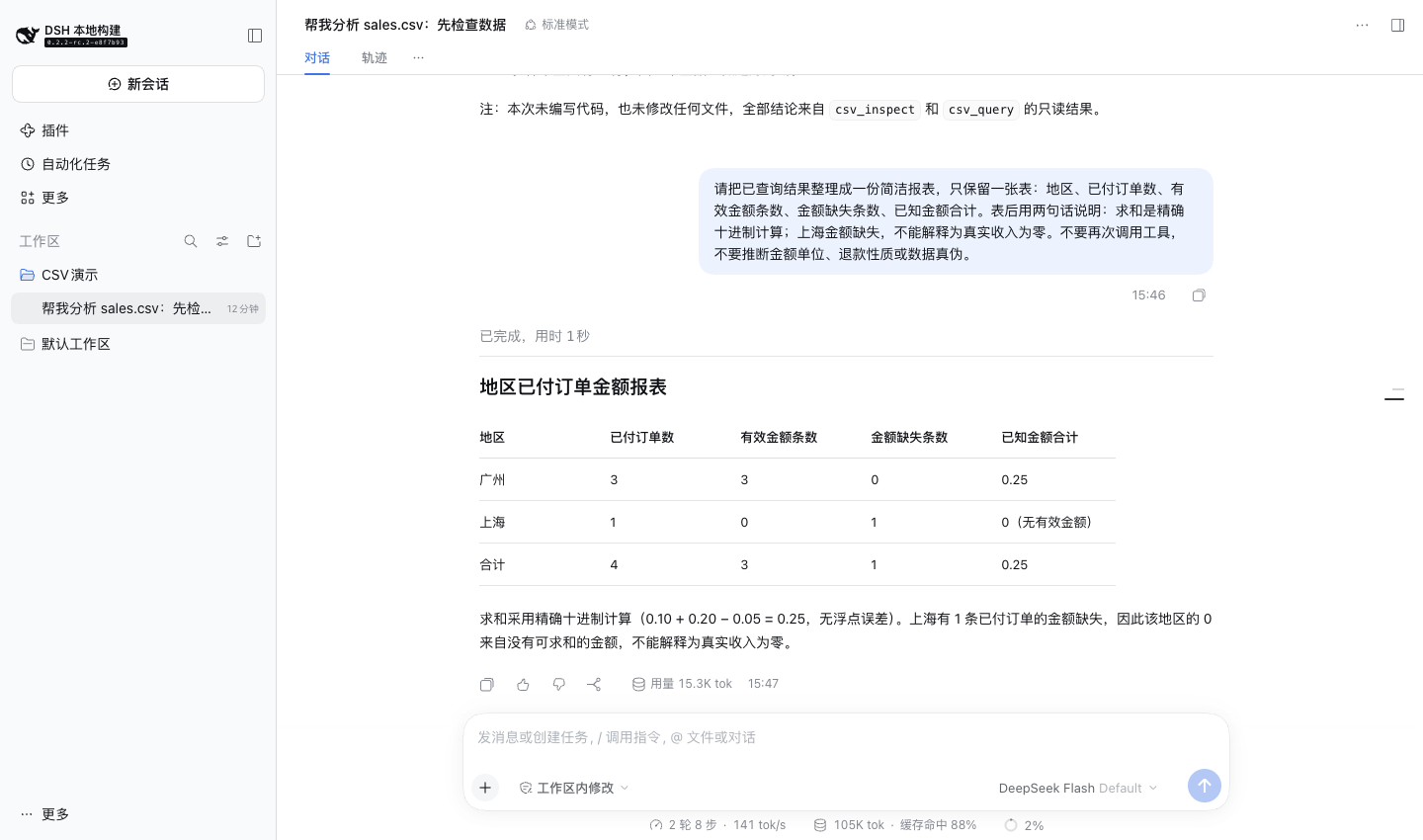
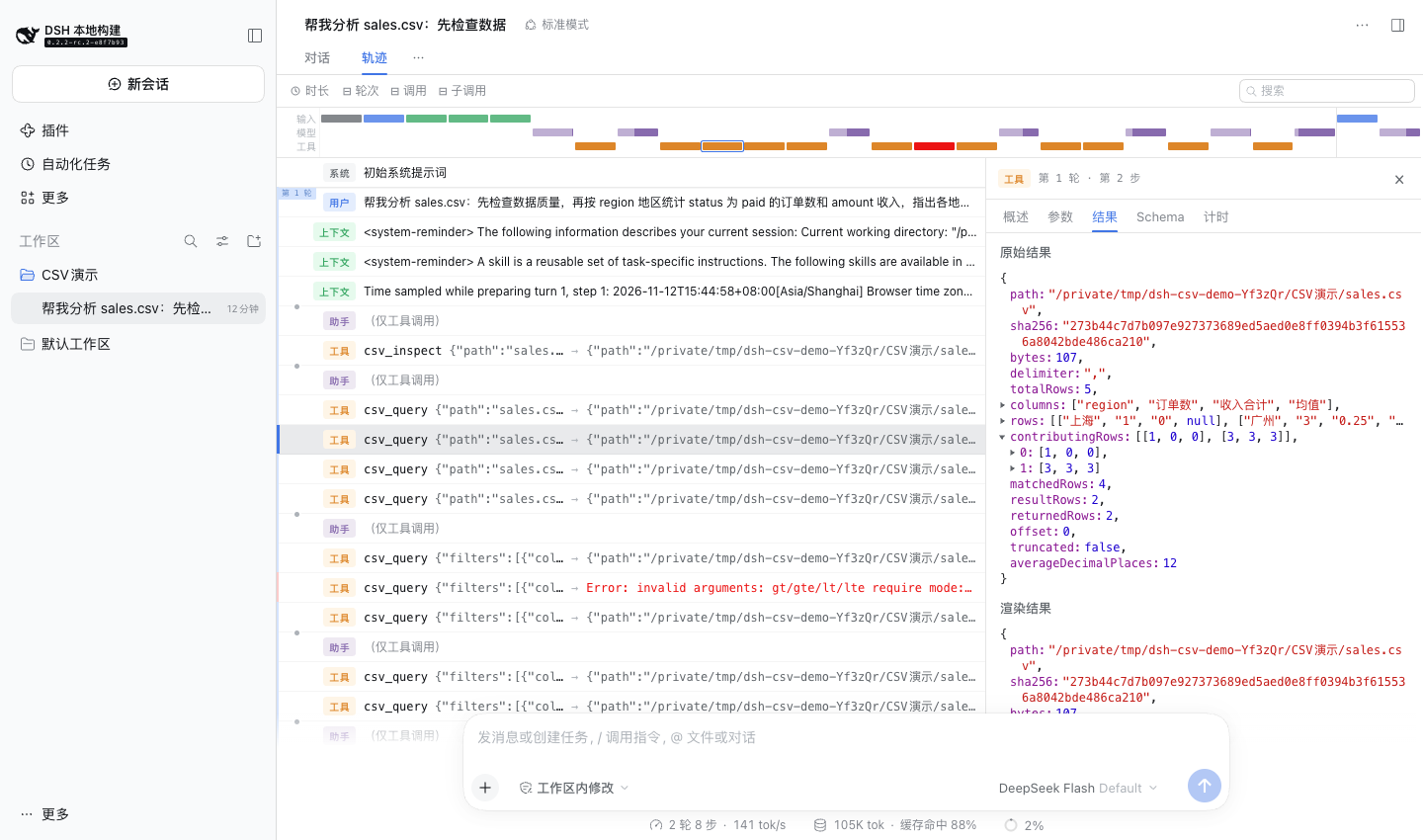
Real DSH Web screenshots using the bundled synthetic sales.csv and a live model, not a mockup. The first view is the model's concise follow-up report; the second opens the actual grouped query result. The model's prose is not a business audit.
Install
Developed and tested with DSH 0.2.2-rc.2 and Node 25.6.1. These versions document the development baseline only: the plugin declares no engine restrictions, leaves host peer versions unrestricted, and performs no runtime version check. You can use other DSH versions without a plugin-imposed version gate; this does not establish compatibility with every future API change. Your shell's dsh --version may differ from a source checkout's pnpm dsh --version.
dsh plugin --profile web add dsh-csv-analyst
dsh web
For a source checkout, run those commands as pnpm dsh .... Install into each profile that needs the tools. The prebuilt npm package has no installation scripts and contributes only two tools through a standard dsh.bundle patch. It works with Web, Desktop and headless compositions providing tools, fs and workingDirectory; it does not modify the client UI.
Uninstall:
dsh plugin --profile web remove dsh-csv-analyst
No plugin-specific user files or settings remain. Existing session logs keep their recorded tool results.
Real tasks
Place a UTF-8 CSV in your session's working directory; mention its path, or use DSH's file attachment workflow and its resulting readable file path.
- “Inspect
sales.csv. Count paid orders and sum revenue by region. Show the top ten regions, and tell me how many amount cells are blank.” - “In
expenses.csv, find transactions above 500. Return merchant, category and amount, largest first.” - “For
support.tsv, count tickets by status. The delimiter is tab, not comma.” - “Check
settlements.csvbefore computing totals. Do not guess what currency symbols or thousands separators mean.”
Try examples/sales.csv. Filtering status = paid, grouping by region, and summing amount returns Guangzhou 0.25 from three numeric records and Shanghai 0 from zero numeric records; Shanghai has one paid record with a blank amount. Counts expose that difference.
Tools and results
csv_inspect returns exact headers, a byte SHA-256, complete record count, per-column blank/decimal/other counts, and a bounded preview. sample_rows: 0 hides preview values. Header names retain spaces and are case-sensitive.
csv_query supports select, AND filters, group_by, metrics, multi-key sort, offset and limit. Its canonical result is a column array plus a row matrix; unusual names such as __proto__ do not become JavaScript object keys. Native rendering is JSON; PTC callers receive the same typed fields directly.
{
  "path": "sales.csv",
  "filters": [{"column": "status", "op": "eq", "value": "paid"}],
  "group_by": ["region"],
  "metrics": [
    {"op": "count", "as": "orders"},
    {"op": "sum", "column": "amount", "as": "revenue"}
  ],
  "sort": [{"column": "revenue", "mode": "decimal", "direction": "desc"}],
  "limit": 10
}
- Filters:
eq,ne,contains,empty,not_empty,gt,gte,lt,lte. Comparisonsgt/gte/lt/lterequiremode: "decimal"; other filters default to case-sensitive untrimmed text. Blank decimal cells match no binary decimal condition, includingne. Every numeric filter validates every nonblank input cell in its column, even if another AND condition excludes that record. - Metrics: record
count, numericsum,avg,min,max. Numeric inputs permit an optional sign, digits and a decimal dot, with whitespace around the number. Exponents, currency signs, thousands separators, formulas and nonfinite values fail rather than being interpreted. Numeric outputs are decimal strings, not floating-point JSON numbers. - Blank numeric cells are excluded.
contributingRowsgives each returned aggregate's contributing count for every metric in requested order. An empty sum is"0"; an empty average or extremum isnull.countcounts records and accepts no column. With no matched records, a non-grouped aggregate still returns its empty totals; a grouped aggregate returns no groups. - Sums are exact within the configured digit limit. Averages round half up to
averageDecimalPlaces(default 12); they are not promised to be exact rational values. totalRowscounts all data records;matchedRowscounts accepted records;resultRowscounts all output rows before paging;returnedRowsis the current page.offsetis zero-based.truncatedis true when the returned page omits any output rows. Reducinglimitnever changes aggregate totals.- Sort uses code-unit text order or exact decimal order, preserves input order for ties and places nulls last in both directions. Decimal sorting also places blank strings last. Sorting refers to output column names.
- Each call rereads the whole file. Compare
sha256across pages or separate computations; a changed hash means different source bytes, not a stable multi-call snapshot. The plugin has no cache.
Configuration
Override the row in your profile's cordis.patch.yml. DSH replaces its entire config, and Schemastery supplies omitted defaults.
- id: csv-analyst
  config:
    maxBytes: 8388608
    maxRows: 100000
    maxReturnedRows: 200
    averageDecimalPlaces: 12
| Field | Default | Meaning |
|---|---|---|
maxBytes |
8388608 | Complete file byte cap, enforced at the filesystem read |
maxRows |
100000 | Complete data record cap |
maxColumns |
200 | Header field cap |
maxCellChars |
4096 | UTF-16 code units per header or cell |
maxReturnedRows |
200 | Maximum preview or result page size |
defaultPreviewRows |
5 | Default preview size, capped by maxReturnedRows; zero disables previews |
defaultPageRows |
100 | Default query page size, capped by maxReturnedRows |
maxOperations |
20 | Maximum entries per explicit select/filter/group/metric/sort list |
maxGroups |
10000 | Distinct aggregate group cap |
maxOutputBytes |
262144 | UTF-8 byte cap for the serialized result |
maxNumericDigits |
100 | Digits per numeric input, including leading zeros |
averageDecimalPlaces |
12 | Half-up rounding places for averages |
batchRows |
1000 | Records between cooperative analysis yields |
Invalid configuration fails at load. Oversized input or output fails without partial totals or silently clipped cells. Lower the preview/page size, select fewer fields, split the file or deliberately raise the corresponding limit.
Limits and safety
This is not an Excel editor, database, arbitrary SQL engine or chart generator. .xlsx, legacy .xls, GBK and UTF-16 files must first be exported to UTF-8 CSV; UTF-8 BOM is supported. Delimiter guessing is deliberately absent: comma is the default; tab, semicolon and pipe are explicit alternatives. Headers must be unique and nonblank; ragged records and malformed quoting fail. Physically empty lines are skipped; a quoted empty single-field record is preserved. Duplicate records are not deduplicated.
The plugin performs no file writes, network requests, subprocesses or dynamic-code evaluation. It uses the host filesystem provider and the normal tool permission pipeline; it does not create a stronger filesystem sandbox than your DSH configuration provides. Cell text remains untrusted and may contain prompt injection. The model provider receives returned cells and derived statistics through normal tool messages, and DSH may retain them in session logs. Read-only does not mean private or offline.
Calls observe cancellation during I/O and cooperative analysis, and unloading cancels and drains in-flight work. CSV parsing and final sorting are bounded synchronous operations; a timer-triggered abort is observed when they yield back to the event loop, not as a hard CPU interrupt.
See SECURITY.md for the threat model and reporting.
Development and verification
pnpm install --frozen-lockfile
pnpm check
pnpm audit
check runs strict type checking (including dependency declarations), lint, unit/property/runtime tests with 100% source coverage gates, builds plain ESM/declarations, and verifies the npm package allowlist and absence of install hooks, direct host filesystem imports or code execution. Runtime tests mount the real Cordis registry, Native executor, local filesystem and working-directory service; no model/API key is needed for that tier.
Expected user-facing results are checked in tests/snapshots. CI runs on Linux, macOS and Windows. A passing local check is not proof that remote CI, an untested DSH version, or every possible security defect has been verified. See docs/verification.md for the executed release evidence and remaining gaps.
No comments yet. Be the first to write one.