dsh-plugin-market
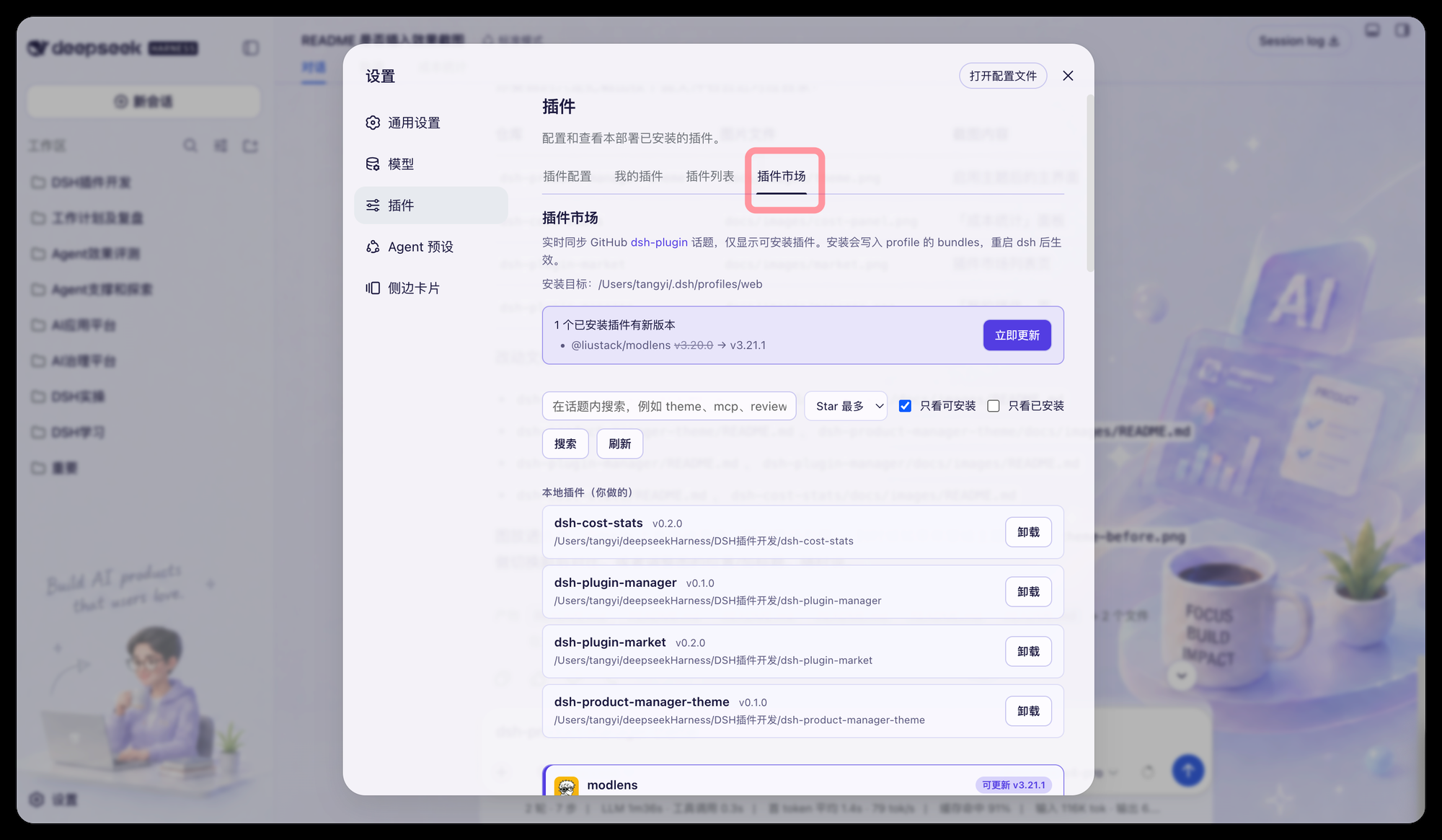
DSH 插件市场:把 GitHub 的 dsh-plugin 话题直接装进设置界面,不用再翻 GitHub。
面向谁,解决什么
- 面向:想快速发现、安装、更新 DSH 插件的用户
- 解决:不用翻 GitHub,在设置界面里搜索
dsh-plugin话题、看清能否安装、一键装进当前 profile,并在上游发布新版时明显提示、引导一键更新
它能做什么
- 实时同步:列表直接来自 GitHub
dsh-plugin话题的搜索接口,动态更新,支持话题内搜索、按 Star(默认)/ 最近更新 / 相关度排序、分页。 - 只看可安装:勾选后服务端跨搜索结果页扫描,跳过非 bundle 仓库,直接给出满页的可安装插件。
- 每张卡片讲清楚:面向谁(
audience)、解决什么问题(problem)两个字段,优先用当前配置的模型对仓库 README + 描述做批量精读,模型不可用时回退到基于描述与话题的启发式判断。 - 一眼看出能否装:只有声明了
dsh.bundle.patch、且包名合法的仓库才标记为可装载;其余显示原因(缺 package.json / 缺 name / 非 bundle / private)。 - 一键安装:
pnpm add github:<owner>/<repo>写入当前 profile,并把包名追加进该 profile 的dsh.profile.bundles,重启 dsh 后生效。 - 新版本提醒:打开页面就会检查所有已安装插件的上游版本。有新版时顶部出现一条横幅(列出「当前版本 → 最新版本」,可一键「全部更新」),对应卡片也会高亮并给出「更新到 vX.Y.Z」按钮。本地
link:开发中的插件不会被提示,避免覆盖你正在改的代码。 - 本地插件自动识别:「本地插件(你做的)」列表会自动扫描开发目录里所有本地插件,而不只是已装上的那几个。没装过的显示「安装」按钮,一键以
link:方式装进当前 profile(会持续跟踪你的源码改动);装过的显示「卸载」。扫描目录默认取自已link:插件的父目录,也可用localDirs配置补充其它位置。
效果预览
安装
第 1 步:安装 DSH 本体
插件依赖 DSH (DeepSeek Harness)。如果终端执行 dsh -V 提示 command not found,说明还没装:
npm install -g @deepseek-ai/dsh
装好后确认一下:
dsh -V
第 2 步:安装并登记插件
整段复制到终端执行即可,不用手改任何文件:
PLUGIN=dsh-plugin-market
REPO=newbieYi/dsh-plugin-market
PROFILE="$HOME/.dsh/profiles/web"

dsh plugin --profile web add "github:$REPO" \
&& test -f "$PROFILE/node_modules/$PLUGIN/cordis.patch.yml" \
&& node -e '
const fs = require("fs");
const file = process.argv[1] + "/package.json";
const name = process.argv[2];
const pkg = JSON.parse(fs.readFileSync(file, "utf8"));
const profile = ((pkg.dsh ??= {}).profile ??= {});
const list = (profile.bundles ??= []);
if (!list.includes(name)) {
  list.push(name);
  fs.writeFileSync(file, JSON.stringify(pkg, null, 2) + "\n");
}
console.log("已登记 bundles:", list.join(", "));
' "$PROFILE" "$PLUGIN" \
|| echo "安装未完成,profile 未被改动。请检查网络后重跑本段。"
看到 已登记 bundles: ... dsh-plugin-market 就成功了,继续第 3 步。
看到 安装未完成 说明包没下载下来(常见原因:网络不通、pnpm 不可用)。这时 profile 没有被改动,DSH 仍能正常启动;解决网络问题后重跑本段即可。
第 3 步:重启 DSH
插件在启动时装载,改完配置必须重启才生效。请正常退出,不要用 kill -9,否则会话数据可能来不及落盘:
- 切到正在运行
dsh web的那个终端窗口,按Ctrl + C等它自己退出; - 重新启动:
dsh web
如果找不到原来的终端窗口,可以先查一下进程再正常终止:
lsof -ti :3080 | xargs kill
第 4 步:验证
浏览器打开 DSH Web,进入 设置 → Plugins → 插件市场,应该能看到插件列表。
之后从市场里安装其它插件,上面这些步骤(下载、登记 bundles、重启)都由市场自动完成,包括一键重启。
常见问题
装完在设置里找不到「插件市场」?
九成是没重启。也可以检查 ~/.dsh/profiles/web/package.json 的 bundles 里有没有 "dsh-plugin-market"。
启动时报 cannot resolve profile bundle "dsh-plugin-market"?
bundles 里登记了插件,但 node_modules 里没有这个包。重跑第 2 步那段即可(它会先确认下载成功再动 profile)。
如果始终装不上,用这条命令把登记撤掉,DSH 就能正常启动,之后再排查网络问题:
node -e '
const fs = require("fs");
const file = process.env.HOME + "/.dsh/profiles/web/package.json";
const pkg = JSON.parse(fs.readFileSync(file, "utf8"));
const list = pkg.dsh?.profile?.bundles ?? [];
pkg.dsh.profile.bundles = list.filter((n) => n !== "dsh-plugin-market");
fs.writeFileSync(file, JSON.stringify(pkg, null, 2) + "\n");
console.log("剩余 bundles:", pkg.dsh.profile.bundles.join(", "));
'
需要登录 GitHub 账号吗? 不需要。搜索、读取仓库信息、安装全程匿名,不用填账号密码或 token。代价是匿名搜索接口每分钟只有 10 次配额,点太快会提示稍后重试。
市场里搜不到某个插件?
只能列出公开仓库、且打了 dsh-plugin 话题的项目。私有仓库匿名读不到,不会出现在列表里。
插件更新了,市场为什么没提示?
版本号取自插件仓库 package.json 的 version(发到 npm 的则取 npm 上的最新版)。作者改了代码但没提版本号,市场就无从判断,这是刻意的:宁可不提示,也不误报。另外只有严格更高的版本才提示,0.10.0 会被正确判定为高于 0.9.0。
配置
在 profile 的 cordis.patch.yml 里可选配置:
- insert:
    - id: plugin-market
      name: dsh-plugin-market
      config:
        # 安装写入的 profile 目录。留空则自动寻找 bundles 中包含本包的 profile,
        # 找不到再回退到 $DSH_HOME/profiles/web。
        profileDir: ''
        # 「本地插件(你做的)」列表额外扫描的目录。留空则自动取已 link 插件
        # 的父目录(即你的开发工作区)。
        localDirs: []
安全说明
- GitHub 匿名搜索接口每分钟 10 次、按 IP 限流;超出时页面会提示稍后再试。
- 所有
/plugin-market/*路由都挂在每进程随机的 Bearer Token 之后,Token 注入 index.html,本页面才能调用;安装动作发生在当前 profile 目录内。
目录结构
lib/index.js—— 宿主侧:GitHub 话题代理、卡片标注(模型 + 启发式)、安装。lib/client.js—— 浏览器侧:插件市场设置页,ModuleLoader 工厂格式,无需打包器。cordis.patch.yml—— 本包的 bundle patch 行。
No comments yet. Be the first to write one.