dsh-plugin-notify
A DeepSeek Harness plugin that shows a native desktop card whenever the agent is waiting for an answer from you. It tells you; you answer in the chat.
| Question | Permission prompt |
|---|---|
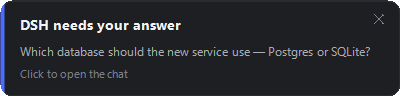 |
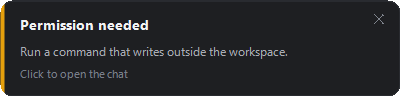 |
| Two questions, one card | Plan review |
|---|---|
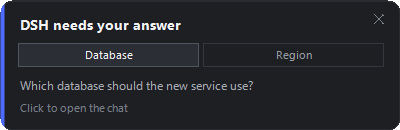 |
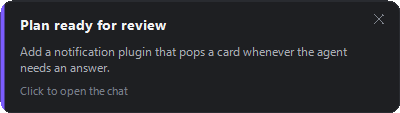 |
It notifies; it does not answer
The card has no answer buttons. Clicking it brings the chat forward, and the answer is always given there.
That is a deliberate reversal of an earlier design that answered from the card. The chat client owns each pending question through its own waterfall channel:
const channel = this.#waterfall !== void 0 ? "waterfall" : ...
detachWaterfall(channel) {
  if (this.#waterfall !== channel) return;
  this.#waterfall = void 0;
}
// "Drop a waterfall channel that settled or was cancelled; the card stays."
An answer delivered out-of-band settles the request while leaving the client's card on screen with nothing able to settle it — so answering from the card left the chat asking for an action that had already been taken. A host plugin cannot reach into that channel, so it does not answer at all.
The plugin is therefore a pure observer: it calls next() and returns
whatever the rest of the waterfall produced, so the chat behaves exactly as it
would without this plugin installed.
How a card goes away
| You | What happens |
|---|---|
| Click the card | Brings the chat forward and dismisses the card. |
| Click the ✕ | Dismisses it without switching to the chat. |
| Answer in the chat | The card retires on its own. |
| Nothing | It stays. A card never times out. |
The auto-close is worth spelling out, because it looks like answering but is not.
The plugin calls next() and returns it untouched; next() resolves when the
chat's own answerer settles the request, so a .then on that same promise fires
exactly when the question stops being pending. The plugin then writes a
<cardId>.close marker, and the card's poll picks it up and slides away. The
value returned to the waterfall is never altered, which the smoke test asserts.
Triggers
| Trigger | Source waterfall | Card |
|---|---|---|
ask_user_question |
user-questions/request |
question text, blue accent |
Plan review (exit_plan_mode) |
same, intent.kind: plan-review |
purple accent |
| Permission prompt | approval/request |
amber accent |
One card per chat, one tab per question
A card belongs to a chat. Every pending question from that session becomes a tab on its card, the way the chat UI presents them — so two questions asked in one request are one card with two tabs, not two pop-ups. Separate pop-ups are reserved for separate chats.
Grouping is by request.agent.session.id plus the kind of decision, so a
session's questions and its approvals never share a card. When another question
joins a chat that already has a card, the card is respawned with the extra tab,
keeping its slot on screen.
Cards persist, and they stack
A card does not time out. It stays until you click it or its ✕.
When a card from another chat arrives it takes the bottom slot, pushes the existing cards up, and each pushed card starts a countdown — shown as a bar draining along its bottom edge — after which it closes:
                                    ┌──────────────────────────────┐
   pushed up, counting down ──────► │ Permission needed            │
                                    │ Run a command that writes…   │
                                    │ ▓▓▓▓▓▓▓░░░░░░░░░░░░░░░░░░░░░ │
                                    └──────────────────────────────┘
                                    ┌──────────────────────────────┐
   newest, stays until clicked ───► │ DSH needs your answer        │
                                    │ Which database should the…   │
                                    │ Click to open the chat       │
                                    └──────────────────────────────┘
A card that becomes the newest again — because the cards below it were dismissed
— stops counting down and stays. maxStack (default 5) closes the oldest
card immediately if a burst would exceed it.
How the cards coordinate
Each card is its own powershell.exe and they cannot talk to each other, so the
plugin owns the stack and publishes it as a plain-text layout file that every
card polls:
<cardId>|<countdownSeconds> one line per card, newest first
Index 0 is the newest card, at the bottom nearest the corner. Heights are
deliberately not in the file — each card writes its own <cardId>.size, so a
card positions itself from the real heights of the cards below it rather than
from an estimate the plugin would have to duplicate.
The file is plain text rather than JSON because the cards read it in C#, where there is no JSON reader without pulling in another assembly.
Install
The plugin is a normal profile bundle. From the profile directory
(%USERPROFILE%\.dsh\profiles\desktop for the desktop app):
// package.json
"dependencies": {
  "dsh-plugin-notify": "link:<absolute path to your checkout>"
},
"dsh": {
  "profile": {
    "bundles": [
      "@deepseek-ai/dsh-base",
      "@deepseek-ai/dsh-web-app",
      "dsh-plugin-notify"
    ]
  }
}
cd %USERPROFILE%\.dsh\profiles\desktop
pnpm install
The bundle's own cordis.patch.yml mounts the row, so no extra config row is
required. To change the defaults, add a row to the profile's own
cordis.patch.yml:
- id: notify
  name: dsh-plugin-notify
  config:
    countdownMs: 30000
    sound: false
Restart the app to pick the plugin up. (There is no in-place reload in a
packaged build: the shell only adds a Reload Page menu item when running in
development. F12 opens DevTools, from where location.reload() works.)
The row name is a path, and that matters
The bundle patch mounts the row as name: ./index.mjs rather than the bare
package name dsh-plugin-notify.
app-boot's anchorInsertedPluginNames() rewrites a relative name into a file
URL anchored beside the patch file, so the row points at the entry file directly
and does not depend on how the loader resolves a bare specifier. Both forms load,
so this is a deliberate choice for an explicit mount rather than a workaround — a
plugin linked from a checkout resolves through a symlink, and naming the file
removes any question about the resolution base.
Configuration
| Key | Default | Meaning |
|---|---|---|
enabled |
true |
Master switch; false unmounts both listeners. |
questions |
true |
React to user-questions/request. |
approvals |
true |
React to approval/request. |
countdownMs |
20000 |
How long a card waits after being pushed up by a card from another chat. The newest card never counts down. |
maxStack |
5 |
Ceiling on visible cards; past this the oldest closes immediately. |
sound |
true |
Play the system exclamation sound. |
focusOnClick |
true |
Clicking a card activates the Harness window. |
throttleMs |
5000 |
Window for suppressing an identical request re-dispatched in a loop. It must never gate distinct questions — see the trap below. |
powershell |
absolute Windows PowerShell | Interpreter that draws the card. Defaults to %SystemRoot%\System32\WindowsPowerShell\v1.0\powershell.exe so it does not depend on the host's PATH. |
maxBodyChars |
220 |
Body text clamp. |
title |
DSH needs your answer |
Heading when a single question declares no header of its own. |
debug |
false |
Append a diagnostic log (mount, dispatch, helper result). |
debugPath |
<plugin>/debug.log |
Where that log goes; only read when debug is on. |
How it works
Both seams are Cordis waterfalls. Waterfalls are dispatched with an agent
scope, and dsh-scope admits untagged listeners to every descendant scope, so a
single registration observes every agent, subagents included.
Why a PowerShell-drawn card instead of a Windows toast
- The DSH host runs in a Node child process spawned by the Electron shell
(
dsh-desktop-host/lib/index.js), not in the Electron main process, soelectron.Notificationis not reachable from a plugin. - On Windows 11 24H2 the WinRT toast APIs reject unpackaged senders with
0x80073D54 "The process has no package identity"— verified against both the app's registered AppUserModelID (com.deepseek.dsh) and an explicit process AUMID. A toast sender would first have to register an AppUserModelID and a Start Menu shortcut.
So the card is a short-lived, hidden powershell.exe drawing an ordinary
borderless topmost window — a rounded Region for the corners and
CS_DROPSHADOW for the shadow. See lib/card.cs.
An earlier version used a layered window (WS_EX_LAYERED +
UpdateLayeredWindow), which is the only way to get antialiased rounded corners
and a genuinely soft shadow. It was replaced after a long debugging session in
which it appeared never to display — a diagnosis that turned out to rest on a
broken screen-capture method (a sandboxed shell cannot composite any window, so
both a plain and a layered test window captured as zero pixels). The layered
version may well have been fine; this one is kept because it is simpler and
demonstrably displays.
Traps that cost real debugging time
Never spawn the helper detached. With detached: true on Windows,
powershell.exe exits with code 0 in ~130 ms without executing a single line of
the script — no card, no error, no log entry, and no non-zero exit to notice.
Measured, everything else identical:
detached |
windowsHide |
outcome |
|---|---|---|
true |
true |
helper dies instantly, no card |
false |
true |
card renders normally |
true |
false |
helper dies instantly, no card |
false |
false |
card renders normally |
Never call CreateGraphics() in the form constructor. On a Control it
forces handle creation, so OnHandleCreated runs from inside the constructor —
before the size fields exist, which makes new Bitmap(0, 0) throw. Use
Graphics.FromHwnd(IntPtr.Zero) for DPI instead. Relatedly, Close() is illegal
while the handle is still being created; queue it with BeginInvoke.
The slide-in timer must start at 0, not 1. The window is created parked at
_startX = screen.Right, just off the right edge, and a timer slides it to
_targetX. Initialising the progress field to 1f means "already arrived", so
the animation is skipped and the card stays parked off-screen forever — while
every layer still reports success: the bitmap renders correctly, the window is
visible and topmost at the right size, the process exits 0, and the log names the
target position. The helper now logs where the window really ended up, and
test/smoke.mjs asserts that it equals the target.
De-duplicate on the request, never on the chat. An earlier version keyed its
duplicate-suppression on session.id, so the second question from one chat was
silently discarded as a duplicate — exactly the case the tab support exists for.
It also applied a flat 250 ms throttle that dropped it regardless. The key is now
the question ids (or the approval's callId), and the smoke test runs with the
default throttle so it cannot hide this again.
PowerShell 5.1 guesses ANSI for a file with no BOM. A U+2026 ellipsis
literal in card.cs was read as three mojibake characters, so a truncated tab
label rendered as …. card.cs, popup.ps1 and test/previews.ps1 are now
pure ASCII, and popup.ps1 reads the C# with an explicit -Encoding UTF8.
The preview script still exercises non-ASCII end-to-end by building its em dash
from [char]0x2014.
Windows PowerShell 5.1 compiles as C# 5. Inline out variables, discards
(out _), and string interpolation do not compile, and Add-Type treats
warnings as errors — so a member that hides an inherited one (Click, Layout,
Margin) fails the build outright.
You cannot verify card visibility from a sandboxed shell
A DSH tool call runs under the file sandbox, and windows created by a
sandboxed process are not composited onto the screen at all — neither layered
nor plain. Measured: a plain borderless form filled with opaque green and a
layered form filled with opaque red, both shown from a sandboxed pwsh, both
produced zero matching pixels in a CAPTUREBLT screen capture. Also note that
a sandboxed shell's $env:TEMP is its own directory, not the host's, so scratch
files written by the host are elsewhere.
Limitations
- Windows only (
os: ["win32"]inpackage.json). The hook layer is portable;lib/card.csandlib/popup.ps1are not. - It never answers. By design — see the top of this file. Answering happens in the chat.
- Cost per card is one process start plus an
Add-Typecompile of ~33 KB of C# (~0.5 s, longer when several cards start at once). Cards are rare, so this is deliberate: a short-lived helper cannot leak or hang around after a crash. - No focus detection. A card is shown even when the Harness window is already focused; the host has no reliable "is the user looking at me" signal.
- A card stays until you click it. By design.
maxStackbounds how many can pile up, and pushed cards count down on their own.
Development
node test/smoke.mjs
The test mounts the plugin against a fake Cordis context and asserts on the helper's own log lines, so it fails if a card is requested but never drawn, if a card settles off-screen, or if a two-question request does not produce one card with two tabs. It also asserts the plugin never answers: every dispatch must return exactly what the rest of the waterfall produced.
Re-render the previews above with:
powershell.exe -NoProfile -ExecutionPolicy Bypass -File test/previews.ps1
Run that under Windows PowerShell 5.1, not pwsh: the card compiles with
-ReferencedAssemblies System.Drawing.dll, which is right for .NET Framework but
not for PowerShell 7, where System.Drawing forwards to
System.Drawing.Common and the compile fails.
License
MIT
No comments yet. Be the first to write one.