English | Español
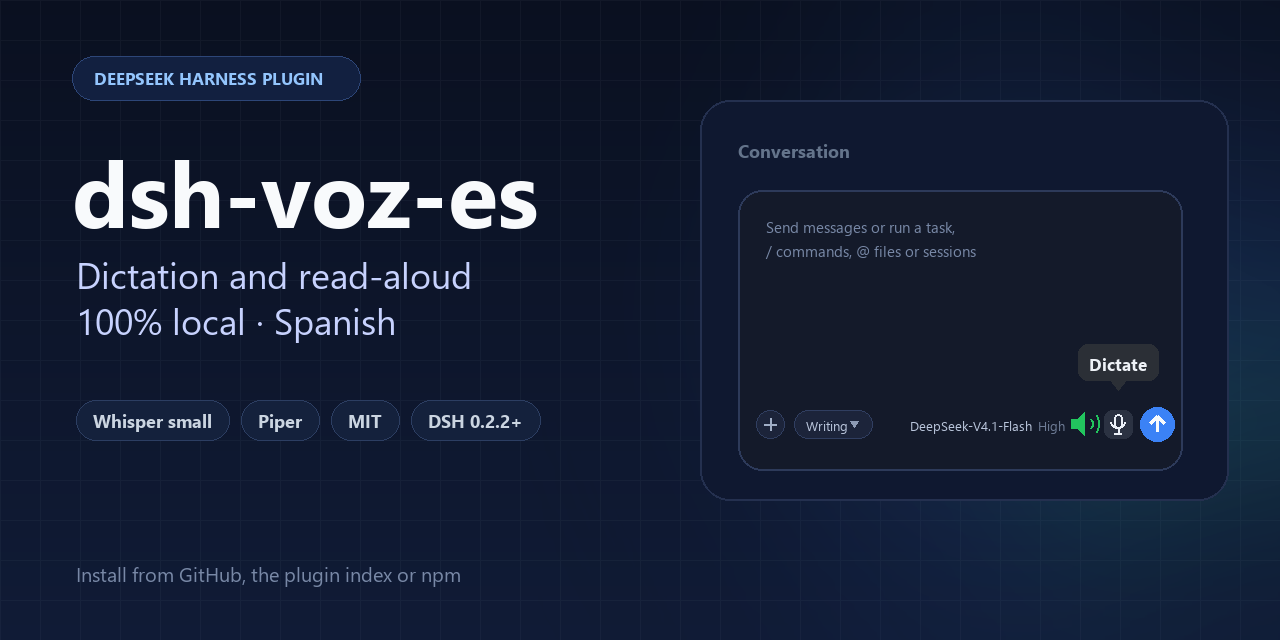



Local Spanish voice for DeepSeek Harness, without the cloud. Dictate with on-device Whisper and listen to replies with Piper, with SHA-256-verified models and true pause/resume.
Why it exists
- DSH ships SenseVoice, which does not recognize Spanish.
- The voices the browser exposes on Windows (SAPI) sound robotic.
- Most alternatives send your audio to a cloud service.
This repository fixes all three with two plugins that install into DSH and run on your machine.
What's inside
| Plugin | What it does |
|---|---|
dsh-whisper-voice |
Adds a microphone that dictates with Whisper (ONNX, sherpa-onnx) in Spanish. The transcript is inserted at the cursor without clearing what you already wrote. |
dsh-read-aloud |
Reads replies with Piper (local neural voice). Button next to the microphone: green = reading, red slashed = muted. Muting pauses for real; resuming continues where it stopped; after 5 s it discards. |
Details that matter
- Truly local: inference runs on your CPU; no accounts, no telemetry, no voice services.
- Verified downloads: every weight is pinned by revision, size and SHA-256.
- Real pause/resume with an audio element, not the browser's speech synthesis.
- Dictation silences the narration while the microphone records and resumes when it stops; sending a message cuts the narration and moves on to the new reply.
- Prefetch: the next fragment is synthesized while the current one plays, so long replies have no gaps.
- No core changes: everything goes through DSH extension points (slots,
speechToText, authenticated routes).
Installation
Requirements
- DSH 0.2.2.x (tested on
0.2.2-rc.2and0.2.2-rc.3). sherpa-onnx-node, shipped with the DSH installation.- For dictation, enable DSH's Voice input bundle first (Plugins): the Whisper provider adjusts its rows and needs them to exist.
- Tested on Windows 11. The engine supports macOS and Linux; not tested there yet.
From the plugin index (recommended)
Enable the custom plugin indexes bundle, add this URL in Discover, and install from the card:
https://raw.githubusercontent.com/Navasfj/dsh-voz-es/main/index.json
From Git
Pinned to a commit (the one you want to publish):
git+https://github.com/Navasfj/dsh-voz-es.git#<commit>&path:/packages/dsh-read-aloud
git+https://github.com/Navasfj/dsh-voz-es.git#<commit>&path:/packages/dsh-whisper-voice
Order for dictation: Voice input first, then dsh-whisper-voice.
From npm (optional)
cd packages/dsh-read-aloud && npm publish --access public
cd ../dsh-whisper-voice && npm publish --access public
Then @navasfj/dsh-read-aloud@1.0.0 and @navasfj/dsh-whisper-voice@1.0.0.
Usage
| Action | How |
|---|---|
| Dictate | Press the microphone between the model selector and Send, speak, press Stop. The transcript is inserted at the cursor without clearing the draft. |
| Read | Press the speaker next to the microphone. Green with waves = reading; red slashed = muted. |
| Pause | Press the speaker once. Press it again within 5 s to continue. |
| Discard | Leave it muted for more than 5 s: re-enabling does not resume the previous narration. |
Mute, step by step
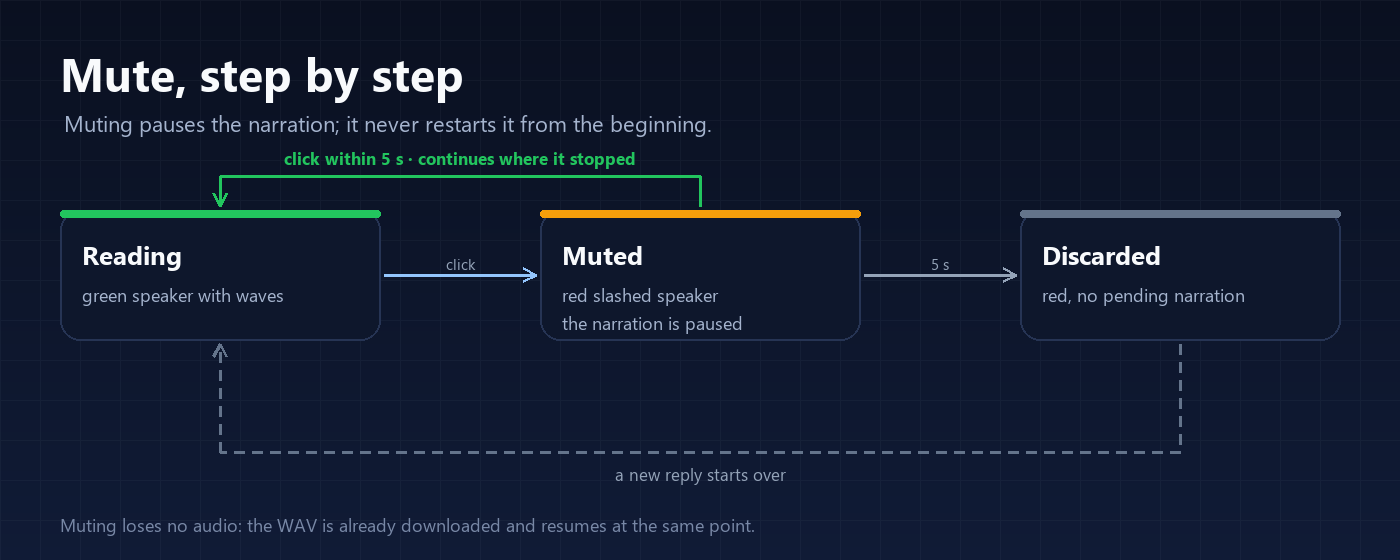
- Green: it is reading.
- Click: pauses the audio at the exact point, without restarting or re-synthesizing.
- Click within 5 s: continues where it stopped, without repeating the sentence.
- 5 s without resuming: discards the pending narration. The button stays red and the next reply starts fresh.
Audio is not lost on pause: the WAV is already downloaded in the browser. A reply that finishes while muted is not read later.
Full guide with dictation, what is read and what is not, limits and FAQ: docs/USAGE.en.md (español).
Screenshots

The real composer: the read-aloud speaker sits left of the dictation microphone, and the blue circle sends. The banner above is a stylised version of this row.
Architecture
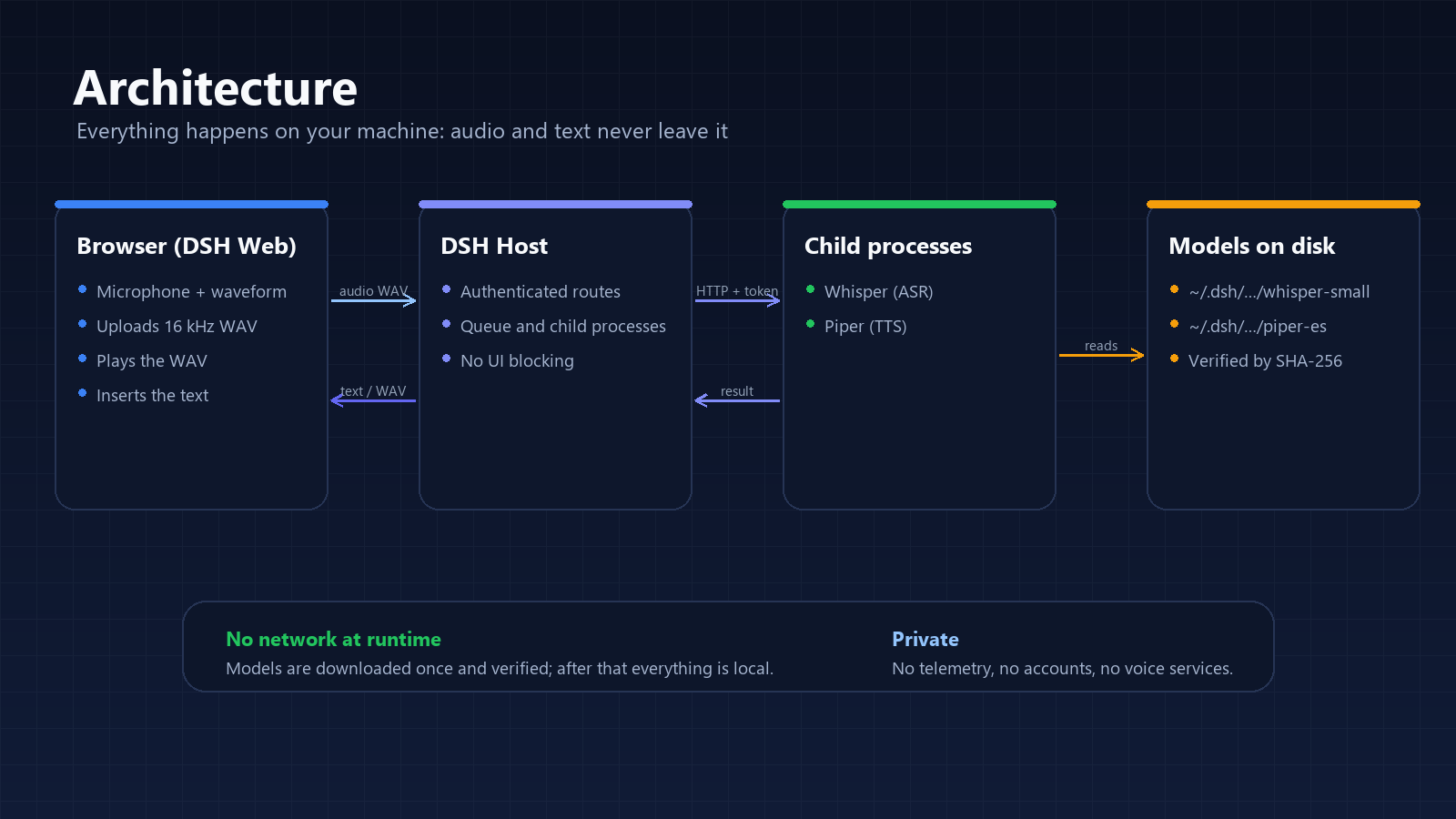
- The browser captures at 16 kHz mono and uploads the WAV over DSH's authenticated channel.
- The Host queues the work and hands it to a child process (Whisper or Piper) over loopback with a token.
- Reading returns a WAV that the browser plays with an audio element.
- Models live under
%USERPROFILE%\.dsh\...and are verified before use.
Configuration
Each plugin is configured in its cordis.patch.yml row:
- insert:
    - id: speech-to-text-whisper
      name: "@navasfj/dsh-whisper-voice"
      config:
        model: small        # tiny | base | small (default small)
        language: es
        threads: 4

    - id: ui-read-aloud
      name: "@navasfj/dsh-read-aloud"
      config:
        speed: 0.9          # 0.8 slower, 1.0 natural pace
        threads: 4
modelDirectory lets you use weights already on disk; nothing is downloaded then.
Models and cache
| Model | Size | Path |
|---|---|---|
Whisper small INT8 |
~375 MB | ~/.dsh/speech-to-text/whisper/models/whisper-small |
Piper es_ES-sharvard-medium + espeak |
~77 MB | ~/.dsh/read-aloud/models/piper-es-sharvard |
Each plugin downloads its model on first use. Uninstalling the plugin does not delete the cache.
Privacy
- Audio goes from the browser to the Host over DSH's authenticated channel and then to the local Whisper process.
- Reading synthesizes in the Host with Piper; the browser only plays the WAV.
- No telemetry, no accounts, no voice services. The only network use is the initial model download.
Troubleshooting
| Symptom | Cause and fix |
|---|---|
| No microphone appears | The Voice input bundle is not enabled or the page was not reloaded. Enable it and press Ctrl+Shift+R. |
| The microphone appears but does not transcribe | The model is missing or the Whisper process did not start. Check Plugins → Whisper voice and the browser console. |
| Reading is silent | Make sure the button is green; if you just installed, wait for the Piper model download. |
| The first transcription is slow | small loads the model on first use; it stays warm afterwards. base is faster and less accurate. |
| The download is blocked | Use modelDirectory with weights already on disk, or check access to Hugging Face. |
Development
# Plugin syntax
node --check packages/dsh-whisper-voice/index.js
node --check packages/dsh-whisper-voice/worker.js
node --check packages/dsh-read-aloud/index.js
node --check packages/dsh-read-aloud/tts-worker.js
node --check packages/dsh-read-aloud/client.js

# Regenerate images
python scripts/make-assets.py

# Regenerate the Discover index (pins the current commit)
node scripts/make-index.mjs
Contributing: CONTRIBUTING.md. Reporting vulnerabilities: SECURITY.md. Community standards: CODE_OF_CONDUCT.md.
License and credits
Code MIT — see LICENSE. Models and runtime keep their own licenses (Piper, espeak-ng, Whisper, sherpa-onnx): see NOTICE.md.
No comments yet. Be the first to write one.