dsh-token-account
Token usage, wallet balance, and daily/monthly usage overview for DeepSeek Harness — as a sidebar panel.
A DSH plugin (Host + Client halves) that adds one entry to the left sidebar and answers "how much has this account used, and how much is left?" without leaving the app.
中文说明见下方 中文文档。
Screenshots
The panel running in the Harness Web UI (light theme), showing the wallet, today / month / recent totals, the monthly daily-usage chart, the daily table, and the model breakdown:
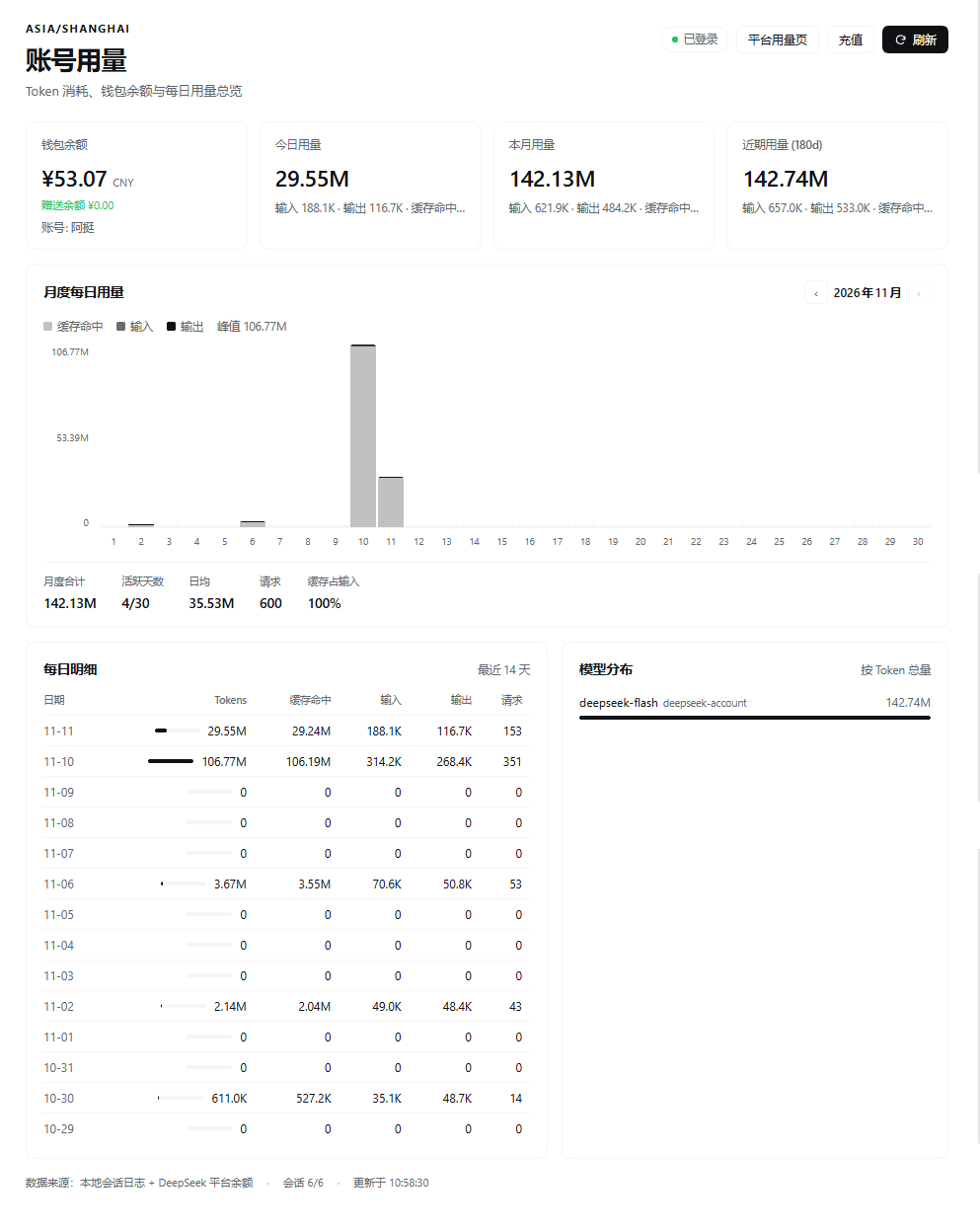
Captured on v1.0.0. Since v1.1.0 the input/output and cache/requests detail under each total sits on its own line instead of being truncated.
Features
| Block | Content |
|---|---|
| Wallet | DeepSeek Platform wallet balances (recharge + bonus), signed-in profile name, links to the Platform usage page and top-up |
| Today | Tokens used since local midnight: cache reads, cache-miss input, output, request count |
| This month | Tokens used in the current local month, with active days |
| Recent | Tokens over the selected window (180 days by default) |
| Daily usage by month | One stacked bar per day (cache read / input / output), month switcher, monthly total, active days, daily average, peak day, cache share |
| Daily detail | The last 14 days as a table |
| Model breakdown | Tokens per provider/model for the window |
Install
The plugin is a DSH bundle: a package that declares dsh.bundle.patch.
git clone https://github.com/nanvtin-droid/dsh-token-account.git
Then install that directory in the current profile (absolute path):
// plugin_manager → install_bundle
{ "target": "C:/path/to/dsh-token-account" }
The plugin manager runs the package install, adds @local/dsh-token-account to the profile
bundles, and applies the row live. The sidebar entry appears next to the other panel icons;
refresh the Web UI once if the page was already open (client bundles load with the page).
Uninstall
Remove the @local/dsh-token-account bundle from the Plugins page (or plugin_manager →
remove_bundle). The plugin keeps no state of its own — everything it shows derives from the
session logs and the account service.
How it works
sidebar.panellist#token-account   →  main#token-account
                                        │
                    GET /api/token-account/overview
                                        │
              ┌─────────────────────────┴─────────────────────────┐
   ctx.sessionQuery + ctx.sessionPersistence          ctx.deepseekAccount
   fold assistant/message TokenUsage per day            getBalance / getProfile
- Usage is folded from the committed session logs — the same
assistant/messageusage records the Harness replays. Forked sessions inherit their source's events; only events the session actually produced are counted, so a fork never double counts its prefix. - Balance is read by the Host half from
ctx.deepseekAccount.getBalance, the same Platform wallet the account settings show. The browser never receives a credential: the Client half only calls the same-origin JSON route. - Results are cached per session against its persistence revision, so reopening the panel costs
one
list()instead of a full log replay. The first visit to a large corpus runs under a time budget and the panel keeps asking until every session is folded.
Token math
The adapter reports inputTokens as prompt tokens not served from cache, with
cacheReadTokens / cacheWriteTokens beside it; its own totalTokens equals the sum of the
parts (verified against live logs). The panel therefore defines:
total = input (cache miss) + output + cache read + cache write
and shows cache reads separately, so the numbers never contradict each other.
Configuration
The row accepts an optional config block (no schema is declared, unknown keys are ignored):
- id: token-account
  config:
    scanBudgetMs: 7000      # per-request budget for folding new session logs
    maxSessions: 400        # newest sessions considered
    readConcurrency: 3      # parallel session reads
    accountTtlMs: 30000     # wallet cache lifetime
    defaultDays: 120        # day window when `days` is absent
    maxDays: 366            # hard cap for the days query
    clientVersion: '1.0.0'  # x-client-version sent to the Platform
Limits
- Usage is the account activity recorded on this machine, in the local time zone. Activity from another device only appears on the Platform's own usage page.
- Balance needs a signed-in DeepSeek account; otherwise the panel shows the sign-in hint and still reports local token usage.
- Token counts are provider-reported; the plugin does not estimate prices.
Development
node test/host.test.mjs     # daily buckets, fork de-duplication, cache reuse, wallet mapping
node test/client.test.mjs   # registrations, locale dictionaries, full render smoke test
Both tests run against plain Node (no DSH process needed); the Client test renders the panel through a stub React runtime.
License
中文文档
DSH 左侧栏账号用量面板:Token 消耗、钱包余额、每日与月度用量总览。
功能
- 钱包余额:平台真实钱包(充值余额 + 赠送余额)、登录账号名,以及平台用量页 / 充值入口
- 今日 / 本月 / 近 180 天:总量、缓存命中、输入、输出、请求数
- 月度每日用量:可切换月份的逐日堆叠柱状图(缓存命中 / 输入 / 输出),附月度合计、活跃天数、日均、峰值、缓存占比
- 每日明细:最近 14 天表格
- 模型分布:按 Token 总量排序的模型占比
安装
git clone https://github.com/nanvtin-droid/dsh-token-account.git
然后在当前 profile 里用插件管理器安装该目录(绝对路径):
{ "target": "C:/path/to/dsh-token-account" }
装好后左侧栏会多出一个图标;若页面已经打开,刷新一次即可(Client 半部随页面加载)。
数据来源与隐私
- 用量来自本机会话日志里的
assistant/message用量记录,按本地自然日聚合;分叉会话只统计自身产生的事件,不会重复计算源会话前缀。 - 余额由 Host 半部读取
ctx.deepseekAccount.getBalance(与设置里的账户同源)。浏览器只请求同源GET /api/token-account/overview,拿不到任何凭据。 - 插件不持久化任何自己的数据;停用即无残留。
口径说明
适配器的 inputTokens 是未命中缓存的输入,另有 cacheReadTokens / cacheWriteTokens,官方 totalTokens 为各项之和。因此面板的「总量」= 输入 + 输出 + 缓存读取 + 缓存写入,缓存命中单独展示,不会出现总量小于缓存命中的怪数。
已知边界
- 只统计本机产生的用量(本地时区);其他设备的用量请看平台用量页。
- 未登录 DeepSeek 账号时余额显示登录提示,用量仍可用。
- Token 数为服务商上报值,不做价格估算。
配置
同上文 YAML 示例(scanBudgetMs、maxSessions、defaultDays 等)。
测试
node test/host.test.mjs
node test/client.test.mjs
No comments yet. Be the first to write one.