Stock Dashboard
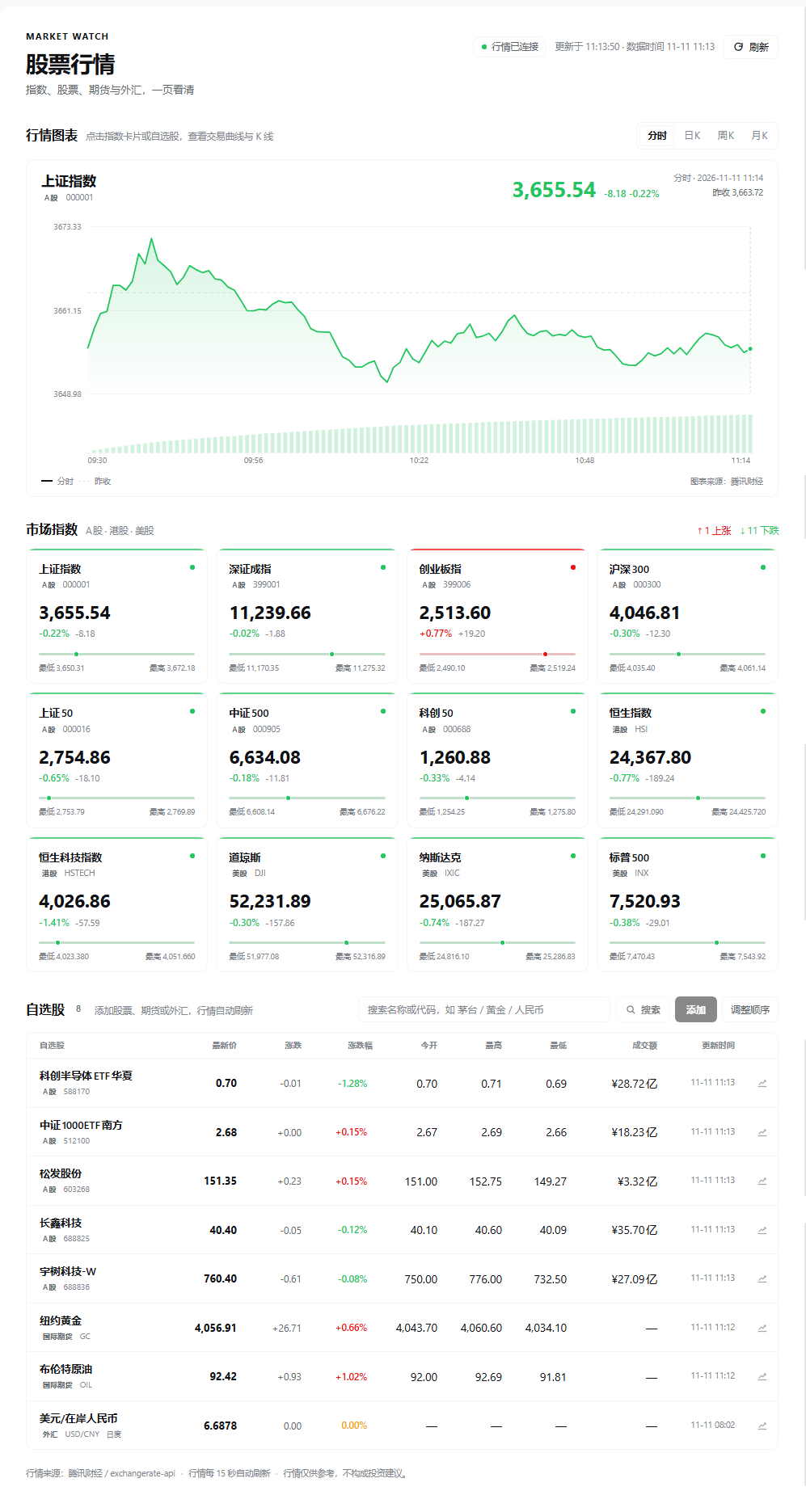
A DSH Web UI plugin that adds a 股票行情 / Stock Dashboard entry to the left sidebar and opens a full page with:
- 12 major indices from mainland China, Hong Kong, and the United States.
- A persisted watchlist with add and remove controls, plus a reorder mode.
- Name / pinyin / code search with an add button for each result.
- International futures and CNY/CNH FX can be searched and added to the watchlist.
- A local catalog makes
黄金,布伦特,人民币,GC, orUSDCNYsearchable even though Tencent's stock search box does not index futures or FX. - An intraday price curve and daily, weekly, or monthly candlestick charts.
- Automatic quote refresh every 15 seconds, plus a manual refresh button.
Screenshots
The dashboard inside the Harness Web UI:
Removing and reordering
Every watchlist row has a 删除 / Delete button. In reorder mode each row shows ↑ / ↓ plus the same delete action.
Click 调整顺序 / Reorder beside the watchlist search box:
- Drag any row up or down; the list reorders live as the row crosses its neighbors.
- Or use the ↑ / ↓ buttons at the end of each row.
- Click 完成 / Done to leave reorder mode.
The new order is stored in the same localStorage value as the watchlist, so it
survives reloads.
Selecting a chart
The chart panel is directly under the page header. Click any index card, or the
chart button on a watchlist row, to load that symbol into the panel. The
分时 / 日K / 周K / 月K buttons switch between the intraday line and candlestick
periods.
Data path
The browser calls three same-origin routes owned by the Host half:
GET /api/stock-dashboard/quotes?symbols=sh000001,sh600519,hk00700
GET /api/stock-dashboard/search?q=茅台
GET /api/stock-dashboard/chart?symbol=sh000001&period=minute
GET /api/stock-dashboard/chart?symbol=sh600519&period=day
The Host fetches Tencent Finance's public HTTP endpoints, decodes the GBK quote response, normalizes the JSON chart/search payloads, and returns JSON to the page:
http://qt.gtimg.cn/q=...                         quotes
http://smartbox.gtimg.cn/s3/?q=...&t=all         search
http://web.ifzq.gtimg.cn/appstock/app/...        minute and K-line data
This avoids CORS and works on this cloud desktop, where the Tencent HTTP endpoints are reachable but several other quote hosts are filtered.
No token, API key, or model call is used at runtime. Requests are ordinary HTTP requests made by the Host process and the browser.
Accepted watchlist codes
600519          -> sh600519
000001          -> sz000001
sh000001        -> Shanghai Composite
399001.SZ       -> sz399001
00700 / hk00700 -> Hong Kong stock
AAPL / usAAPL   -> US stock
Search accepts Chinese names, pinyin, and codes such as 茅台, 腾讯, 600519,
or AAPL. The watchlist is stored in browser localStorage under
dsh.stock-dashboard.watchlist.v1.
Source caveat
Tencent's endpoints are public, undocumented feeds. If their format changes,
update parseQuotePayload, parseSearchPayload, or parseKlinePayload in
index.js. Quotes and charts are informational only and are not investment
advice.
Futures and FX coverage
Tencent's quote endpoint does support these international futures:
hf_GC   纽约黄金 (COMEX gold)
hf_SI   纽约白银
hf_CL   纽约原油 (WTI)
hf_OIL  布伦特原油
hf_HSI  恒生指数期货
These are realtime quotes from Tencent. Tencent's minute/K-line endpoints reject
hf_*, so their chart panel says the chart is unavailable while the quote keeps
refreshing.
Tencent's quote endpoint does not return Shanghai gold futures (nf_AU0) or FX
pairs (fx_usr, fx_susdcny). Search shows 上海黄金期货 as 暂不支持
instead of inventing data.
For onshore/offshore RMB, the Host uses the reachable
http://open.er-api.com/v6/latest/USD endpoint and exposes:
fx_usdcny  USD/CNY  在岸人民币
fx_usdcnh  USD/CNH  离岸人民币
It also supports EUR/USD, USD/JPY, GBP/USD, AUD/USD, and USD/HKD. This source
updates once per day, so those rows carry a 日度 marker and no change/K-line.
No comments yet. Be the first to write one.