Quadrant Todos for DeepSeek Harness
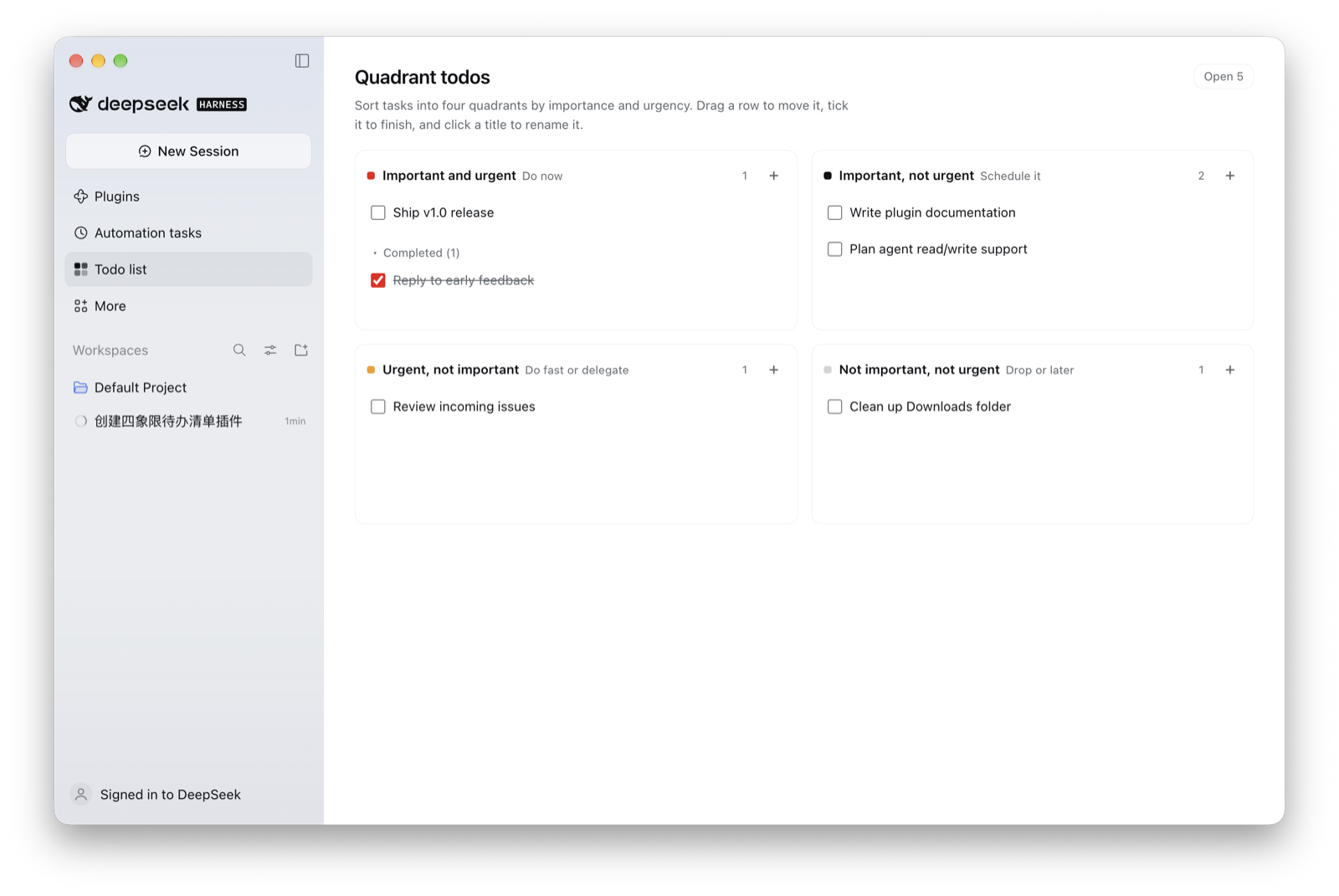
Four-quadrant (Eisenhower) todo list plugin for the DeepSeek Harness Web UI. It installs one sidebar entry and one main panel: sort tasks into Important & Urgent, Important, not Urgent, Urgent, not Important, and Not Important, not Urgent.
Features
- Sidebar entry + full panel —
Todo listappears in the left column's global panel list; selecting it opens the board without touching your sessions. - Four quadrants — accent dot, inline hint, and open-task counter per quadrant.
- Inline add —
+in a quadrant header opens a composer bound to that quadrant; Enter submits, and IME composition is ignored so Chinese/Japanese/Korean input never submits mid-composition. - Complete without losing context — ticking a task greys it out in place and moves it into a collapsible
Completed (n)group in the same quadrant. - Rename & move — click a title to edit it; the four colour swatches in the editor move the task to another quadrant.
- Drag & drop — drag a row across quadrants; the target card highlights while hovering.
- Delete with undo — hover a row for its
×, delete, then undo from the 8-second notice. - Persistent — every change is written to
localStorage(dsh.quadrant-todos.v1) and survives reloads and app restarts. A storage failure is reported in the panel instead of failing silently. - Fits the host — styling uses only
--dsw-alias-*theme tokens, so light and dark themes follow the app; all copy goes through the host locale service (English and Simplified Chinese dictionaries included) and follows the app language.
Requirements
- DeepSeek Harness with bundle support (the
plugin_managertool /install_bundle). Tested with0.2.1-rc.5on macOS. - No network or extra dependencies: the plugin is a single bundle directory with plain JavaScript.
Install
git clone https://github.com/nangongwentian-fe/dsh-quadrant-todos.git
Then install the cloned directory into your Harness profile. The simplest way is to ask the agent in any DSH session:
Install the bundle at
/absolute/path/to/dsh-quadrant-todoswithplugin_manager(install_bundle).
Or call the tool yourself with action: "install_bundle" and target: "/absolute/path/to/dsh-quadrant-todos". The plugin is enabled immediately (no restart) and the Todo list entry appears in the left column.
Usage
- Click
Todo listin the sidebar. - Press
+in a quadrant and type the task, then Enter (keep the composer open to add several). - Tick a task to finish it — it becomes struck-through inside the same quadrant, under
Completed (n). - Click a task title to rename it or move it with the four colour swatches; drag a row to another quadrant for a quick move.
- Hover a row and press
×to delete; useUndoin the notice if you change your mind.
Data and uninstall
Tasks live in the Web client's localStorage under dsh.quadrant-todos.v1 — per browser profile, never sent to the Host. Uninstalling the plugin leaves that data in place; reinstalling shows the same tasks again.
plugin_manager, action: "remove_bundle", target: "dsh-quadrant-todos"
Development
| File | Purpose |
|---|---|
package.json |
Bundle manifest: dsh.bundle.patch, dsh.client, exports for locale files and icon |
cordis.patch.yml |
Inserts the plugin row into the Harness loader patch |
index.js |
Host half; a no-op for the client-only 1.0 |
client.js |
The whole UI: sidebar.panellist entry and matching main panel |
locale/{en,zh}.json |
Display title and description for the Plugins page |
icon.svg |
Original four-square artwork |
After editing client.js, the client bundle is reloaded on the next page load; package or patch changes need a reinstall (install_bundle again). There is no build step — the bundle is plain ES modules plus a window.__ModuleLoader__ factory.
The store helpers in client.js (readStore / writeStore) are deliberately small so a later Host-backed store can replace them without touching the view.
Roadmap
- Phase 2: Host-side storage plus an agent tool, so you can ask the model to triage tasks into quadrants and both sides share one source of truth.
- Optional: due dates and overdue highlighting.
License
MIT — see LICENSE.
中文说明
DeepSeek Harness Web UI 的四象限(艾森豪威尔)待办插件:在左侧栏增加一个入口,主区域是一个 2×2 看板——重要且紧急、重要不紧急、紧急不重要、不重要不紧急。
功能
- 侧边栏
Todo list入口,点击打开面板,不影响当前会话; - 每个象限有强调色、说明和未完成计数;
+行内新增,回车提交(中文输入法组词时的回车不会误提交); - 勾选完成:原地置灰,收进同象限可折叠的
Completed (n)分组,保留上下文; - 点标题改名,编辑器里四个色块可换象限;跨象限拖动也行;
- 悬停出现
×删除,顶部 8 秒内可撤销; - 改动实时写入
localStorage(dsh.quadrant-todos.v1),刷新、重启都在;写入失败会提示而不是静默丢失; - 样式只用宿主
--dsw-alias-*token,浅色/深色主题自动跟随;文案走宿主的语言服务(内置中英文字典),跟随应用语言。
安装
git clone https://github.com/nangongwentian-fe/dsh-quadrant-todos.git
然后在任意 DSH 会话里对 agent 说:
用
plugin_manager的install_bundle安装/你的绝对路径/dsh-quadrant-todos。
装好后左侧栏立即出现 Todo list,无需重启。
数据与卸载
任务存在 Web 客户端的 localStorage,键为 dsh.quadrant-todos.v1,不会上传到 Host。卸载插件不会删除数据,重装后任务还在。
卸载:plugin_manager,action: "remove_bundle",target: "dsh-quadrant-todos"。
路线图
- 第二阶段:Host 端持久化 + agent 工具,让「帮我把这些事按四象限排一下」真正生效,两边共享同一份数据;
- 可选:截止日期与逾期高亮。
No comments yet. Be the first to write one.