dsh-restart
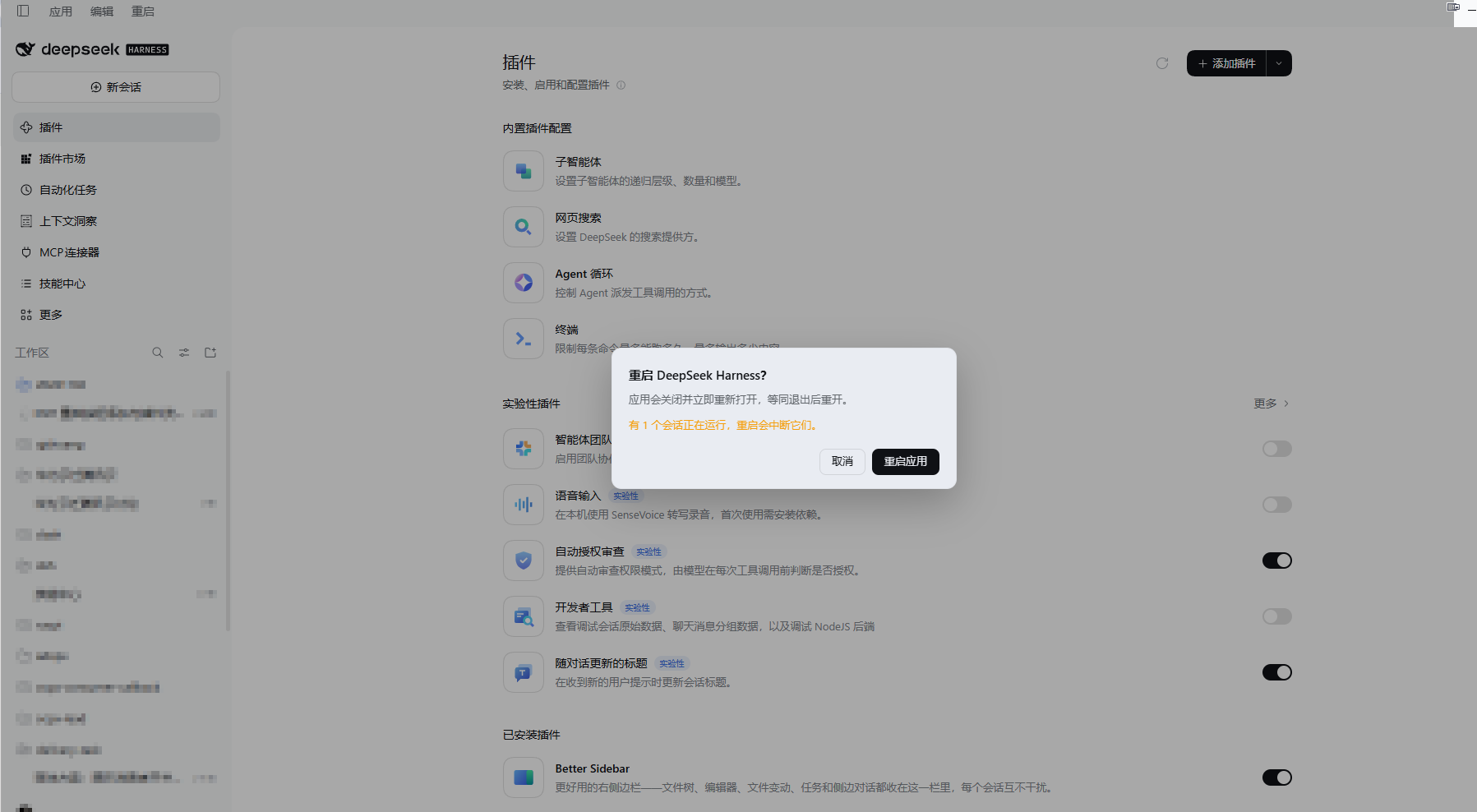
给 DeepSeek Harness Desktop(Windows)的标题栏加一个「重启」按钮。点一下弹出确认框,确认后应用关闭并重新打开。
非 DeepSeek 官方插件,社区插件。

安装
dsh plugin --profile desktop add github:mwk719/dsh-restart
也可以从插件市场(dsh-market)安装。装完重启一次应用,标题栏「应用 / 编辑」右边就会出现「重启」。
用法
- 点「重启」(英文界面是
Restart)。 - 弹出确认框:标题「重启 DeepSeek Harness?」,正文说明会关闭并重新打开,第三行告诉你现在有几个会话正在运行、重启会中断它们(空闲时说明没有正在运行的会话)。
- 「取消」/
Esc/ 点击遮罩 = 关掉,什么都不做;「重启应用」= 立刻重启。
为什么按钮在标题栏,而不是「应用」菜单里
「应用」弹出的菜单是 Electron 主进程里的原生菜单,由 app.asar 内 lib/main.js 的 applicationItems() 构造(最后一项是「退出」)。dsh 的插件系统没有给这个菜单留插槽,桌面端也没有把 quit / restart 暴露给网页或插件,所以插件无法往那条菜单里插条目。
本插件改为把按钮追加进同一个标题栏菜单行——桌面端 preload 在页面里建的 [data-windows-menu] 元素,其 shadow root 里那个 [role="menubar"](装「应用 / 编辑」的那一行)。因此按钮紧挨「应用 / 编辑」,沿用该行的布局和按钮样式,并随界面语言显示「重启 / Restart」。
这一处是整个插件唯一依赖桌面端内部结构的地方:它只读这个元素的 shadow root 并往菜单行里 append 一个按钮,不修改既有按钮、不拦截事件。如果将来的桌面端不再提供这个元素,插件在 20 秒内找不到就什么都不渲染(不会报错、不影响其它插件)。
重启是怎么实现的
- 桌面端的 Host 进程就是
DeepSeek Harness.exe以 Node 模式运行(ELECTRON_RUN_AS_NODE=1,由 Electron 主进程 spawn 并带 IPC 通道),所以在 Host 里process.execPath就是应用可执行文件,process.ppid就是 Electron 主进程。 - 确认后,Host 起一个 detached 的助手进程(
restart-child.mjs);助手先结束 Electron 主进程,再结束 Host 进程(释放它占的 HTTP 端口),约 2 秒后用同一个可执行文件重新启动应用。 - 效果等同「退出后重新打开」:所有插件代码、原生菜单、Host 全部重新加载。
日志写在 ~/.dsh/dsh-restart.log(每次弹框、确认、取消、重启都有一行,助手进程的每一步也在里面)。
安全边界
重启会中断正在跑的回合,所以按下的动作被刻意做成两步:
- 点一下只弹框,不发任何请求。取消 /
Esc/ 点遮罩都只是关掉。 - Host 侧还有第二道闸:
POST /dsh-restart/restart必须带?force=1(即弹框里确认过的那一次)。没有确认的按下一律返回409,绝不重启——即使页面是旧版本的代码也一样。 - 弹框会先问 Host 现在有几个会话在跑,并把数量写在正文里,让你知道这次重启的代价。
- 20 秒后应用还在运行(说明重启没生效),弹框会改成报错文案并允许重试。
代价是真实的:正在生成的回答会中断。会话记录、消息、文件都在磁盘上,重开后仍在列表里。
要求与限制
- 仅 Windows 桌面端:只有它才有这条标题栏菜单行(macOS 用原生应用菜单,Linux 桌面端没有这个 menubar),其它平台插件不渲染任何东西。
- 需要
dsh >= 0.2.0-rc.1(dsh.engines.dsh)。 - 零依赖、零构建:
index.js(Host)、client.js(浏览器端)、restart-child.mjs(助手)都是手写 ESM,装完即可用,不需要pnpm install或构建步骤。 - 重启用的是「结束进程再拉起」,不是优雅退出:如果某次重启后应用没起来,手动打开一次即可(日志里有每一步的结果)。
诊断
Host 提供两个只读/自检路由(同源、需要自定义请求头):
GET /dsh-restart/state→{ status, guard, desktop, busy, mounted, log }:busy是正在运行的会话数,mounted是按钮挂载时间,guard是当前保护版本。POST /dsh-restart/restart?dry=1→ 只回答「现在按下去会怎么处理」,不会重启。
卸载
设置 → 插件 → dsh-restart → 停用或卸载,按钮随之消失。
文件结构
| 文件 | 作用 |
|---|---|
index.js |
Host 半区:注册 /dsh-restart/restart、/dsh-restart/state,起重启助手 |
client.js |
浏览器端:把按钮追加进标题栏菜单行,渲染确认框 |
restart-child.mjs |
重启助手:结束主进程与 Host,再拉起应用 |
cordis.patch.yml |
bundle patch,插入一行插件 |
locale/*.json |
插件页里的标题与描述(中/英) |
icon.svg / icon.png |
插件图标与市场卡片图标 |
screenshots.json |
市场详情页截图声明 |
English
A Restart button in the Windows titlebar of DeepSeek Harness Desktop. A click opens a confirmation dialog; confirming closes the app and starts it again.
- Why the titlebar: the Application menu is a native Electron menu built in
app.asar(applicationItems(), whose last item is Quit), and it has no plugin extension point. The plugin appends a button into the same caption menubar row the desktop shell renders ([data-windows-menu]→ shadow root →[role="menubar"]), so it sits right after Application / Edit. - How the restart works: the desktop Host is the Electron executable running in Node mode, so
process.execPathis the app executable andprocess.ppidis the Electron main process. A detached helper terminates both, then relaunches the executable — the same thing quitting and reopening does. - Two-step by design: a click only opens the dialog and sends no request; Cancel,
Escand the backdrop just close it. The Host additionally requires?force=1on the restart request and answers409to anything else, so an unconfirmed press can never restart the app. The dialog names how many sessions would be interrupted. - Limits: Windows desktop only (that is where the caption menubar exists);
dsh >= 0.2.0-rc.1; no dependencies, no build step; a restart interrupts running turns, while sessions and files stay on disk. - Log:
~/.dsh/dsh-restart.log.
Install:
dsh plugin --profile desktop add github:mwk719/dsh-restart
License
MIT
No comments yet. Be the first to write one.